Hello! Welcome to the final lesson of our first module on database fundamentals.
In our last session, we dissected the internal architecture of a DBMS, separating it into two main functional units: the Query Processor (the "brain") and the Storage Engine (the "hands"). We established that the Query Processor works with a high-level, conceptual view of the data, while the Storage Engine manages the complex reality of how that data is physically stored on disk.
Today, we will formalize this critical separation. Your interest in low-level systems and how things truly work from the ground up will be particularly helpful here. We'll explore the distinction between the logical data model and the physical storage structure. This isn't just an academic exercise; it's the core principle that makes modern databases so powerful and flexible. Understanding this abstraction is the final piece of our architectural puzzle before we begin writing SQL.
By the end of this lesson, you will be able to distinguish between a logical data model and the physical storage structure, explaining why this separation is essential.
The Principle of Abstraction: Data Independence
The ability to separate the user's view of the data from its physical storage is a cornerstone of database design. This is achieved through a concept known as the three-schema architecture. To get a clear overview of this principle, let's watch a short video.
Three-Schema Architecture & Data Independence
This video from Neso Academy introduces the three-schema architecture and the crucial concept of data independence, which is the main benefit of separating data models.
Please watch from the beginning to 02:07 and then from 05:07 to 06:18. Focus on understanding the three levels (Internal, Conceptual, External) and the definition of Physical Data Independence.
As the video explained, we have three levels of data representation:
- External Schema: Tailored views for specific applications or users (e.g., a report that only shows employee names and departments).
- Conceptual Schema: The unified, holistic view of the entire database's structure. This is what we call the logical data model. It describes the entities, their attributes, and their relationships.
- Internal Schema: The description of how the data is physically stored on disk. This is the physical storage structure.
The most important takeaway here is Physical Data Independence. This is the ability to change the physical storage structure (the Internal Schema) without affecting the logical data model (the Conceptual Schema). For example, a database administrator (DBA) could move the data to a new, faster disk, or add a new index to speed up queries, all without any application developer having to change a single line of their code. This abstraction is fundamental to database management.
Now, let's look at the logical and physical levels in more detail.
The Logical Data Model: The Blueprint
The logical data model is the architect's blueprint for the database. It's an abstract representation that defines all the pieces of data and how they relate to one another, based on business requirements.
Key characteristics of a logical data model:
- Focuses on business entities: It models concepts like
Customers,Products, andOrders. - Defines attributes and relationships: It specifies that a
Customerhas anameandaddress, and that aCustomercan place multipleOrders. - Technology-agnostic: A logical model isn't tied to any specific database system (like PostgreSQL or MySQL). It can be implemented on any relational database.
This next video provides a great walkthrough of how a conceptual idea evolves into a detailed logical model.
Conceptual, Logical & Physical Data Models (Enhanced Audio)
This video from DataAcademy.in clearly illustrates the components of a logical data model. Pay attention to how it adds detail to a simple idea.
Watch the segment from 03:34 to 07:49. Focus on the key components it introduces: entities, attributes, key attributes (primary keys), and the definition of primary/foreign key relationships.
As you saw, the logical model introduces structure. It identifies unique identifiers (primary keys) and establishes links between entities using foreign keys.
Here is an example of what a logical data model looks like in a diagram:
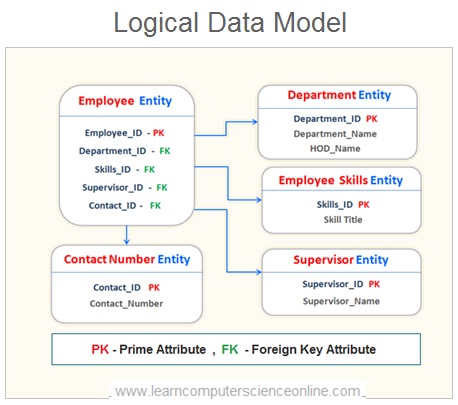
When you write an SQL query, you are interacting with the logical data model. You ask for data from the Employee table and join it to the Department table, without needing to know where or how those tables are stored on disk.
The Physical Storage Structure: The Implementation
If the logical model is the blueprint, the physical storage structure is the concrete implementation built from that blueprint. It describes all the low-level details of how the data is actually stored on a physical medium.
Key characteristics of a physical storage structure:
- Technology-specific: It is tied to a particular DBMS. The physical model for PostgreSQL will differ from that for SQL Server.
- Defines storage details: It specifies table names, column names (often abbreviated), exact data types (
VARCHAR(100),INTEGER), and how tables are organized into files. - Includes performance mechanisms: It defines indexes, file arrangements, and other structures that the Storage Engine uses to access data efficiently.
Let's continue with the video to see how the logical model is translated into a physical one.
Conceptual, Logical & Physical Data Models (Enhanced Audio)
Now we'll see the final stage: creating the physical model. Notice how the abstract concepts become concrete and technology-specific.
Watch the segment from 07:49 to 12:59. Note the changes from the logical model: entity names become table names, attributes become columns with specific data types, and user-friendly names are converted to database-compatible names (e.g., using underscores).
This is where your interest in low-level systems comes into play. The "physical model" isn't just about table and column names. It's about the sophisticated data structures the Storage Engine uses to manage data. In the previous lesson, we mentioned that the "Access Methods" component manages files and indexes. Let's look at two of the most common data structures used for this.
Storage Engines: How Data is Stored
This article, 'Storage Engines: How Data is Stored', gives a glimpse into the actual data structures that form the physical layer. This will connect back to what we learned about the Storage Engine.
Please read the sections titled 'B-tree' and 'LSM-tree vs B-tree'. You don't need to memorize the implementation details. The goal is to understand that these—B-Trees and LSM-Trees—are examples of the concrete data structures that exist at the physical level, completely hidden from the user who is interacting with the logical model.
Structures like B-Trees and LSM-Trees are the heart of the physical layer. When you create an INDEX in SQL (a topic for a future lesson), you are telling the DBMS to build a B-Tree or a similar structure at the physical level to speed up data retrieval. The Query Optimizer knows about these physical structures and uses them to create efficient execution plans.
Test your understanding!
For each statement below, decide if it describes a concern of the Logical Data Model or the Physical Storage Structure.
- A
Producthas aname, aprice, and belongs to aCategory. - The
userstable will be partitioned by country to improve query performance for local users. - Each
Ordermust be associated with a validCustomer_ID. - The
emailcolumn in thecustomerstable will use a B-Tree index for faster lookups. - Column names should not contain spaces; for example, 'Product Name' should be stored as
product_name.
Show answer
- Logical: This defines business entities and their relationships.
- Physical: Partitioning is a storage strategy to optimize performance; it's an implementation detail.
- Logical: This is a business rule (a relationship constraint) enforced via a foreign key.
- Physical: A B-Tree is a specific index data structure used for storage and retrieval.
- Physical: This relates to the specific naming conventions and constraints of the database software.
Comparison: Logical vs. Physical
To solidify the distinction, let's review a clear breakdown of the differences.
Logical vs Physical Data Model: A Comprehensive Guide
The following reading from 'Logical vs Physical Data Model: A Comprehensive Guide' provides a concise list of the key distinctions between the two models.
Please read the section titled 'Logical and Physical Data Models: 10 Main Differences'. This will serve as an excellent summary of everything we've discussed.
Here is a summary table capturing the most important distinctions:
| Aspect | Logical Data Model | Physical Storage Structure |
|---|---|---|
| Level of Detail | High-level, abstract | Low-level, detailed, concrete |
| Focus | Business concepts: entities, attributes, relationships | Implementation details: tables, columns, data types, indexes |
| Technology | Independent (agnostic) of any specific DBMS | Specific to a particular DBMS (e.g., PostgreSQL, MySQL) |
| Audience | Business analysts, data architects, application developers | Database administrators (DBAs), system programmers |
| Analogy | An architect's blueprint or an API contract | The physical building or the server-side implementation |
Conclusion
Today we've formalized the crucial separation between the "what" and the "how" in a database. This abstraction is not just a theoretical concept; it's a practical design choice that provides immense flexibility and power.
Key Takeaways:
- A Logical Data Model is the abstract blueprint of the database. It defines entities and relationships from a business perspective and is what you, as a developer, will primarily interact with.
- The Physical Storage Structure is the concrete implementation. It deals with low-level details like files, data types, and indexes (like B-Trees) and is specific to the chosen DBMS.
- The separation between these two layers provides Physical Data Independence, allowing the underlying storage to be changed and optimized without breaking applications that use the database.
- This separation is what allows you to write a declarative SQL query (
SELECT name FROM users) and trust the DBMS to figure out the best physical way to retrieve that data.
Preview of the Next Lesson:
We've now completed our tour of database architecture! You understand why we use a DBMS, how it communicates, its internal components, and the vital separation between logical and physical design.
With this foundation in place, we are finally ready to start working with the most common logical model: the Relational Model. In our next lesson, we will kick off Module 2 by explaining how the relational model organizes data into the familiar structure of tables, rows, and columns, setting the stage for you to write your first SELECT statement.