Hello! Welcome to the final lesson of our second module on SQL fundamentals.
In our last lesson, you learned how to control the presentation of your data by sorting it with the ORDER BY clause. This is a crucial step, but often, you don't need to see all the sorted rows at once. Think about a Google search, an e-commerce site, or a list of support tickets—they all present results one page at a time.
Today, we'll build directly on that concept. The learning outcome for this lesson is to use LIMIT and OFFSET to paginate query results. This is the standard technique for creating "pages" of data, fetching "Top 10" lists, and implementing features like infinite scrolling.
We will cover the basic syntax, see how it fits into the logical query execution order, and, aligning with your interest in the deeper "why," we'll investigate the significant performance and data integrity problems that can arise when using this method on large, dynamic systems.
The Mechanics of Pagination: LIMIT and OFFSET
At its core, pagination involves two simple actions:
- Skipping a certain number of rows (
OFFSET). - Taking a specific number of rows after that (
LIMIT).
Let's look at a visual representation of this process.
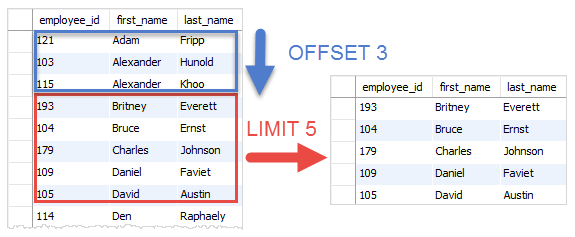
The LIMIT and OFFSET clauses are typically the very last parts of a SELECT statement.
How to Use the SQL Limit and Offset Clause
To start, let's get familiar with the basic syntax and the formula for calculating pages. This article from Coefficient.io provides a clear, concise explanation.
Please read the section titled 'Understanding the SQL LIMIT and OFFSET'. Focus on: The definitions of LIMIT and OFFSET. The basic syntax example. The formula for combining them for pagination: OFFSET (page_number – 1) * page_size.
As you've just read, the logic is straightforward. If you want to display 20 items per page:
- Page 1: You want to skip 0 rows and take 20.
LIMIT 20 OFFSET 0(or justLIMIT 20, sinceOFFSET 0is the default).
- Page 2: You want to skip the first 20 rows and take the next 20.
LIMIT 20 OFFSET 20.
- Page 3: You want to skip the first 40 rows and take the next 20.
LIMIT 20 OFFSET 40.
The general formula is OFFSET (page_number - 1) * page_size.
The Critical Role of ORDER BY
A crucial question arises: a "page" of data is only meaningful if the order of the data is consistent. If you ask for the second page of users, you expect it to contain the same users every time. How do we guarantee this?
This is where the previous lesson on ORDER BY becomes essential. Without an explicit ORDER BY clause, a relational database does not guarantee the order of rows returned. The order could change between queries based on internal optimization strategies.
Therefore, LIMIT and OFFSET should almost always be used with ORDER BY to ensure stable and predictable pagination.
Logically, this makes sense when you consider the SQL execution order. ORDER BY is processed, creating a sorted list. Only then, at the very end, do LIMIT and OFFSET take a slice of that final, sorted list.
SQL Order of Execution: Understanding How Queries Run
This article on the SQL order of execution reinforces this point. It shows precisely where LIMIT and OFFSET are evaluated.
Please read the introduction 'What Is SQL Order of Execution?' and the section on the 'LIMIT/OFFSET clause'. Notice that they are the last steps in the logical execution plan, happening after ORDER BY.
Test your understanding!
You have a products table with columns product_name and price. You need to build a product catalog page that displays 15 products per page.
Write a query to retrieve the products for the 4th page, ordered from the most expensive to the least expensive.
Show answer
First, let's calculate the OFFSET.
- Page size = 15
- Page number = 4
- Offset = (4 - 1) * 15 = 45
The query would be:
SELECT
    product_name,
    price
FROM products
ORDER BY price DESC
LIMIT 15 OFFSET 45;
Syntax Across Different Database Systems
While the LIMIT/OFFSET syntax is common, especially in open-source databases like MySQL and PostgreSQL, it's not part of the official SQL standard. Other systems, like SQL Server and Oracle, use a different syntax to achieve the same result. Being aware of these differences is important for job readiness, as you may encounter different database backends.
How to Use the SQL Limit and Offset Clause
Let's revisit the Coefficient.io article to see how the syntax differs across major database systems.
Read the section 'LIMIT and OFFSET in Other SQL Databases'. Pay attention to the syntax for MySQL, PostgreSQL, and especially the OFFSET...FETCH NEXT... syntax for SQL Server.
To summarize the key variations:
- PostgreSQL / MySQL:
LIMIT <row_count> OFFSET <offset> - SQL Server / Oracle:
OFFSET <offset> ROWS FETCH NEXT <row_count> ROWS ONLY
The Deeper Dive: Hidden Dangers of OFFSET
For simple applications or small tables, LIMIT/OFFSET works perfectly well. However, in high-traffic systems with large, frequently changing datasets, it has two serious drawbacks. This is the kind of "low-level" detail that separates basic knowledge from a professional understanding of system behavior.
- Performance Degradation: As the
OFFSETvalue grows, the query becomes slower. If you requestOFFSET 1000000, the database must still fetch all 1,000,000 rows, sort them, and then discard them before it can even start picking the rows for your requested page. It doesn't just "jump" to the millionth row. - Data Instability: If new rows are inserted into the table while a user is clicking from page to page, the "window" of data shifts. This can cause the user to see duplicate records on a subsequent page or miss some records entirely.
This video provides an excellent demonstration of these problems.
The Hidden Dangers of SQL OFFSET: Pagination Woes Explained
This video clearly explains the two major pitfalls of using OFFSET for pagination in a real-world scenario.
Please watch the following segments: 00:00 - 01:03: This part demonstrates the data integrity problem. Notice how adding new rows causes duplicates to appear on the next page. 04:03 - 05:04: This part explains the performance problem, highlighting that the database still has to iterate over the skipped rows.
The more robust alternative to OFFSET-based pagination is called keyset pagination (or "cursor-based" pagination). Instead of telling the database how many rows to skip, you tell it where to start the next page based on the last value seen on the previous page (e.g., "get me the next 20 rows after created_at = '2023-10-26 10:00:00'"). This is a more advanced topic, but it's valuable to know that a problem with OFFSET exists and that a better solution is used in high-performance systems.
Conclusion
You have now reached the end of Module 2 and have mastered the fundamental building blocks of querying a single table. You can select columns, filter rows with complex conditions, sort the results, and now, select specific pages of data.
Key Takeaways:
LIMITspecifies the maximum number of rows to return, whileOFFSETspecifies how many rows to skip.- Together, they are the standard mechanism for implementing pagination.
- Using
LIMIT/OFFSETwithoutORDER BYleads to unpredictable results, as row order is not guaranteed. OFFSET-based pagination suffers from serious performance degradation on large page numbers and can show inconsistent data if the underlying table is being modified.- Syntax for pagination can differ between database systems (e.g., MySQL vs. SQL Server).
Preview of the Next Module:
So far, all our queries have dealt with data from a single table. But the real power of a relational database comes from its ability to connect, or relate, data from multiple tables. How do you link a customer to all the orders they've placed? In our next module, "Joining Multiple Tables," we will start by exploring the foundational concepts that make these relationships possible: primary keys and foreign keys. This will open up a whole new level of querying capability.