Hello! Welcome to the seventh lesson in our module on SQL fundamentals.
In our last few lessons, we've focused on how to retrieve and filter data effectively using clauses like WHERE and operators like IN, BETWEEN, LIKE, and IS NULL. You now have a solid toolkit for selecting which rows you want from a table.
Today, we'll focus on controlling the presentation of those rows. The learning outcome for this lesson is to sort query results using ORDER BY on single or multiple columns. This is a fundamental skill used daily in development and support roles, whether it's to display the most recent support tickets, list users alphabetically, or find the highest-value transactions.
We'll start with the basic syntax and then, fitting your interest in the logical underpinnings of systems, we'll explore when the database performs this sorting action during query execution. This "why" is key to mastering SQL and writing efficient queries.
The Basics: ORDER BY, ASC, and DESC
The ORDER BY clause is used to sort the rows in your query's result set. It's one of the last clauses in a SELECT statement. You can specify one or more columns to sort by, and for each column, you can define the direction of the sort.
ASC(Ascending): Sorts from lowest to highest value (A to Z, 0 to 9). This is the default behavior if you don't specify a direction.DESC(Descending): Sorts from highest to lowest value (Z to A, 9 to 0).
Let's begin by reviewing the core syntax and seeing some simple examples.
This article from Tutorialspoint provides a concise and clear overview of the ORDER BY clause, its syntax, and how to control the sort direction.
Please read the following sections: 'The SQL ORDER BY Clause': Focus on the purpose and basic syntax. 'ORDER BY Clause with ASC (Default)': Understand that ascending is the default behavior. 'ORDER BY Clause with DESC Keyword': Learn how to reverse the sort order. 'ORDER BY Clause on Single Column': Review the example for sorting by a single column.
As you've read, a basic query to get all customers sorted by name would look like this:
-- Get all customers, sorted alphabetically by name
SELECT *
FROM CUSTOMERS
ORDER BY NAME ASC;

-- Since ASC is the default, this is equivalent:
SELECT *
FROM CUSTOMERS
ORDER BY NAME;
To find the customers with the highest salary first, you would use DESC:
-- Get all customers, with the highest salary shown first
SELECT *
FROM CUSTOMERS
ORDER BY SALARY DESC;
Logical Query Execution: The "Why" Behind ORDER BY
Here’s a question that gets to the heart of how SQL engines work: when does the database actually perform the sort? Does it happen before or after it filters rows with WHERE? And does it happen before or after it calculates the columns in your SELECT list?
The answer lies in the logical order of execution, which is often different from the order in which you write the clauses.

This late execution of ORDER BY has a very important practical implication. Since it runs after the SELECT clause, you can sort your results by a column alias that you created in the SELECT list.
This video provides an excellent logical proof of this concept.
SQL Order of Execution (Logical Explanation) | Namaste SQL | Ankit Bansal
To understand the 'why' behind how ORDER BY works, it's crucial to know when it runs. This video by Ankit Bansal provides an excellent logical explanation of the SQL order of execution, focusing on where ORDER BY fits in.
Watch the segment from 03:34 to 05:15. Pay close attention to the proof he provides: you can sort by a column alias (like 'half_salary') that is created in the SELECT clause. This is only possible because ORDER BY is executed after SELECT.
Understanding this execution order (FROM -> WHERE -> GROUP BY -> HAVING -> SELECT -> ORDER BY) is a big step towards thinking like the database engine. It helps you understand what's possible in a query and provides a foundation for diagnosing performance issues later on.
Sorting by Multiple Columns
Often, sorting by a single column isn't enough. You might want to sort a list of employees by department, and then, within each department, sort them by last name. This is called a hierarchical sort, and it's done by providing a comma-separated list of columns to the ORDER BY clause.
The database sorts the result set by the first column specified. Then, for any rows that have the same value in that first column, it sorts them by the second column, and so on.
ORDER BY and GROUP BY with Multiple Columns | Important SQL Concept
This video clearly explains the logic of sorting by multiple columns. It demonstrates how the second column is only used for sorting when values in the first column are identical.
Watch the segment from 01:21 to 03:07. Focus on how the query ORDER BY country, state, city works. It first sorts by country, then within each country it sorts by state, and so on.
Here is a static example of the same concept in action.
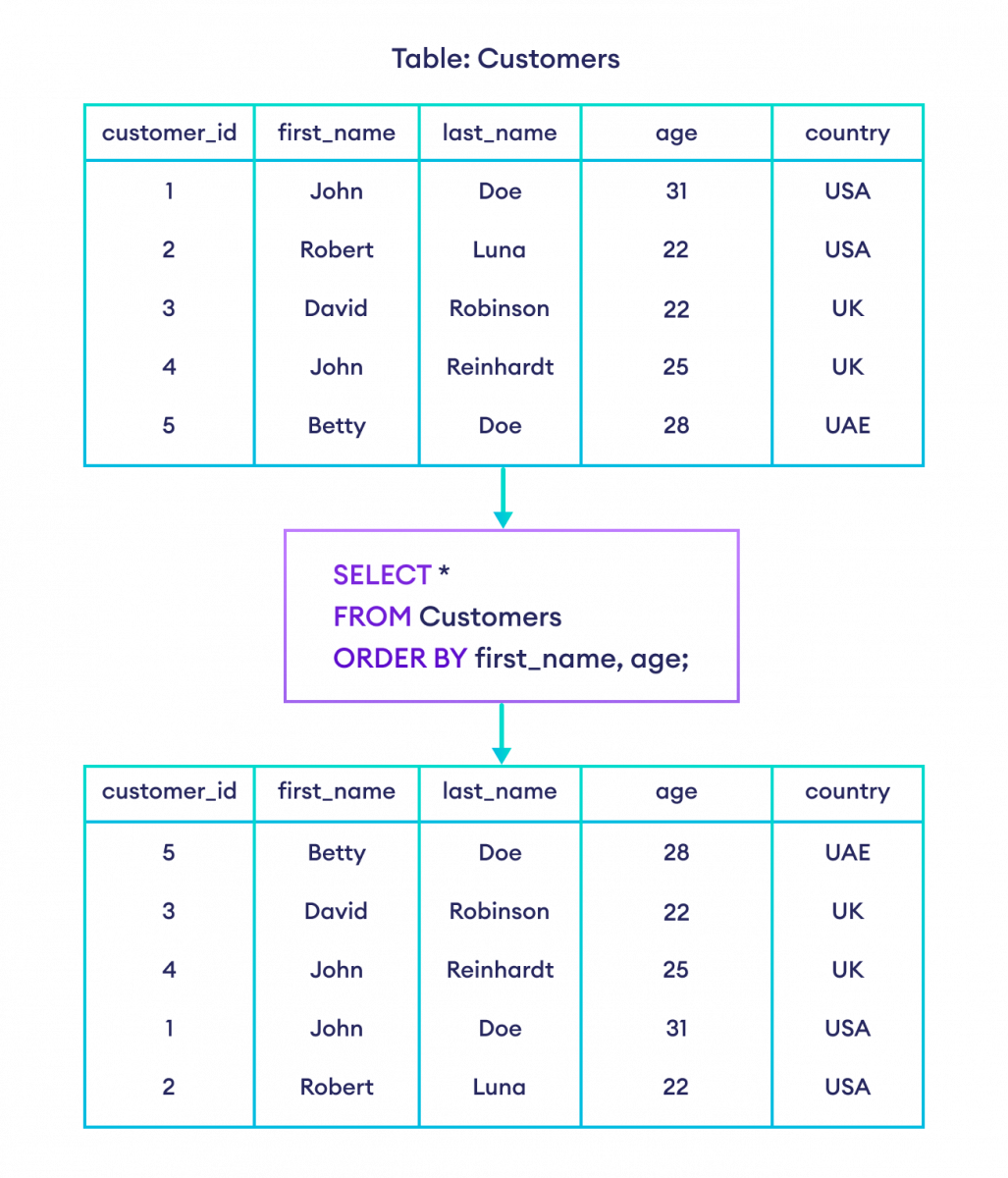
You can also specify a different sort direction for each column. For example, you might want to see product categories alphabetically (ASC), but within each category, you want to see the most expensive products first (DESC).
SELECT
    category,
    product_name,
    price
FROM products
ORDER BY category ASC, price DESC;
To solidify this, let's return to our reading resource.
The Tutorialspoint article also covers the syntax for multi-column sorting, including how to apply different sort directions to each column.
Now, refer back to the article and read these two sections: 'ORDER BY Using Both ASC and DESC': This shows an example of mixing sort directions. 'ORDER BY Clause on Multiple Columns': This reinforces the concept with another example.
Test your understanding!
You are working on a tickets table for a support system. The table has columns priority ('High', 'Medium', 'Low'), created_at (a timestamp), and summary.
Write a query to retrieve all tickets, showing the most urgent tickets first. For tickets with the same priority, you want to see the oldest ones first. (Hint: 'High' comes before 'Low' alphabetically).
Show answer
SELECT
    priority,
    created_at,
    summary
FROM tickets
ORDER BY priority ASC, created_at ASC;
priority ASC: Sorts priorities alphabetically, so 'High' comes before 'Low' and 'Medium'.created_at ASC: For tickets with the same priority, this sorts them by their creation date, from oldest to newest.
How Sorting Interacts with NULL
In our last lesson, we saw how NULL represents an "unknown" and requires special handling with IS NULL. How does ORDER BY treat these unknown values?
Unfortunately, the SQL standard does not strictly define a default sort order for NULLs. This is an important detail for job readiness, as the behavior can change depending on the database system you're using:
- PostgreSQL and Oracle: By default,
NULLvalues are treated as the largest possible value. They appear last inASCsorts and first inDESCsorts. - MySQL and SQL Server: By default,
NULLvalues are treated as the smallest possible value. They appear first inASCsorts and last inDESCsorts.
While some database systems provide syntax like NULLS FIRST or NULLS LAST to explicitly control this, it's crucial to be aware of the default behavior for the system you are working with to avoid surprises.
Conclusion
Great work! You can now not only select and filter data but also present it in a logical, ordered way that meets business requirements.
Key Takeaways:
- The
ORDER BYclause sorts your final result set. UseASCfor ascending order (the default) andDESCfor descending order. ORDER BYis one of the last clauses to be logically executed, running after theSELECTclause. This allows you to sort by column aliases.- You can sort by multiple columns to create a hierarchical sort order. The directions (
ASC/DESC) can be set independently for each column. - The default sorting behavior for
NULLvalues varies between different database systems, which is an important consideration in a professional environment.
Preview of the Next Lesson:
You can now retrieve filtered data in a specific order. But what if you only need the "top 5" highest-scoring players, or you need to display search results on a web page, 20 at a time? In our next lesson, we will learn how to use LIMIT and OFFSET to select a specific slice of your sorted results, a technique essential for features like leaderboards and pagination.