Hello! Welcome to the first lesson of Module 3.
In the previous module, we mastered the art of querying data from a single table. We learned how to select, filter, sort, and paginate our results. However, the true strength of a relational database lies in its ability to manage relationships between different sets of data. Our last lesson ended with a preview of this very topic, setting the stage for combining data from multiple tables.
Today, we will learn the foundational concept that makes these connections possible. The learning outcome for this lesson is to explain the function of primary keys and foreign keys in establishing relationships. Understanding this is crucial before we can write queries that join tables together, aligning perfectly with your preference for building knowledge from the fundamentals up.
The Problem: How to Uniquely Identify and Link Data
Imagine a simple spreadsheet for an online store. If you store all the customer and order information in one large table, you quickly run into problems, especially with repeat customers.
Let's start by watching a short video from Eddie Woo that clearly illustrates the problem with storing all data in a single, 'flat' file and introduces the solution of splitting the data into related tables.
Please watch from the beginning until 05:47. Pay close attention to: The problem of redundant data when a customer makes multiple orders. The issues this redundancy causes (wasted space, potential for inconsistency). The solution: splitting the data into two separate tables, orders and customers.
As the video demonstrated, splitting the data solves the redundancy problem. But it creates a new one: how do we know which customer belongs to which order? We need a reliable way to uniquely identify each customer and then use that unique identifier to link them to their orders. This is where keys come in.
The Primary Key: A Unique Identifier
A primary key (PK) is a column (or a set of columns) in a table whose value uniquely identifies each row. Think of it as a Social Security Number for a person, a Process ID (PID) for a running program, or a serial number for a product. It's a guaranteed unique handle for a specific record.
A primary key has two strict rules:
- It must be unique: No two rows in the table can have the same primary key value.
- It cannot be
NULL: Every row must have a primary key value.
The same video provides a concise definition of a primary key. Let's see how it's identified in the customer table example.
Watch the segment from 05:47 to 06:33.
In the video's example, customer_id is the primary key for the customers table. Even if two customers have the same name, their customer_id will be different, allowing us to tell them apart with 100% certainty.
The Foreign Key: The Link Between Tables
Now that we have a way to uniquely identify a row in one table (the "parent" table, like customers), we need a way to refer to it from another table (the "child" table, like orders). This is the job of the foreign key (FK).
A foreign key is a column in one table that contains values that correspond to the primary key values in another table. It acts as a cross-reference, creating a link or relationship between the two.
Let's continue with the video to see how the foreign key is defined in the orders table to link back to the customers table.
Watch the segment from 06:33 to 06:54.
In the orders table, the customer_id column is a foreign key. It refers to the customer_id primary key in the customers table. This simple mechanism allows us to connect every order to a specific, unique customer.
This image provides a clear visual summary of the relationship.

Referential Integrity: The Database as a Gatekeeper
This PK-FK relationship isn't just a naming convention; it's a rule that the database actively enforces. This enforcement is called referential integrity.
It guarantees that a value in a foreign key column can only exist if that same value already exists as a primary key in the referenced table.
In practice, this means:
- You cannot insert an order with a
customer_idof999if there is no customer with the ID999in thecustomerstable. The database will reject theINSERToperation. - It prevents "orphaned" records (like an order that doesn't belong to any customer), ensuring the data remains consistent and logical.
SQL Foreign Key: Keep Your Database Relationships in ...
This article from DataCamp provides excellent written definitions and a clear summary of the differences between primary and foreign keys. It also touches on the concept of referential integrity.
Please read the following sections: 'Primary Key vs. Foreign Key': Focus on the definitions and the summary table comparing the two. 'Managing constraints and naming conventions' and 'Referential integrity and cascading actions': Focus on understanding that a foreign key is a constraint and how it enforces referential integrity to prevent orphaned records.
Test your understanding!
You have two tables:
Employees(columns:EmployeeID,FirstName,LastName,DepartmentID)Departments(columns:DepartmentID,DepartmentName)
- What is the most logical primary key for the
Employeestable? For theDepartmentstable? - Which column in which table would be the foreign key to link an employee to their department?
- Based on the principle of referential integrity, what would happen if you tried to add a new employee with a
DepartmentIDthat does not exist in theDepartmentstable?
Show answer
- The primary key for
EmployeesisEmployeeID. The primary key forDepartmentsisDepartmentID. - The
DepartmentIDcolumn in theEmployeestable would be the foreign key, referencing the primary key of theDepartmentstable. - The database would reject the operation and return an error. Referential integrity ensures that an employee can only be assigned to a department that actually exists.
Summarizing the Differences
To put it all together, let's look at a direct comparison of the attributes of primary and foreign keys.
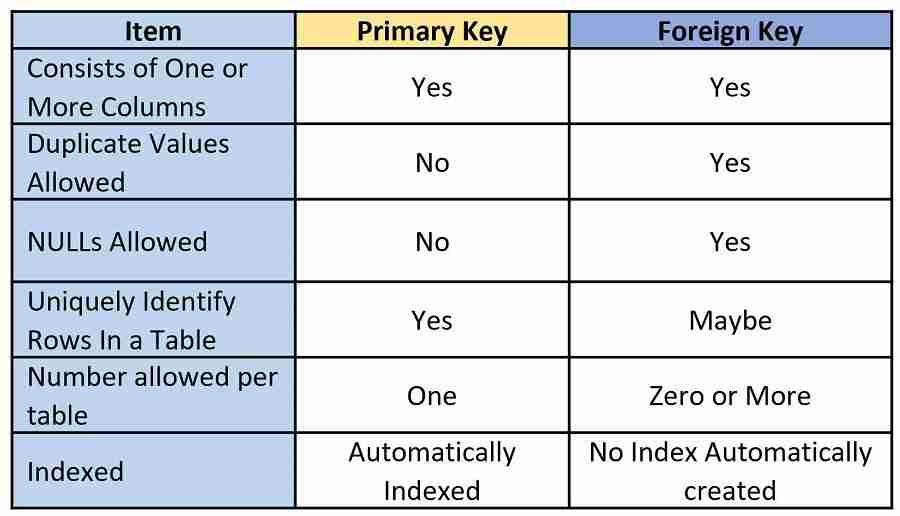
As the table shows:
- A table can only have one primary key, but it can have multiple foreign keys (e.g., an
Orderstable might have a foreign key forCustomerIDand another forShipperID). - Primary keys must be unique, but foreign key values can be duplicated (e.g., one customer can have many orders, so the same
CustomerIDwill appear many times in theOrderstable).
Conclusion
In this lesson, you've learned the fundamental architectural concept that underpins relational databases. By understanding how data is structured and linked, you're now prepared to perform more complex and powerful queries.
Key Takeaways:
- Primary Key (PK): A column that uniquely identifies every row in a table. It cannot be null and must be unique.
- Foreign Key (FK): A column in one table that references the primary key of another table. It's the "link" that establishes the relationship.
- Referential Integrity: The rule, enforced by the database, that ensures relationships between tables remain consistent. It prevents the creation of orphaned records by ensuring a foreign key value points to an existing primary key.
- These keys solve the problem of data redundancy and inconsistency found in "flat file" systems by allowing us to logically separate and then reconnect our data.
Preview of the Next Lesson:
Now that you understand the "why" and "how" of table relationships, we can move on to the "what." In the next lesson, you will learn how to use the INNER JOIN clause in a SELECT statement to combine rows from two or more tables based on the relationships established by their keys.