Hello! Welcome to your next lesson in our SQL journey.
In our last session, we laid the critical groundwork by understanding how primary keys (PK) and foreign keys (FK) create the structural links between tables. You learned that these keys aren't just labels; they enforce referential integrity, ensuring the relationships in your data are logical and consistent.
Today, we'll build directly on that foundation. We're moving from the architectural "why" to the practical "how." You will learn to combine rows from two tables using INNER JOIN based on a matching condition. This is one of the most fundamental and frequently used operations in SQL, and mastering it is a major step toward job readiness.
What is an INNER JOIN?
At its core, INNER JOIN is about bringing together related data from two separate tables into a single result set. The key principle is that it only returns rows where the join condition finds a match in both tables. Think of it as finding the intersection between two sets of data.
This image provides a perfect visual for the concept:
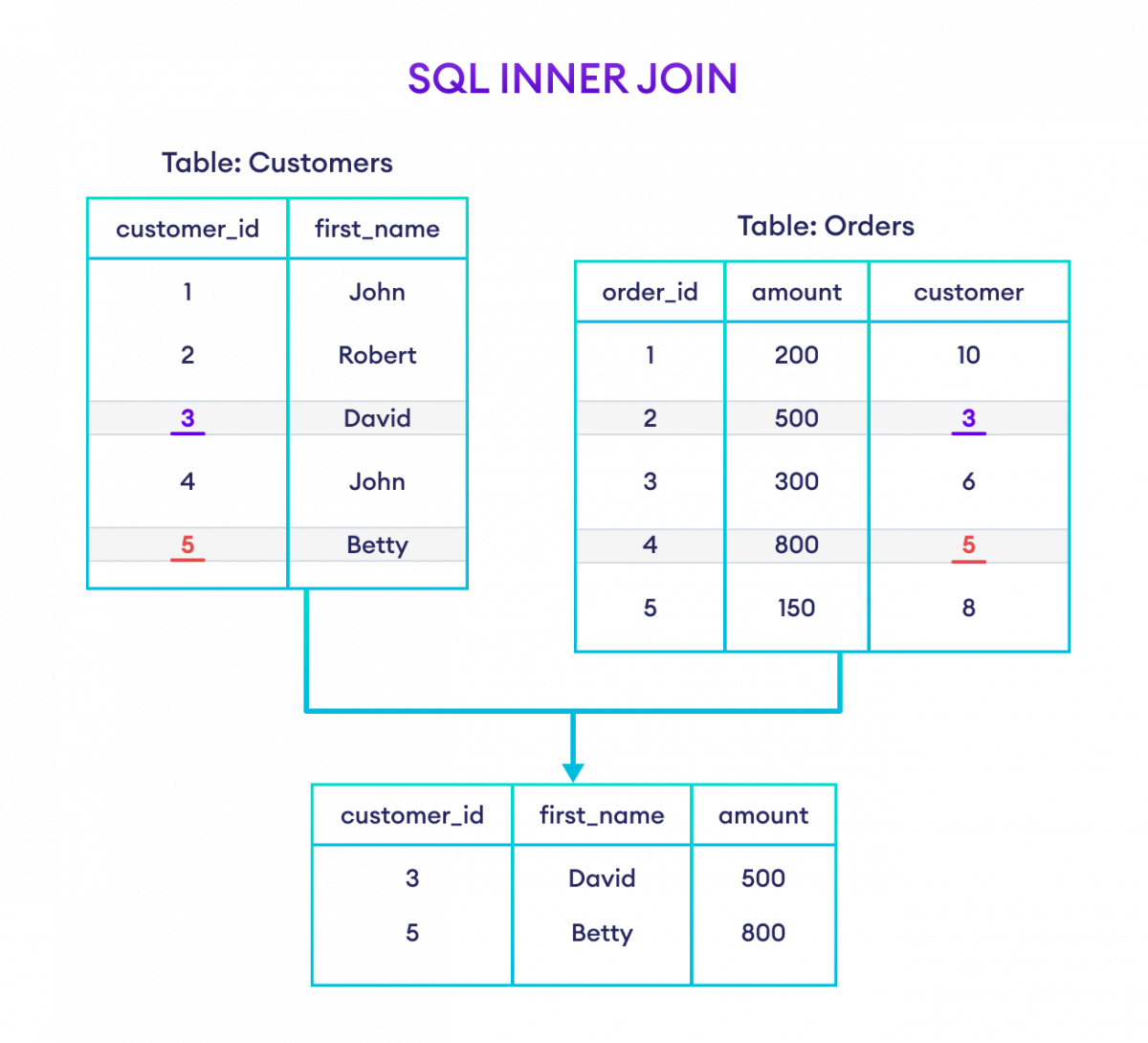
The Logic: How a Join Works Under the Hood
Before we even write the code, let's understand what the database is actually doing. Your background in programming and systems will be useful here; you can think of a join as a systematic, algorithmic process of matching records.
The following video provides an excellent, low-level explanation of how a database engine processes an INNER JOIN. It methodically steps through each record in one table and compares it to the records in the other, which is a great way to build a solid mental model.
SQL JOINS Interview Question | What does different SQL Joins return?
Watch this segment from the techTFQ channel. It demonstrates the logical process of an INNER JOIN by manually comparing records between two simple tables.
Please watch from 01:28 to 05:37. Focus on how each record from the first table is compared against every record in the second table to find matches. Notice what happens when a single value in the first table matches multiple values in the second.
As you saw, the database doesn't magically find the matches. It performs a comparison for each potential pair of rows based on the condition you provide. If a row in Table A matches three rows in Table B, you get three rows in your result set. If a row has no match, it's simply discarded from the final result.
The Syntax: Writing Your First INNER JOIN
Now that you understand the logic, let's look at the syntax. An INNER JOIN query has a clear and declarative structure.
SELECT
    table1.column1,
    table2.column2
FROM
    table1
INNER JOIN
    table2 ON table1.primary_key_column = table2.foreign_key_column;
Let's break this down:
SELECT ...: You list the columns you want from either or both tables. It's good practice to specify the table name (e.g.,table1.column1) to avoid ambiguity if columns in both tables have the same name.FROM table1: This is your "left" table.INNER JOIN table2: This specifies the "right" table you want to connect to.ON table1.pk = table2.fk: This is the crucial join condition. It tells the database how the tables are related. This is almost always the Primary Key from one table and the corresponding Foreign Key from the other—the very concepts we covered in the last lesson.
This next video walks through a practical example using customer and product_order tables, which is a classic scenario.
SQL Inner Join vs Outer Join: Explained
This video from Database Star provides a clear, real-world demonstration of the INNER JOIN syntax.
Watch from 01:17 to 02:47. Pay close attention to how the SELECT, FROM, INNER JOIN, and ON clauses are constructed. Note how the final result only includes customers who have orders, as explained at the end of the clip.
Textual Reference and Important Details
For a quick reference and a slightly different example, the following article provides a concise written explanation.
The Complete Guide to SQL Joins and Join Strategies
Please review this article from Celerdata. It presents the definition and syntax for INNER JOIN using Employees and Salaries tables, which is another common business use case.
Read the sections 'What Are the Different Types of Joins in SQL?' and 'What Is Inner Join?'. The tables are defined first, followed by the specific INNER JOIN example. This will reinforce the query structure.
Two Quick but Important Points
-
JOINvs.INNER JOIN: In the SQL standard, if you write justJOIN, the database interprets it asINNER JOIN. They are functionally identical. You will see both in the wild, so it's good to know they mean the same thing. -
How are
NULLs Handled?: What if the value in a join key column isNULL? ANULLvalue represents an "unknown." Therefore, in SQL,NULLis never equal toNULL. This means rows where the join key isNULLin either table will not be included in anINNER JOINresult, because a match cannot be confirmed.
Test your understanding!
You have two tables: Products (ProductID, Name) and Reviews (ReviewID, ProductID, Comment).
The Reviews table has a record where the ProductID is NULL because the review was submitted without being linked to a specific product.
If you perform an INNER JOIN between Products and Reviews on Products.ProductID = Reviews.ProductID, will that orphaned review appear in the result? Why or why not?
Show answer
No, the orphaned review will not appear. The INNER JOIN condition Products.ProductID = Reviews.ProductID can only be true if ProductID has a value. Since the review's ProductID is NULL, it cannot be matched to any ProductID in the Products table, so it is excluded from the result set.
Time to Practice
Theory and examples are great, but mastery comes from practice. The following resource provides some excellent exercises. You'll be working with tables for countries and continents, and singers and albums.
The Launch School book provides a great set of exercises. I recommend reading the initial sections for another take on the mental model of joins, then tackling the exercises.
First, quickly read the sections 'What is a SQL Join?', 'Join Syntax', and 'INNER JOIN' to see their 'transient table' mental model. Then, navigate to the 'Exercises' section at the end of the page. Complete Exercises 1 and 2 to practice the INNER JOIN we've discussed today. The solutions are provided for you to check your work.
These exercises will help solidify your understanding of how to link tables and filter them to get the specific information you need.
Conclusion
You've just learned one of the most powerful tools in SQL. By combining INNER JOIN with the knowledge of primary and foreign keys, you can now query across related tables to answer complex questions.
Key Takeaways:
INNER JOINcombines rows from two tables when the values in the specified join columns match.- It effectively returns the intersection of the two tables.
- The
ONclause is where you define the relationship, typically by equating a primary key from one table with a foreign key from another. - Rows from either table that do not have a match in the other table are excluded from the final result.
JOINis a shorthand forINNER JOIN.
Preview of the Next Lesson:INNER JOIN is perfect for finding data that exists in both tables. But what if you want to find data that doesn't have a match? For example, how would you find all customers who have never placed an order? To answer that, you need a different kind of join. In the next lesson, we will explore LEFT JOIN and RIGHT JOIN, which allow you to include unmatched rows from one of the tables.