Hello! Welcome back.
In our last lesson, you mastered the INNER JOIN, learning how to combine data from two tables to find the intersection—the records that have a match in both. We ended with a question: what if you need to find records that don't have a match? For example, how would you list all customers, including those who have never placed an order?
Today, we'll answer that question by exploring OUTER JOINs. Specifically, this lesson will teach you how to use LEFT JOIN and RIGHT JOIN to include unmatched rows from one table. This is a crucial skill for data analysis, reporting, and finding gaps in your data.
The Concept of an Outer Join
While INNER JOIN is exclusive, returning only the matching rows, OUTER JOIN is inclusive. It starts with the matching rows (the INNER JOIN result) and then adds the non-matching rows from one or both tables.
The keywords LEFT and RIGHT simply tell the database which table's non-matching rows to keep.
LEFT JOIN: Keeps all rows from the "left" table (the one listed afterFROM).RIGHT JOIN: Keeps all rows from the "right" table (the one listed after theJOINkeyword).
For columns from the table that doesn't have a matching row, the database fills in the value NULL.
This set of Venn diagrams is a perfect visual summary of the concept. Notice how LEFT and RIGHT joins include the non-overlapping parts of one of the circles.
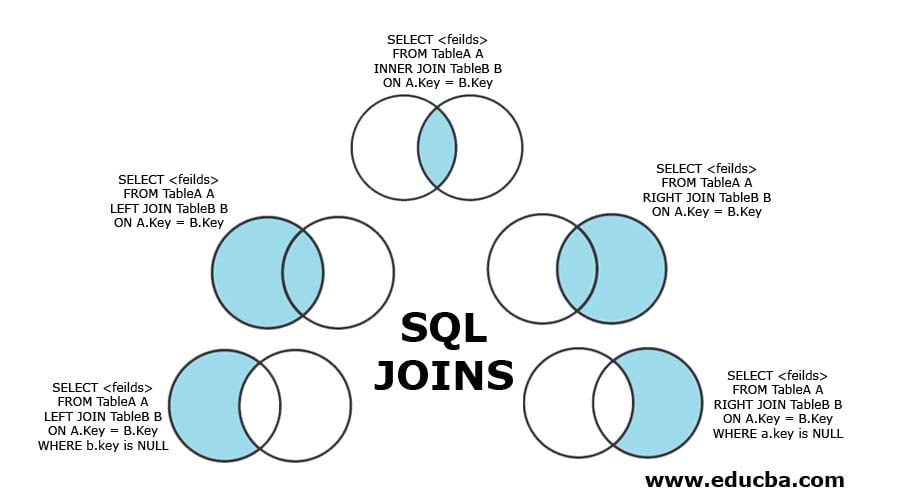
LEFT JOIN: Prioritizing the Left Table
Let's imagine a common business request: "Show me all employees and the department they work in. Make sure no employees are missing from the list, even if their department isn't registered in the departments table yet."
An INNER JOIN would fail here because it would drop any employee whose department_id doesn't exist in the departments table. This is the perfect use case for a LEFT JOIN.
The following video provides an excellent walkthrough. It starts with the problem (an INNER JOIN that loses employees) and shows how a LEFT JOIN solves it. The presenter also introduces a simple but powerful "formula" for thinking about how it works.
SQL JOINS Tutorial for beginners | Practice SQL Queries using JOINS - Part 1
Watch this segment from the techTFQ channel. It clearly explains the need for a LEFT JOIN and demonstrates its behavior.
Watch from 13:58 to 19:59. Pay close attention to the 'formula' presented: LEFT JOIN = INNER JOIN + additional records from the left table. Notice how NULL appears in the department_name column for employees who don't have a matching department.
As you saw, the core logic is:
- Perform an
INNER JOINto find all the matching records. - Go back to the left table and add all rows that were not part of the
INNER JOINresult. - For these added rows, populate the columns from the right table with
NULL.
For a textual reference, this article provides a clean example using Customers and Orders tables.
Outer Join in SQL: A Comprehensive Guide
This article from DBVis provides a concise written explanation and query for a LEFT JOIN.
Read the section titled 'Left Outer Join'. It shows the syntax and the resulting table, where you can see the customer 'Emily Clark' has a NULL for the Product because she has no orders.
RIGHT JOIN: The Mirror Image
A RIGHT JOIN does the exact same thing as a LEFT JOIN, but in reverse. It keeps all records from the table on the right side of the JOIN keyword and fills in NULLs for the left-table columns where there's no match.
The formula is symmetrical: RIGHT JOIN = INNER JOIN + additional records from the right table.
Let's continue with the same video to see this in action.
SQL JOINS Tutorial for beginners | Practice SQL Queries using JOINS - Part 1
This next segment demonstrates the RIGHT JOIN using the same tables.
Watch from 19:59 to 22:36. Observe how the query now includes the 'Finance' and 'Admin' departments, which have no employees, and shows NULL for the employee-related columns.
Practical Tip: Any RIGHT JOIN can be rewritten as a LEFT JOIN by simply swapping the order of the tables. Many developers prefer to use LEFT JOIN exclusively for consistency. However, you must understand RIGHT JOIN because you will encounter it in code written by others.
Test your understanding!
Consider the following query:
SELECT
    c.CustomerName,
    o.OrderID
FROM
    Orders o
RIGHT JOIN
    Customers c ON o.CustomerID = c.CustomerID;
How would you rewrite this query to produce the exact same result using a LEFT JOIN?
Show answer
You would swap the table positions and change RIGHT to LEFT:
SELECT
    c.CustomerName,
    o.OrderID
FROM
    Customers c
LEFT JOIN
    Orders o ON c.CustomerID = o.CustomerID;
In both cases, the Customers table is the one whose rows are all preserved, making it the "left" table in the LEFT JOIN and the "right" table in the RIGHT JOIN.
A Critical Detail: NULL in Join Keys
In the last lesson, we noted that NULL = NULL is never true in SQL. This has an important implication for outer joins. If the join key column in both tables contains a NULL value, the database will not consider them a match.
This video gives a concise explanation of this behavior, which is a key low-level detail to remember.
SQL JOINS Interview Question | What does different SQL Joins return?
This clip from another techTFQ video focuses on how NULLs are handled in join conditions.
Watch from 21:30 to 22:21. The presenter explains that even if both tables have NULL in the join key, they won't match. This is because NULL represents an 'unknown' value.
Finding What's Missing: A Powerful Pattern
One of the most valuable uses of an outer join is to find records in one table that do not have a corresponding record in another. For example:
- Customers who have never placed an order.
- Products that have never been reviewed.
- Users who have never logged in.
The pattern is simple and powerful:
- Perform a
LEFT JOINfrom the primary table (e.g.,Customers) to the secondary table (e.g.,Orders). - Add a
WHEREclause that filters for rows where the primary key of the secondary table isNULL.
A NULL in the secondary table's key proves that no match was found.
Looking back at the Venn diagram image from the beginning of the lesson, you can see this pattern illustrated in the bottom-left corner for finding customers with no orders.
A Deeper Dive: ON vs. WHERE Clause Filtering
Your interest in the low-level "why" makes this next point especially important. Where you place your filter conditions with an outer join can dramatically change your results. This is a common source of bugs for developers.
- A condition in the
ONclause is applied before the join happens. It defines which rows are considered a match. - A condition in the
WHEREclause is applied after the join has been completed. It filters the final result set.
When you LEFT JOIN, putting a filter on the right table in the WHERE clause will often implicitly turn your LEFT JOIN into an INNER JOIN. Why? Because the WHERE clause will filter out all the rows where the right table's columns are NULL, which defeats the purpose of the outer join!
The following article explains this critical distinction perfectly.
SQL JOINs Venn Diagram: A Visual Guide
Please read this section from Red9's blog. It highlights one of the most common and subtle mistakes when using outer joins.
Read section #7, 'The Accidental Filtering: WHERE vs. ON Clause Confusion'. Compare Query A (filtering in ON) and Query B (filtering in WHERE) and understand why they produce different results. This is a high-value insight.
Time to Practice
To solidify these concepts, let's set up a small practice database and run a few queries. The following article provides the CREATE TABLE and INSERT statements for a simple Customers and Orders database.
Outer Join in SQL: A Comprehensive Guide
This article gives you the setup code for a practice scenario. We will use these tables for the exercises below.
Navigate to the section 'Setting Up the Dataset'. Copy and run the SQL code provided to create and populate the Customers and Orders tables in your SQL client.
Now, using the tables you just created, write the following queries:
- Write a query that lists all customers and the
Productthey ordered. Customers who have not ordered anything should still appear in the list. - Write a query that lists all products that have been ordered and the name of the customer who ordered them.
- Write a query that returns the names of only the customers who have NOT placed an order.
Show solutions
1. All customers and their orders:
SELECT
    c.CustomerName,
    o.Product
FROM
    Customers c
LEFT JOIN
    Orders o ON c.CustomerID = o.CustomerID;
(You should see 'Emily Clark' with a NULL product.)
2. All ordered products and the customer:
This is a simple INNER JOIN because the prompt asks for ordered products, implying a match is required.
SELECT
    o.Product,
    c.CustomerName
FROM
    Orders o
INNER JOIN
    Customers c ON o.CustomerID = c.CustomerID;
3. Only customers who have not ordered:
This uses the LEFT JOIN ... WHERE ... IS NULL pattern.
SELECT
    c.CustomerName
FROM
    Customers c
LEFT JOIN
    Orders o ON c.CustomerID = o.CustomerID
WHERE
    o.OrderID IS NULL;
(You should see only 'Emily Clark'.)
Conclusion
You have now added two more essential join types to your SQL toolkit. Understanding the difference between INNER and OUTER joins is fundamental to writing correct and effective queries.
Key Takeaways:
LEFT JOINreturns all rows from the left table and matched rows from the right table.RIGHT JOINreturns all rows from the right table and matched rows from the left table.- For non-matching rows, the columns from the other table are filled with
NULL. - The pattern
LEFT JOIN ... WHERE right_table.key IS NULLis the standard way to find records that lack a relationship. - Be very careful where you place your filters:
ONapplies the condition during the join, whileWHEREfilters the final result, which can accidentally negate yourOUTER JOIN.
Preview of the Next Lesson:
Our queries are getting more complex. As we start joining more than two tables, the syntax can become long and hard to read. In the next lesson, we will learn how to apply table aliases to make our multi-table join queries cleaner, more readable, and easier to maintain—a crucial best practice for any developer.