Hello! Welcome to your next lesson.
In our previous lessons, we've been building up your ability to combine data from different tables using INNER JOIN, LEFT JOIN, and RIGHT JOIN. As you've seen, even with just two tables, the queries can start to look a bit long, with table names repeated in the SELECT and ON clauses. What happens when we need to join three, four, or even more tables?
This lesson addresses that exact problem. We'll focus on a simple but powerful technique that is a cornerstone of professional SQL development. You will learn how to apply table aliases to improve the readability of multi-table join queries.
Mastering aliases is not just about saving keystrokes; it's about writing clean, maintainable code that is easy for you and others to understand and debug. Given your interest in the fundamentals of programming and systems, you'll appreciate how this practice directly relates to writing better, more professional code.
The Problem: Verbose and Ambiguous Queries
Imagine we're joining a customers table with an orders table. A simple query might look like this:
SELECT
    customers.customer_name,
    orders.order_date,
    orders.order_total
FROM
    customers
INNER JOIN
    orders ON customers.customer_id = orders.customer_id;
Notice how we have to write out the full table names (customers and orders) multiple times. While manageable here, it quickly becomes cumbersome with longer table names or more joins.
Furthermore, a critical issue arises if both tables have a column with the same name, for example, an id column. If you just write SELECT id, ..., the database will respond with an "ambiguous column" error because it doesn't know which table's id you're referring to. You're forced to prefix the column with the full table name, like customers.id, which adds to the verbosity.
The Solution: Table Aliases
A table alias is a temporary, shorter "nickname" you give to a table within a single query. This makes your code more concise and easier to read.
The syntax is straightforward. You declare the alias after the table name in the FROM or JOIN clause, optionally using the AS keyword.
Full Syntax: ... FROM table_name AS alias_name
Shorthand: ... FROM table_name alias_name
Let's see a quick video demonstration that shows exactly how this works and why it's useful.
SQL Joins Made EASY! 🔥 Learn with Animations & Practice
Watch this brief segment from the 'Data with Baraa' channel. It perfectly illustrates the problem of long table names and the immediate benefit of using aliases.
Watch from 0:18:38 to 0:19:41. The presenter explains how aliases (like 'c' for customers and 'o' for orders) make the query much cleaner, especially for prefixing column names.
As you just saw, by rewriting our previous query with aliases, it becomes much cleaner:
SELECT
    c.customer_name,
    o.order_date,
    o.order_total
FROM
    customers AS c
INNER JOIN
    orders AS o ON c.customer_id = o.customer_id;
This is far more readable and addresses both the verbosity and ambiguity problems simultaneously.
This image provides another clear example of a query joining three tables, using aliases Emp, Dept, and logg to distinguish columns and shorten the code.
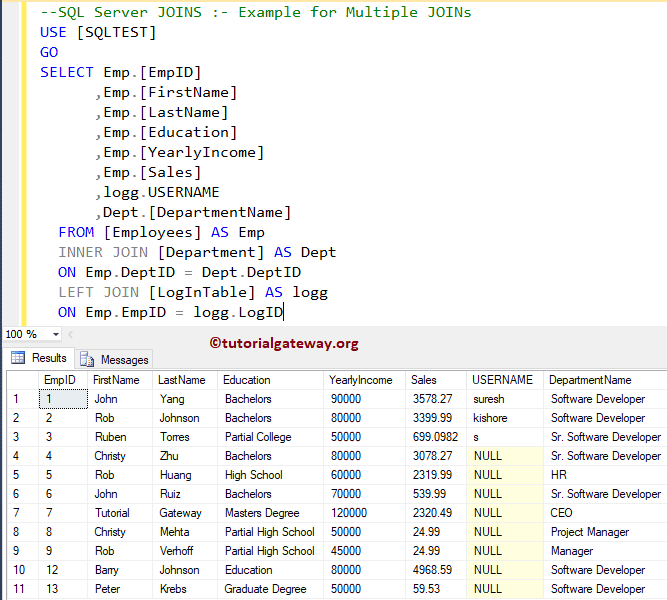
Best Practices: Choosing Good Aliases
While you can use any alias, this is where you can distinguish yourself as a thoughtful developer. Using arbitrary letters like a, b, and c is a common but poor practice. It forces anyone reading the code (including your future self) to constantly look back at the FROM clause to remember what a refers to.
A much better approach is to use short, mnemonic aliases that are clearly connected to the table name. This excellent blog post discusses this exact topic.
Bad Habits to Kick: Table aliases like (a, b, c) or (t1, t2, t3)
This article from SQLBlog.org, 'Bad Habits to Kick', argues for using meaningful aliases. It aligns perfectly with your goal of understanding not just the 'how' but the professional 'why'.
Please read the following parts of the article: The introduction, which shows an example of hard-to-maintain code with arbitrary aliases. The section 'So, what is a better way to do it?', which proposes the best practice. The section with the two side-by-side queries showing a SalesOrderHeader and Customer join. This is a powerful visual comparison of a query with no aliases versus one with good aliases. Focus on how the author's preferred style drastically improves readability and maintainability.
The key takeaway is simple but impactful:
- Avoid:
FROM sales_orders AS a JOIN customers AS b - Prefer:
FROM sales_orders AS so JOIN customers AS c
This small change makes your queries significantly easier to understand at a glance.
Test your understanding!
You need to write a query that joins products, product_categories, and suppliers. What would be a good set of aliases for these three tables according to the best practice you just read about?
Show answer
A good set of aliases would be short and mnemonic. For example:
products->pproduct_categories->pcsuppliers->s
A query might start like this:FROM products AS p JOIN product_categories AS pc ON p.category_id = pc.id JOIN suppliers AS s ON p.supplier_id = s.id
The Essential Use Case: Self-Joins
So far, we've seen aliases as a tool for readability and convenience. However, there's a type of query where they are absolutely required: the self-join.
A self-join is when you join a table to itself. This is common when a table contains hierarchical data. The classic example is an employees table where each employee has a manager_id, which is also an employee ID from the same table.
If you want to create a list showing each employee's name next to their manager's name, you need to join the employees table to itself. How do you do that? You can't write FROM employees JOIN employees....
The solution is to use aliases to create two distinct logical instances of the table within the query.
This video from Decomplexify provides a perfect explanation of a self-join and why aliases are mandatory.
Watch from 19:24 to 20:59. The video presents an Employee table where each employee has an Approver. Pay close attention to how it uses two different aliases, e (for employee) and ap (for approver), to refer to the same Employee table to solve the problem.
This demonstrates a deeper, more structural reason for aliases that goes beyond simple readability. You are telling the database engine to treat the same physical table as two different logical sources of data for the purpose of the join.
Putting It All Together: A Multi-Join Example
Now let's see how aliases shine in a more complex, real-world scenario involving multiple joins. This next video walks through a request to combine data from four different tables: orders, customers, products, and employees.
SQL Joins Made EASY! 🔥 Learn with Animations & Practice
Let's return to the 'Data with Baraa' video. This extended segment is a fantastic, practical demonstration of everything we've discussed.
Watch from 1:04:10 to 1:14:22. Don't worry about memorizing every detail of the query. Instead, focus on: How aliases (o, c, p, e) are used consistently throughout. How the aliases make the ON clauses (ON o.customer_id = c.customer_id) easy to read. How aliases solve the ambiguous column problem when both customers and employees have first_name and last_name columns.
This example is a perfect bridge to our next topic, as it shows the power and necessity of aliases when constructing complex queries.
Conclusion
You have now learned a fundamental skill for writing professional-grade SQL. Using table aliases correctly is a mark of a competent developer.
Key Takeaways:
- Purpose: Table aliases make queries shorter, more readable, and less ambiguous.
- Syntax: Use
ASor simply a space after the table name to declare an alias (e.g.,FROM customers AS corFROM customers c). - Best Practice: Choose short but meaningful (mnemonic) aliases, like
cforcustomersorodfororder_details, instead of arbitrary letters. - Essential Use: Aliases are mandatory for self-joins, where you need to treat a single table as two distinct logical entities.
Preview of the Next Lesson:
You've now mastered INNER JOIN, OUTER JOINs, and the aliasing technique required to manage them effectively. In the next lesson, we will formalize the process and give you practice with exercises to construct queries that join three or more tables. The complex example you just watched has already given you a great preview, and you are now fully equipped with the tools to tackle it yourself.