Hello! Welcome to your lesson on joining multiple tables.
In our last session, we focused on using table aliases to make your queries cleaner and more readable. You saw that aliases are not just for convenience; they are essential for managing complexity and are mandatory for certain operations like self-joins.
Today, we will build directly on that foundation. Our goal is to construct queries that join three or more tables. This is where your SQL skills transition from basic retrieval to powerful data integration, a core activity in any data-related role.
Given your interest in how systems work, we'll approach this by looking at the logical process the database follows. It's not magic; it's a sequence of well-defined steps, much like executing a program. You'll see how each JOIN builds upon the last, creating a chain that links all the necessary data together.
How Multi-Table Joins Work: A Chain of Operations
When you write a query with multiple JOINs, the database doesn't try to connect all the tables at once. Instead, it processes them sequentially, usually from left to right.
- The
FROMtable is joined with the firstJOINtable. - The result of this operation is a temporary, in-memory result set—often called an intermediate or transient table.
- This intermediate table is then joined with the next table in the sequence.
- This process repeats until all
JOINclauses have been executed.
This concept is crucial for understanding how to build and debug complex queries. Let's look at a resource that explains this process visually.
An Illustrated Guide to Multiple Join
This article, 'An Illustrated Guide to Multiple Join' from LearnSQL.com, provides an excellent, clear explanation of the sequential nature of joins.
Please read the section 'What is a Multiple Join in SQL?'. Pay close attention to the text and the diagram under the heading 'The picture below presents the sequence...'. This diagram perfectly illustrates how the database joins vehicle and color first to create an intermediate result, and then joins that result with person.
The key idea is that each join operation takes two table-like inputs and produces one table-like output. This is a powerful and scalable model.
A Practical Example: Joining Three Tables
Let's see this in action. We'll watch a short video that constructs a three-table join to answer a business question.
SQL Joins - Beginner to PRO Masterclass with 10 Examples
This clip from Chandoo's channel demonstrates joining three tables (shipments, products, and people) to find shipments of a specific product category made by a specific salesperson.
Watch from 07:22 to 09:22. Notice how the query starts with two tables (shipments and people) and then a third JOIN clause is added to bring in the products table. This follows the sequential process we just discussed.
The query structure looks like this:
SELECT
    -- Columns from all three tables
FROM
    shipments AS s
JOIN
    people AS p ON s.sp_id = p.sp_id -- First join creates an intermediate table
JOIN
    products AS pr ON s.product_id = pr.product_id; -- Second join operates on the intermediate table
Each JOIN ... ON clause adds another link to the chain, progressively building up the data you need.
In-Depth Walkthrough: A Real-World 4-Table Query
In the last lesson, you saw a preview of a complex query joining four tables. Now, let's analyze it properly as our main case study. This is a common scenario in technical support or development, where you might need to pull a complete record for a customer order.
The task is: "Retrieve a list of all orders along with the related customer, product, and employee details."
SQL Joins Made EASY! 🔥 Learn with Animations & Practice
Let's revisit the 'Data with Baraa' video. This time, watch it with the goal of understanding the problem-solving process for constructing a multi-table join.
Please watch the segment from 1:04:10 to 1:14:22. As you watch, focus on these key steps: Identifying the 'Main' Table: The presenter decides orders is the central table because the request is about 'all orders'. Using an ER Diagram: Notice how an Entity-Relationship (ER) diagram is used to quickly identify the relationships and foreign keys needed for the joins. This is a critical professional skill. Sequential Joins: Observe how each table (customers, products, employees) is added one by one with a new LEFT JOIN clause. Aliases: Pay attention to the consistent use of aliases (o, c, p, e) to keep the query clean and resolve ambiguous column names (like first_name).
This walkthrough demonstrates a robust strategy: start from a central entity (like an order or a customer) and progressively join the other tables needed to enrich the data. The use of aliases, which you mastered in the last lesson, is what makes a query of this complexity manageable.
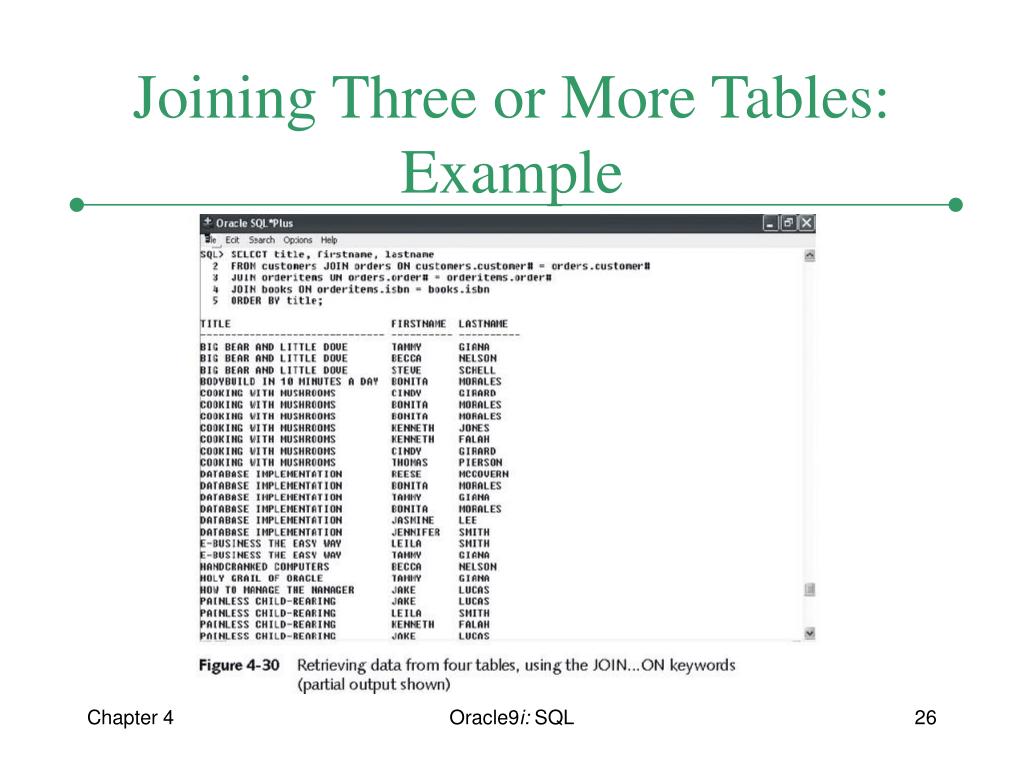
Here's an image showing a similar 4-table join, reinforcing the pattern you've just seen.
Your Turn: Build a Multi-Table Query
Now it's time to put this into practice. The following resource provides a series of exercises that build on each other, taking you from a three-table join to a four-table join.
These exercises from Launch School's 'SQL and Relational Databases' book are a perfect way to test your understanding. You will be connecting to a fictional ls_burger database.
Please work through Exercises 7, 8, and 9. Don't just look at the solution; try to write the query yourself first for each exercise. Exercise 7: Start by joining orders, order_items, and products to get all items for each order. Exercise 8: Build on your previous query by adding a WHERE clause to filter for a specific product. Exercise 9: Take the next step by joining the customers table to find the names of customers who ordered that specific product.
Test your understanding!
Based on the exercises, imagine you need to find the product_type (e.g., 'Burger', 'Side') for all items ordered by the customer 'Aaron Muller'. In plain English, what tables would you need to join, and in what logical order?
Show answer
You would need to join four tables, likely in this order:
- Start with the
customerstable to find 'Aaron Muller's' ID. - Join
customerstoordersusing the customer ID to find all of his orders. - Join
orderstoorder_itemsusing the order ID to find all the specific products in those orders. - Finally, join
order_itemstoproductsusing the product ID to get theproduct_type.
An Important Consideration: Join Order and Type
When you only use INNER JOINs, the order doesn't usually affect the final result (though it can affect performance). However, when you start mixing INNER JOINs with OUTER JOINs (LEFT, RIGHT), the order and type of join become critical.
This gets back to the concept of the intermediate table. A LEFT JOIN preserves all rows from the left side (the intermediate table from the previous step), while an INNER JOIN might filter them out. Changing the order can completely change your result.
An Illustrated Guide to Multiple Join
Let's revisit the 'Illustrated Guide' to see a practical example of why join order matters when mixing join types.
Read the section 'Mixed Left and Right Join With Inner Join'. Focus on why the first query with LEFT JOIN ... INNER JOIN fails to return people without vehicles. Then, see how rewriting the query with (INNER JOIN) ... RIGHT JOIN solves the problem. This highlights how the sequence of operations dictates the final output.
This is a more advanced point, but it's vital for your "deeper level" understanding. When a query isn't returning what you expect, the cause is often a misunderstanding of how the sequence of joins is filtering your data.
Conclusion
You have now learned how to weave together data from multiple tables, a fundamental skill for any developer or technical support professional who works with databases.
Key Takeaways:
- Joining three or more tables is done by chaining
JOINclauses. - The database processes these joins sequentially, with the output of one join becoming the input for the next.
- A common and effective strategy is to start with a central "fact" table (like
orders) and use joins to pull in details from surrounding "dimension" tables (likecustomers,products). - Aliases are essential for managing the complexity and ambiguity of multi-table queries.
- When mixing
INNERandOUTERjoins, the order and type of your joins are critical and will significantly affect the final result set.
Preview of the Next Lesson:
We've been joining different tables together based on relationships between them. In the next lesson, we will explore a special and powerful technique: the self-join. You'll learn how to query hierarchical relationships—like employees and their managers—by joining a table to itself.