Hello! Welcome to your next lesson on joining tables.
In our previous lesson, we explored how to construct queries that join three or more different tables, using aliases to keep things organized. You saw how the database chains these joins together, building a final result set step-by-step.
Today, we'll look at a special application of this concept: performing a self-join to query hierarchical relationships within a single table. Instead of joining table_A to table_B, we are going to join table_A to itself. This might sound strange, but it's an elegant and efficient way to solve a very common problem.
Why Join a Table to Itself? The Concept of Hierarchy
Imagine an employees table. Every row is an employee, but some employees are also managers of other employees. How do you store this "reports to" relationship?
You could create a separate managers table, but managers are also employees. A more efficient design is to represent this hierarchy within the employees table itself.
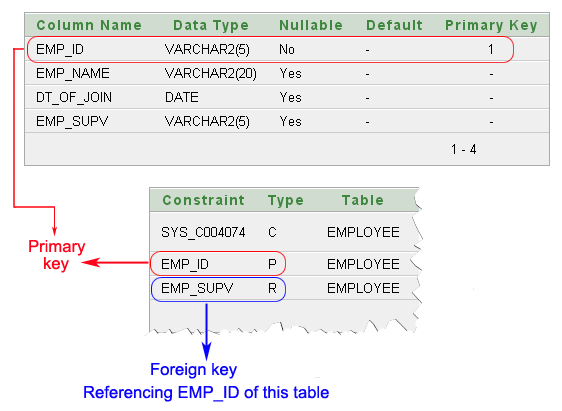
This is done by having a column that refers back to the table's own primary key. For example, an employees table might have:
employee_id(the primary key)employee_namemanager_id(a foreign key that references anotheremployee_idin the same table)
For the CEO, the manager_id would be NULL because they don't report to anyone. For everyone else, manager_id would contain the employee_id of their boss. This structure is fundamental to querying hierarchical data. Given your interest in how systems are built, you can think of this as a way to represent a tree data structure within a relational table.
This image shows exactly this kind of structure.
The Trick: Treating One Table as Two
To get the name of an employee and the name of their manager in the same result row, we need to access the employees table twice in one query: once to get the employee's details and a second time to get the manager's details.
The database can't read our minds. If we just write FROM employees JOIN employees, it won't know how to distinguish between the "employee" role and the "manager" role.
This is where the aliases you mastered in the last lesson become mandatory. By giving the same table two different aliases, we can treat it as two separate, virtual tables for the purpose of the query.
Let's watch a short video that introduces this core idea.
Database Design 50 - Self Join
The video 'Database Design 50 - Self Join' by Caleb Curry provides a great conceptual start. He explains why you would use a self-join with a user referral example, which is another common hierarchical relationship.
Watch from the beginning to 04:08. Focus on his explanation of thinking about the self-join as if you are making a copy of the table and joining them together. Pay attention to how he introduces the need for aliases to make this work.
Constructing the Self-Join Query
Now that we have the core concept, let's build the query. A self-join follows the standard JOIN syntax, but with the crucial use of aliases.
The general structure is:
SELECT: Use aliases to pick columns from each "version" of the table (e.g.,e.namefor the employee,m.namefor the manager).FROM: Name the table and give it its first alias (e.g.,employees AS e).JOIN: Name the same table again and give it a second alias (e.g.,employees AS m).ON: This is the key. You connect the foreign key from the "child" alias to the primary key of the "parent" alias (e.g.,ON e.manager_id = m.employee_id).
Let's see this put into practice. The following resource provides a clear walkthrough of building this query from scratch for an employee-supervisor hierarchy.
What Is a Self Join in SQL? Explained With 7 Examples
The article 'What Is a Self Join in SQL?' on LearnSQL.com gives a concise, step-by-step guide to writing the query.
Read the first two sections, 'What Is a Self Join in SQL?' and 'Table Aliases in Self Join'. Notice how the query uses aliases 'e' and 'm' to represent the two roles (employee and manager) and how the ON clause links them.
The resulting query and its output are shown perfectly in the image below. You can see how the aliases e and m are used to create a clear, readable list of employees and their managers.

An Important Detail: INNER JOIN vs. LEFT JOIN
What happens to the CEO who has a NULL manager_id?
- With a standard
JOIN(which is anINNER JOIN), the conditione.manager_id = m.employee_idwill fail for the CEO becauseNULLdoesn't equal anything. The CEO will be excluded from the results. - If you want to see all employees, including those without a manager, you should use a
LEFT JOIN.
SELECT ... FROM employees AS e LEFT JOIN employees AS m ON e.manager_id = m.employee_id;
This query says, "Give me all rows from the e (employee) table, and if you find a matching manager in the m table, show their details. If not, just show NULL for the manager's columns."
This distinction is crucial for getting complete hierarchical reports. The following video demonstrates this difference clearly.
MySQL SELF JOINS are ... ughhh
The video 'MySQL SELF JOINS are ... ughhh' by Bro Code gives another excellent set of examples and explicitly compares INNER JOIN with LEFT JOIN for this exact scenario.
Please watch from 05:44 to 10:00. The presenter first builds the employee-supervisor hierarchy using an INNER JOIN, noting that the top manager is missing. Then, at 09:03, they switch to a LEFT JOIN to show how to include all employees in the result.
Test your understanding!
Imagine you have a parts table for an electronics project. It contains part_id, part_name, and sub_component_of_id (which is another part_id). A motherboard might have a sub_component_of_id that is NULL, while a CPU has a sub_component_of_id pointing to the motherboard's part_id.
How would you write a query to list all parts and the name of the larger part they are a component of? Include parts that are not sub-components of anything.
Show answer
You would use a LEFT JOIN on the parts table with itself.
SELECT
    p1.part_name AS component_name,
    p2.part_name AS part_of
FROM
    parts AS p1
LEFT JOIN
    parts AS p2 ON p1.sub_component_of_id = p2.part_id;
p1is the alias for the component part.p2is the alias for the main part it belongs to.- The
LEFT JOINensures that top-level parts (like the motherboard, wheresub_component_of_idisNULL) are included in the result, withNULLin thepart_ofcolumn.
Conclusion
You have just learned a powerful technique that leverages concepts you already know—joins and aliases—in a new way. The self-join is a key tool for working with the countless real-world datasets that have inherent hierarchies.
Key Takeaways:
- Self-joins are used to query hierarchical data stored within a single table.
- This is possible when a table contains a foreign key column that references its own primary key.
- Table aliases are mandatory to distinguish the different roles the table plays in the query (e.g., employee vs. manager).
- The
ONclause is the heart of the self-join, connecting a "child" row to its "parent" row. - Use a
LEFT JOINif you want to include rows at the top of the hierarchy that have no parent.
Preview of the Next Lesson:
So far, we've focused on retrieving and combining individual rows of data. In the next module, we will shift our focus to summarizing and analyzing data. We'll begin by learning about aggregate functions like COUNT(), SUM(), and AVG(), which allow you to calculate statistics across many rows at once.