Hello! Welcome to the first lesson in our module on data aggregation.
In the previous modules, we've focused on retrieving and organizing individual rows of data. You've learned to filter rows with WHERE, sort them with ORDER BY, and even combine them from multiple tables using JOINs. The end result was always a set of rows. Now, we're going to shift our thinking from retrieving rows to summarizing them.
This lesson introduces aggregate functions, the tools SQL provides to perform calculations across many rows and distill them into a single, summary value. This is a cornerstone of data analysis and a skill you'll use constantly to answer questions like, "How many support tickets were created today?" or "What is the total revenue this month?".
Your learning outcome for this lesson is to: Use aggregate functions COUNT, SUM, AVG, MIN, and MAX to summarize data.
What is an Aggregate Function?
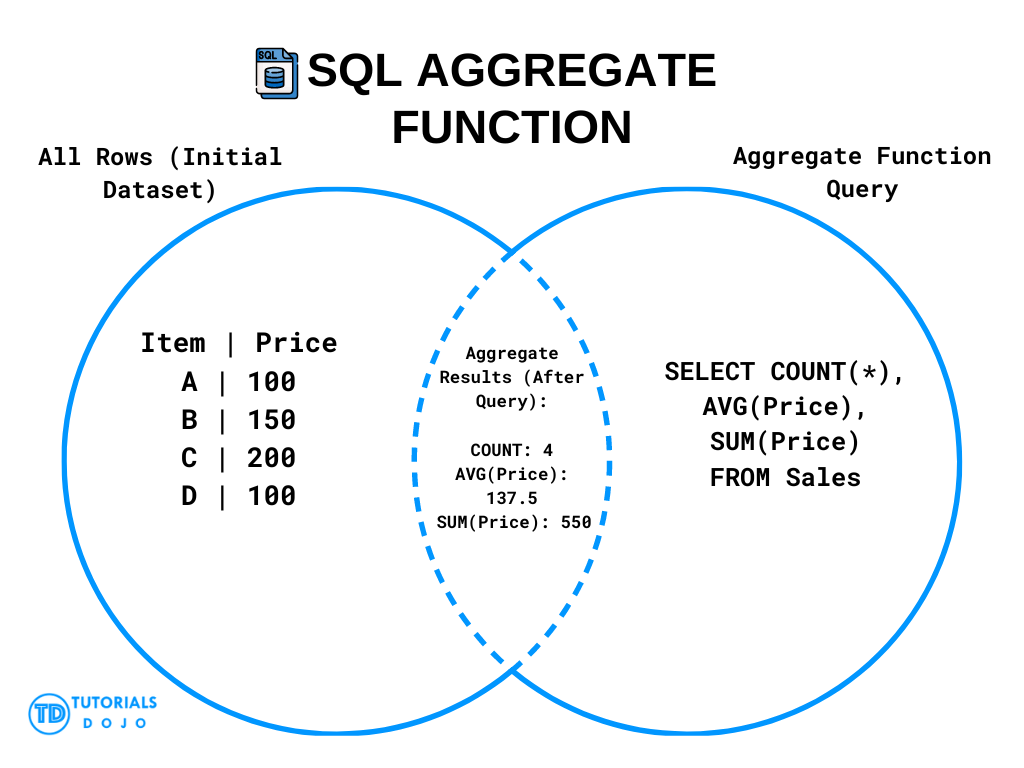
An aggregate function takes a set of values (typically from a column across multiple rows) as input and returns a single summary value as output. Think of it as collapsing a whole list of numbers into one representative statistic.
The diagram below provides a great mental model for this process. A query with aggregate functions takes a whole table of individual records and produces a new result table with just a single row of summary information.
To get a feel for why these are so useful, this first short video gives some excellent real-world analogies.
The video 'Aggregate Functions in SQL' from Neso Academy provides a solid conceptual introduction, explaining the 'many-to-one' nature of these functions.
Watch the first 2 minutes and 50 seconds. Pay attention to the examples of how aggregation is used in systems like Google Maps and industrial sensors. This connects well to your interest in how systems work.
The Five Core Aggregate Functions
SQL provides several aggregate functions, but we'll focus on the five most common ones that you'll use in almost any data-related role.
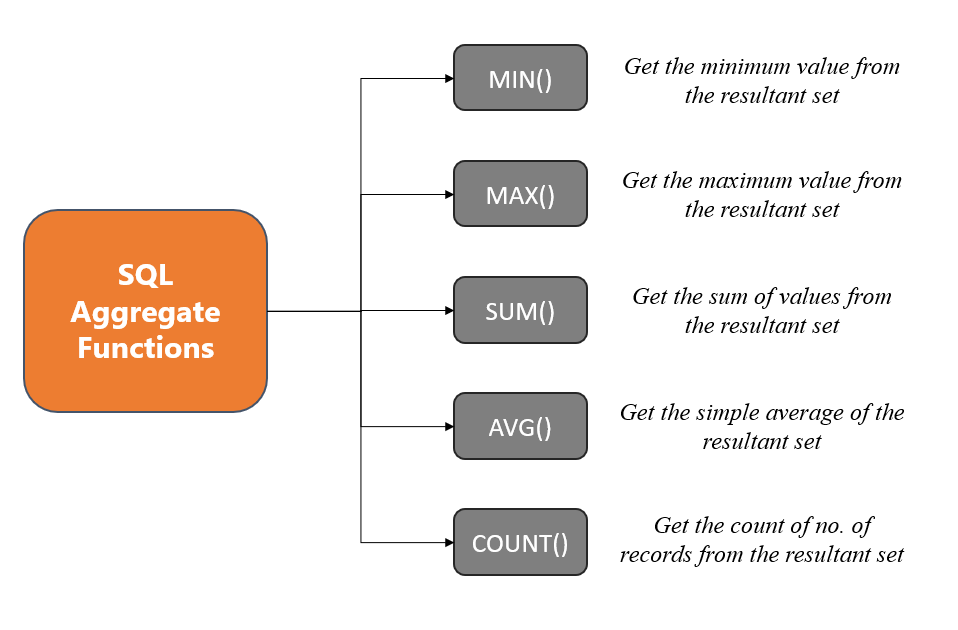
Let's look at each one.
1. COUNT() - Counting Rows
This is perhaps the most-used aggregate function. It simply counts the number of rows that match your query criteria.
COUNT(*): Counts all rows in the group.COUNT(column_name): Counts all rows wherecolumn_nameis notNULL. This is a subtle but important distinction.
2. SUM() - Summing Values
This function adds up all the values in a numeric column. It's perfect for calculating totals, like revenue or inventory counts. SUM() ignores NULL values.
3. AVG() - Calculating the Average
As the name suggests, AVG() calculates the arithmetic mean (the average) of a numeric column. It also ignores NULL values.
4. MIN() and MAX() - Finding Extremes
These two functions find the minimum and maximum values in a column, respectively. They work on numbers, dates, and even text (where they find the first and last values alphabetically).
To see these functions in action, the following video provides quick, practical demonstrations.
SQL Aggregate Functions | COUNT, SUM, AVG, MAX, MIN | #SQL Course 21
The video 'SQL Aggregate Functions' by Data with Baraa offers a fast-paced, hands-on look at writing queries with each of the five core functions.
Watch from 02:33 to 04:43. Notice how each query uses a function to get a single number and uses an alias (e.g., AS total_number_of_orders) to give the result column a meaningful name.
Here's an example query that uses all five functions to summarize an orders table:
SELECT
    COUNT(order_id) AS number_of_orders,
    SUM(order_value) AS total_revenue,
    AVG(order_value) AS average_order_value,
    MIN(order_date) AS first_order_date,
    MAX(order_value) AS largest_single_order
FROM
    orders;
This single query can give you a comprehensive snapshot of your business activity.
A Deeper Look: How Aggregates Actually Work
Given your interest in low-level systems, you might be curious about what the database is doing under the hood. It's not magic; it follows a logical process. Aggregate functions are fundamentally different from row-level functions (like UPPER() or CONCAT()) because they have to maintain a "state" as they iterate through rows.
This article provides a superb, concise explanation of this internal mechanism.
Understanding SQL Aggregate Functions
The article 'Understanding SQL Aggregate Functions' from TigerData explains the internal process of aggregation. This directly addresses your desire to understand the 'how' behind the syntax.
Read the section titled 'How Aggregates Work'. Focus on the concepts of the 'state transition function' and the 'final function'. You can think of this like a C program: the state transition is the operation inside a for loop that updates a variable (e.g., total += current_value), and the final function is the calculation performed after the loop finishes (e.g., return total / count).
Logical Order of Operations
This internal mechanism has a critical consequence: aggregate functions are calculated at a specific point in a query's execution. A common mistake for beginners is trying to use an aggregate function in the WHERE clause, like this:
-- This query will fail!
SELECT *
FROM orders
WHERE order_value > AVG(order_value);
This fails because the WHERE clause is executed before aggregate functions are computed. The database filters the rows first, and then it calculates the aggregates on the remaining rows. It can't use the result of an AVG() to decide which rows to filter, because the average hasn't been calculated yet.
This concept is part of the logical order of operations in SQL, which is not the same as the order in which you write the clauses.
This article explains it beautifully.
A Beginner's Guide to the True Order of SQL Operations
The article 'A Beginner's Guide to the True Order of SQL Operations' from the jOOQ blog explains the logical processing order of a SQL query. Understanding this will save you a lot of confusion.
Read the section that starts with the list item 'aggregations'. It clearly explains that this step happens after GROUP BY (and implicitly, after WHERE) and before HAVING. This is the key to understanding why aggregates can't go in the WHERE clause.
The correct way to filter based on an aggregate result involves concepts we'll cover in future lessons, like subqueries or the HAVING clause. For now, the key takeaway is that WHERE filters rows before aggregation happens.
Test your understanding!
You have a table named service_tickets with the following columns: ticket_id, agent_id, status (e.g., 'open', 'closed'), and resolution_time_minutes.
Write a single SQL query to find the following information for all tickets with a 'closed' status:
- The total number of closed tickets.
- The average resolution time in minutes.
- The shortest resolution time.
- The longest resolution time.
Give each resulting column a clear alias.
Show answer
SELECT
    COUNT(*) AS total_closed_tickets,
    AVG(resolution_time_minutes) AS average_resolution_time,
    MIN(resolution_time_minutes) AS shortest_resolution_time,
    MAX(resolution_time_minutes) AS longest_resolution_time
FROM
    service_tickets
WHERE
    status = 'closed';
This query first filters the table to include only rows where status is 'closed'. Then, it applies the four aggregate functions to this filtered subset of rows to produce the final single-row summary.
Conclusion
You've just taken your first step into data summarization. While the functions themselves are simple, they are incredibly powerful and form the basis for almost all data analysis and reporting.
Key Takeaways:
- Aggregate functions (
COUNT,SUM,AVG,MIN,MAX) transform many rows into a single summary value. - They operate on the set of rows returned after the
WHEREclause has done its filtering. - Because of the logical order of operations, you cannot use an aggregate function directly in a
WHEREclause. - Internally, the database uses a state-based mechanism to efficiently calculate aggregates as it loops through rows.
Preview of the Next Lesson:
Currently, we can only get summaries for an entire table (or a filtered portion of it). But what if you need to break down the data into categories? For example, instead of the total number of tickets, you want the number of tickets per agent? To do that, we'll need to learn how to group our data before aggregating it. That's exactly what we'll cover in the next lesson with the GROUP BY clause.