Hello! Welcome back.
In our last lesson, you learned how to use aggregate functions like COUNT() and SUM() to summarize an entire table into a single row of results. This is powerful for getting a high-level overview, like the total number of support tickets or the average resolution time across all cases.
However, analysis often requires more granularity. You don't just want the total number of tickets; you want the number of tickets per support agent. You don't just want the average sales amount; you want the average sales amount per country.
This is where the GROUP BY clause comes in. It is the tool that allows you to divide your data into groups (or subsets) and then apply aggregate functions to each group individually. This bridges the gap between analyzing individual rows and analyzing the entire table.
Your learning outcome for this lesson is to: Group rows using GROUP BY to perform aggregate calculations on subsets of data.
The Core Concept: Split, Apply, Combine
Before we even look at the syntax, let's build a mental model for what GROUP BY does. It follows a logical three-step process often called "Split-Apply-Combine":
- Split: The database takes all the rows that passed the
WHEREclause and partitions them into different groups. All rows that have the same value in theGROUP BYcolumn(s) are put into the same group, or "bucket." - Apply: An aggregate function (like
COUNT(),SUM(),AVG()) is applied independently to each of these groups. - Combine: The results from each group (which will be one summary row per group) are combined into the final result set.
This image provides a perfect visual for this process:
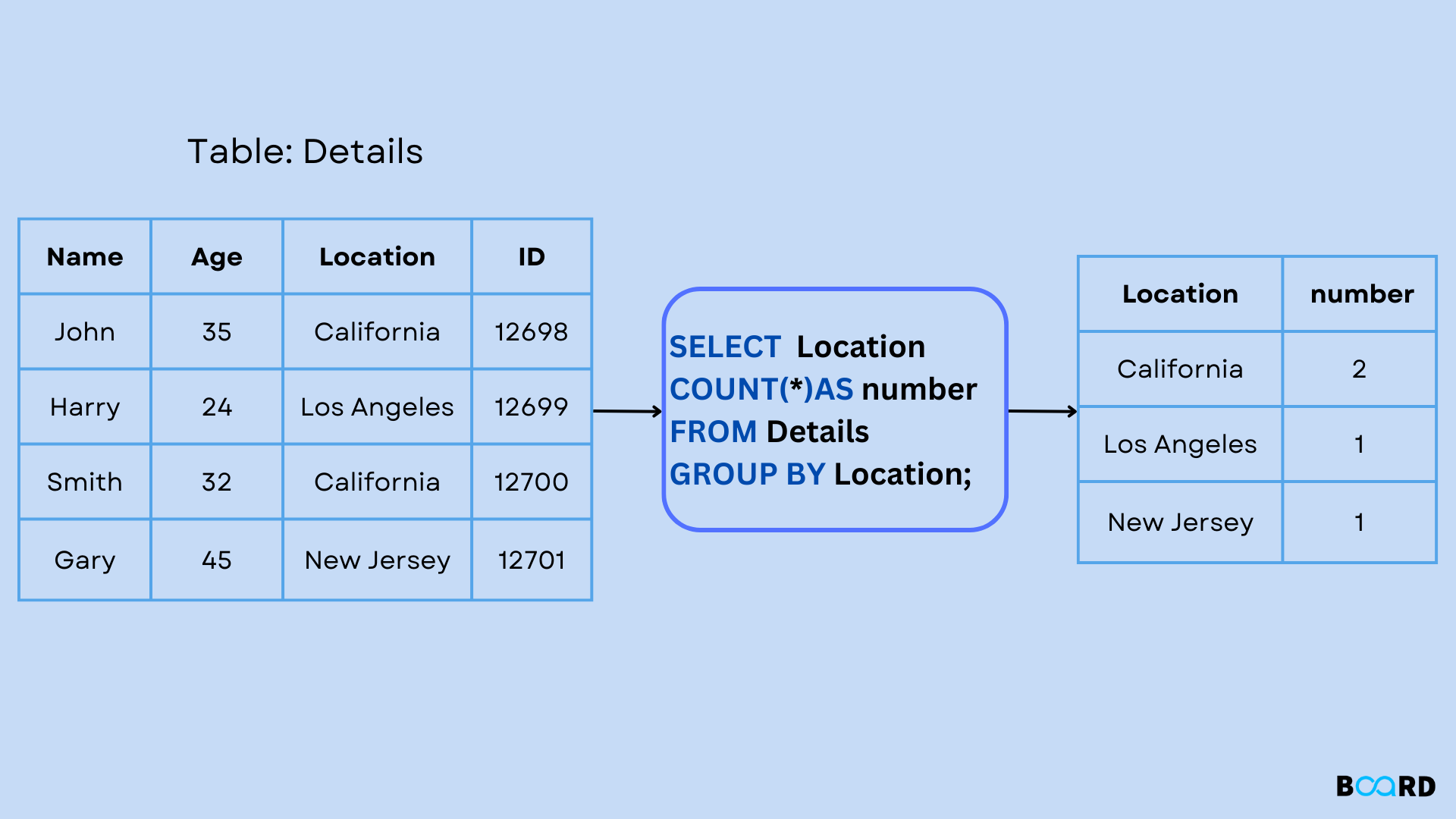
Another way to visualize this, which aligns with your interest in low-level data structures, is to think of the database collapsing rows into a group that holds a list of values.
Let's say you have this data:
| Product | SaleAmount |
|---|---|
| Laptop | 1200 |
| Phone | 800 |
| Laptop | 1300 |
If you GROUP BY Product, the database logically transforms it into this:
| Product | (SaleAmount) |
|---|---|
| Laptop | (1200, 1300) |
| Phone | (800) |
Now, when you apply an aggregate function like SUM(SaleAmount) or COUNT(*), it operates on the list of values within each group:
| Product | SUM(SaleAmount) | COUNT(*) |
|---|---|---|
| Laptop | 2500 | 2 |
| Phone | 800 | 1 |
This "list of values" is an internal concept, but it's key to understanding why GROUP BY works the way it does.
The Syntax and the "Golden Rule" of GROUP BY
The basic syntax is straightforward: you add GROUP BY after your FROM and WHERE clauses.
SELECT
    column_to_group_by,
    aggregate_function(column_to_aggregate)
FROM
    your_table
GROUP BY
    column_to_group_by;
However, this syntax comes with a critical rule that often trips up beginners:
Any column in the
SELECTlist must either be used in an aggregate function OR be listed in theGROUP BYclause.
Why? Think back to our logical model. Once you group by Product, the SELECT statement generates one row for "Laptop" and one for "Phone". If you tried to also select an individual SaleAmount, the database wouldn't know which one to show for the "Laptop" group—1200 or 1300? The context of the individual row is lost; only the group-level context remains. An aggregate function like MAX(SaleAmount) resolves this ambiguity.
The following video provides an excellent walkthrough of introducing GROUP BY and demonstrates this exact rule in action.
Master the SQL SELECT statement part 06: Aggregate Functions, GROUP BY and HAVING clauses
Watch these sections from the video 'Master the SQL SELECT statement part 06' by Michael Fudge. It will introduce the GROUP BY clause and clearly explain the common error that occurs when you violate the 'golden rule'.
Please watch from 09:02 to 14:22. Pay close attention to the explanation around 10:33, where he explains the error message and the logic behind why you must include non-aggregated columns in the GROUP BY clause. This directly addresses the 'why' behind the syntax.
Expanding Your Summaries
You can make your grouped summaries even more powerful in two ways: by using multiple aggregate functions and by grouping by multiple columns.
- Multiple Aggregate Functions: You can include as many aggregate functions as you need in a single query to build a comprehensive report for each group.
- Multiple Grouping Columns: You can list more than one column in the
GROUP BYclause (e.g.,GROUP BY country, city). This creates groups based on the unique combination of values in those columns.
The next segment of the video you just started demonstrates both of these techniques.
Master the SQL SELECT statement part 06: Aggregate Functions, GROUP BY and HAVING clauses
Continue with the same video to see how to build more complex and useful reports with GROUP BY.
Now watch from 14:22 to 22:24. This part shows how to add multiple aggregate functions to create a detailed report for each group. It then moves on to grouping by multiple columns, even using a JOIN, to get more granular summaries.
Test your understanding!
You have a service_tickets table with columns: ticket_id, agent_id, customer_id, status ('open', 'closed'), and resolution_time_minutes.
Write a SQL query that calculates the number of closed tickets and the average resolution time for each agent. The result should show the agent_id, the ticket_count, and the avg_resolution_time.
Show answer
SELECT
    agent_id,
    COUNT(*) AS ticket_count,
    AVG(resolution_time_minutes) AS avg_resolution_time
FROM
    service_tickets
WHERE
    status = 'closed'
GROUP BY
    agent_id;
Explanation:
- The
WHEREclause first filters the table to only include 'closed' tickets. - The
GROUP BY agent_idclause then splits these closed tickets into groups, one for each uniqueagent_id. - Finally,
COUNT(*)andAVG(resolution_time_minutes)are calculated for each agent's group of tickets.
GROUP BY and the Logical Order of Operations
In the last lesson, we discussed the logical order of SQL operations. Understanding where GROUP BY fits is essential for writing correct and complex queries.
Here's the logical pipeline we've built so far:
FROM: Gathers all rows from the table(s).WHERE: Filters out individual rows that don't meet the criteria.GROUP BY: Organizes the remaining rows into groups.SELECT: Generates the final columns, applying aggregate functions to each group.
This order explains why the WHERE clause filters rows before they are grouped. For a crystal-clear, step-by-step example of this flow, let's look at a short reading.
SQL Aggregate Functions and GroupBy Clause .
The article 'SQL Aggregate Functions and GroupBy Clause' provides a fantastic, concrete example of how the database engine processes a query with WHERE and GROUP BY.
Read the section titled '2. With GROUP BY'. Focus on the 'Step-by-Step Process' part. It shows exactly how the data is first filtered by WHERE, then grouped by GROUP BY, and only then are the aggregate functions calculated on those groups. This reinforces the logical order.
This logical ordering is a fundamental concept. Remembering that WHERE acts on individual rows and GROUP BY creates groups from those rows will prevent many common errors as your queries become more advanced.
Conclusion
You have now unlocked a new level of data analysis. Instead of just getting one summary for your entire dataset, you can now generate powerful, categorized reports that answer much more specific business questions.
Key Takeaways:
GROUP BYworks by splitting data into groups, applying aggregate functions to each group, and combining the results.- The "golden rule" of
GROUP BYis that any column inSELECTmust either be aggregated or be part of theGROUP BYclause. This is because the context of individual rows is lost after grouping. - You can group by multiple columns to create more granular subsets.
- In the logical order of operations,
GROUP BYhappens afterWHEREfilters the rows.
Preview of the Next Lesson:
So far, we've used GROUP BY to create unique groups and COUNT to see how many rows are in each. In the next lesson, we will look at another keyword, DISTINCT. It provides a simpler way to find the unique values within a single column, which is useful for quick explorations before you build a full GROUP BY query. We'll also see how it can be used inside an aggregate function, for example, to count the number of distinct customers an agent has served.