Hello! Welcome back.
In our last lesson, we put a crucial piece of our application's architecture in place: dependency injection. You created an APIServer that depends on a Storage interface, not a concrete database implementation. We then wired up an in-memory version, proving how flexible this design is.
Today, we're taking the next major step toward a production-ready system. We will replace our temporary in-memory storage with a real, persistent database: PostgreSQL.
Today's Learning Outcome: Set up and configure a PostgreSQL connection pool using pgx/pgxpool.
We won't be implementing the full Storage interface just yet. Instead, we'll focus on the foundational task of managing database connections efficiently. This is a critical aspect of system design, as mishandling connections is a common source of performance bottlenecks and instability. You'll learn why we need a connection pool, how to choose the right Go library for the job, and how to configure it for robust performance.
Why Do We Need a Connection Pool?
Before we write any code, let's address a fundamental question. Why can't our application just open a new connection to PostgreSQL every time it needs to run a query?
Establishing a database connection is an expensive operation. It involves:
- Network Handshake: A TCP connection must be established between your application and the database server.
- TLS Negotiation: For secure connections, a TLS handshake adds several more round trips.
- Authentication: PostgreSQL must authenticate the client, checking credentials and permissions.
- Process Forking: The main PostgreSQL process often forks a new worker process to handle the connection, consuming memory and CPU.
Doing this for every single query would cripple application performance, especially under concurrent load. A connection pool solves this by creating and maintaining a cache of open connections that can be reused by multiple parts of your application.
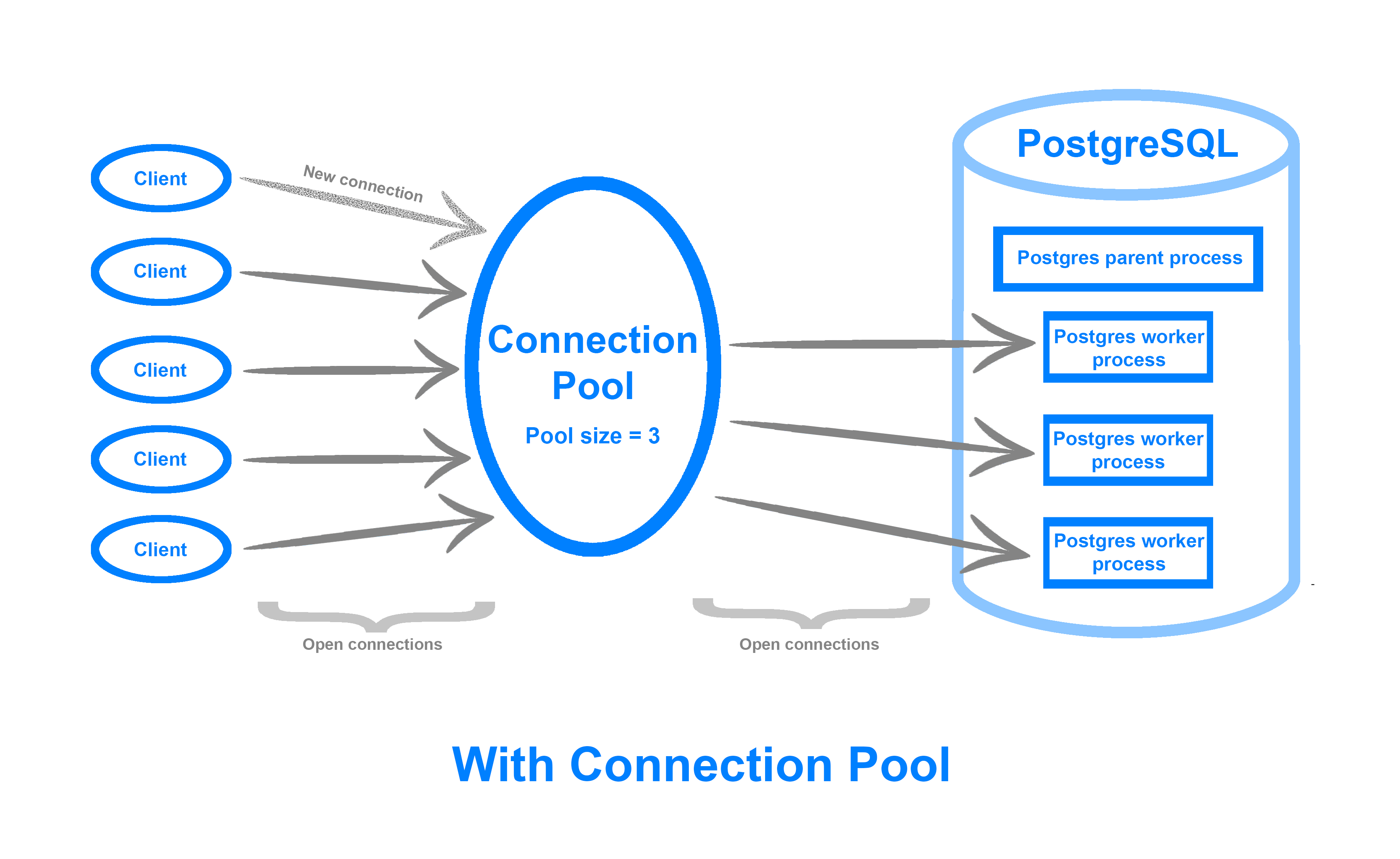
To solidify this concept, the following article provides a concise explanation of the problem and the solution.
How to Implement Connection Pooling in Go for PostgreSQL
The article 'How to Implement Connection Pooling in Go for PostgreSQL' from OneUptime clearly explains the performance costs of creating new connections and the role a pool plays in mitigating them.
Please read the first two sections, 'On this page' and 'Understanding Connection Pooling'. Reviewing the foundational concepts will set the stage for the practical implementation.
Choosing Our Toolkit: database/sql vs. pgx
The Go standard library provides the database/sql package, which defines a generic SQL interface. While many drivers, including a pgx compatibility driver, can plug into it, we'll be using the native pgx library directly.
For a project targeting a specific database like PostgreSQL, using pgx's native interface and its connection pooler, pgxpool, offers significant advantages:
- Performance: It uses the more efficient PostgreSQL binary protocol for many data types, bypassing the textual representation required by
database/sql. - Features: It provides direct support for PostgreSQL-specific features like
LISTEN/NOTIFY,COPYprotocol, and advanced data types (JSON/JSONB, arrays, etc.). - Modern API: Its API was designed with
contextpropagation from the ground up, leading to cleaner code compared to the dualQueryandQueryContextmethods indatabase/sql.
This video gives a good overview of the Go database landscape and highlights why pgx is a popular, modern choice.
Golang Microservices: PostgreSQL: sqlx, pgx and sql
In this clip from 'Golang Microservices: PostgreSQL' by Mario Carrion, he discusses the different database access methods in Go and specifically introduces pgx and pgxpool.
Starting at about nine minutes in, watch the pgxpool section. The presenter explains the benefits of using pgxpool directly, such as its explicit API and support for PostgreSQL-specific features.
This choice aligns with our goal of "absolute mastery," as we're opting for the tool that gives us the most control and performance for our target database.
Hands-On: Setting up the Connection Pool
Let's get our hands dirty. The first step is to get a PostgreSQL instance running and then write the Go code to connect to it.
Step 1: Run PostgreSQL with Docker
We'll use Docker to run a local PostgreSQL database. This is a standard industry practice that avoids polluting your local machine with different database installations.
Create a docker-compose.yml file in the root of your simple-bank project with the following content:
version: '3.8'
services:
  postgres:
    image: postgres:14-alpine
    container_name: simple-bank-db
    environment:
      - POSTGRES_USER=admin
      - POSTGRES_PASSWORD=secret
      - POSTGRES_DB=simple_bank
    ports:
      - "5432:5432"
    volumes:
      - postgres_data:/var/lib/postgresql/data

volumes:
  postgres_data:
Now, open a terminal in your project root and run:
docker-compose up -d
This command will download the PostgreSQL image and start a container in the background. Your database is now running and accessible on localhost:5432.
Step 2: Install pgx and Create the Connector
First, add the pgxpool library to your project's dependencies:
go get github.com/jackc/pgx/v5
Next, we'll create a new package to house our PostgreSQL logic. This keeps it separate from our MemoryStorage and follows the organizational structure we set up earlier.
- Create a new directory:
internal/storage/postgres. - Inside it, create a file named
postgres.go.
Now, add the following code to internal/storage/postgres/postgres.go. This function will be responsible for creating and configuring our connection pool.
package postgres

import (
	"context"
	"fmt"
	"time"

	"github.com/jackc/pgx/v5/pgxpool"
)

// Config holds the configuration for the PostgreSQL connection.
type Config struct {
	ConnString      string
	MaxConns        int32
	MinConns        int32
	MaxConnLifetime time.Duration
	MaxConnIdleTime time.Duration
}

// NewDBPool creates a new PostgreSQL connection pool.
func NewDBPool(ctx context.Context, cfg Config) (*pgxpool.Pool, error) {
	// Parse the connection string
	poolConfig, err := pgxpool.ParseConfig(cfg.ConnString)
	if err != nil {
		return nil, fmt.Errorf("failed to parse pgx config: %w", err)
	}

	// Apply pool size settings
	poolConfig.MaxConns = cfg.MaxConns
	poolConfig.MinConns = cfg.MinConns

	// Apply connection lifetime settings
	poolConfig.MaxConnLifetime = cfg.MaxConnLifetime
	poolConfig.MaxConnIdleTime = cfg.MaxConnIdleTime

	// Create the pool
	pool, err := pgxpool.NewWithConfig(ctx, poolConfig)
	if err != nil {
		return nil, fmt.Errorf("failed to create pgxpool: %w", err)
	}

	// Ping the database to verify the connection
	if err := pool.Ping(ctx); err != nil {
		pool.Close() // Close the pool if ping fails
		return nil, fmt.Errorf("failed to ping database: %w", err)
	}

	return pool, nil
}
This NewDBPool function is the heart of our connection logic. It:
- Takes a
Configstruct, making its dependencies explicit. - Uses
pgxpool.ParseConfigto create a base configuration from a connection string. - Applies our custom settings for pool size and connection lifetime.
- Creates the pool with
pgxpool.NewWithConfig. - Performs a
Pingto ensure the database is reachable before returning the pool.
Step 3: Wire it Up in main.go
For now, let's modify main.go to test our new connection logic. We will replace the MemoryStorage with a call to our new NewDBPool function.
Update your cmd/main.go file:
package main

import (
	"context"
	"log"
	"simple-bank/internal/api"
	"simple-bank/internal/storage/postgres"
	"time"
)

func main() {
	// Database connection string
	// For production, this should come from environment variables!
	connString := "postgres://admin:secret@localhost:5432/simple_bank?sslmode=disable"

	dbConfig := postgres.Config{
		ConnString:      connString,
		MaxConns:        10,
		MinConns:        2,
		MaxConnLifetime: 1 * time.Hour,
		MaxConnIdleTime: 30 * time.Minute,
	}

	ctx, cancel := context.WithTimeout(context.Background(), 10*time.Second)
	defer cancel()

	// 1. Create the database connection pool
	pool, err := postgres.NewDBPool(ctx, dbConfig)
	if err != nil {
		log.Fatalf("Failed to initialize database connection: %v", err)
	}
	defer pool.Close() // Ensure the pool is closed when main exits

	log.Println("Successfully connected to PostgreSQL!")

	// 2. We'll replace this with the real PostgresStorage in the next lesson
	// store := storage.NewPostgresStorage(pool)

	// For now, we are just testing the connection. Let's create a placeholder store.
	// This is where our previous MemoryStorage would go. We'll connect the real one soon.
	var placeholderStore /* = storage.NewMemoryStorage() */

	// 3. Inject the dependency into the API server
	server := api.NewAPIServer(":8080", nil /* placeholderStore */)

	// 4. Start the application
	server.Start()
}
Note: We've set sslmode=disable for simplicity in local development. In production, you would always use require or verify-full.
Run the application:
go run cmd/main.go
You should see the following output, confirming your success:
2023/10/27 10:00:00 Successfully connected to PostgreSQL!
2023/10/27 10:00:00 API server starting on :8080
Production-Ready Configuration
Hardcoding connection strings and pool settings in main.go is fine for a quick test, but it's not suitable for real applications. Configuration should be externalized. The standard way to do this is with environment variables.
The following reading provides a robust, production-grade example of how to load a complete database configuration from environment variables and use it to create a pool.
How to Implement Connection Pooling in Go for PostgreSQL
Let's return to the OneUptime article. This section provides an excellent, self-contained example of loading all necessary database and pool settings from the environment.
Read the section 'Configuration from Environment Variables', specifically the environment configuration pattern. Pay close attention to the LoadDatabaseConfig function and the helper functions like getEnvOrDefault. This is a pattern you will use in almost every production Go service you write.
While we won't implement this full configuration loader right now, keep this pattern in mind. We will integrate a more comprehensive configuration management system using the viper library in a future lesson. For now, our hardcoded Config struct serves the same purpose of separating configuration from connection logic.
Conclusion
Excellent work! You've successfully connected our Go application to a PostgreSQL database using a properly configured, high-performance connection pool. This is a significant milestone and a core skill for any backend developer.
Key Takeaways:
- Connection pooling is essential for performance, avoiding the high cost of establishing a new database connection for every query.
pgx/pgxpoolis the modern, feature-rich choice for Go applications using PostgreSQL, offering better performance and a cleaner API than the standarddatabase/sqlabstractions.- A production connection pool requires careful tuning of parameters like
MaxConns,MinConns,MaxConnLifetime, andMaxConnIdleTime. - Always externalize configuration (like connection strings and pool settings) from your code, typically using environment variables.
Next Up
We have an open connection to our database, but the database itself is empty. We need a way to define our schema (the tables, columns, and indexes) and manage changes to it over time in a structured, repeatable way.
In the next lesson, we will tackle this by learning how to implement database migrations using golang-migrate. You will write your first migration to create the accounts table, bringing us one step closer to a fully functional PostgreSQL-backed storage layer.