Introduction
In our previous lesson, we focused on active listening—the crucial first step of understanding a user's problem by paying close attention to their words and the emotions behind them. Now that you know how to gather information effectively, it's time to learn how to respond. The way you communicate back to the user is just as important as how you listen; it shapes their experience, builds trust, and is the primary way you will guide them toward a solution.
This lesson addresses how to write clear and professional responses for both email and chat, which are the most common communication channels for a technical support analyst. We will cover the fundamental structure of a professional message, core principles for effective writing, and a vocabulary of phrases you can use to ensure your communication is always helpful and professional.
The Anatomy of a Professional Email
Before we dive into what to say, let's look at how to structure it. Just like a well-organized diagnostic process, a well-structured email is easier for the user to read and understand. Every professional email, no matter how brief, should contain a few key components.
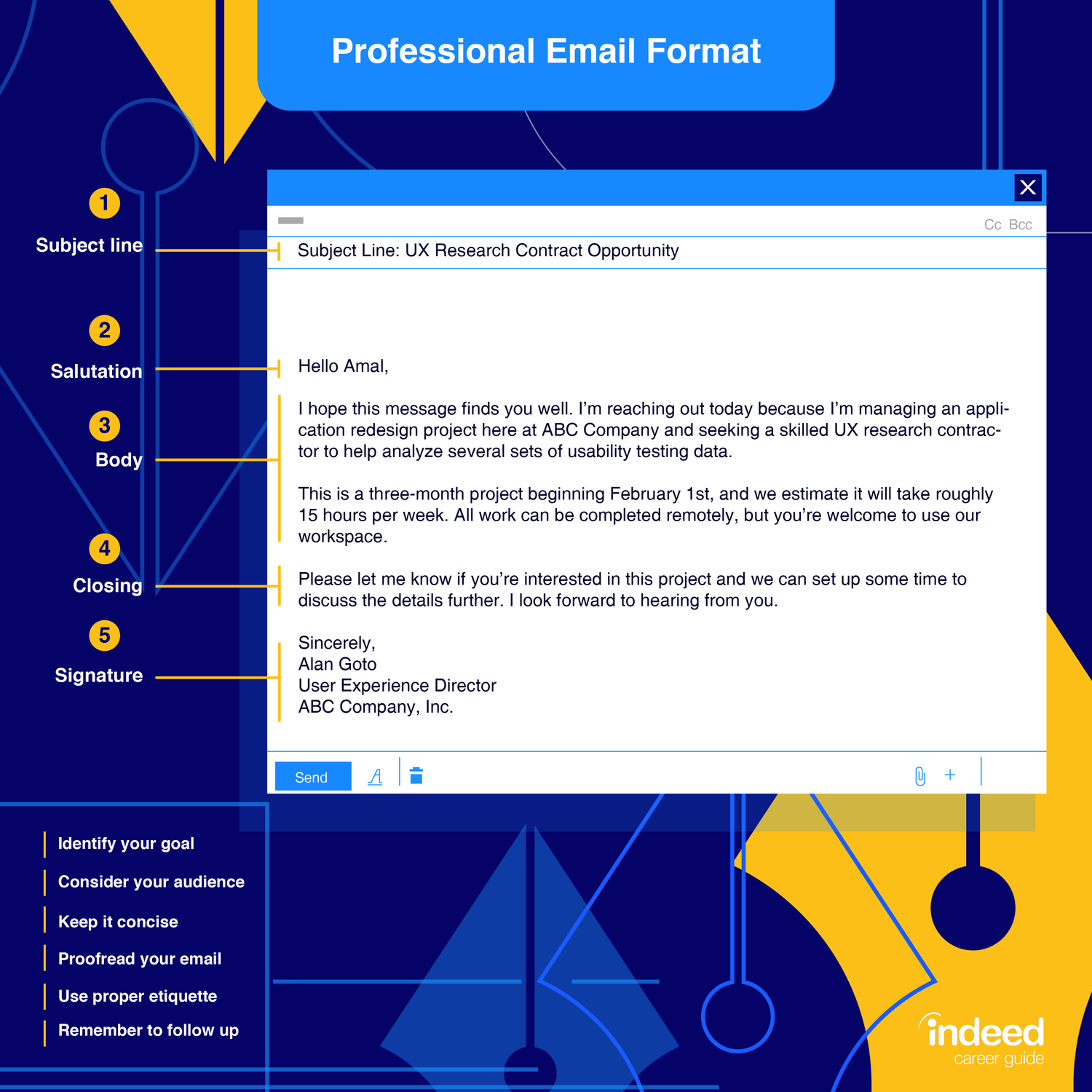
As you can see, the structure is simple and logical:
- Subject Line: Make it clear and concise. A good practice is to include the ticket number (if you have one) and a brief summary of the issue, like "Re: Ticket #12345 - Cannot access printer". This helps both you and the user keep track of the issue.
- Salutation: This is your greeting. Always be professional. "Hello [User Name]," or "Hi [User Name]," is perfect.
- Body: This is where you apply your active listening skills. You'll acknowledge the problem, show you understand, and explain the next steps. We'll spend most of our lesson focusing on this part.
- Closing: A simple and professional closing like "Best regards," "Sincerely," or "Thank you," works well.
- Signature: Your signature should include your full name and title (e.g., "Technical Support Analyst").
Following this format consistently makes your communication predictable and professional, which helps build user confidence.
Six Core Principles for Great Support Emails
With the structure in place, let's focus on the content. Writing a good support email isn't about being a creative writer; it's about being clear, empathetic, and efficient. The following short video from Freshworks Academy outlines six essential checks to perform before you send any support email.
Writing emails in customer support: 6 tips you can use (ACTIONABLE) | Freshworks Academy
This video provides six actionable tips that serve as a foundational checklist for all your written communication.
Please watch the entire video. As you watch, take note of these six key principles: Addressing the customer by name Thanking the customer Answering all their questions Addressing the underlying emotion Trying the solution first Proofreading your message
Let's quickly recap those essential points:
- Personalize and Thank: Starting with the user's name and a simple "Thank you for reaching out" immediately sets a positive tone.
- Be Thorough and Empathetic: Make sure you've answered every part of their question. This is where you connect back to active listening. By paraphrasing their issue and acknowledging their frustration ("I can see how that would be frustrating..."), you show that you've truly understood.
- Be Diligent and Professional: Always test a solution before you suggest it, and never forget to proofread for typos or errors. Small mistakes can undermine your credibility as an expert.
Building Your Professional Vocabulary
Now let's get practical. Knowing what to say is easier when you have a toolbox of professional and positive phrases. The right words can turn a negative experience into a positive one.
This infographic shows a collection of phrases that are designed to build rapport and show commitment to helping the user.

Notice how many of these phrases are simple acknowledgements like "I understand how you feel," "Thank you for your patience," or offers of help like "Let me look into that for you."
While these phrases are great, they need to fit into the flow of a conversation. The following resources provide templates and examples for both chat and email.
For Live Chat: Quick and Clear Responses
Live chat is faster than email, so your responses need to be quicker and more concise. This article offers excellent "canned responses" you can adapt for the most common parts of a chat conversation.
Examples of Responses for Live Chat - Provide Support live chat
This guide from Provide Support offers specific phrases for navigating a live chat interaction professionally.
Please read the following four sections. Focus on the example phrases and think about when you would use them. How to start a chat: Notice the options for a friendly, personal opening. How to ask for more information: These phrases are direct ways to paraphrase and confirm your understanding, building on what we learned in the last lesson. How to say "I don't know": This is a critical skill. Learn how to respond confidently even when you don't have the answer immediately. How to wrap up the call: Ending the conversation professionally is just as important as starting it well.
For Email: Structure and Detail
Emails allow for more detail. A great support email restates the problem, provides clear instructions, and sets expectations. The Zendesk guide we'll look at next has dozens of templates, but we will focus on the single most relevant one for your role: the technical support message.
34 customer service email templates + best practices | Zendesk Singapore
This article provides a wealth of templates. We will focus on one specific template that is perfect for a technical support context.
In the section "The best customer service email templates for every scenario," please find and read template #15, Technical support message. You can search the page for the heading "Technical support message". Notice how this template's body text is structured. It first confirms receipt of the message ("I received your message about..."), then it asks clarifying questions ("When the issue began," "How often the issue occurs"). This is a perfect example of applying active listening to written communication.
Putting It All Together: A Practical Example
Let's see how these principles and phrases come together to form a clear, professional response.
Imagine a user sends you a one-line email: "My internet isn't working."
A poor response would be:
"Did you restart your router?"
This response is abrupt, makes an assumption, and doesn't show any empathy or professionalism.
A good response, applying our principles, would look like this:
Subject: Re: Internet Connection Issue
Hello Jane,
Thank you for reaching out to the IT help desk. I understand it's frustrating to be without an internet connection, and I'd be happy to help you get back online.
To make sure I have the right information, could you tell me a little more about the issue?
- Are other devices in your home able to connect to the internet?
- What lights are currently showing on your router?
- Have you seen any specific error messages on your computer?
Once I have this information, we can start troubleshooting together.
Best regards,
[Your Name]
Technical Support Analyst
See the difference? This email is professional, empathetic, and uses clarifying questions to gather the necessary information to solve the problem efficiently. It combines the structure we learned at the start with the principles and phrasing we've just covered.
Conclusion
In this lesson, you have learned the essential components of writing a professional support response. We covered the five parts of a standard email, the six core principles of effective communication—from personalizing your message to proofreading it—and reviewed specific phrases for handling common situations in both chat and email. Most importantly, you saw how to combine these elements into a response that is not only professional but also genuinely helpful.
As you saw in the Freshworks video and our example, a key part of good communication is addressing the user's underlying emotion. In our next lesson, we will focus specifically on this skill by learning how to identify verbal cues and keywords that indicate user frustration. This will prepare you to handle more challenging conversations and begin the process of de-escalation.