Hello! Welcome to the first lesson in our module on designing core business systems.
In our previous module, we focused on how to connect Notion to other systems, culminating in a deep dive into API limitations and architectural workarounds. We established that for an integration to be successful, the core systems themselves must be well-designed.
Today, we take that principle and apply it to one of the most fundamental systems in any business: the Customer Relationship Management (CRM) system. Your learning outcome for this lesson is to design the database architecture for a scalable CRM, including contacts, companies, and interaction logs.
As a Notion consultant, you're not just building databases; you're architecting the central nervous system for a client's business operations. A well-designed CRM is often the heart of that system, connecting sales, client management, and project delivery. Our focus will be on the architectural principles that ensure your CRM can scale with the business, moving beyond simple lists to a robust, relational structure.
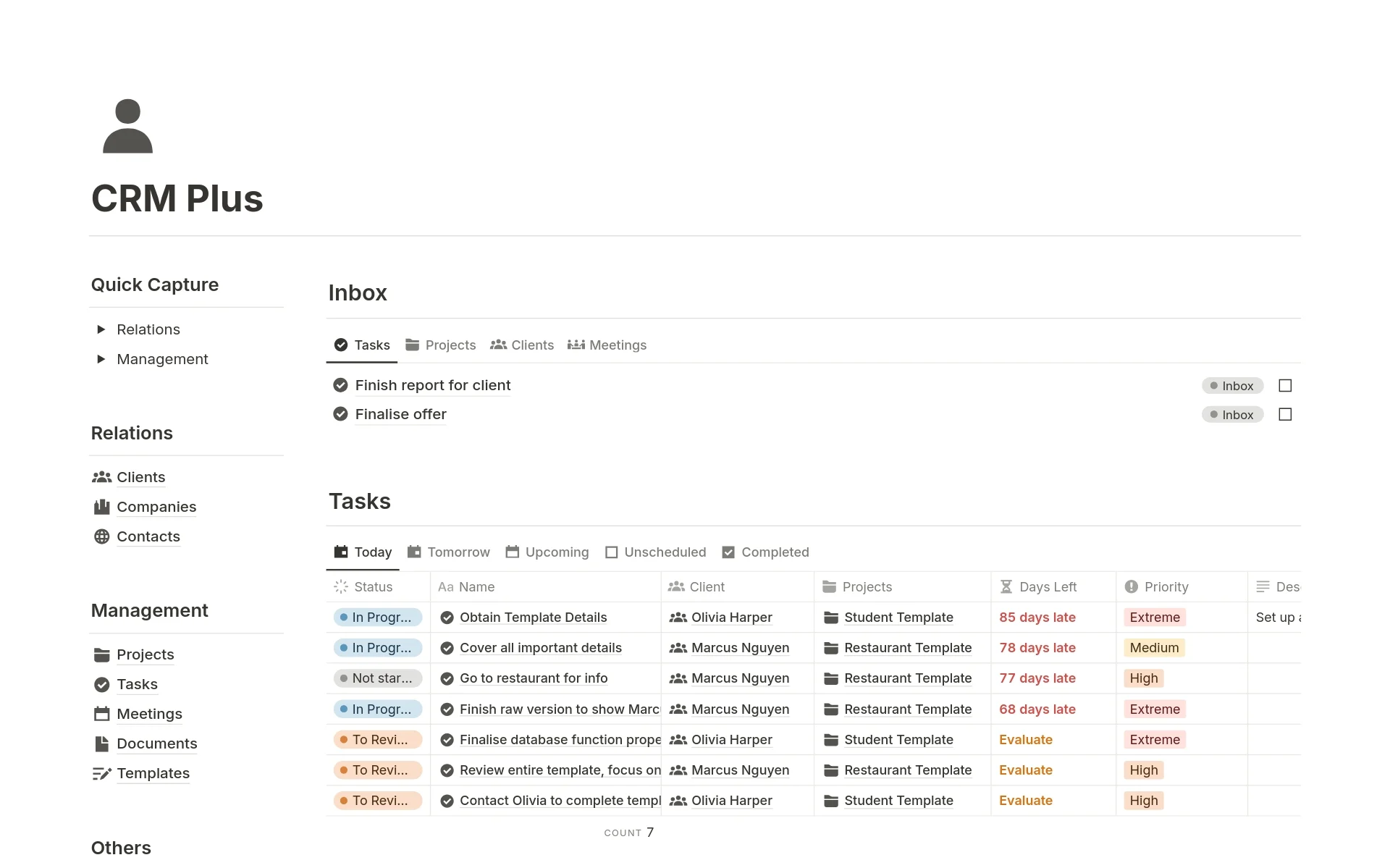
Let's begin by looking at what a finished, well-structured CRM can look like in Notion.

1. The Architectural Foundation: Why Not Just a Spreadsheet?
Before we build, we must understand the core principle that separates a professional CRM from a simple contact list. Many businesses start by tracking clients in a spreadsheet, but as you know from your process improvement work, this model breaks down quickly. Why?
- Redundancy: The same company information is typed out for every contact at that company.
- Lack of Context: A contact list doesn't show you the history of interactions, ongoing deals, or related projects at a glance.
- Scalability Issues: Filtering, reporting, and maintaining data integrity become nearly impossible.
The solution is to move from a flat-file model (a single list) to a relational one, where different types of information live in separate but connected databases.
Build a CRM in Notion | Beyond Spreadsheets
This article from Conway Group, 'Build a CRM in Notion', provides an excellent high-level overview of this very concept. It frames the discussion around system design rather than just Notion features.
Please read the section 'What This Session Covers'. Focus on the distinction it makes between 'linked databases' and 'lists', and note the 'core CRM model' it proposes.
As the article highlights, the core architectural model for a scalable CRM consists of distinct databases for Companies, Contacts, and Deals/Interactions. Let's design these pillars.
2. The Three Pillars of a Scalable CRM
We will now design the three foundational databases. Our goal is to create a clear hierarchy and structure that ensures data integrity and scalability.
Pillar 1: The Companies Database (The Top of the Hierarchy)
This database holds one entry for each organization you work with. It's the central hub to which everything else will connect. Placing companies at the top of the hierarchy is a key architectural decision that allows information to flow downwards to related contacts and deals.
Notion CRM Masterclass: Build From Scratch
To see this in practice, we'll use the 'Notion CRM Masterclass' video from OptiOpp. This video provides a detailed, step-by-step build that we can analyze from a strategic perspective. First, let's see how the 'Companies' database is constructed.
Watch the section from 01:41 to 05:27. As you watch, don't focus on the clicks, but on the properties being created and the reasoning behind them. Pay attention to properties like 'Relationship Type' and 'Owner'.
Key architectural takeaways from this build:
- Separation of Concerns: A dedicated database for companies avoids data duplication. You enter a company's website and industry once, not for every contact who works there.
- Essential Properties:
- Company Name (
Title): The primary identifier. - Relationship Type (
Select): Crucial for segmenting your database (e.g., Prospect, Customer, Partner). This enables you to create powerful filtered views. - Owner (
Person): Assigns internal responsibility for the account, critical for team-based workflows. - Website (
URL), Industry (Select), etc.: Key firmographic data for analysis.
- Company Name (
Pillar 2: The Contacts Database
This database holds the people you interact with. Each entry is an individual. The critical step here is linking each person back to their employer in the Companies database.
Notion CRM Masterclass: Build From Scratch
Let's continue with the 'Notion CRM Masterclass' to see how the 'Contacts' database is built and, more importantly, how it's linked to 'Companies'.
Watch the segment from 05:27 to 11:49. Focus on three key concepts: The creation of the Relation property to link to the 'Companies' database. The use of a Rollup property to pull the 'Relationship' status from the Company record. The use of another Rollup to pull the 'Owner' from the Company record.
The patterns you just saw are fundamental to scalable Notion architecture:
- The
RelationProperty: This is the glue that connects your databases. By creating a relation fromContactstoCompanies, you establish a many-to-one relationship (many contacts can belong to one company). - The
RollupProperty (for Data Integrity): Using a rollup to display the company'sOwnerandRelationshipon the contact page is a powerful design choice. It ensures that this information is managed in one place (the Company page) and displayed everywhere it's needed. If a company becomes a customer, you update it once, and all related contact records reflect the change automatically. This is a core principle of database normalization and is vital for maintaining data integrity.
Pillar 3: The Interaction Logs Database
How do you track the history of your relationship with a contact or company? You could add a text property, but that's not scalable or searchable. A superior architectural choice is a dedicated Interactions database. Each entry represents a single touchpoint: a meeting, a call, an important email.
Build a Notion CRM Template in Under an Hour
The article 'Build a Notion CRM Template' by Notion Sender provides a very clear model for an 'Interactions' database.
Read the sections '3. Interactions Database' and 'Weaving It All Together with Relations'. Note the properties suggested for the Interactions database and how it's designed to relate to both Contacts and Companies.
Based on this model, your Interactions database should have:
- Essential Properties:
- Interaction Title (
Title): e.g., "Q3 Check-in Call". - Date (
Date): When the interaction occurred. - Type (
Select): e.g., "Email," "Call," "Meeting." - Notes (
Text): Key takeaways.
- Interaction Title (
- Key Relations:
- A relation to the Contacts database (who participated?).
- A relation to the Companies database (which company was this about?).
With this structure, you can open any Company page and instantly see a complete, chronological log of every meeting and call with anyone from that organization.
Test your understanding!
A client tells you they currently track all their contacts in a single Notion database. They have properties for "Contact Name," "Email," "Company Name," and "Company Website." They want to start tracking multiple contacts per company and log meeting notes. From an architectural perspective, what is the primary flaw in their current setup, and what three databases would you propose to create a more scalable system?
Show answer
The primary flaw is that they are using a flat-file structure, which leads to data redundancy and poor scalability. The "Company Name" and "Company Website" are repeated for every contact from the same company.
The proposed scalable architecture would involve three separate databases:
- Companies: To store unique information about each organization (Company Name, Website).
- Contacts: To store information about individuals (Contact Name, Email), with a
Relationproperty linking each contact to their respective entry in the Companies database. - Interactions: To log meeting notes, with
Relationproperties linking each note to the relevantContact(s)andCompany.
3. Architecting for Commercial Activity
We now have a robust system for managing relationships. To make it a true CRM, we need to track commercial activity: the deals and the revenue. This introduces another layer to our architecture.
A simple approach is to add a "Deal Value" property to your Companies database. But what if you have multiple deals with one company? The system breaks. Therefore, we need a dedicated Opportunities (or Deals) database.
To see how all these pieces—including the commercial aspects—fit together, let's watch a final, comprehensive walkthrough.
How to Build a Notion CRM Like Salesforce (Free Template)
This video, 'How to Build a Notion CRM Like Salesforce', provides a concise overview of the entire architecture, including the commercial components. It introduces concepts like 'Opportunity Products', which are critical for scalability.
Please watch these three segments: The Overview (00:32 - 02:15): Listen for the description of all the core 'objects' (databases) and their purpose, especially 'Opportunity Products'. Deals & Products (04:14 - 07:44): Observe how an 'Opportunity' is created and linked to an Account and Contact. Pay close attention to how a 'Product' is connected to the deal via an 'Opportunity Product' record. This is the most advanced architectural concept in this lesson. Interactions (08:32 - 10:03): See how 'Tasks' and 'Notes' are used to log interactions related to the opportunity and account.
The video introduces the most important pattern for a truly scalable CRM: the junction database (called "Opportunity Products" or "Deal Line Items").
- The Problem: A single
Opportunitymight involve multiple products or services. A simpleRelationfrom Opportunities to Products can't capture quantity or custom prices. - The Architectural Solution: You create a
Deal Line Itemsdatabase that sits betweenOpportunitiesandProducts.- The
Deal Line Itemsdatabase has a relation toOpportunitiesand a relation toProducts. - Each entry represents one line item in a deal (e.g., "5 units of Product A at $100 each").
- The total value of the
Opportunityis then aRollupthat sums the prices of all its relatedDeal Line Items.
- The
This Deals <-> Deal Line Items <-> Products structure is the gold standard. It allows you to track exactly what was sold in each deal, handle discounts, and run detailed reports on product performance.
Conclusion
In this lesson, you have moved beyond simple database creation to designing the foundational architecture of a scalable business system. By understanding and applying the principles of relational database design within Notion, you can build CRMs for your clients that are not only functional today but are prepared to grow with their business tomorrow.
Key Takeaways:
- Separate Entities: A scalable CRM architecture separates Companies, Contacts, and Interactions into distinct, interconnected databases.
- Hierarchy and Data Flow: The Companies database sits at the top of the hierarchy. Information flows down to Contacts and Deals via
Rollupproperties to ensure data integrity. - Interaction Logs: A dedicated
Interactionsdatabase provides a complete, filterable history of all touchpoints, which is far superior to unstructured notes. - The Junction Pattern for Sales: For tracking complex sales, a "junction" database (like
Deal Line Items) is the key to connectingDealsandProductsin a scalable way.
In our next lesson, we will build on this foundation. Now that you have designed the core CRM entities, you will learn how to implement relationship mapping systems that connect CRM entities to projects and tasks, bridging the gap between winning a client and delivering the work.