Hello! Welcome to the final lesson in our module on strategic automation and integration planning.
In our last session, you mastered the art of creating a technical specification, the crucial blueprint that translates business needs into an actionable plan for developers. We focused on structure: defining the why, what, and how of an integration, including sections for system constraints and error handling.
Today, we're going to put that structure to the test by focusing on the most challenging parts of that document. Your learning outcome is to assess Notion API limitations and design architectural workarounds for complex business requirements. As a consultant, knowing the boundaries of the tools you work with is just as important as knowing their capabilities. This lesson will equip you to anticipate challenges and design robust, resilient systems that don't break when they encounter the inevitable limits of the real world.
1. Identifying API Limitations: The Rules of the Game
Every API operates under a set of rules and constraints. A developer will read the documentation to understand these, but as a strategist, you must understand their implications for the systems you design. We can group Notion's API limitations into two categories: hard technical limits and functional gaps.
Hard Technical Limits
These are the explicit, documented constraints of the API. Ignoring them will lead to failed integrations and frustrated clients. Let's examine the most important ones, which you should always include in your technical specifications.
The official Notion API documentation is the definitive source for these limits. We will focus on the 'Request limits' page to understand the fundamental rules we need to design for.
Please read the sections on 'Rate limits', 'Size limits', and 'Limits for property values'. Pay close attention to the specific numbers provided, as these are the constraints your architectural designs will need to respect.
Based on that documentation, here are the key constraints and their architectural implications:
- Rate Limits: The Notion API allows an average of three requests per second.
- Implication: This is the single most important constraint for any high-volume or real-time integration. A workflow that needs to update 100 Notion pages quickly will be throttled. The documentation mentions that integrations must handle
429errors, which is a technical instruction. For you, the architectural instruction is that any design for a large-scale data sync must be asynchronous. You can't assume requests will succeed instantly. - The Standard Solution (Retry with Exponential Backoff): When a request fails due to rate limiting, the system should wait and try again, increasing the wait time after each subsequent failure. This prevents the system from hammering the API and ensures eventual success. As the architect, you don't code this, but you must specify it in your technical documentation.
- Implication: This is the single most important constraint for any high-volume or real-time integration. A workflow that needs to update 100 Notion pages quickly will be throttled. The documentation mentions that integrations must handle

*This diagram illustrates the 'Retry with Exponential Backoff' pattern. Service 1 makes a request and receives an error. It waits 1 second and retries, failing again. It then doubles the wait time to 2 seconds and retries, finally succeeding. This is the standard, resilient way to handle transient API errors like rate limiting.*
-
Size & Property Limits: The documentation specifies limits on everything from the number of relations (100 per page) and characters in a text property (2000) to the overall payload size.
- Implication: You cannot assume that data from another system will fit neatly into Notion. If you are designing a system to sync blog posts from a website into a Notion database, you must have a plan for what happens when a post exceeds the 2000-character limit on a rich text property.
- Design Consideration: Your specification should define the behavior. Should the text be truncated? Should it create a link back to the original source? Or should the integration create multiple linked Notion pages to contain the full text? The answer depends on the business need, and it's your job to define it.
-
Pagination: When an API call requests a list of items (e.g., all pages in a large database), the API returns a limited number of items at a time, or a "page" of results. To get all the items, the developer must make a series of requests.
- Implication: Retrieving all 5,000 items from a Notion database doesn't happen in one API call. It might take dozens of calls, each of which counts against the rate limit. This makes "full sync" operations slow and resource-intensive by design.
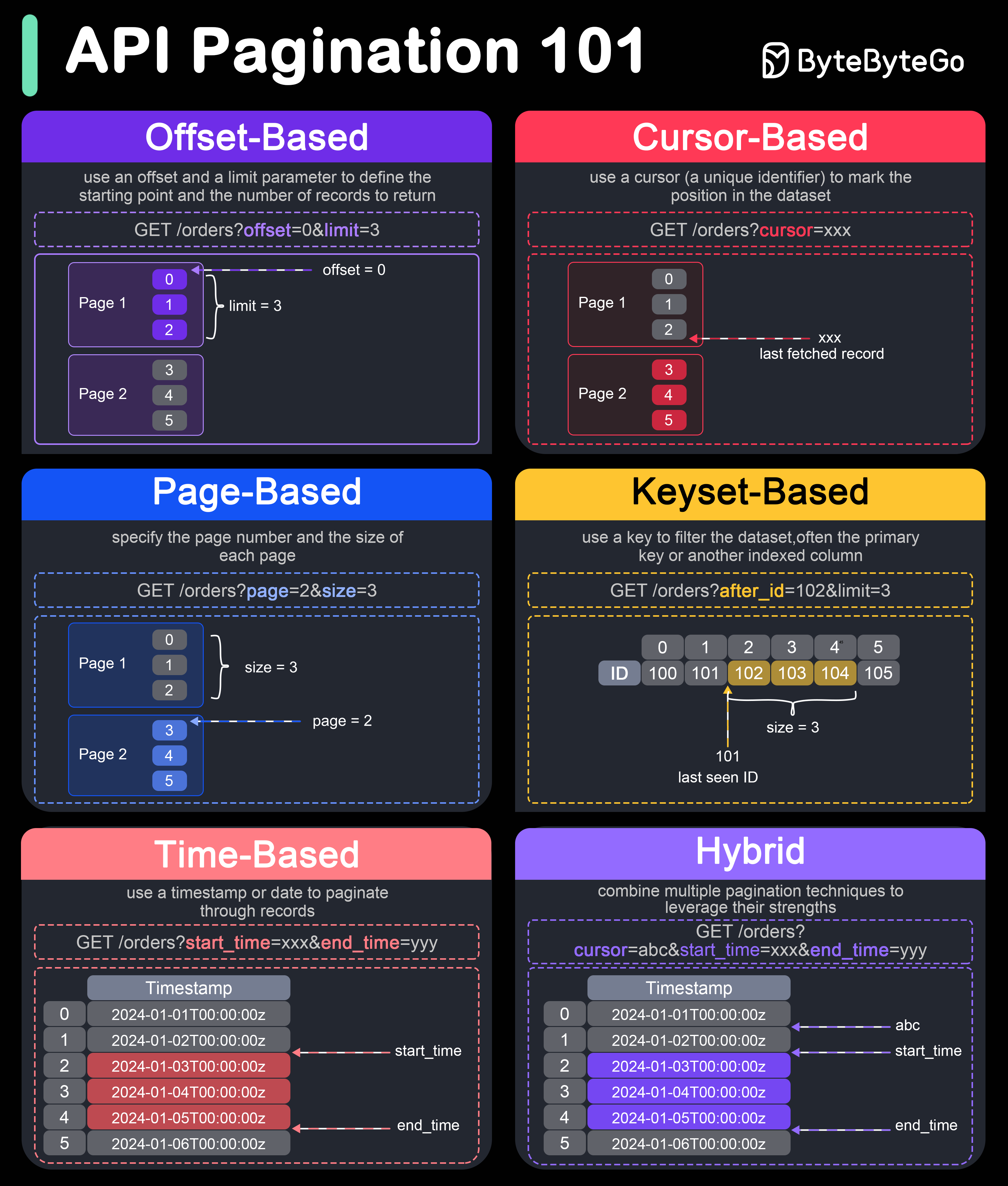
*This image shows various API pagination strategies. Notion's API primarily uses Cursor-Based pagination, where each response contains a 'cursor' pointing to the next page of results. This is a fundamental concept for any integration that handles large datasets.*
Functional Gaps
Functional gaps are features the API simply doesn't support or supports in a way that creates architectural challenges.
- Metadata-Only Webhooks: This is a subtle but critical limitation for real-time integrations. When a change happens in Notion, a webhook can notify another system, but it only sends metadata (like the ID of the page that was changed), not the actual content that was changed.
Sync Notion databases with Webflow CMS to build ...
This Webflow article on syncing with Notion provides an excellent real-world analysis of this challenge. It's an advanced resource, but it perfectly captures the kind of architectural thinking this lesson is about.
Read the 'Architecture overview' and 'Implementation concepts' sections. Focus on how it describes the challenge of 'metadata-only webhooks' and how that, combined with rate limits, makes real-time sync architecturally complex.
As the article explains, this turns one logical event ("a page was updated") into a two-step technical process:
- Receive a webhook notification:
{"page_id": "abc-123"} - Make a separate API call to fetch the content of page
abc-123.
This two-step dance doubles the number of API calls and is a primary reason why high-volume, real-time syncs with Notion are architecturally complex.
- Limited Functionality in No-Code Tools: While the core Notion API might be able to perform a certain action (like updating a relation property), the no-code tools that use the API (like Zapier or Make) may not have implemented a user interface for it.
Using Notion's API to Automate My Business (Explained)
In this video, Daniel Canosa briefly mentions a common limitation when working with a no-code tool.
Watch the short clip from 04:21 to 04:44. He points out that altering relational properties from Zapier wasn't possible for his use case at the time.
The takeaway here is that you must assess limitations at two levels: the native API itself and the specific tools your client is using to connect to it.
2. Designing Architectural Workarounds
Identifying limitations is the first step. Designing solutions is the second. A workaround isn't a hack; it's a deliberate architectural pattern designed to solve a problem. Let's explore some of the most common and powerful patterns.
The Intermediary Pattern
This is your go-to pattern when a direct integration is impossible or inefficient. Instead of connecting System A to System B, you connect both to a mutually compatible System C that acts as a staging area or translator.
Using Notion's API to Automate My Business (Explained)
Daniel Canosa's video provides a perfect, practical example of this pattern in action.
Watch the section from 00:58 to 02:17. He faces a limitation where he can't send data from a free Gmail account directly to Notion. Observe how he uses Google Sheets as an intermediary to solve the problem.
The flow becomes Gmail -> Google Sheets -> Notion. This is a powerful architectural choice. You've identified a limitation and designed a robust, multi-step workflow that achieves the business goal.
The Offload Pattern (Best-of-Breed)
Instead of trying to force Notion to do something it's not designed for, use the API to "offload" that function to a specialized tool. Notion remains the central hub, but the specific task is handled by a "best-of-breed" application.
Notion API: Thoughts & Analysis on What It Means for Notion's Future
August Bradley discusses this concept from a strategic perspective. He frames the API as a way to break out of Notion's 'walled garden'.
Watch the sections from 08:15 to 09:55 and 12:50 to 14:20. He discusses using dedicated apps like Todoist for task management or external visualization tools for charts and graphs, with Notion acting as the integrated backbone.
A prime example is data visualization. Notion has no native charts. The architectural workaround is not to wait for Notion to build them, but to design a workflow where:
- Data is collected and organized in a Notion database.
- An API integration pushes this data to a business intelligence tool (like Google Looker Studio, Power BI, or a custom dashboard).
- The client views the charts and graphs in the specialized tool.
The Decoupled / Queued Architecture
This is an advanced pattern for handling the rate-limiting and metadata-webhook limitations in high-volume scenarios. Instead of processing updates as they happen (which would quickly get you rate-limited), you "decouple" the receiving of an event from the processing of it.
The architecture looks like this:
- Trigger: A Notion webhook fires.
- Queue: The webhook's simple message (
{"page_id": "abc-123"}) is placed in a message queue (like AWS SQS or Google Pub/Sub). This is an extremely fast operation. - Worker: A separate process (the "worker") pulls messages from the queue at a controlled, throttled pace (e.g., 2-3 messages per second).
- Process: For each message, the worker makes the necessary API call to Notion to fetch the content and perform the required action.
This pattern, mentioned in the Webflow article as essential for production configurations, is the gold standard for building scalable, resilient integrations.
Test your understanding!
A client wants to sync their entire 5,000-product Shopify inventory into a Notion database. The sync must run nightly and include product descriptions and a link to the main image. Based on the limitations discussed, what are the top two major architectural challenges you foresee? Propose a high-level architectural workaround for each in your technical specification.
Show answer
Here are the two primary challenges and their architectural solutions:
-
Challenge: Rate Limiting and API Volume. Processing 5,000 products involves at least 5,000 API calls to Notion (one to create each page), plus all the paginated calls to get the data from Shopify. A simple, linear script would take a long time and inevitably be rate-limited by Notion.
- Architectural Workaround: Propose a Queued Architecture. The process would first fetch all product IDs from Shopify and place them into a message queue. A worker process would then consume from this queue at a controlled rate (e.g., 2 items per second) to create or update pages in Notion, incorporating exponential backoff for any transient errors.
-
Challenge: Data Size Limits. Some product descriptions might be very long and could exceed Notion's 2000-character limit for a single rich text property.
- Architectural Workaround: Define a clear Data Transformation Rule. The technical specification should state: "For product descriptions exceeding 1,900 characters, the integration will truncate the text at the nearest whole word and append a 'Read More' link pointing to the product's public URL on Shopify. The full description will not be stored in Notion to avoid hitting property size limits."
Conclusion
You now understand that designing with an API is a process of navigating constraints. As a Notion consultant operating at a strategic level, your value comes not just from knowing what's possible, but from having a clear plan for what to do when you hit a wall.
Key Takeaways:
- The Notion API has both hard technical limits (rate, size, pagination) and functional gaps (metadata-only webhooks, limitations of no-code tools).
- Your role is to translate these limitations into architectural implications for the client's business goals.
- Mastering architectural workarounds—like the Intermediary Pattern, the Offload Pattern, and Queued Architectures—is essential for designing robust and scalable systems.
- These constraints and workarounds must be explicitly documented in the technical specifications you create for development teams.
This lesson concludes our module on automation and integration. You have progressed from evaluating automation tools to designing detailed integration specs and now to architecting solutions around real-world API limitations.
In our next module, "Designing Core Business Systems," we will apply everything you've learned. We will shift from the abstract principles of automation to the concrete design of flagship systems, starting with how to design the database architecture for a scalable CRM.