Hello! Welcome back to our module on strategic automation and integration planning.
In our last lesson, we navigated the complexities of bi-directional synchronization, uncovering the architectural pitfalls of simple "dual one-way" setups and establishing robust strategies for conflict resolution. You learned to identify the right approach—be it "Source of Truth," "Last-Write-Wins," or another method—based on business needs.
Now, we shift from high-level strategy to a critical deliverable. Your learning outcome for this lesson is to create technical specifications for custom API integrations that a development team can implement. As a consultant, this document is your primary tool for translating a client's business goals into a clear, actionable blueprint for engineers. Mastering this skill is what separates a strategist from a mere tool user, ensuring that the systems you design are the systems that actually get built—correctly, on time, and on budget.
1. The Tech Spec: Your Blueprint for Integration
Before a single line of code is written, a successful integration project begins with a shared understanding of the why, what, and how. The technical specification (or "tech spec") is the document that captures this understanding. It is a contract between the business stakeholders and the development team.
However, not all technical documents are the same. Their purpose, audience, and level of detail vary.
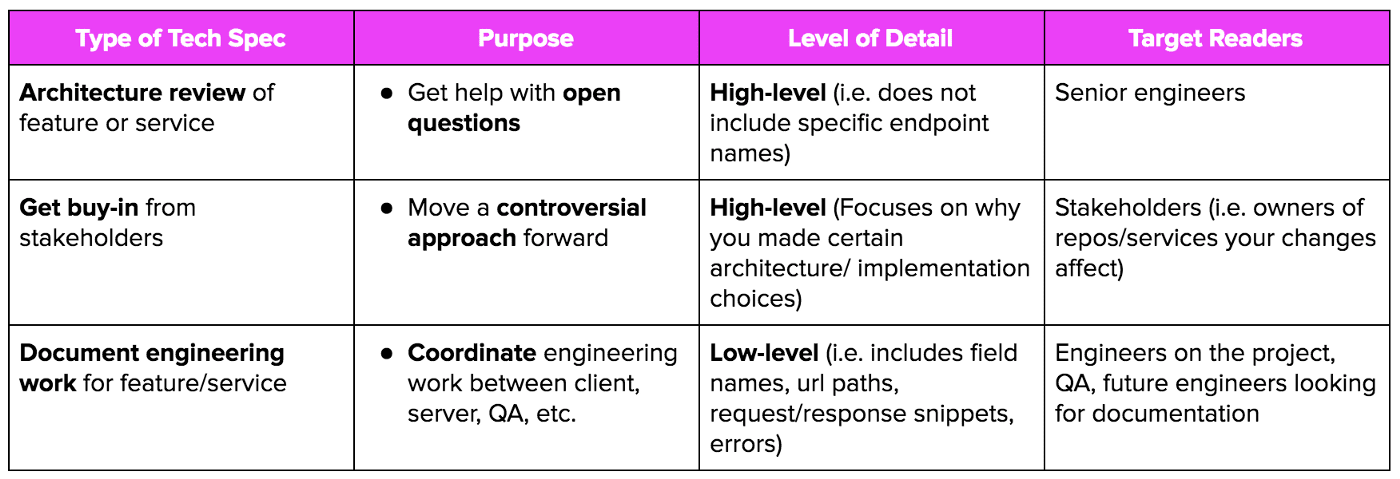
For a custom Notion API integration, your specification document will primarily be for the development team. It needs to be detailed enough for an engineer to build the integration without having to guess at the business logic or technical requirements. It is fundamentally different from the final API documentation that developers might produce later.
Let's clarify this distinction.
How to Write an Integration Specification Document - 2026 ...
The article 'How to Write an Integration Specification Document' from Pandium provides a clear explanation of this difference in its FAQ section.
Please read the FAQ question: 'How is this different from a technical design doc?'. This distinction is key to understanding your role.
As the article notes, your integration spec focuses on the interface: what data moves where, when, and how. The developer's technical design doc will then focus on the internal implementation: the server architecture, database schemas, and specific code libraries needed to make your spec a reality. You define the "what," and they figure out the "how-to-code."
2. The Anatomy of a World-Class Integration Specification
A comprehensive tech spec leaves no room for ambiguity. It should be a complete guide that an engineer can follow from start to finish. Let's build out the structure of a robust integration spec, drawing on best practices from software engineering. The Atlassian guide "Software Design Document" provides a great framework for the critical elements.
Here are the essential sections your document must include.
Section 1: The 'Why' — Business & Project Context
This section sets the stage and ensures the technical solution is aligned with business objectives.
- Project Overview & Goals: Start with a concise summary. What is the purpose of this integration? What business problem does it solve? (e.g., "This integration will automate the creation of client project pages in Notion from closed-won opportunities in Salesforce, reducing manual data entry by 10 hours per week and ensuring project kickoffs are standardized.")
- User Stories: Frame the requirements from a user's perspective. This makes the goals tangible for the development team. (e.g., "As a Project Manager, I want a new project automatically created in our 'Client Projects' database when a deal is marked 'Closed Won' in Salesforce, so I can immediately begin the onboarding process without waiting for a manual handoff.")
- Scope (In & Out): Be explicit about what this integration will and will not do. This prevents "scope creep." (e.g., "IN SCOPE: Creating new project pages from a template. OUT OF SCOPE: Syncing task-level updates back to Salesforce.")
Section 2: The 'What' — Functional & Architectural Requirements
This is the heart of the specification, where you map out the data's journey.
- Integration Architecture Diagram: A picture is worth a thousand words. Create a simple data flow diagram. This visualizes the systems involved, the direction of data flow, and the main trigger. You can use tools like Miro, Whimsical, or even Notion's own mermaid blocks.
- Supported Data Flows & Field Mapping: This is the most critical part for developers. You need to detail every piece of data that moves.
How to Write an Integration Specification Document - 2026 ...
The Pandium article provides excellent, practical templates for documenting data flows and field mapping. We will adopt this structure.
Review the sections 'Integration Architecture Diagram' and 'Supported Data Flows & Field Mapping'. Pay close attention to the structure of the two tables provided: one for the overall flow and one for the detailed field mapping.
Here's how you'd apply that structure:
Data Flow: Create Notion Project from Salesforce Opportunity
| Element | Details |
|---|---|
| Trigger | Salesforce Opportunity stage is updated to 'Closed Won'. |
| Source | Salesforce Opportunity object |
| Destination | Notion Client Projects database |
| Sync Logic | On trigger, create a new page in the Notion database. |
| Frequency | Near real-time (within 5 minutes of the trigger). |
| Outcome | A new Notion page representing the client project is created and populated. |
Field Mapping: Salesforce Opportunity -> Notion Project Page
Salesforce Field (Opportunity) |
Notion Property (Client Project) |
Transformation/Notes |
|---|---|---|
Name |
Project Name (Title) |
Direct copy. |
Account.Name |
Client (Relation) |
Look up or create a matching entry in the Companies database. |
Amount |
Contract Value (Number) |
Format as USD currency. |
CloseDate |
Kickoff Date (Date) |
Direct copy of the date. |
Id |
Salesforce ID (Text) |
Store the Salesforce ID for future reference and updates. |
Section 3: The 'How' — Technical & Operational Details
This section provides the specific technical details the developer will need to interact with the APIs.
API Documentation Best Practices – Full Course
The 'API Documentation Best Practices' course on freeCodeCamp.org breaks down exactly what information developers look for in API documentation. Understanding this will help you provide what they need in your spec.
First, watch the section on practical guidance (01:08:10 - 01:14:14) to get a checklist of what to include. Then, review the 'Anatomy of API Reference' (starting around 00:12:35 in the second clip) to understand the concepts of endpoints, methods, and request/response bodies.
Your spec should translate those developer needs into clear instructions:
- Authentication: Specify the required authentication method for each system (e.g., "The integration will use a Notion internal integration token. The token should be stored as a secure environment variable. For Salesforce, it will use OAuth 2.0.").
- Endpoints: List the specific API endpoints to be used. You don't need to be an expert, but you should reference the official API documentation. For our example, you'd list:
- Notion API:
POST /v1/pagesto create the project page. - Notion API:
GET /v1/databases/{database_id}to retrieve database properties. - Salesforce API: (Specific endpoint for subscribing to Opportunity updates).
- Notion API:
- Request & Response Examples: Include example JSON payloads for requests and responses. You can copy these directly from the API documentation (like the Notion API reference below) and adapt them to your specific use case. This removes all guesswork for the developer.

- System Constraints (Rate Limits): This is non-negotiable. You must document the API rate limits of all systems involved. For Notion, state clearly: "The Notion API has a rate limit of an average of 3 requests per second. The integration must include logic to handle
429rate-limiting errors with an exponential backoff retry mechanism." - Error Handling: Plan for failure. What should happen when things go wrong? Be specific.
- Connection Failure: "If the integration cannot connect to the Notion API, retry 3 times with exponential backoff. If it still fails, log the error and send a notification to the system administrator."
- Data Validation Error: "If the Salesforce Opportunity is missing a required
Account.Name, skip the record, log an error with theOpportunity ID, and notify the sales operations team to correct the source data."
- Conflict Resolution: If your integration has any bi-directional components, this is where you explicitly state the strategy decided upon in the previous lesson (e.g., "For syncing project status, the Notion database will be the 'Source of Truth'. Any conflicting changes from other systems will be overwritten by the status in Notion.").
Test your understanding!
You are writing a spec to sync a Tasks database in Notion with Todoist. The Due Date for a task can be updated in either system. A developer asks you, "What should I do if the due date is changed in Notion and Todoist at the same time?" Where in the spec would you answer this, and what might your answer be?
Show answer
You would answer this in the Conflict Resolution section of your technical specification.
Your answer would depend on the business rule you helped the client decide on. For example:
- Option 1 (Source of Truth): "In case of a conflict on the
Due Datefield, Notion is the designated Source of Truth. The value in the Notion database will always overwrite the value in Todoist." - Option 2 (Last-Write-Wins): "In case of a conflict, the Last-Write-Wins (LWW) strategy should be applied. The update with the most recent timestamp, regardless of its origin system, will be considered the correct one."
- Option 3 (Manual Intervention): "If a conflict is detected on the
Due Date, the sync should be paused for that specific task. A new item should be created in the 'Sync Errors' database, flagging it for manual review."
The key is that you must provide a definitive rule. Simply saying "sync the due date" is an incomplete specification.
3. From Specification to Implementation
Once your document is complete, the journey isn't over. The handoff to the development team is a crucial step.
Introducing OpenAPI (Swagger)
For more complex projects, you may encounter or want to request an OpenAPI Specification (formerly known as Swagger).
API Documentation Best Practices – Full Course
Let's briefly touch on what OpenAPI is. You won't be writing these files, but knowing what they are is part of being a knowledgeable technical project manager.
Watch the section introducing OpenAPI (01:36:11 - 01:38:46). Focus on its purpose: describing an API in a standard way that machines can read to generate documentation and code.
As a consultant, you can specify that a key deliverable from the development team is an OpenAPI file for the custom integration they build. This enforces consistency and makes future maintenance and documentation far easier.
The Spec as a Living Document
Finally, remember that the tech spec is not a "fire and forget" document. It's a living blueprint. You should schedule a walkthrough with the development team to review it, answer questions, and incorporate their technical feedback. A great spec is a collaborative effort.
Conclusion
You now have a complete framework for creating technical specifications that bridge the gap between business needs and engineering execution. This document is the single most important factor in the success of a custom integration project.
Key Takeaways:
- A technical specification is a detailed blueprint for an integration, focusing on the interface between systems.
- A great spec is structured into three parts: The 'Why' (business context), the 'What' (functional requirements like data flows and field mapping), and the 'How' (technical details like endpoints, error handling, and rate limits).
- Be explicit and unambiguous. Document every data field, every potential error, and every business rule. Leave no room for interpretation.
- Plan for failure. A robust spec includes detailed error handling and logging procedures.
- The spec is a collaborative, living document. Review it with developers and stakeholders to ensure alignment before and during development.
In our next lesson, we will build on this foundation. Now that you know how to document an integration, we'll explore the real-world boundaries of what's possible. We will assess Notion API limitations and design architectural workarounds for complex business requirements.