Hello again!
In our last lesson, we explored why variables are so important in programming. We saw that they act as named containers for data, making our code much easier to read, reuse, and update. You learned that by changing a variable in one place, you can update its value everywhere it's used.
Today, we'll build directly on that knowledge. You'll learn how to create variables in Lua and what kinds of information they can hold. We'll focus on the four most fundamental "data types": numbers, strings (text), booleans (true/false), and nil (nothing). Mastering these is the next essential step toward writing scripts for your Factorio mods, as they allow you to represent everything from an item's name to a machine's power status.
Declaring Variables in Lua
In the last lesson, we used a simple assignment like item_name = "Iron Gear Wheel". This works, but in Lua, it's considered best practice to declare your variables using the local keyword.
local item_name = "Iron Gear Wheel"
local item_count = 50
Using local tells Lua that this variable is intended for use only within the current script or a specific section of your code. While the distinction between local and non-local (global) variables is a topic for a future lesson, getting into the habit of using local now will help you write cleaner and more reliable code from the start.
For a quick explanation of this, let's turn to a short video.
Variables and Data Types - Lua Basics (Part 3)
This clip from the video "Variables and Data Types - Lua Basics" by Steve's teacher introduces how to create a variable using the local keyword.
Watch from 02:21 to 03:12. The video explains that a variable is a named container and shows the syntax local variable_name = value. Don't worry too much about the 'scope' part for now; just focus on the syntax.
So, from now on, whenever we create a new variable, we'll start the line with local.
The Different Types of Data
A variable can hold different kinds of information. In programming, we call these data types. You can't add a player's name to their health score, just as you can't multiply "Iron Plate" by 2. Data types help the computer understand what kind of data it's working with.
This image gives a great overview of the basic types in Lua. We'll be focusing on the first four: nil, boolean, number, and string.
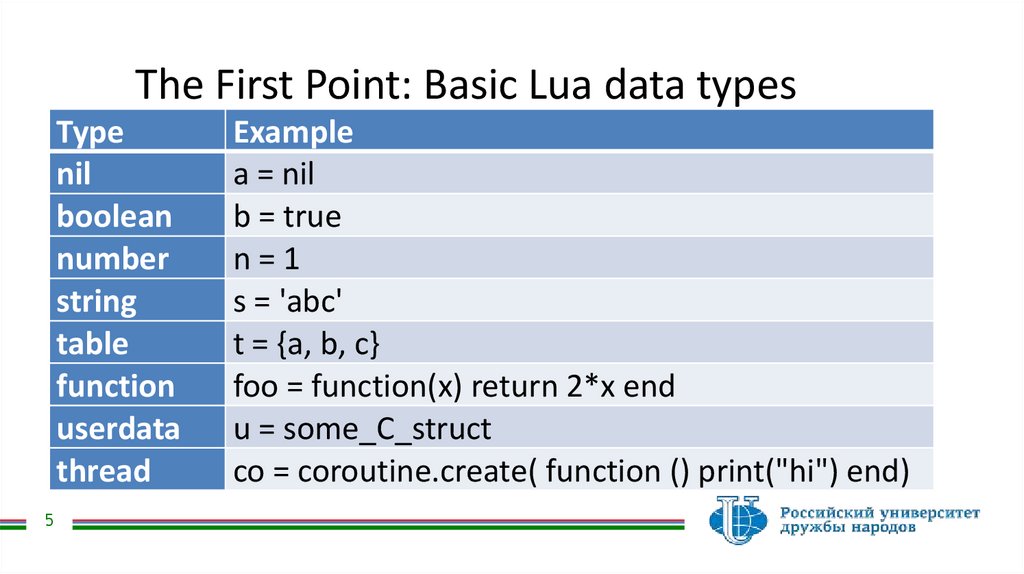
Now, let's get a more detailed overview from a video before we break them down one by one.
How to learn Lua - Beginner series #2 - Variables, types
This segment from Eufuu's beginner series provides a clear summary of the fundamental data types you'll use most often in Lua.
Watch from 08:25 to 10:01. Pay attention to the four main types discussed: number, string, boolean, and nil. Note the examples given for each one.
Let's look at each of these with some Factorio examples.
1. Number
This is for any kind of numeric value, including whole numbers (integers) and numbers with decimal points (floats).
- Use Case: Item counts, inventory sizes, crafting times, health points, damage values.
- Factorio Example:
local inserter_speed = 0.83
local iron_plate_in_chest = 2400
2. String
This is for text. A string is always enclosed in either double quotes (") or single quotes (').
- Use Case: Item names, technology descriptions, player chat messages.
- Factorio Example:
local item_name = "Assembling Machine 1"
local message_to_player = 'Warning: Low power!'
3. Boolean
This is a simple type that can only have one of two values: true or false.
- Use Case: Checking if a machine is working, if research is complete, or if a condition is met.
- Factorio Example:
It's very important to remember thatlocal is_powered = true local research_unlocked = falsetrueis a specific value, not the string"true".
4. Nil
This special type represents the absence of a value, or "nothing". A variable that you've declared but haven't given a value to will be nil by default.
- Use Case: A placeholder for a value you'll assign later, or to represent something that doesn't exist.
- Factorio Example:
-- We want to find a specific enemy, but haven't found one yet.
local target_biter = nil
Checking a Variable's Type
Sometimes, especially when debugging, it's useful to check what data type a variable is holding. Lua gives us a built-in function for this called type(). It takes a variable or a value and returns a string with the name of its type.
Let's see it in action.
How to learn Lua - Beginner series #2 - Variables, types
The type() function is a simple but powerful tool for understanding your code. This clip shows exactly how to use it.
Watch from 10:11 to 11:18. Observe how type() is used inside a print() function to show the data type of a number, a string, a boolean, and a variable that hasn't been assigned a value (which is nil).
Test your understanding!
Based on what you've learned, what do you think the following lines of code will print to the console?
print(type(100))print(type("false"))print(type(false))
Show answer
number-100is a numeric value.string-"false"is text inside quotation marks, making it a string.boolean-false(without quotes) is a boolean value.
This highlights the critical difference between a value and its string representation!
Let's Practice: Storing Factorio Data
Time to put this all together. Let's create a script that defines the properties of a basic item in Factorio using different data types.
- Create a new file in VS Code named
item_data.lua. - Type or copy the following code into your file.
-- Define properties for a stone furnace
local entity_name = "Stone Furnace"
local crafting_speed = 1
local is_fuel_powered = true

-- We haven't defined its health yet, so we'll use nil for now
local health_points = nil

-- Now, let's print our data and check the types
print("--- Data for: " .. entity_name .. " ---")

print("Crafting Speed:")
print(crafting_speed)
print("Type is: " .. type(crafting_speed))

print("Is it fuel powered?")
print(is_fuel_powered)
print("Type is: " .. type(is_fuel_powered))

print("Health Points:")
print(health_points)
print("Type is: " .. type(health_points))
- Run the script with
Ctrl+Shift+B.
You should see an output like this in the terminal:
--- Data for: Stone Furnace ---
Crafting Speed:
1
Type is: number
Is it fuel powered?
true
Type is: boolean
Health Points:
nil
Type is: nil
(Note: Concatenating a boolean or nil value with a string like "Type is: " .. is_fuel_powered can cause errors in some contexts. That's why we print the value and its type on separate lines for now.)
This exercise demonstrates how you can use variables of different types to represent a collection of structured information—a core part of what you'll be doing when you mod Factorio!
Conclusion
Great work! You've now covered the essential building blocks for storing data in Lua. You've gone from knowing why you need variables to knowing how to create them and what types of data they can hold.
Here are the key takeaways from this lesson:
- Variable Declaration: It's best practice to declare variables using the
localkeyword (e.g.,local my_variable = 10). - Four Basic Data Types:
- Number: For all numeric values (
10,3.14). - String: For text, enclosed in quotes (
"hello"). - Boolean: For logical states (
true,false). - Nil: For representing "nothing" or an undefined value.
- Number: For all numeric values (
type()function: A useful tool to find out the data type of any variable or value.
Preview of the next lesson: As scripts get longer, it becomes important to leave notes for yourself and others explaining what your code does. In the next lesson, we'll learn how to use comments to document your code, making it much easier to understand and maintain.