Hello! Welcome back to your Lua learning journey.
In our last lesson, we covered how to declare variables and assign them different types of data, like numbers, strings, and booleans. This is a crucial skill for storing information, like an item's name or a machine's status.
Today, we're going to learn how to leave notes for ourselves inside our code. As you start writing more complex scripts for your Factorio mods, you'll find it incredibly helpful to document what different parts of your code do. These notes, called comments, are ignored by the computer but are invaluable for making your code readable and easy to maintain. By the end of this lesson, you'll be able to use comments to explain your code and even use them as a handy tool for testing.
What are Comments and Why Do We Use Them?
A comment is simply text in your code file that the Lua interpreter completely ignores. It's for human eyes only. Think of it like writing notes in the margin of a book.
There are two main reasons to use comments:
- To Explain Your Code: When you come back to a script you wrote weeks or months ago, you might not remember why you wrote a certain line of code. A good comment can explain the "why" behind your code, saving you a lot of time. This is especially important when you start looking at other people's Factorio mods to learn from them.
- To Temporarily Disable Code: Sometimes you want to turn off a piece of code to see what happens, but you don't want to delete it permanently. You can "comment it out," effectively making it invisible to the computer until you're ready to turn it back on. This is a very common technique for finding and fixing bugs.
To start, let's watch a short video that introduces the concept and purpose of comments.
Comments and Printing - Lua Tutorial (Part 2)
This clip from the video "Comments and Printing" by Steve's teacher gives a great explanation of why comments are so important, especially for your future self.
Watch from 02:25 to 02:47. The key idea is that comments are pieces of code that don't get executed and serve as notes.
Now let's learn how to actually write them. There are two types of comments in Lua.
1. Single-Line Comments
The most common type of comment is a single-line comment. It starts with two hyphens (--) and tells Lua to ignore everything that follows on that same line.
You can use it to comment out a whole line, or just the end of a line.
-- This entire line is a comment.

local research_cost = 100 -- Set the base cost for the research.
For a clear explanation and examples, please read the following section from the article "Understanding Comments in Lua".
This article provides a concise guide to comments. We'll start with the section on single-line comments.
Read the section titled 'Single Line Comments'. It shows you the syntax and gives a simple example of how to use it both on its own line and after a piece of code.
Here's how you might use single-line comments in a Factorio context, building on our script from the last lesson:
-- Define properties for a stone furnace
local entity_name = "Stone Furnace" -- The name that appears in-game
local crafting_speed = 1            -- A speed of 1 is the baseline
local is_fuel_powered = true        -- This entity requires fuel like coal or wood
As you can see, these little notes make the code much clearer without changing how it runs.
Test your understanding!
What will the following code print to the console when you run it?
print("Starting up the factory...")
-- print("Assembling iron plates.")
print("Mining some copper ore.") -- We need this for circuits.
-- print("Building more inserters.")
Show answer
It will print:
Starting up the factory...
Mining some copper ore.
The lines print("Assembling iron plates.") and print("Building more inserters.") are fully commented out, so the computer ignores them. The comment -- We need this for circuits. is also ignored and doesn't affect the print command on its line.
2. Multi-Line (Block) Comments
What if you want to write a longer note, or temporarily disable a large chunk of code? Doing it line-by-line with -- would be tedious. For this, Lua has multi-line comments, also called block comments.
A block comment starts with --[[ and ends with ]]. Everything in between, no matter how many lines it spans, is ignored by the interpreter.
--[[
This script will define a new recipe for Factorio.
It requires two inputs: iron plates and copper plates.
The output will be an electronic circuit.
Author: Your Name
Date: Today's Date
]]

local recipe_is_enabled = true -- This variable will control if the recipe is active.
Now, let's go back to the article to see the syntax for multi-line comments.
Let's continue with the same article to learn about multi-line comments.
Read the section titled 'Multi-Line Comments'. It explains the --[[ and ]] syntax and provides an example for documenting a function.
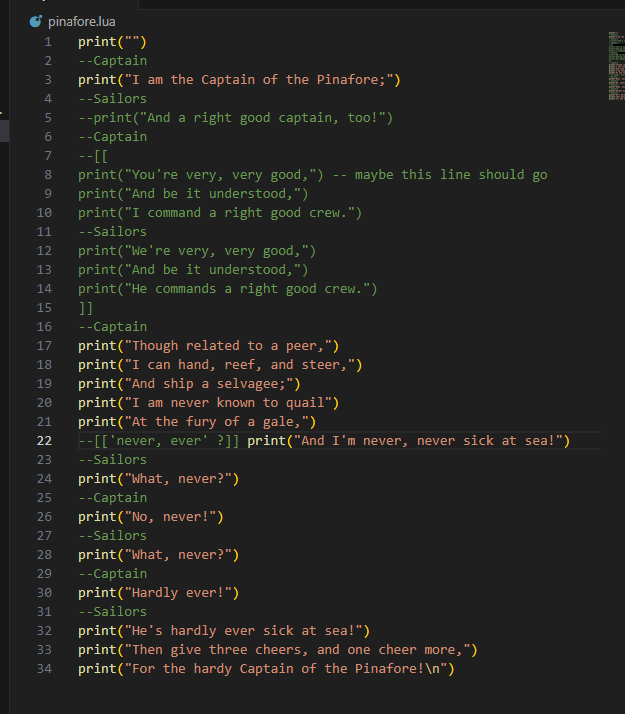
This image provides a fantastic visual summary of how both single-line and multi-line comments look in a code editor. Notice how the editor often changes the color of the comments to make them easy to spot.
Let's Practice: Documenting Your Code
Let's apply what you've learned. Take the item_data.lua script we created in the last lesson and add some comments to it.
-
Open your
item_data.luafile. It should look like this:local entity_name = "Stone Furnace" local crafting_speed = 1 local is_fuel_powered = true local health_points = nil print("--- Data for: " .. entity_name .. " ---") print("Crafting Speed:") print(crafting_speed) print("Is it fuel powered?") print(is_fuel_powered) print("Health Points:") print(health_points) -
Now, modify the file to do the following:
- Add a multi-line comment at the very top of the file explaining that this script defines variables for a stone furnace.
- Add a single-line comment next to each of the first three variables explaining what it represents.
- Use a multi-line comment to temporarily disable all the
printstatements at the end of the file.
-
Run the script. If you've done it correctly, nothing should be printed to the console, because all the
printstatements are now inside a comment.
Show the solution
Your final code should look something like this:
--[[
  This script holds the basic data for a Stone Furnace entity.
  These variables will be used later to define the item in the game.
]]

local entity_name = "Stone Furnace" -- The internal name of the entity.
local crafting_speed = 1            -- The speed at which it crafts items.
local is_fuel_powered = true        -- Does this entity require fuel to operate?
local health_points = nil

--[[
print("--- Data for: " .. entity_name .. " ---")
print("Crafting Speed:")
print(crafting_speed)
print("Is it fuel powered?")
print(is_fuel_powered)
print("Health Points:")
print(health_points)
]]
Conclusion
Fantastic! You've now mastered a fundamental skill for writing clean, understandable, and maintainable code. Leaving good comments is a habit that will pay off enormously as your Factorio mods grow from a few lines to hundreds or thousands.
Here are the key takeaways from today's lesson:
- Comments are notes for humans that the Lua interpreter ignores.
- Single-line comments start with
--and continue to the end of the line. They are perfect for short explanations. - Multi-line comments start with
--[[and end with]]. They are great for longer descriptions or for temporarily disabling blocks of code. - Commenting your code is essential for explaining its purpose and for debugging.
Preview of the next lesson:
Now that we know how to store data in variables and how to document our code with comments, it's time to start manipulating that data. In our next lesson, we will dive into arithmetic operators. You'll learn how to use Lua as a powerful calculator, performing addition, subtraction, multiplication, and division, which is essential for things like calculating resource costs or damage in your mods.