In our previous lesson, we explored the inner workings of a JVM stack frame, the private workspace for each thread's method calls. We saw how the local variable array, operand stack, and frame data work together to execute bytecode. Now, we shift our focus from the transient, per-thread world of the stack to the persistent, shared memory space where all of a program's objects reside: the Java Heap.
This lesson will demystify the architecture of the heap. You will learn how the JVM organizes this critical memory area to manage the lifecycle of billions of objects efficiently. Our objective is to explain the heap's structure, including the Young Generation (with its Eden and Survivor spaces), the Old Generation, and the modern Metaspace, which handles class metadata. Understanding this structure is fundamental to grasping Java's automatic memory management and performance characteristics.
The Rationale for a Generational Heap
Before diving into the heap's structure, it's essential to understand why it's structured the way it is. The design is based on an empirical observation about how most object-oriented programs behave, known as the Weak Generational Hypothesis. This hypothesis has two main points:
- Most objects die young.
- There are very few references from old objects to young objects.
Think about the code you write. Many objects, like temporary variables within a loop, iterators, or data transfer objects for a single web request, are created and become unreachable very quickly. A smaller number of objects, such as application-level caches, configuration objects, or connection pools, persist for a long time.
If the garbage collector (GC) had to scan the entire heap every time to find the few surviving objects among a sea of dead ones, it would be incredibly inefficient. To optimize this, the HotSpot JVM partitions the heap into different "generations".
Understanding Generational GC: Young, Old & Promotion - GC easy - Universal Java GC Log Analyser
This article from the GCeasy blog provides a concise explanation of the motivation behind partitioning the heap.
Please read the first two sections, "Why JVM Heap is Partitioned into Young & Old Gen?". Focus on the core idea: how this partitioning strategy allows the garbage collector to reclaim a majority of objects by scanning only a small portion of the heap.
By separating objects based on their age, the JVM can run frequent, fast garbage collection cycles on the Young Generation, where most garbage is found. The long-lived objects are moved to the Old Generation, which is scanned much less frequently.
The Young Generation: The Nursery for Objects
The Young Generation is the starting point for every object created in your application. Its primary purpose is to quickly identify and collect short-lived objects. It is internally divided into three distinct regions:
- Eden Space: When you write
new MyObject(), the memory forMyObjectis allocated here. Eden (like the biblical garden) is where all new objects are born. - Two Survivor Spaces (S0 and S1): These are staging areas. Objects that survive a garbage collection cycle in Eden are moved into one of the survivor spaces.
This entire process is managed by a type of garbage collection called a Minor GC.
Garbage collection in Java, with Animation and discussion of G1 GC
This video provides a superb animated walkthrough of an object's journey through the Young Generation.
First, watch the overview of the heap generations to get a high-level picture of the Young and Old spaces. Then, pay close attention to the animation, which demonstrates the following key steps: Objects are allocated in Eden. When Eden fills up, a Minor GC is triggered. Live objects are copied from Eden to a survivor space (e.g., S0). Dead objects are discarded. On the next Minor GC, live objects from Eden and the first survivor space (S0) are copied to the other survivor space (S1). This "ping-pong" between S0 and S1 continues. Each time an object survives, its "age" is incremented.
This "copying" mechanism is highly efficient for collecting sparsely populated memory regions and has the added benefit of compacting the live objects, preventing memory fragmentation within the Young Generation.
The Old Generation: The Home for Long-Lived Objects
What happens to objects that keep surviving the Minor GCs in the Young Generation? They are eventually promoted to the Old Generation (also called the Tenured Generation).
An object is promoted under a few conditions:
- Aging: It has survived a specific number of Minor GC cycles. This number is controlled by the JVM flag
-XX:MaxTenuringThreshold, which defaults to 15 on most modern JVMs. - Survivor Space Overflow: If a survivor space is too small to hold all the survivors from Eden and the other survivor space, some objects may be promoted directly to the Old Generation, regardless of their age.
- Large Object Allocation: Very large objects might be allocated directly in the Old Generation to avoid the overhead of copying them between survivor spaces.
Java Memory Management Explained
This DigitalOcean tutorial provides a detailed textual explanation of the Young and Old generations and the processes that govern them.
First, read the section on The Young Generation to solidify your understanding of Eden, survivor spaces, and Minor GC. Then, read the section on The Old Generation. Pay attention to the concepts of promotion, Major GC, and Full GC, and note the performance implications of collecting the Old Generation.
Garbage collection in the Old Generation is a much more significant event. A Major GC collects only the Old Generation, while a Full GC collects the entire heap (both Young and Old Generations). These collections are far less frequent but can cause noticeable application pauses ("stop-the-world" events) because they involve scanning a much larger set of potentially live objects. A primary goal of GC tuning is often to minimize the frequency and duration of these Full GCs.
Metaspace: The Home for Class Metadata
So far, we've only discussed where objects live. But what about the information that defines those objects—the class definitions themselves? This includes:
- Class and interface metadata
- Method bytecode
- The runtime constant pool
- Static variables
This information is stored in a separate memory area logically known as the Method Area. In Java 8 and later, this area is implemented as Metaspace.
A crucial point is that Metaspace is allocated from native memory, not from the Java heap. This was a major architectural change from older JVM versions.
Before Java 8, class metadata was stored in a part of the heap called the Permanent Generation (PermGen). PermGen had a fixed maximum size, and if an application loaded too many classes (common in large application servers or systems with dynamic class loading), it would throw a java.lang.OutOfMemoryError: PermGen space. This was a frequent source of production issues.
By moving this data to Metaspace in native memory, the JVM largely eliminated this problem. Metaspace can grow dynamically as needed, limited only by the available system memory.
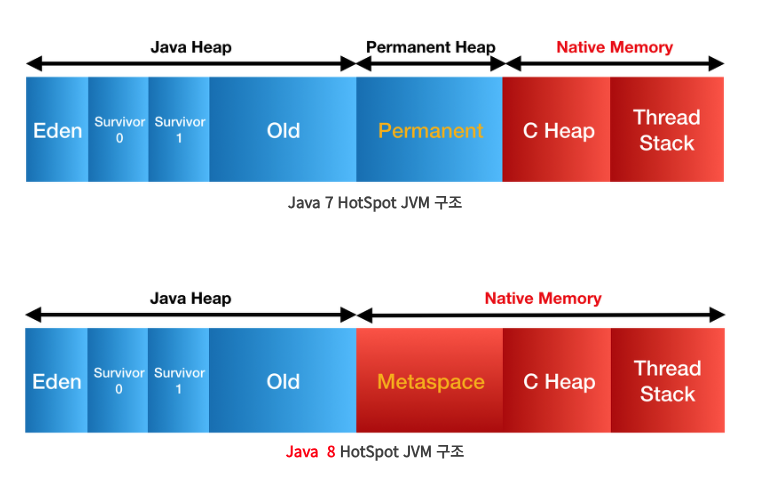
Java Memory Management Explained
This part of the DigitalOcean tutorial gives an excellent breakdown of the evolution from PermGen to Metaspace.
Read the section Method Area (Implemented as Metaspace in Java 8+). Focus on the distinction between what the Method Area stores (metadata) and where it's stored. Understand the problems with the old PermGen and the advantages brought by Metaspace.
While Metaspace reduces the risk of memory errors from loading too many classes, it's not a silver bullet. If a program has a class loader leak (where class loaders and all the classes they loaded are not properly garbage collected), it can still exhaust native memory, leading to an OutOfMemoryError: Metaspace.
Conclusion
In this lesson, we've mapped out the architecture of the JVM's primary memory regions for runtime data. You now have a clear model of how memory is organized to facilitate efficient garbage collection.
Key Takeaways:
- The heap is divided into a Young Generation and an Old Generation based on the "weak generational hypothesis" that most objects are short-lived.
- The Young Generation contains Eden (for new objects) and two Survivor spaces (S0/S1). It is collected frequently via fast Minor GCs.
- Objects that survive long enough in the Young Generation are promoted to the Old Generation.
- The Old Generation holds long-lived objects and is collected less frequently by more costly Major GCs or Full GCs.
- Metaspace, located in native memory, stores class metadata, replacing the problematic PermGen from pre-Java 8 versions.
We have seen where objects live. In the next lesson, we will zoom in even further and examine the memory layout of a single object in the HotSpot JVM, looking at its header, instance data, and the alignment padding that surrounds it.