Welcome to our next lesson. In our previous session, we established a high-level map of the JVM's runtime memory, focusing on the heap's division into Young and Old generations and the role of Metaspace. We now understand where objects live. Today, we're going to zoom in from the macroscopic structure of the heap to the microscopic anatomy of a single object.
Our goal is to dissect the memory layout of an object as it exists in the HotSpot JVM. You will learn precisely how an object is represented in memory, breaking it down into its constituent parts: the object header, which contains critical JVM metadata like the mark word and klass pointer; the instance data, where your field values are stored; and the alignment padding that ensures efficient memory access. This knowledge is fundamental for understanding performance, memory consumption, and advanced JVM features like locking and garbage collection.
The Blueprint of a Java Object
Every object allocated on the Java heap, from a simple new Object() to a complex custom class, follows a standard memory structure. It's not just a block of memory for your fields; the JVM embeds its own metadata within each object.
This structure can be broken down into three logical parts:
- Object Header: Metadata used by the JVM for object management.
- Instance Data: The memory for the object's fields, as declared in its class.
- Padding: Unused bytes added to the end of the object to make its total size align with a specific memory boundary (typically 8 bytes).
The HotSpot JVM uses a special data structure called an "Ordinary Object Pointer" (or oop) to represent a reference to any object. The in-memory data that an oop points to is what we will be examining.
Memory Layout of Objects in Java
This article from Baeldung will serve as our primary guide for this lesson. It uses the Java Object Layout (JOL) tool to provide concrete examples, which we will explore.
To begin, please read the sections on Ordinary Object Pointers (OOPs) and the following two paragraphs describing the layout for normal objects and arrays. This will introduce the core components of the object header: the mark word and the klass word.
The Object Header: A Two-Part Control Center
As you just read, the header is the JVM's internal bookkeeping area for an object. On a typical 64-bit HotSpot JVM using compressed pointers (which we'll revisit), this header is 12 bytes long. It consists of two primary components.
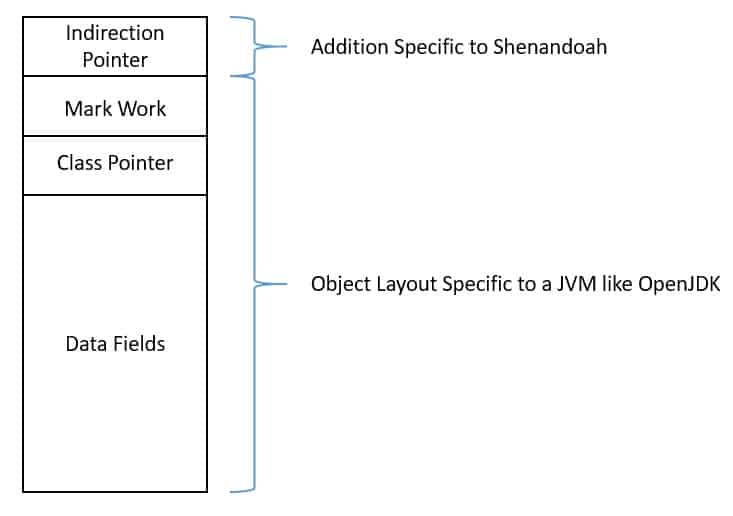
1. The Mark Word (8 bytes on 64-bit JVM)
The Mark Word is a marvel of engineering. It's a 64-bit field that doesn't hold a single value but rather encodes different pieces of information depending on the object's current state. Think of it as a status register for the object. Its responsibilities include:
- Identity Hash Code: The value returned by
System.identityHashCode(). It is computed lazily and stored here the first time it's requested. - Locking Information: When an object is used for synchronization (i.e., in a
synchronizedblock), the mark word's bits are repurposed to store information about the lock's state (e.g., unlocked, lightweight-locked, or a pointer to a heavyweight monitor). - Garbage Collection Age: A few bits are used to track how many Minor GC cycles an object has survived. This "age" determines when the object gets promoted from the Young to the Old Generation.
The fact that this single field can represent so many different things is possible because an object is rarely, for example, locked and being garbage collected at the exact same time. The JVM changes the interpretation of the bits based on the object's state, indicated by a few "tag" bits within the mark word itself.
Save 10-20% Memory With Compact Headers - Inside Java Newscast #48
This video from the official Java YouTube channel provides an excellent explanation of the object header, focusing on the dynamic nature of the mark word.
First, get an overview of the two header words. Then, watch the detailed explanation of how the mark word changes its meaning for locking and garbage collection. The key concept here is displacement: the original mark word data (like the hash code) is moved elsewhere to make room for a pointer when the object is locked or being moved by the GC.
Given your experience with C and low-level systems, you might appreciate seeing how this is defined within the HotSpot source code. The tmdevlab article provides a great summary.
Inside the JVM: The Engineering Behind Enterprise Performance
This article offers a view into the C++ implementation of these concepts within HotSpot.
Read the section on Object Layout, paying close attention to the table describing the header components and the C++ code snippets from markWord.hpp and oop.hpp. Notice how the markWord class defines bit masks for lock state, GC age, and the hash code, encapsulating the logic for this multi-purpose field.
2. The Klass Pointer (4 bytes with Compressed Oops)
The second part of the header is the Klass Pointer. This is a pointer to the object's class metadata, which, as we learned in the previous lesson, is stored in Metaspace. This Klass structure (spelled with a 'k' in the HotSpot source) contains all the information about the class: its fields, methods, implemented interfaces, the v-table for virtual method dispatch, and more.
The Klass Pointer is essential for many core Java features:
- Runtime Type Identification: It's how
instanceofchecks and casts work. - Virtual Method Invocation: It provides access to the class's v-table to find the correct method implementation to execute.
- Garbage Collection: The GC uses the
Klassstructure to determine the object's size and find any object references within its instance data that need to be followed.
On 64-bit systems, a full 64-bit (8-byte) pointer would be wasteful. The JVM uses a technique called Compressed Class Pointers (-XX:+UseCompressedClassPointers, on by default) to represent this as a 32-bit (4-byte) offset from the start of Metaspace, saving 4 bytes per object.
Instance Data and Field Reordering
Following the 12-byte header, we find the actual instance data: the memory allocated for the object's fields. A boolean takes 1 byte, an int takes 4 bytes, a long takes 8, and an object reference takes 4 bytes (with compressed oops).
An interesting optimization here is that the JVM is free to reorder the fields in memory. It does not necessarily lay them out in the order you declare them in your source code. This is done to minimize memory waste due to padding. This is analogous to struct packing in C/C++, where the compiler reorders members to satisfy alignment requirements and reduce total size.
This clip from a talk by a JetBrains developer advocate introduces the concept of hidden data in an object and the reordering of fields.
Watch from this timestamp. The speaker confirms that the JVM may reorder instance fields for optimization purposes.
The Baeldung article provides a concrete example of this field packing.
Memory Layout of Objects in Java
Let's see an example of field reordering in action.
In the Baeldung article, find section 4.4, "Field Packing". Look at the FieldsArrangement class and the corresponding JOL output. Notice how the double and int are placed before the smaller char and boolean fields to create a more compact layout.
Alignment Padding
We've now accounted for the header and instance data. The final component is padding. Modern processors read memory most efficiently in chunks of a certain size (e.g., 64-bit or 8-byte words). Accessing data that straddles these word boundaries is slower.
To prevent this, the HotSpot JVM ensures that every object's total size is a multiple of 8 bytes. If the size of the header plus the instance data isn't a multiple of 8, the JVM adds a few empty bytes of padding at the end to round it up.
Memory Layout of Objects in Java
This concept is best understood with an example.
First, read the brief introductory example in section 4.1, "Basic", which shows a SimpleInt class that naturally aligns to 16 bytes (12-byte header + 4-byte int). Then, read section 4.3, "Alignment". The SimpleLong example is perfect: the header (12 bytes) + the long (8 bytes) equals 20 bytes. The JOL output clearly shows the JVM adding a 4-byte "padding gap" to bring the total size to 24 bytes, a multiple of 8.
This padding, combined with the header, is why even very small objects have a significant memory footprint. A Boolean object, which holds just one bit of information, requires:
- 12 bytes for the header
- 1 byte for the
booleanvalue - 3 bytes of padding to round the total size up to 16 bytes.
That's an overhead of 15 bytes for 1 byte of data. This has major implications for data-intensive applications and is a key motivation for Project Valhalla's value types.
Arrays: The Exception with a Length
Arrays are objects and follow the same basic layout, with one addition. Since the length of an array is immutable, it is stored directly in the object itself. An array header includes the Mark Word, the Klass Pointer, and a 4-byte integer for the array length, making the typical array header 16 bytes. The array elements immediately follow the header.
Memory Layout of Objects in Java
Let's see the layout of an array.
Please read section 4.8, "Arrays". The JOL output for a boolean[3] clearly shows the 12-byte standard header, followed by a 4-byte array length, followed by the 3 bytes for the boolean elements themselves.
Conclusion
Today we've peeled back the layers of a Java object to reveal its precise in-memory structure in the HotSpot JVM. You are now equipped with a detailed mental model of how your objects are physically represented.
Key Takeaways:
- Every Java object consists of an Object Header, Instance Data, and optional Alignment Padding.
- The header contains a Mark Word (for GC info, locking, and identity hash code) and a Klass Pointer (a reference to the class metadata in Metaspace).
- The Mark Word is dynamic, changing its contents based on the object's state.
- The JVM can reorder instance fields to optimize memory layout and minimize padding.
- Padding is added to ensure every object's size is a multiple of 8 bytes, which improves memory access performance but adds overhead.
- Arrays are special objects that include a length field in their header.
This detailed understanding of object layout is not just academic. It's the foundation for our next topic: method dispatch. The Klass Pointer you learned about today is the very mechanism that enables the JVM to perform virtual method calls, and we will explore exactly how that works in our next lesson.