Introduction
In our previous lesson, you made a strategic decision on which platform will serve as the digital home for your freelance business. Now that you've chosen where to build, it's time to decide what to build. Think of this as the architectural phase: before laying the first brick, you need a blueprint.
Today's lesson focuses on a critical step often overlooked by new designers: defining the site structure and page hierarchy for your personal portfolio website. For you, with your background in commerce and audit, this process should feel familiar. It's about creating a logical, organized system that ensures every part of your website serves a specific business purpose—guiding a potential client from curiosity to contact. We will create a sitemap, which is the foundational document that will guide the entire design and build of your portfolio.
1. What is a Sitemap and Why is it Your Blueprint?
Before diving into Figma or your chosen website builder, it's essential to plan. In web design, this plan takes the form of a visual sitemap. It's important to distinguish this from an XML sitemap, which is a file for search engines. A visual sitemap is a diagram for you, your stakeholders (and in this case, potential clients) that shows the hierarchy and relationship between all the pages on your site.
Why Designers Should Start with a Sitemap - Modulify
This article from Modulify clearly explains the role of a sitemap in the design process. It addresses the common pitfall of designing without a plan, which often leads to rework—a costly inefficiency you'll recognize from your audit experience.
Read the introduction and the section "What Is a Sitemap in Web Design?". Focus on understanding: The difference between a visual sitemap and an XML sitemap. The key benefits: creating clarity, guiding your design, and ensuring content supports your business goals.
A well-structured sitemap ensures that visitors—specifically, potential clients—can navigate your site intuitively, find the information they need to trust you, and are gently guided toward the action you want them to take.
2. The Essential Pages of a Freelancer's Portfolio
While every portfolio is unique, a successful freelance portfolio generally requires a standard set of pages to effectively pitch your services, showcase your expertise, and facilitate contact. Think of these as the core departments of your one-person business.
How I'd Build A JOB READY UI/UX Design Portfolio In 2026. [FULL GUIDE]
Saptarshi Prakash's guide on building a job-ready portfolio offers an excellent breakdown of the essential components your website needs.
Watch the section from the structure of a portfolio. He outlines five key components that will form the basis of your sitemap. As you watch, list them out.
Based on the video and industry best practices, your portfolio's primary navigation should include these core pages:
- Home: Your digital front door and sales pitch. It should have a catchy headline and immediately communicate who you are and the value you provide.
- Work / Projects: The heart of your portfolio. This page acts as a gallery, featuring previews of your case studies.
- About: Your chance to tell your story and connect with clients on a personal level. This is where you'll frame your unique background in finance and creative entrepreneurship as a key strength.
- Services (Optional but Recommended for Freelancers): A dedicated page that clearly lists the services you offer (e.g., Landing Page Design, Social Media UI). This is a direct signal to clients about how they can hire you.
- Contact: A clear, simple way for potential clients to get in touch.
This structure is a proven formula for success. You can see it in action in many professional portfolios.

3. Defining the Hierarchy: Parent & Child Pages
A sitemap isn't just a list of pages; it shows their relationship. The most common structure is a hierarchy with parent and child pages.
- Parent Pages: These are your main, top-level navigation items (Home, Work, About, etc.).
- Child Pages: These are pages that live under a parent page. For a portfolio, the most important child pages are your individual case studies, which will live under the "Work" parent page.
How to Design a UX Sitemap for a Website - Slickplan
This article from Slickplan provides a fantastic step-by-step guide to building out this hierarchy.
Read the sections titled "Design sitemap navigation," "Define parent pages," and "Expand child pages into your sitemap page design." The analogy of parent pages as "chapter headings in a book" and child pages as the "content within a chapter" is particularly useful.
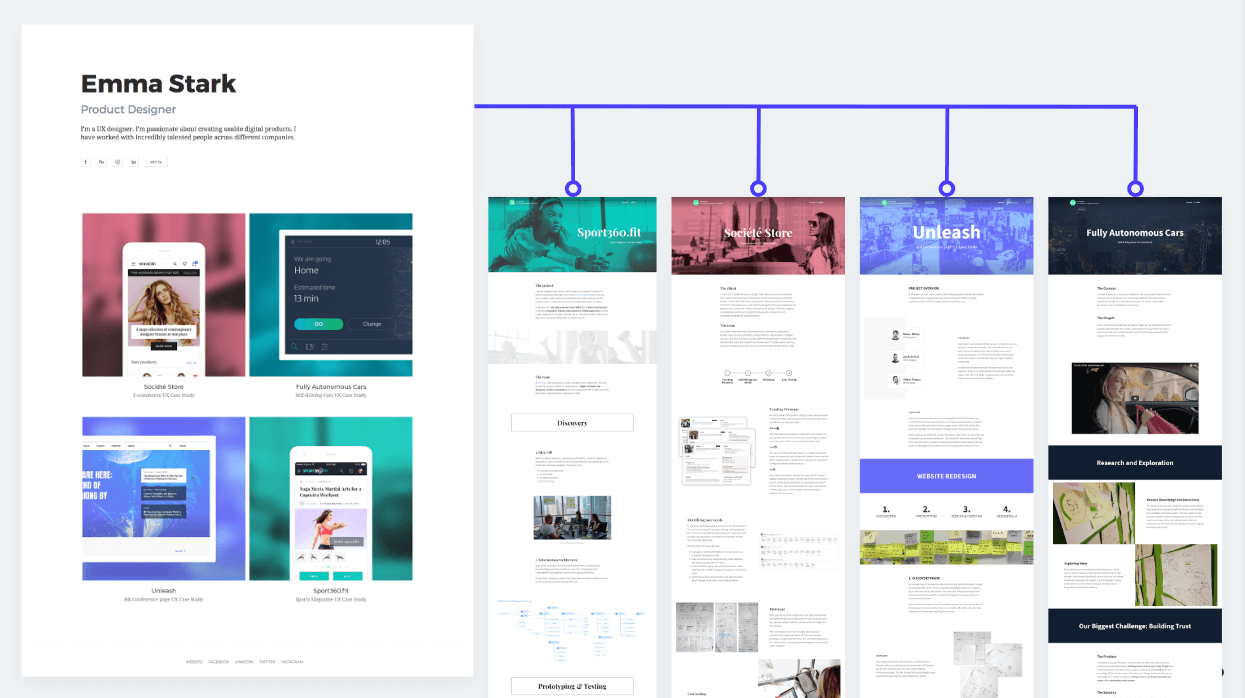
This parent-child structure creates a logical user flow. A client lands on your "Work" page (the parent), sees compelling thumbnails of your projects, and clicks on one to dive into the detailed "Case Study" page (the child).
This diagram perfectly illustrates this flow:
4. Activity: Draft Your Portfolio Sitemap
Now it's time to apply these concepts and create the blueprint for your own portfolio. This activity will result in a tangible plan you can use to build your site in the next lesson.
Task: Create Your Portfolio Sitemap (15 mins)
Use a tool you're comfortable with—FigJam, your notebook, or even just a simple document—to map out your website's structure.
Instructions:
-
Define the Primary Goal: At the top of your page, write down the single most important action a client should take on your site (e.g., "Fill out the contact form," "Schedule a call"). Every structural decision should support this goal.
-
Map Your Parent Pages (Level 1): Create boxes for your main navigation. Based on what we've learned, this will likely be:
- Home
- Work
- About
- Services
- Contact
-
Map Your Child Pages (Level 2):
- Under the Work page, create boxes for the 2-3 case studies you plan to feature. Label them for now (e.g., "Case Study 1: Gifting Business Website," "Case Study 2: Landing Page Project").
- Under the Services page, you might list child pages or sections for specific offerings like "UI for Social Media," "Digital Invitation Design," and "Landing Page Design."
-
Consider Footer & Utility Links: At the bottom, list items that will likely go in your website's footer. These aren't in the main navigation but are still important.
- Link to your Resume (PDF)
- Link to your Behance profile
- Link to your LinkedIn profile
Example Sitemap Structure:
Here is a typical structure you can use as a template:
- Home
- Work
- Case Study 1
- Case Study 2
- About
- Services
- Contact
- Footer Links
- Resume
- Behance
This simple diagram is now your architectural plan. It provides complete clarity on what you need to build.
Conclusion
In this lesson, you've moved from the abstract "what platform" to the concrete "what pages." You've learned how to create a sitemap, which acts as the strategic blueprint for your professional portfolio. By defining a clear structure and hierarchy, you ensure that your website will not only showcase your work but also function as an effective tool for your freelance business, guiding clients smoothly toward hiring you.
Key Takeaways:
- A visual sitemap is an essential architectural blueprint that defines the structure and hierarchy of your website before you start designing.
- A standard freelance portfolio structure includes Home, Work, About, Services, and Contact as the primary (parent) pages.
- Individual case studies are treated as child pages nested under the main "Work" gallery page.
- This structured approach, much like planning in finance, prevents costly rework and ensures your portfolio is strategically aligned with your business goal of attracting clients.
Preview of the Next Lesson:
With your blueprint complete, it's time to start construction. In our next lesson, you will build a polished case study page on your chosen platform, integrating visuals and narrative. We will take one of the "child" pages from your sitemap and bring it to life, transforming your documented process into a compelling story that sells your skills.