Introduction
In the last lesson, you learned to analyze a UI, identify a specific flaw based on a psychological principle, and propose a justified design improvement. This was a crucial step in moving from critique to creation.
Today, we're scaling that analytical skill up significantly. We're moving from a micro-analysis of a single screen to a macro-analysis of a competitor's entire product experience. This lesson kicks off Module 6, "User Research and Empathy," by teaching you how to conduct a structured competitor UX audit. Your background in finance and audit provides a powerful foundation for this; the core logic of measuring against a standard, identifying deviations, and documenting findings is directly applicable here.
For a freelancer, a competitor audit is a highly valuable service. It helps you understand the market, identify strategic gaps, and provide data-driven recommendations to your clients. We'll focus this exercise on your niche—the bespoke gifting and events space—making the insights immediately relevant to your entrepreneurial goals.
By the end of this lesson, you will be able to systematically evaluate a competitor's website using a defined set of criteria and document your findings professionally.
What is a Competitor UX Audit?
Before we dive into the "how," let's clarify the "what" and "why." A UX audit is an expert evaluation of a digital product's user experience against a set of established principles or "heuristics." When we focus this audit on a competitor's product, it becomes a powerful research tool.
It's important to distinguish this from user testing. A UX audit is an expert review performed by you, the designer. User testing involves observing real users interacting with a product. Both are vital, but the audit is often the faster, more cost-effective first step.
This video provides an excellent overview of what a UX audit entails and why it's a valuable part of the design process.
UI UX Audit & Analysis Tutorial | GYMSHARK Case Study Included | 2022
The video "UI UX Audit & Analysis Tutorial" from the Ari Pxl channel clearly defines the process and its purpose.
Watch the first two sections to understand the fundamentals: What is a UX audit? Pay attention to the description of it as an "inspection of a platform by UX experts" to find usability issues and inconsistencies. Why and when to audit. This section highlights the benefits, such as its cost-effectiveness and its role in understanding a product and eliminating issues early on.
The Audit Process: A Step-by-Step Guide
A successful audit isn't just random clicking; it's a systematic investigation. Given your background, think of this as preparing a formal audit file. It requires clear objectives, a standard checklist, and meticulous documentation.
Step 1: Define Scope and Identify Competitors
First, decide what you're analyzing. Are you looking at a competitor's entire website or focusing on a specific flow like their checkout process? For today, we'll focus on a single, critical user flow.
Next, identify who you're analyzing. You'll need to find both direct and indirect competitors.
Conducting UX Competitive Analysis: How To + Free Template | Maze
This article from Maze provides a clear guide on how to start your analysis by identifying the right competitors.
Please read the sections titled "How to do competitive analysis" and "1. Identify your competitors." Focus on the distinction between direct competitors (offering similar products) and indirect competitors (solving a similar user need with a different product).
For your gifting business, a direct competitor would be another online store selling bespoke wedding hoops. An indirect competitor might be a platform like Etsy or even a local high-end gift shop with a strong online presence.
Step 2: Establish Your Evaluation Criteria
This is the heart of a structured audit. You need a consistent set of criteria to evaluate each competitor against. This ensures your analysis is objective and comprehensive. We'll use a checklist synthesized from industry best practices.
What are Design Audits? — updated 2026 - IxDF
This article from the Interaction Design Foundation (IxDF) provides a detailed breakdown of the components of a design audit.
Read the section "What are the Key Components of a Design Audit?" and the Q&A entry "What are the key components of a successful UX design audit?" Pay close attention to the checklist items they describe, such as identity assessment, user flow analysis, visual design, information architecture, and accessibility.
Based on these resources, here is a starting checklist for your audit. Notice how these categories encompass many of the psychological principles we covered in the last module.
Your Evaluation Checklist:
-
Clarity & First Impression:
- Is the value proposition immediately clear?
- Does the branding feel trustworthy and appropriate for the audience?
- Does the homepage effectively guide users toward key actions?
-
Navigation & Information Architecture (IA):
- Is the main navigation logical and easy to understand?
- Can you easily find key information (e.g., shipping policies, contact info)?
- How effective is the search functionality?
-
Key User Flow Usability:
- How much friction (cognitive load, number of steps) is there in the primary task (e.g., finding a product, customizing it, adding to cart)?
- Are calls-to-action (CTAs) clear and consistent? (Applies Nielsen's Heuristics).
- Does the site provide good feedback? (e.g., confirmation messages, loading indicators).
-
Visual Design & UI:
- Is there a clear visual hierarchy?
- Is the use of color, typography, and spacing consistent and effective?
- Are interactive elements (buttons, forms, links) easily identifiable?
-
Accessibility:
- Is text legible (good size and contrast)?
- Are forms and links clearly labeled?
- Can the site be navigated using only a keyboard? (Try using the Tab key).
Step 3: Document Findings and Prioritize
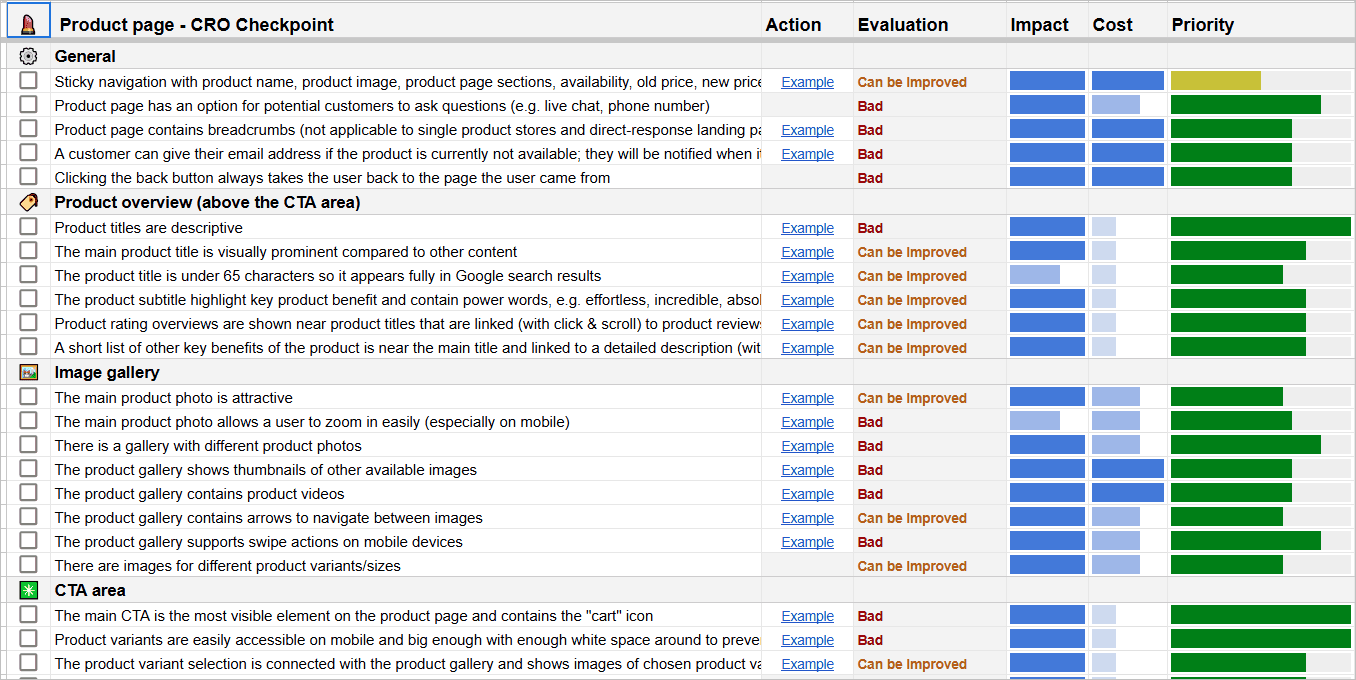
Your findings need to be captured in a clear, actionable format. A simple table or a structured Figma file works perfectly. The goal is to create a report that details the issue, explains its impact, and suggests a potential solution.
The following image shows an example of a detailed checklist used in a professional audit. Note how it includes ratings for impact and cost—this aligns perfectly with the business-oriented mindset you bring from your commerce background.
To see how this documentation looks in practice, let's return to the Ari Pxl video. He provides an excellent demonstration of setting up a Figma file to capture screenshots, annotate issues, and build a summary table of recommendations.
UI UX Audit & Analysis Tutorial | GYMSHARK Case Study Included | 2022
This part of the "UI UX Audit & Analysis Tutorial" shows you exactly how to structure and present your findings.
First, watch the section on the audit template. See how he organizes the file with pages, screenshots, numbered annotations, and a final recommendations table. This is a fantastic workflow to adopt. Next, see how he translates his findings into a prioritized list of actions in the recommendations section. Focus on how he scores each issue by severity and effort, then assigns a priority. This turns raw observations into a strategic plan.
Your Turn: Conduct a Mini-Audit
Now it's time to apply this process. You'll conduct a focused audit on one key user flow of a competitor in the gifting or events space.
Your Task (20-25 minutes):
-
Choose Your Subject:
- Identify one direct competitor for your bespoke gifting business. This could be another online store, a prominent Etsy seller, or a brand you admire in the space.
- Define one key user flow to audit. For example: "Find a specific type of product (e.g., 'custom wedding sign') and view its product detail page."
-
Set Up Your Figma File:
- Create a new page in your main Figma file and name it "Competitor Audit: [Competitor Name]".
- As you move through the user flow, take screenshots of each key screen (e.g., homepage, search results page, product page).
-
Audit and Document:
- Arrange the screenshots in order on your Figma canvas.
- Using your Evaluation Checklist from earlier, identify 3-5 specific issues or opportunities within the flow.
- For each finding, use the annotation method from the video:
- Place a numbered circle or marker on the screenshot pointing to the specific UI element.
- Add a text box next to it with the corresponding number.
- In the text box, write a brief, objective description of the finding. Frame it using the principles we've learned.
Example Finding:
- (On a product page screenshot) You place a marker on a vague "Submit" button for a customization form.
- Annotation: "1. Unclear CTA & High Friction: The button text 'Submit' doesn't match the user's goal, which is to 'See Preview' or 'Add to Cart.' This violates the 'Match Between System and Real World' heuristic and creates uncertainty, increasing cognitive friction."
Focus on clear documentation, not on redesigning anything yet. Your goal is to produce a clean, professional set of findings.
Conclusion
Congratulations on completing your first structured UX audit! You've successfully applied your analytical mindset to a core UX research methodology. This process transforms subjective opinions ("I don't like this page") into objective, evidence-based analysis ("This page has a high error rate due to inconsistent button design").
Key Takeaways:
- A competitor UX audit is a systematic inspection, not a casual browse. It relies on structured criteria and meticulous documentation.
- Your audit background is a superpower. The process of evaluating against standards, documenting findings, and assessing severity/priority is central to both financial and UX audits.
- The output is an actionable report. The goal is to identify not just problems, but opportunities to create a better user experience, which in turn drives business goals.
Preview of the Next Lesson:
In this lesson, we analyzed what competitors are already doing (secondary research). In our next lesson, we will shift our focus to understanding users directly. You will learn how to write a user interview discussion guide with open-ended, unbiased questions, preparing you to gather primary research and uncover the deep-seated needs and motivations of your target audience.