In our last session, we equipped our programs with decision-making abilities using if, elif, and else. This was a crucial step, allowing your code to react differently to various conditions. Now, we'll give our programs the power of persistence and repetition.
This lesson focuses on loops, the fundamental construct for executing a block of code multiple times. You'll learn to write for loops to iterate over sequences and while loops to repeat actions as long as a condition holds true. For test automation, this is indispensable. Whether you're checking every element in a dropdown, processing rows of test data, or repeatedly polling an API for a status update, loops are the engine that drives these repetitive tasks.
By the end of this lesson, you will be able to write and control both for and while loops, a foundational skill for building any automation script.
The for Loop: Iterating Through Sequences
The most common type of loop you'll encounter is the for loop. Its purpose is straightforward: to execute a block of code for each item in a sequence. A sequence can be a list of elements, the characters in a string, or a series of numbers. This is often called definite iteration because you are iterating over a finite collection of items.
Imagine you have a list of browser names (['chromium', 'firefox', 'webkit']) and you want to run the same validation step for each. A for loop is the perfect tool.
To get a clear visual and conceptual understanding of how for loops work behind the scenes, let's watch a segment from the video "Python Loops (Visually Explained)".
Python Loops (Visually Explained) | For, While, Break, Continue, Else
This video provides an excellent animated explanation of the components of a for loop, including the loop variable, the sequence, and the concept of an "iterator" that Python uses internally.
Watch the section on for loops, paying close attention to how the loop variable gets its value during each iteration. This part covers the fundamental mechanics of a for loop. This next segment shows a practical coding example and introduces a best practice for naming loop variables and sequences (e.g., for item in items).
As the video explained, the basic syntax is for variable in sequence:. The variable is a temporary placeholder that holds the current item from the sequence during each pass of the loop.
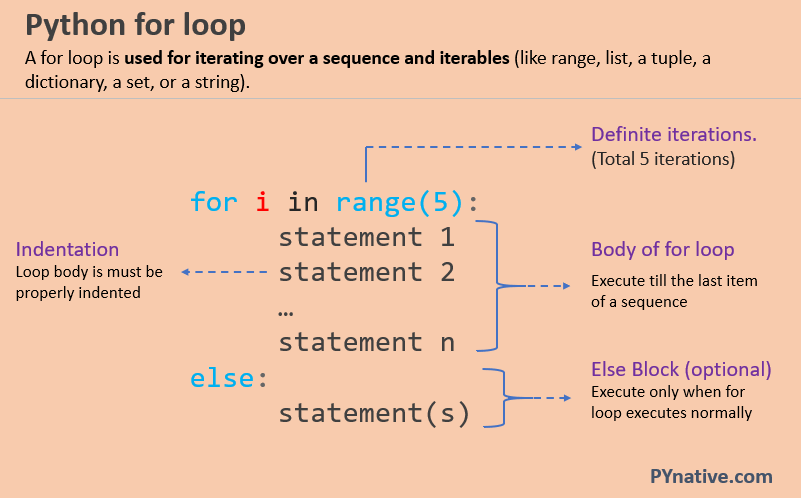
Here's a simple example based on a testing scenario:
# A list of test statuses to review
test_statuses = ["PASSED", "PASSED", "SKIPPED", "PASSED", "FAILED"]

print("Reviewing test run...")
for status in test_statuses:
    print(f"  - Found test with status: {status}")

print("Review complete.")
The range() Function
While you can loop over any sequence, a very common need is to repeat an action a specific number of times. The range() function is designed for this. It generates a sequence of numbers that you can loop over.
The range() function can be used in three ways:
range(stop): Generates numbers from 0 up to (but not including)stop.range(start, stop): Generates numbers fromstartup to (but not including)stop.range(start, stop, step): Generates numbers fromstartup tostop, incrementing bystep.
To explore this in more detail, let's turn to a chapter from the excellent book "Automate the Boring Stuff with Python".
Chapter 3 - Loops, Automate the Boring Stuff with Python, 3rd Ed
This reading clearly explains how to use for loops specifically with the range() function, which is a cornerstone of writing loops that execute a fixed number of times.
Please read the following two sections: Start at the section titled for Loops and the range() Function. This introduces the basic concept. Then, skip down to the section Arguments to range() to see how to control the start, stop, and step values.
The while Loop: Looping While a Condition is True
The second type of loop is the while loop. Instead of iterating over a fixed sequence, a while loop executes as long as a specified condition remains True. This is often called indefinite iteration because you don't necessarily know how many times the loop will run.
This is extremely useful in test automation for situations where you need to wait for a state to change. For example, you might need to keep refreshing a page while the status is "Processing" and stop only when it changes to "Complete".
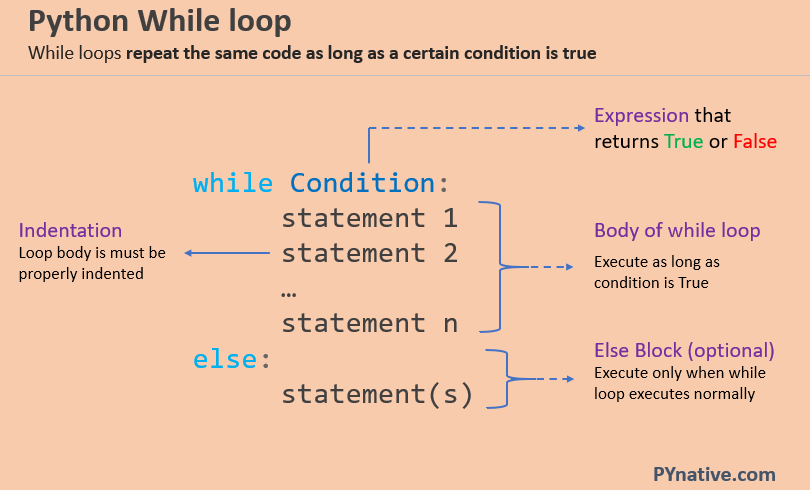
A while loop requires three key components:
- Initialization: A variable is set up before the loop starts.
- Condition: The
whilestatement checks this variable in a condition that evaluates toTrueorFalse. - Update: Inside the loop, the variable is updated. If you forget this step, you can easily create an infinite loop, where the condition is always
Trueand the program gets stuck.
Let's look at a simple example that counts down from 5.
attempts_left = 5

while attempts_left > 0:
    print(f"Login attempts remaining: {attempts_left}")
    attempts_left = attempts_left - 1 # Update step

print("No login attempts left.")
Controlling Loop Execution: break and continue
Sometimes, you don't want a loop to run to completion. Python gives you two statements to control the flow from inside a loop:
break: Immediately terminates the loop. The program continues execution at the first statement after the loop.continue: Immediately stops the current iteration and jumps to the top of the loop to begin the next iteration.
In QA, you might use break to stop a test suite on the first critical failure. You might use continue to skip a test case that is marked as not applicable for the current environment but proceed with the rest.
The video from Data with Baraa offers a fantastic visual breakdown of these concepts.
Python Loops (Visually Explained) | For, While, Break, Continue, Else
This video uses flowcharts to clearly distinguish between break, continue, and pass, showing exactly how they alter the path of execution inside a loop.
Watch the segment explaining these control statements. The visual metaphor of an "emergency exit" for break is particularly helpful. This part explains the break statement. This next part covers the continue statement.
Choosing the Right Loop
Knowing when to use a for loop versus a while loop is key to writing clean and effective code.
- Use a
forloop when you have a definite set of items to iterate over (e.g., a list of web elements, a range of numbers, lines in a file). The number of iterations is known beforehand. - Use a
whileloop when you need to repeat an action based on a dynamic condition, and you don't know how many times it will run (e.g., waiting for an API response, retrying a failed connection, waiting for a user action).
Python Loops (Visually Explained) | For, While, Break, Continue, Else
Let's conclude with a final clip that provides a direct side-by-side comparison of for and while loops.
Watch this short summary to solidify your understanding of when to use each type of loop. This segment compares the two loops and their primary use cases.
Let's Practice
Now, let's apply these concepts to a scenario relevant to your work. Imagine you are processing a batch of API test results. The results are stored in a list of dictionaries.
Your task is to write a Python script that iterates through these results and reports on them according to the following rules:
- Loop through the
test_resultslist. - For each test, print its name and status.
- If you encounter a test with a
'BLOCKER'status, print a critical alert message and immediately stop processing the rest of the tests (usebreak). - If a test has a status of
'FLAKY', print a warning message but continue to the next test in the list (usecontinue).
Here is the data for your script:
test_results = [
    {'name': 'TC-01_Login_Success', 'status': 'PASS'},
    {'name': 'TC-02_Login_Invalid_User', 'status': 'PASS'},
    {'name': 'TC-03_Navigation_Dashboard', 'status': 'FLAKY'},
    {'name': 'TC-04_Create_Resource', 'status': 'BLOCKER'},
    {'name': 'TC-05_Delete_Resource', 'status': 'PASS'} # This should not be processed
]


# Your code goes here
Solution:
test_results = [
    {'name': 'TC-01_Login_Success', 'status': 'PASS'},
    {'name': 'TC-02_Login_Invalid_User', 'status': 'PASS'},
    {'name': 'TC-03_Navigation_Dashboard', 'status': 'FLAKY'},
    {'name': 'TC-04_Create_Resource', 'status': 'BLOCKER'},
    {'name': 'TC-05_Delete_Resource', 'status': 'PASS'}
]

print("--- Starting Test Result Analysis ---")
for result in test_results:
    if result['status'] == 'FLAKY':
        print(f"WARNING: Test '{result['name']}' is flaky. Logging and continuing.")
        continue # Skip to the next iteration

    if result['status'] == 'BLOCKER':
        print(f"\nCRITICAL ALERT: Test '{result['name']}' is a blocker!")
        print("Stopping test run immediately.")
        break # Exit the loop entirely


    # This part only runs for 'PASS' or other non-blocking, non-flaky statuses
    print(f"Processing: Test '{result['name']}' with status: {result['status']}")

print("--- Test Result Analysis Complete ---")
When you run this code, you'll see it processes the first two tests normally, prints a warning for the flaky test, and then stops completely when it hits the blocker, never reaching TC-05.
Conclusion
In this lesson, you've mastered the ability to make your programs perform repetitive tasks efficiently. Loops are a cornerstone of programming and are absolutely essential for automation.
Here are the key takeaways:
forloops are for definite iteration over a known sequence of items.whileloops are for indefinite iteration that continues as long as a condition is true.- The
range()function is a powerful tool for creating numerical sequences forforloops. breakprovides an "emergency exit" from a loop, stopping it entirely.continueskips the current iteration and moves to the next one.
You now have the two main pillars of control flow: conditional statements (if/else) to make decisions, and loops (for/while) to perform repetitions. With these, you can write scripts that handle a wide variety of complex logic.
In our next lesson, we will dive deeper into the data structures you've seen today: lists and dictionaries. You'll learn how to create, access, and modify them, which, when combined with loops, will enable you to manage and process test data effectively.