Welcome to the third lesson in our Python fundamentals module. In the last session, you learned how to work with strings, using methods to manipulate them and f-strings to format them. These skills are vital for creating clear logs and working with textual data, which is everywhere in testing.
Now, we'll build on that by learning how to make our programs act on that data. This lesson introduces conditional statements, the primary way a program makes decisions. You'll learn to write code that executes different actions based on whether a certain condition is true or false using if, elif, and else. This is the foundation of all logic, from simple test assertions ("did the correct error message appear?") to complex user workflow simulations.
The Logic of Control Flow
By default, Python executes code line by line, from top to bottom. Conditional statements allow you to alter this "flow" of execution. You can direct the program down different paths based on the values of your variables. In test automation, this is how you'll check for success, failure, or unexpected states.
Let's begin with a video that introduces the fundamental concepts of if, elif, and else, paying close attention to the concepts of a condition and the crucial role of indentation.
Control Flow in Python - If Elif Else Statements
This video from Programming with Mosh provides an excellent introduction to control flow. It clearly explains the syntax and logic behind conditional statements.
Please watch the first two sections of the video: The first part explains the basic if statement and the importance of indentation. The next section introduces elif and else to handle multiple and alternative conditions.
if, if-else, and if-elif-else
As you saw in the video, conditional logic is built around three keywords:
if: This starts the conditional block. The code inside this block only runs if the condition isTrue.elif: Short for "else if," this allows you to check another condition if the precedingif(orelif) wasFalse. You can have as manyelifstatements as you need.else: This is the final fallback. The code in theelseblock runs only if all the precedingifandelifconditions wereFalse.
The structure is always an if, followed by any number of elifs, and finally an optional else.
A key takeaway from the video is the syntax. Every if, elif, and else line must end with a colon (:), and the code to be executed within that block must be indented. This indentation is how Python groups statements together.
Let's look at a flowchart to visualize this logic.
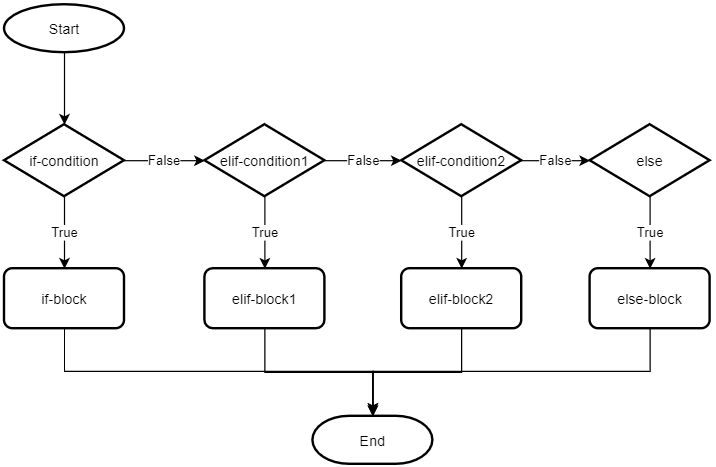
This flowchart shows how Python evaluates conditional statements. It checks the if condition first. If it's true, it executes the if-block and exits. If false, it moves to the first elif condition, and so on. The else-block is only reached if all previous conditions are false.
To solidify your understanding of the syntax and see more examples, let's turn to a detailed reading.
Python Conditional Statements: If_else, Elif, Nested If ...
This article from Software Testing Help provides clear, step-by-step explanations and code examples for each type of conditional statement. Since you are coming from a QA background, you might find the direct, example-driven approach of this resource helpful.
Please read the first three main sections: #1) if statements covers the basic structure of a single if. #2) if-else statements explains how to provide an alternative path. #3) elif statements demonstrates how to check for multiple, mutually exclusive conditions.
Here is a practical code example that uses an if-elif-else chain to determine if a character is a vowel or a consonant. Notice how the output changes based on the initial value of the var variable.
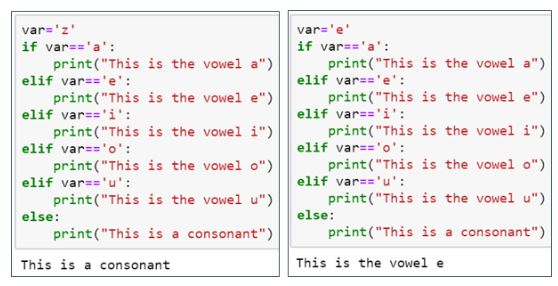
This image shows two runs of the same code. On the left, var is 'z', so the code skips all if/elif blocks and executes the else block. On the right, var is 'e', so the code finds a match at the second elif and executes its print statement, then skips the rest.
Building Complex Conditions
Often, a simple check isn't enough. You might need to verify multiple things at once. For example, in a test, you might need to confirm that "the user is logged in and their role is 'admin'". For this, we use logical operators.
and:Trueonly if both conditions are true.or:Trueif at least one condition is true.not: Inverts a boolean value (TruebecomesFalse,FalsebecomesTrue).
The video you watched earlier has a great segment on this.
Control Flow in Python - If Elif Else Statements
Let's return to the Programming with Mosh video to see how logical operators and other advanced techniques can make your conditions more powerful and readable.
Please watch the following two segments: This section explains the and, or, and not operators with a practical example. This final part demonstrates chaining comparison operators (e.g., 18 <= age < 65), a clean and highly readable Python feature.
Using these operators, you can build very specific and robust checks for your test automation scripts.
For example, to check if a login API response was successful and fast:
status_code = 200
response_time = 0.5  # in seconds

if status_code == 200 and response_time < 1.0:
    print("Test PASSED: Login successful and performant.")
elif status_code == 200 and response_time >= 1.0:
    print("Test WARNING: Login successful but slow.")
else:
    print(f"Test FAILED: Received status code {status_code}.")
Let's Practice
Now it's time to write your own conditional logic. Imagine you're writing a script to classify test results. You have a variable test_result which is a dictionary containing the status and error code of a test.
Your task is to write a script that prints a specific analysis based on these values according to the following rules:
- If the
statusis"PASSED", it should print:"Test passed successfully." - If the
statusis"FAILED", it should then check theerror_code:- If the
error_codeis503, it should print:"Test failed due to server unavailability (Error 503)." - If the
error_codeis404, it should print:"Test failed due to page not found (Error 404)." - For any other
error_code, it should print:"Test failed with an unspecified error."
- If the
- If the
statusis"SKIPPED", it should print:"Test was skipped." - For any other status, it should print:
"Unknown test status reported."
Here is a starting test_result variable. Try changing its values to test all the paths in your logic.
test_result = {
    "status": "FAILED",
    "error_code": 404
}

# Your code goes here
Solution:
test_result = {
    "status": "FAILED",
    "error_code": 404
}

status = test_result["status"]

if status == "PASSED":
    print("Test passed successfully.")
elif status == "FAILED":
    error_code = test_result["error_code"]
    if error_code == 503:
        print("Test failed due to server unavailability (Error 503).")
    elif error_code == 404:
        print("Test failed due to page not found (Error 404).")
    else:
        print("Test failed with an unspecified error.")
elif status == "SKIPPED":
    print("Test was skipped.")
else:
    print("Unknown test status reported.")
This solution uses a nested if-elif-else structure. The outer structure checks the status, and when the status is "FAILED", an inner, indented structure checks the error_code. This is a very common pattern in programming.
Conclusion
In this lesson, you've learned to control the flow of your Python programs. This is a massive step forward from simply executing lines in sequence. You can now write code that responds dynamically to different situations—the very essence of a test assertion or a complex user interaction.
Key takeaways from this lesson:
- Conditional statements (
if,elif,else) allow your program to make decisions. - Each condition is an expression that evaluates to
TrueorFalse. - The colon (
:) and indentation are mandatory and define which code block belongs to which statement. - Python evaluates the
if/elifchain in order and executes the block for the first true condition it finds. - Logical operators (
and,or,not) let you combine conditions to create more sophisticated rules.
Now that your scripts can make decisions, the next step is to make them perform repetitive tasks. In the upcoming lesson, we will explore loops (for and while), which will allow you to execute a block of code multiple times, such as iterating through a list of web elements or test data.