Hello! In our previous lesson, we established the foundational concepts of variables and Python's primitive data types. You learned how to store information in variables and differentiate between integers, floats, booleans, and strings.
This lesson zooms in on the string (str) data type. In test automation, you'll constantly work with text—whether it's logging test progress, constructing API endpoints, validating error messages, or asserting text on a web page. We'll explore two powerful tools for this: string methods, which allow you to manipulate text, and f-strings, a modern and highly readable way to format text with dynamic data. Mastering these will make your test scripts significantly cleaner and more powerful.
Manipulating Strings with Methods
In Python, a "method" is a function that belongs to an object. Since every string you create is a string object, it comes with a built-in set of methods you can use to perform common operations on it. The syntax is straightforward: you take your string variable, add a dot (.), and then the method's name followed by parentheses.

This image illustrates the general syntax for calling a string method. Some methods require additional information (arguments) inside the parentheses, while others do not.
Let's watch a short video that demonstrates some of the most common and useful string methods.
How to Use Strings in Python - Python Tutorial for Beginners
This video from Programming with Mosh provides a clear and practical walkthrough of several key string methods you'll use frequently.
Please watch the section from this timestamp. Pay attention to methods like upper(), lower(), strip(), find(), and replace().
As you saw, these methods are essential tools. Let's solidify this with a more detailed look at the ones most relevant to test automation.
Chapter 6 – Manipulating Strings
This chapter from "Automate the Boring Stuff with Python" is an excellent reference for string manipulation. It provides clear explanations and examples for a wide range of methods.
Please read the section titled "Useful String Methods." Focus on the following subsections: Case conversion methods: Essential for writing case-insensitive assertions. Prefix/suffix checks: Useful for verifying parts of URLs or messages. Joining and splitting: Great for handling lists of items you might find on a webpage. Whitespace removal: Crucial for cleaning up text extracted from a UI before you assert its value.
Let's see how these apply in a testing context.
-
Case-Insensitive Comparison: Imagine you're testing a login failure. The error message on the page is "Invalid credentials.", but your test data has "invalid credentials.". A simple equality check
expected == actualwould fail. Using methods, you can normalize both strings:expected_message = "invalid credentials." actual_message_from_web = "Invalid credentials." if expected_message.lower() == actual_message_from_web.lower(): print("Assertion passed!") -
Cleaning Input Data: When you extract text from a web element, it might have extra spaces. The
strip()method is perfect for cleaning this up before an assertion.# Text extracted from a web element might look like this product_title_on_page = " Awesome T-Shirt " # Cleaned title for assertion cleaned_title = product_title_on_page.strip() print(f"'{cleaned_title}'") # Output: 'Awesome T-Shirt' -
Checking for Substrings: Instead of checking for an entire long message, you might only care if the word "Error" is present. The
inoperator is perfect for this.api_response = "Error: User not found in database." if "Error" in api_response: print("Test correctly identified an error condition.")
Formatting Strings with F-Strings
In the previous lesson, we briefly saw how to combine strings using the + operator (concatenation). This works, but it can quickly become messy and hard to read, especially when mixing strings with numbers or other data types.
# The clumsy way with concatenation
num_of_items = 5
total_price = 125.50
log_message = "Found " + str(num_of_items) + " items. Total price: $" + str(total_price)
print(log_message)
Notice we had to manually add spaces and convert the numbers to strings using str(). There is a much better way: f-strings (formatted string literals). Introduced in Python 3.6, they are now the standard for string formatting due to their readability and performance.
You create an f-string by prefixing the string literal with the letter f. You can then embed Python expressions—like variables or calculations—directly inside the string by placing them in curly braces {}.
Let's see a quick video introduction.
How to Use Strings in Python - Python Tutorial for Beginners
This short segment from the same Programming with Mosh video introduces the concept and syntax of f-strings, contrasting them with the older concatenation method.
Please watch from this timestamp.
The core idea is simple and powerful. Let's formalize this with a reading.
Chapter 6 – Manipulating Strings
This section from "Automate the Boring Stuff with Python" introduces f-strings as the modern solution to string interpolation.
Please read the entire section on this topic. It clearly shows the evolution from concatenation to f-strings.
The real power of f-strings is that you can put almost any valid Python expression inside the braces, including method calls.
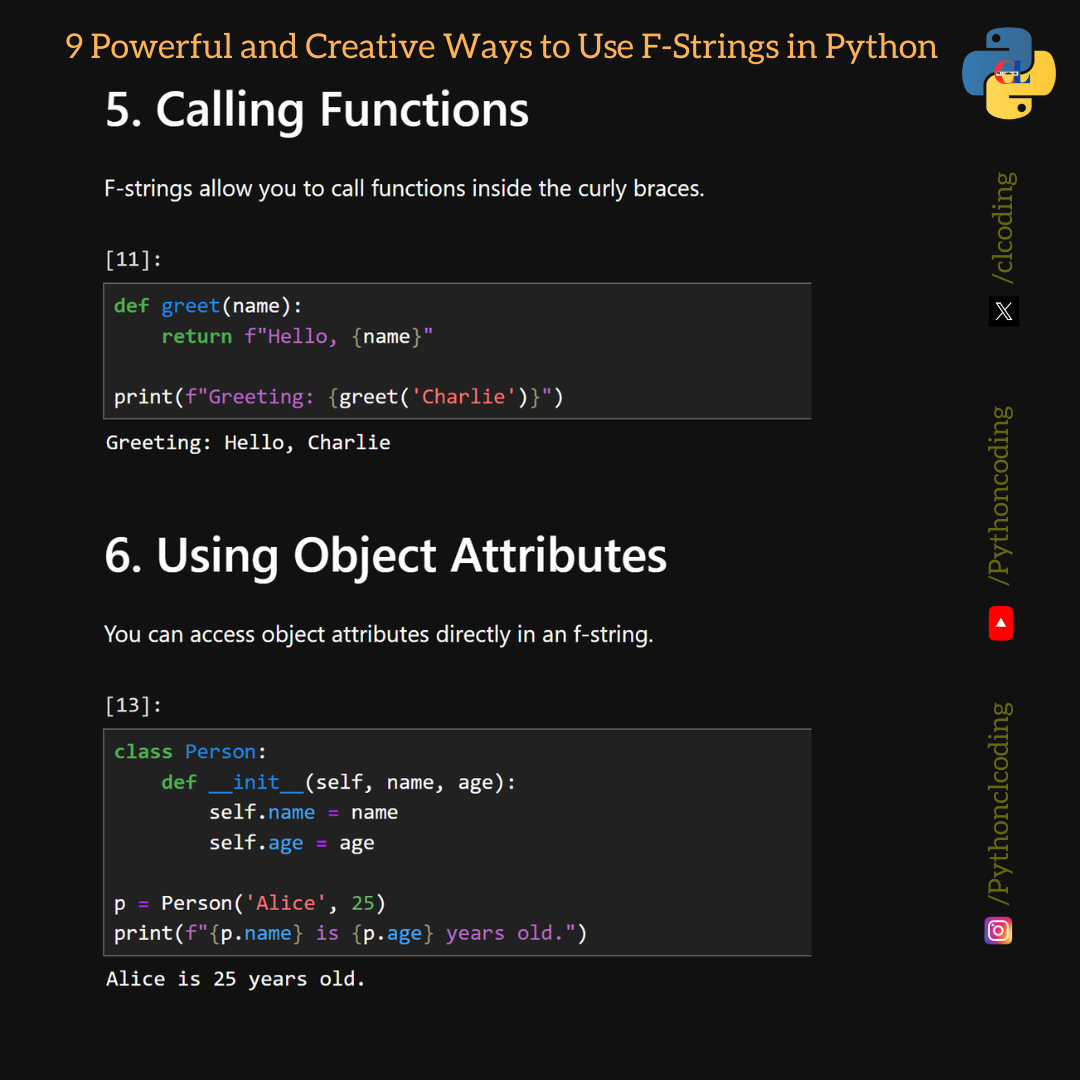
This image demonstrates how you can call functions (or methods) and access object attributes directly inside an f-string's curly braces.
Here’s our previous example, rewritten beautifully with an f-string:
num_of_items = 5
user_name = "testuser"
log_message = f"User '{user_name.upper()}' added {num_of_items * 2} items to the cart."
print(log_message)
# Output: User 'TESTUSER' added 10 items to the cart.
Notice how much cleaner that is? No + operators, no str() calls, and we could even call the .upper() method directly inside the braces.
Advanced Formatting within F-Strings
F-strings also allow you to control the presentation of your data with format specifiers. These are added after the expression, separated by a colon (:). This is particularly useful for controlling decimal places in floats or padding numbers.
For a detailed look at these formatting options, the following article is an excellent guide.
Python f-string: A Complete Guide
This article from DataCamp provides a focused look at advanced formatting options available within f-strings.
Please read the subsection on number formatting. Focus on the examples for controlling decimal places (:.2f) and padding with zeros (:04d).
Here are two examples highly relevant to test automation:
- Formatting API response time: You want to log a response time but only need two decimal places for readability.
response_time = 0.84512 # seconds print(f"API call completed in {response_time:.2f}s") # Output: API call completed in 0.85s (notice it also handles rounding!) - Generating Test Data: You need to create user IDs with a consistent format, like
USER-0001,USER-0002.for i in range(1, 4): user_id = f"USER-{i:04d}" print(user_id) # Output: # USER-0001 # USER-0002 # USER-0003
Let's Practice
Time to combine what you've learned. Imagine you are writing a UI test for a shopping cart. After the test runs, you have the following pieces of information stored in variables:
test_name: "Verify Shopping Cart Total"browser: " chromium"items_in_cart: 3cart_total: 89.975status: "passed"
Your task is to create and print a single, formatted log message that looks exactly like this:
[PASSED] Verify Shopping Cart Total | Browser: chromium | Cart: 3 items, $89.98
Write the Python code to do this. Use an f-string and apply the necessary string methods and format specifiers to match the output perfectly.
Solution:
# Given test data
test_name = "Verify Shopping Cart Total"
browser = "  chromium"
items_in_cart = 3
cart_total = 89.975
status = "passed"

# Construct the log message using an f-string and methods
log_message = f"[{status.upper()}] {test_name} | Browser: {browser.strip()} | Cart: {items_in_cart} items, ${cart_total:.2f}"

print(log_message)
In this solution, we used .upper() to capitalize the status, .strip() to remove whitespace from the browser name, and :.2f to format the cart total to two decimal places, all within a single, readable f-string.
Conclusion
In this lesson, you've added essential string manipulation skills to your Python toolkit. These concepts are not just abstract programming exercises; they are the bread and butter of writing effective automation scripts.
Here are the key takeaways:
- String methods like
.upper(),.lower(),.strip(), and.split()allow you to transform and clean up string data. - The
inoperator is a simple way to check for the presence of a substring. - F-strings (
f"...") are the modern, efficient, and readable way to embed variables and expressions into strings. - Format specifiers within f-strings (like
:.2for:04d) give you fine-grained control over the presentation of numbers.
You now have the ability to not only store data but also to shape and present it. In our next lesson, we will introduce conditional statements (if, elif, else), which will allow your scripts to make decisions. You'll see how combining string checks with conditional logic forms the basis of assertions and dynamic test flows.