In our previous lesson, we explored loops, which allow us to repeat actions. You even got a sneak peek at working with a list of dictionaries in our practice exercise. Now, it's time to formally dive into these powerful data structures that are fundamental to almost every Python program.
This lesson focuses on lists and dictionaries, Python's primary tools for collecting and organizing data. As a test engineer, you will use them constantly. Lists are perfect for managing a sequence of test steps or a collection of web elements, while dictionaries are indispensable for handling structured data, such as test configurations or the JSON responses you'll get from APIs. Mastering them is a critical step toward writing effective automation scripts.
By the end of this lesson, you will be able to create, access, and manipulate both lists and dictionaries, giving you the ability to manage collections of data in your Python programs.
Part 1: Lists - Ordered Collections
A list in Python is an ordered, mutable (changeable) collection of items. Think of it like a to-do list or a list of test cases to execute—the order is important, and you can add, remove, or change items.
Creating and Understanding Lists
The most common way to create a list is by placing items inside square brackets [], separated by commas.
# A list of browsers for cross-browser testing
browsers = ["chromium", "firefox", "webkit"]


# A list of test case IDs (mixed data types)
test_ids = ["TC-01", "TC-02", 5, 12]
The video "How to Use Lists in Python" by Programming with Mosh provides an excellent, fast-paced introduction to creating and working with lists.
This first segment covers the basics: what lists are, how to create them, and how they can contain various data types, including other lists (to form a matrix or grid).
Watch the following parts to get a solid foundation: This section explains how to define lists, including lists of lists (matrices) and how to use operators like * for repetition and + for concatenation. This part demonstrates using the list() function with range() and strings to generate lists programmatically.
Accessing and Modifying List Items
Because lists are ordered, you can access any item by its position, or index. Python uses a zero-based index, meaning the first item is at index 0. You can also use negative indices to count from the end of the list (-1 is the last item).
Beyond accessing single items, you can extract a sub-list using a technique called slicing.
Let's continue with the video from Programming with Mosh to see these concepts in action.
This segment shows how to use indexing and slicing to read from and modify lists. Slicing is particularly powerful for manipulating test data.
Watch from this timestamp to understand how to access and slice lists. Pay close attention to the [start:stop:step] syntax.
Adding and Removing Items
Your test data and the state of your application are rarely static. You'll often need to add or remove items from a list. Python provides several methods for this.
Working with Lists and Dictionaries in Python
This article from Analytics Vidhya provides clear examples of the most common methods for modifying lists. It serves as a great textual reference.
Focus on the section titled Modifying Lists in Python. Read through the subsections covering: append(): to add an item to the end. extend(): to add all items from another list. insert(): to add an item at a specific index. del: to delete an item by index or a slice. remove(): to delete the first occurrence of a specific value. pop(): to remove and return an item from a specific index (or the end). clear(): to remove all items from the list.
Looping and Finding Items in Lists
In the last lesson, you learned how to use a for loop to iterate over a list. A common requirement is to get not only the item but also its index. For this, Python provides the enumerate() function.
If you just need to find where an item is or check if it exists, you can use the index() method or the in operator.
The final segments of the video we've been watching cover these techniques perfectly.
These clips will show you how to effectively loop through lists and find items within them, which are daily tasks in automation.
Watch this section on looping and using enumerate() to get both the index and the value. Then, watch this final part on finding items with index() and count(), and safely checking for existence with the in operator.
Part 2: Dictionaries - Key-Value Pairs
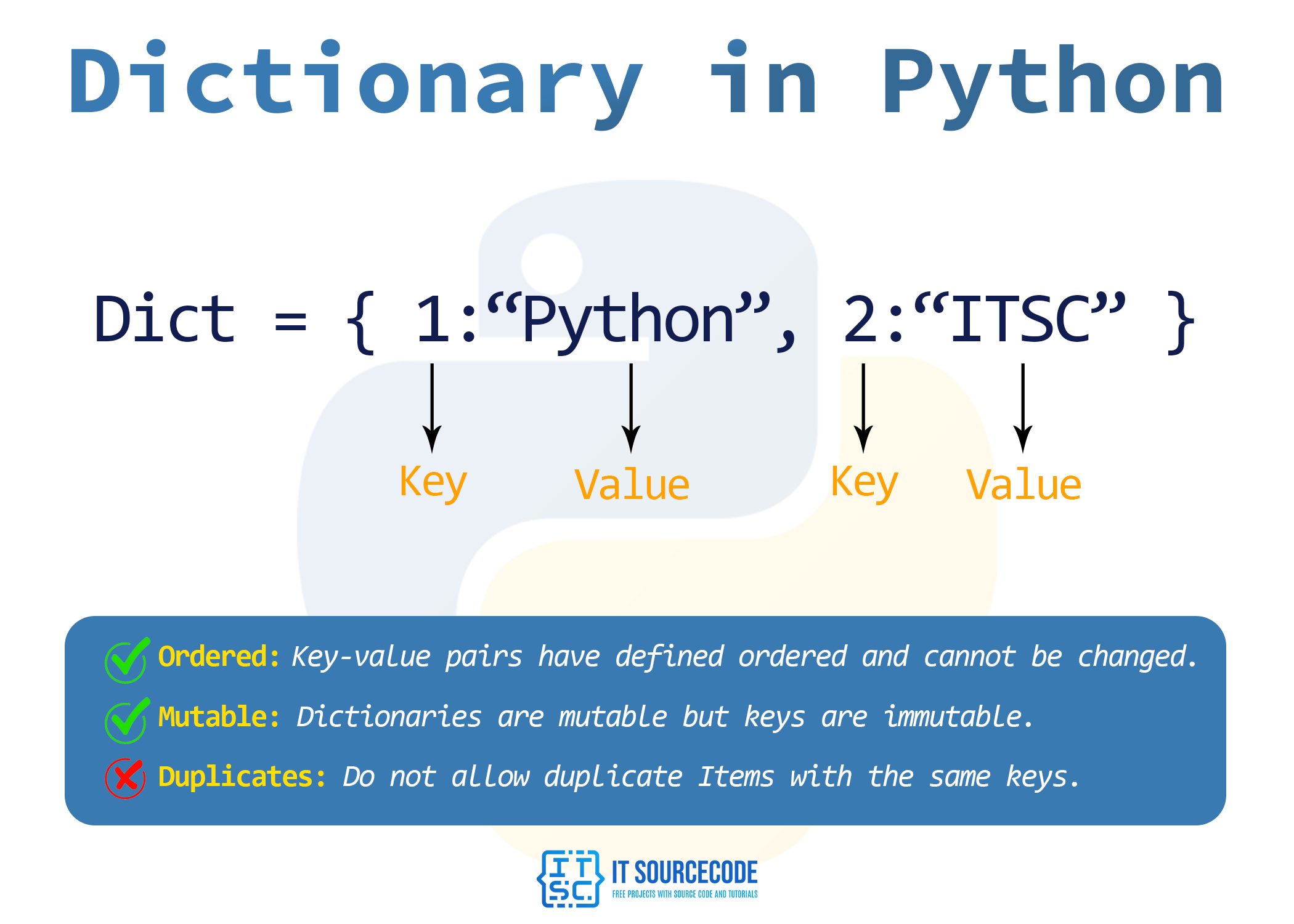
While lists are great for ordered sequences, we often need to store data with named labels. For example, instead of ['John', 25, 'Math'], it's much clearer to have { 'name': 'John', 'age': 25, 'course': 'Math' }. This is where dictionaries come in.
A dictionary is a mutable collection of key-value pairs. Each key must be unique and is used to look up its corresponding value. This structure is extremely similar to JSON, which is the standard format for most modern APIs.
Creating and Working with Dictionaries
Dictionaries are created with curly braces {}. Let's watch a comprehensive tutorial by Corey Schafer that walks through the essential dictionary operations.
Python Tutorial for Beginners 5: Dictionaries - Working with Key-Value Pairs
This video provides an excellent walkthrough of dictionary fundamentals, from creation to safe data retrieval.
Start with the introduction from the beginning to learn how to create a dictionary and access values using a key my_dict['key']. Next, watch the section on the .get() method from here. This is a crucial, safer way to access dictionary values without causing an error if a key is missing.
Adding, Updating, and Removing Entries
Like lists, dictionaries are mutable. You can add new key-value pairs, change existing values, and remove entries.
Python Tutorial for Beginners 5: Dictionaries - Working with Key-Value Pairs
This next segment demonstrates how to modify the contents of your dictionary.
Watch this part to see how to add new entries and update existing ones, both with direct assignment and the useful .update() method for handling multiple changes at once. Then, see how to remove entries using the del keyword and the pop() method here.
Looping Over Dictionaries
Looping is a primary way to process all the data in a dictionary. You can loop through its keys, its values, or its key-value pairs.
Python Tutorial for Beginners 5: Dictionaries - Working with Key-Value Pairs
This final clip shows you the different ways to iterate through a dictionary's contents. The .items() method is especially important and widely used.
Watch from this timestamp to learn how to use .keys(), .values(), and .items() to loop through a dictionary.
Let's Practice
Now, let's combine these concepts in a practical exercise. A common task is to count the occurrences of items in a collection. We will write a script to count the occurrences of each word in a sentence.
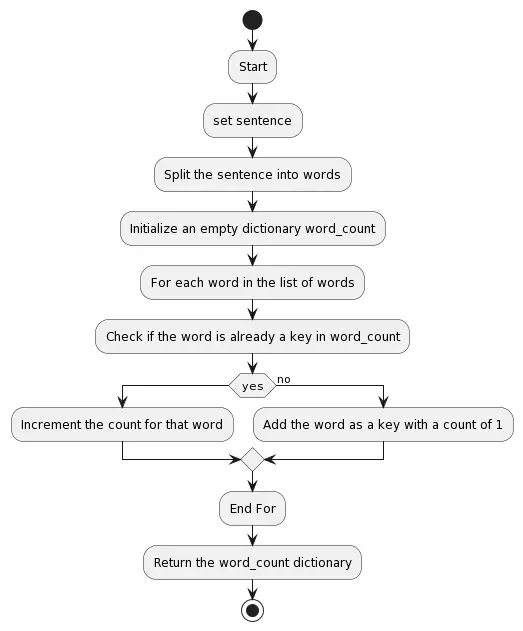
This is a classic problem that perfectly illustrates how dictionaries are used to aggregate data. The logic follows a simple pattern:
- Initialize an empty dictionary.
- Loop through each word in the sentence.
- For each word, check if it's already a key in our dictionary.
- If yes, increment its value (the count).
- If no, add it as a new key with a value of 1.
The following flowchart visualizes this exact process.
Your Task:
Using the logic from the flowchart, write a Python script that takes the string sentence and produces a dictionary where each key is a word and its value is the number of times that word appears.
Hint: The split() string method will be useful for getting a list of words, and the dictionary's .get(key, 0) method is perfect for handling words you haven't seen yet.
sentence = "the quick brown fox jumps over the lazy dog"


# Your code here
# 1. Initialize an empty dictionary
word_counts = {}


# 2. Split the sentence into a list of words
words = sentence.split()


# 3. Loop through the list of words
for word in words:


    # 4. For each word, update the dictionary
    # If the word is already a key, get its current count, otherwise default to 0.
    # Then add 1 and update the key.
    word_counts[word] = word_counts.get(word, 0) + 1


# 5. Print the final dictionary
print(word_counts)
Expected Output:
{'the': 2, 'quick': 1, 'brown': 1, 'fox': 1, 'jumps': 1, 'over': 1, 'lazy': 1, 'dog': 1}
This simple but powerful pattern of using .get() with a default value is one you will use frequently when processing data.
Conclusion
In this lesson, you've gained a solid understanding of Python's two most important data structures. They are the containers you will use to manage almost all of your test data.
Here are the key takeaways:
- Lists are ordered, zero-indexed collections, accessed by their numerical position. They are ideal for sequences of items, like a list of test environments or expected results.
- Dictionaries are collections of key-value pairs, accessed by a unique key. They are perfect for storing structured information, like a user's profile, test configuration, or an API response.
- Both lists and dictionaries are mutable, meaning you can change their contents after they are created.
- You can use
forloops to iterate over both, but the patterns differ slightly. Looping over a dictionary's.items()to get both the key and value is a very common and powerful technique.
You now have a strong grasp of Python's basic data types, control flow (if/else), loops, and data collections. In our next lesson, we'll learn how to package all this logic into functions, allowing us to create reusable, organized, and maintainable code—the foundation of any good test automation framework.