Welcome to our next lesson on Python fundamentals. In our previous sessions, we've covered how to store and organize data using variables, lists, and dictionaries. Now, we'll focus on how to organize and reuse our code. This is a pivotal step that moves us from writing simple scripts to building structured, maintainable programs—a skill that is absolutely essential for creating a robust test automation framework.
This lesson is dedicated to functions. You will learn how to define your own functions to encapsulate a specific piece of logic, how to pass information into them using parameters, and how to get results back using return values. Mastering functions will allow you to write cleaner, more efficient, and more readable code by avoiding repetition, which is a core principle in all software development and testing.
Why Do We Need Functions? The DRY Principle
In programming, there is a fundamental principle called DRY: Don't Repeat Yourself. Imagine you need to perform the same sequence of actions at multiple points in your test script, for instance, logging into a system. Without functions, you would have to copy and paste the same lines of code over and over. This is inefficient, hard to read, and a nightmare to maintain. If the login process changes, you'd have to find and update every single copy.
Functions solve this problem by allowing you to package a block of code, give it a name, and then "call" it whenever you need it.
Defining and Calling a Function
Defining a function in Python is straightforward. You use the def keyword, followed by the function's name, a set of parentheses (), and a colon :. The code that belongs to the function is indented below it.
The video "Python Functions - Visually Explained" provides a superb visual walkthrough of this process. It clearly shows how Python first "memorizes" a function definition and then executes it when called.
Python Functions: Visually Explained
This video breaks down the syntax and execution flow of a Python function. Pay close attention to the visual trace, which clarifies what happens behind the scenes.
Watch from the beginning to this point to learn the basic syntax for defining a function with def, a name, parameters, and an indented body. Then, watch from this section to see how a function is "called" and how Python traces the execution, assigning the provided values to the function's internal variables.
As you saw, a function definition includes:
- The
defkeyword. - A descriptive name (e.g.,
login_user,calculate_total). - Parentheses
()which will hold the function's inputs. - A colon
:to start the indented function body. - The indented block of code that performs the function's task.
To run the function, you call it by writing its name followed by parentheses.
# Function Definition
def print_welcome_message():
    """This function prints a two-line welcome message."""
    print("Welcome to the test automation suite.")
    print("Please wait while the environment is being set up.")


# Function Call
print("Starting the test run...")
print_welcome_message()
print("Setup complete.")
Passing Information: Parameters vs. Arguments
Most of the time, a function needs some input to do its work. You provide these inputs by defining parameters in the function's parentheses. When you call the function, you pass arguments, which are the actual values for those parameters.
This distinction is important but can be tricky. Let's clarify it.
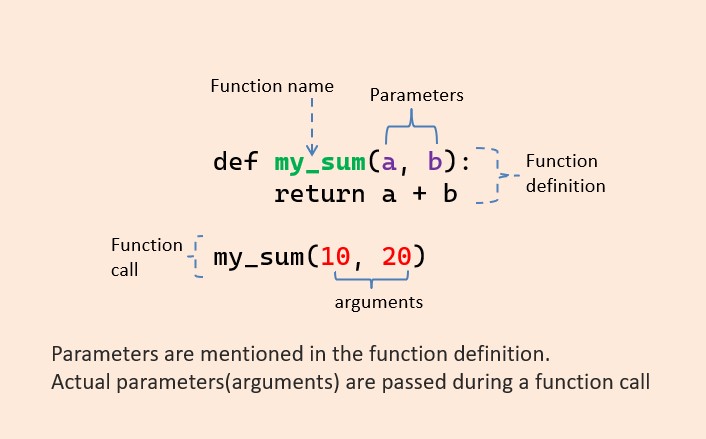
The video "Python Functions" by Programming with Mosh offers an excellent explanation of this concept and introduces different ways to pass arguments.
Python Functions | Python Tutorial for Absolute Beginners #1
This video will solidify your understanding of how to pass data into your functions and improve code readability with keyword arguments.
First, watch the segment on parameters and arguments. The instructor clearly explains the difference and shows how to use parameters inside a function. Next, jump to the section on keyword arguments. This technique is extremely useful in test automation for making your function calls self-documenting, especially when a function takes many parameters.
Here is a summary:
- Positional Arguments: The arguments are matched to parameters based on their order.
my_sum(10, 20)passes10toaand20tob. - Keyword Arguments: You explicitly name the parameter you are assigning the value to.
my_sum(b=20, a=10). The order no longer matters, and your code becomes much clearer.
Getting Results: The return Statement
We can categorize functions into two main types:
- Functions that perform a task: Like our
print_welcome_message()function or Python's built-inprint(). Their primary job is to do something. - Functions that calculate and return a value: These functions process inputs and send a result back to the part of the code that called them.
To send a value back, we use the return keyword. This is the most common and powerful way to use functions. A function that returns a value allows you to compute something, store the result in a variable, and use it for further calculations or validations—a core activity in testing.
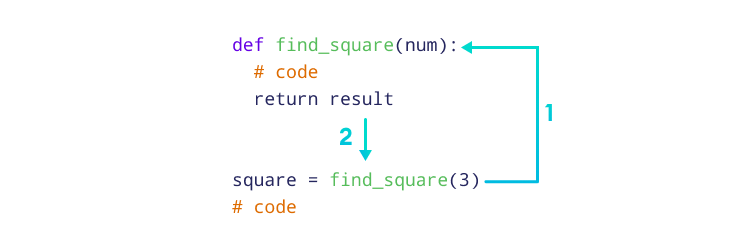
Let's see this in action with two excellent video clips.
Python Functions | Python Tutorial for Absolute Beginners #1
Mosh's video explains the conceptual difference between the two types of functions and introduces the return statement.
Watch the section from this timestamp to understand the difference between functions that perform a task and those that return a value. Then, continue watching from here to learn what happens when a function has no return statement (it implicitly returns a special value called None).
Once a value is returned, you must capture it in a variable to use it. The video "Python Functions - Visually Explained" has a perfect segment showing exactly how this happens.
Python Functions: Visually Explained
This clip provides a clear, visual trace of how a return statement passes a value from the function's local scope back to the main program, where it can be captured in a variable.
Watch the segment on the return statement.
A Practical Example from Software Testing
Let's look at a code example that mirrors what you might do in a testing scenario. The following article defines a few simple math functions, but notice how they are constructed. The add function, for example, relies on another function, is_not_a_number, to validate its inputs before performing its main task. This is a great example of building small, reusable functions that work together.
Beginners guide to software testing in Python - Honeybadger.io
This article, while focused on the unittest framework, provides excellent examples of simple, well-defined functions that are perfect for our current topic.
Focus only on the section Create a Python module. Read through the definitions of the five functions: is_not_a_number, add, subtract, multiply, and divide. Notice how they take parameters (a, b, x), perform a calculation or check, and then use return to send back a result.
This example demonstrates function composition—building more complex logic by combining simpler functions. This is a powerful technique for keeping your code clean and manageable.
Let's Practice: Creating a Test Utility Function
A common task in test automation is generating formatted data, like test IDs, usernames, or report labels. Let's write a function for this.
Your Task:
Create a function called generate_test_user that takes a project_name (string) and a user_id (integer) as parameters. The function should return a formatted username string in the format project_name-user-id.
For example, generate_test_user("Phoenix", 101) should return the string "Phoenix-user-101".
Additionally, let's add an optional parameter. Sometimes we might want to specify a user role.
- Add a third parameter called
rolewith a default value of"guest". - Modify the function to return a string in the format
project_name-role-id. For example,generate_test_user("Phoenix", 101, "admin")should return"Phoenix-admin-101". If the role is not provided, it should use the default, e.g.,generate_test_user("Phoenix", 101)returns"Phoenix-guest-101".
If you need a refresher on default parameters, this short clip is perfect.
Python Functions | Python Tutorial for Absolute Beginners #1
This clip explains how to define optional parameters by giving them a default value.
Watch from this timestamp to see the syntax for default parameters.
Here is a template to get you started.
# Your code here
def generate_test_user(project_name, user_id, role="guest"):
    """
    Generates a formatted username for testing.

    Args:
        project_name (str): The name of the project.
        user_id (int): The unique ID for the user.
        role (str, optional): The user role. Defaults to "guest".

    Returns:
        str: The formatted username string.
    """
    return f"{project_name}-{role}-{user_id}"


# --- Let's test your function ---


# Call with all three arguments
admin_user = generate_test_user("Apollo", 42, "admin")
print(f"Admin user: {admin_user}")


# Call with only the required arguments, using the default role
guest_user = generate_test_user("Apollo", 99)
print(f"Guest user: {guest_user}")


# Call using keyword arguments for clarity
power_user = generate_test_user(project_name="Orion", role="poweruser", user_id=7)
print(f"Power user: {power_user}")
Expected Output:
Admin user: Apollo-admin-42
Guest user: Apollo-guest-99
Power user: Orion-poweruser-7
This exercise combines defining a function, using positional and keyword arguments, implementing a default parameter, and using an f-string to return a formatted value—all key skills you've been learning.
Conclusion
You've now learned one of the most important concepts in programming. Functions are the building blocks you will use to structure every test script you write, from simple helper utilities to complex page object methods.
Here are the key takeaways from this lesson:
- DRY Principle: Functions help you avoid repeating code, making your programs easier to manage.
- Definition and Calling: You define a function with
defand execute it by calling its name with parentheses. - Parameters vs. Arguments: Parameters are the placeholders in a function's definition, while arguments are the actual values you pass during a call.
- Return Values: Functions can send results back to the caller using the
returnstatement. If nothing is returned, the function implicitly returnsNone. - Readability: Using keyword arguments and default values can make your functions more flexible and easier to understand.
In our next lesson, we will explore how to handle things when they go wrong. You saw in the honeybadger.io example that a function might raise TypeError. We'll learn how to use try/except blocks to gracefully handle such runtime errors and make our automation scripts more robust.