Hello! In our last lesson, we mastered slices and maps, the fundamental collection types in Go. You saw a glimpse of today's topic with the "comma ok" idiom (value, ok := myMap[key]), which is a specific use case of a broader Go feature.
This lesson is dedicated to one of Go's most distinctive features: functions with multiple return values. While many languages you know, like C++ and Java, typically return a single value, Go makes returning multiple values a first-class part of the language. This design choice is not just for convenience; it's the foundation of Go's idiomatic error handling, a pattern you will encounter in nearly every line of the Redis operator's controller logic.
By the end of this 60-minute lesson, you will be able to define and call functions that return multiple values, with a strong focus on the conventional (result, error) pattern that is critical for writing robust Go programs.
1. The Mechanics of Multiple Returns
In languages like C++, if you need to get multiple values out of a function, you might pass arguments by reference or pointer. In Python, you might return a tuple. Go builds this capability directly into the function signature.
Let's start with a video that clearly demonstrates the syntax for defining, implementing, and calling a function that returns more than one value.
Go (Golang) Tutorial #10 - Multiple Return Values
This tutorial from the Net Ninja channel provides a concise and clear introduction to the syntax of multiple return values in Go.
Watch the following segments: Defining the function (00:38 - 00:58): Pay attention to how the return types are grouped in parentheses in the function signature. Returning the values (05:03 - 05:30): See how the return statement provides multiple, comma-separated values. Calling the function (06:04 - 06:40): Notice how you must provide multiple variables on the left side of the := operator to capture the returned values.
As you saw, the core concepts are straightforward:
- Function Signature: You declare the types of the values you're returning in a parenthesized list.
// This function will return two strings. func getNames() (string, string) { return "John", "Doe" } - Calling the Function: You use multiple assignment to capture the returned values.
firstName, lastName := getNames()
fmt.Println(firstName, lastName) // Prints: John Doe
For a quick and clear text-based reference with runnable code, the "Go by Example" site is excellent.
Go by Example: Multiple Return Values
The 'Go by Example' site offers a very focused, code-first explanation of this feature. It's a great resource to bookmark.
On the webpage, find and read the 'Multiple Return Values' section from the left-hand navigation menu. Run the example code in the embedded editor to solidify your understanding.
One key takeaway here is that you can use the blank identifier (_) to ignore a returned value that you don't need.
// We only care about the last name
_, lastName := getNames()
2. The Idiomatic Go Pattern: (result, error)
The single most important use of multiple return values in Go is for error handling. By convention, if a function or method can fail, it returns its intended result as the first value and an error as the second.
- If the operation succeeds, the
errorvalue isnil. - If the operation fails, the result is the zero value for its type (e.g.,
""for a string,0for an int), and theerrorvalue contains information about the failure.
The caller is then expected to check the error value immediately.
value, err := someRiskyOperation()
if err != nil {
    // Handle the error. Maybe log it and return.
    return err
}
// If we are here, err is nil, and we can safely use 'value'.
This pattern is far more explicit than using exceptions as in Java or Python. It forces the programmer to confront potential failures at the point they occur. Let's see this in action.
Error Handling - Go Programming Tutorial #8
This video from NeuralNine, while focused on error handling, perfectly demonstrates how multiple return values are used to achieve it. It shows both a built-in function and a custom function following this pattern.
Watch the following parts: Using a built-in function (01:36 - 02:12): See how fmt.Scan returns two values, one of which is an error. Note the use of the blank identifier _. Defining a custom error-returning function (04:43 - 05:44): This is the most crucial part. Observe how the function signature is (int, error) and how it returns either (result, nil) on success or (-1, err) on failure. Calling the custom function (05:50 - 06:12): This shows the classic res, err := ... assignment.
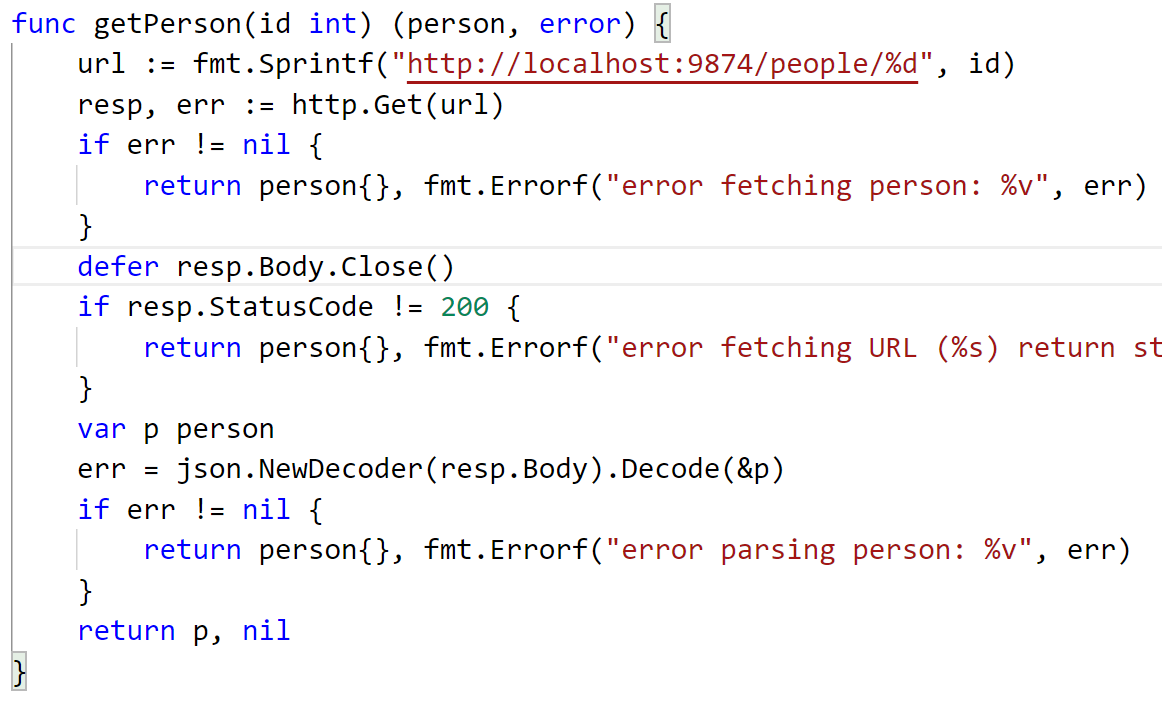
The image below shows a very realistic example from a hypothetical application that fetches data over a network. This is very similar to how a Kubernetes operator communicates with the Kubernetes API server.
3. Named Return Values
Go allows you to name your return values in the function signature. This can serve two purposes:
- Documentation: It makes the function's signature more readable.
- Convenience: Named return values are treated as variables declared at the top of the function. You can assign to them and then use a "naked"
returnstatement to return their current values.
Let's look at the syntax.

Here's how you might rewrite a function to use named returns:
// Without named returns
func divide(a, b float64) (float64, error) {
    if b == 0 {
        return 0, fmt.Errorf("cannot divide by zero")
    }
    return a / b, nil
}

// With named returns for clarity
func divideNamed(a, b float64) (result float64, err error) {
    if b == 0 {
        err = fmt.Errorf("cannot divide by zero")
        return // Automatically returns the current values of result (0) and err
    }
    result = a / b
    return // Automatically returns the current values of result and err (nil)
}
The official Go documentation provides a concise explanation of this feature.
Effective Go: Named result parameters
The 'Effective Go' document is the canonical guide to writing idiomatic Go. This section explains the rationale and usage of named result parameters.
Read the short section titled 'Named result parameters'. Focus on how naming the results clarifies the function's purpose and how a bare return works.
A word of caution: While named returns can improve clarity, overusing the "naked" return can sometimes make code harder to debug, as it's not immediately obvious what values are being returned. Use it judiciously.
4. Practice Exercise
Let's apply this. A common task in the Redis operator is checking if a specific configuration exists. You'll write a function that simulates this.
Task:
- In your
mainfunction, create amap[string]stringto act as a simple in-memory "database" of configurations.configs := map[string]string{ "redis-id-123": "maxmemory 2gb", "redis-id-456": "maxmemory 4gb", } - Write a function
GetConfig(id string, db map[string]string) (string, error). - This function should look up the
idin thedbmap.- If the key exists, it should return the corresponding value and a
nilerror. - If the key does not exist (use the "comma ok" idiom for this), it should return an empty string and an error created with
fmt.Errorf("config with id '%s' not found", id).
- If the key exists, it should return the corresponding value and a
- From
main, callGetConfigtwice: once with an ID that exists ("redis-id-123") and once with an ID that doesn't ("redis-id-789"). - For each call, check the returned error. If the error is not
nil, print the error message. Otherwise, print the retrieved configuration.
Solution
package main
import (
"fmt"
)
// GetConfig retrieves a configuration by ID from a database map.
// It returns the config string and an error if the ID is not found.
func GetConfig(id string, db map[string]string) (string, error) {
// Use the "comma ok" idiom to check for the key's existence.
configValue, ok := db[id]
if !ok {
// Key not found, return an empty string and a descriptive error.
return "", fmt.Errorf("config with id '%s' not found", id)
}
// Key found, return the value and a nil error.
return configValue, nil
}
func main() {
configs := map[string]string{
    "redis-id-123": "maxmemory 2gb",
    "redis-id-456": "maxmemory 4gb",
}
// --- Test Case 1: ID exists ---
fmt.Println("Attempting to fetch config for redis-id-123...")
config, err := GetConfig("redis-id-123", configs)
if err != nil {
fmt.Printf("Error: %v\n", err)
} else {
fmt.Printf("Success! Config found: %s\n", config)
}
fmt.Println("---")
// --- Test Case 2: ID does not exist ---
fmt.Println("Attempting to fetch config for redis-id-789...")
config, err = GetConfig("redis-id-789", configs)
if err != nil {
fmt.Printf("Error: %v\n", err)
} else {
fmt.Printf("Success! Config found: %s\n", config)
}
}
Expected Output:
Attempting to fetch config for redis-id-123...
Success! Config found: maxmemory 2gb
---
Attempting to fetch config for redis-id-789...
Error: config with id 'redis-id-789' not found
Conclusion
You've now learned one of the most fundamental and powerful patterns in Go. While syntactically simple, the (result, error) pattern enabled by multiple return values has a profound impact on code structure, promoting explicit and robust error handling.
Key Takeaways:
- Go functions can return multiple values by listing their types in parentheses:
func f() (int, string). - You must use multiple assignment (
v1, v2 := f()) to capture all returned values. The blank identifier (_) is used to discard values you don't need. - The most common use case is the
(result, error)pattern for error handling. - Always check the returned
errorvalue. Anilerror indicates success. - Named return values can be used to improve code clarity but should be used thoughtfully.
In the next lesson, we will dive into interfaces. You'll discover that the error type you've been using is not a concrete type but an interface. Understanding interfaces will unlock a new level of abstraction and flexibility in your Go programming, and it is essential for understanding how libraries like controller-runtime are designed.