Welcome back! In our last session, we constructed the core of the Java Stream pipeline using intermediate operations like filter() and map. You learned that these operations are lazy, meaning they only define a plan for data transformation but don't execute it. Today, we'll complete the picture by exploring the final, crucial step: terminal operations.
This lesson focuses on triggering your stream pipelines to produce a result or perform an action. You'll learn how to use two of the most fundamental terminal operations: forEach(), for executing a task on each element, and collect(), for gathering the processed elements into a new collection. This is where the "conveyor belt" of the stream delivers its final product.
1. Terminal Operations: Igniting the Pipeline
As a quick recap, a stream pipeline consists of a source, zero or more intermediate operations, and exactly one terminal operation.
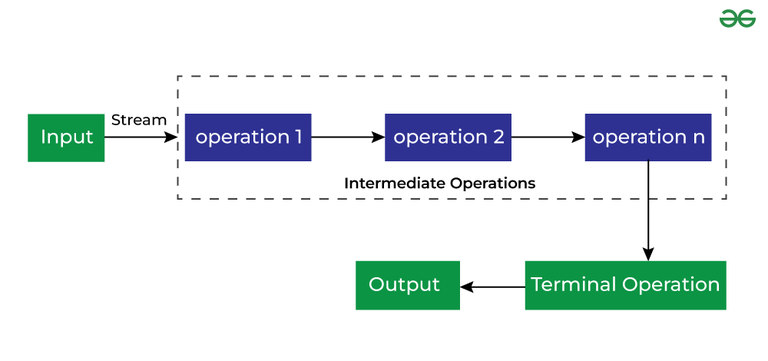
Terminal operations are what make streams useful. They are "eager" and initiate the entire processing sequence. Once a terminal operation is called on a stream, the stream is considered "consumed" and cannot be reused.
There are two main categories of terminal operations:
- Those that produce a side-effect: They perform an action for each element but don't return a value from the pipeline itself (e.g., printing to the console).
- Those that produce a result: They aggregate the stream's elements into a final result, such as a new
List, aMap, or a single value like a count or a sum.
Let's explore one of each.
2. Performing Actions with forEach()
The forEach() method is the simplest terminal operation. Its purpose is to perform an action for each element in the stream. It's ideal for tasks where you need to cause a "side-effect," such as printing values for debugging, writing elements to a file, or saving them to a database.
The forEach() method takes a Consumer as its argument—a functional interface you're already familiar with. You'll typically provide this as a lambda expression.
Let's see it in action. In the previous lesson, we built a pipeline to get the squares of even numbers. Now, let's actually see the result by printing each element.
import java.util.List;

List<Integer> numbers = List.of(1, 2, 3, 4, 5, 6, 7, 8);

numbers.stream()               // Source
       .filter(n -> n % 2 == 0)    // Intermediate: [2, 4, 6, 8]
       .map(n -> n * n)          // Intermediate: [4, 16, 36, 64]
       .forEach(System.out::println); // Terminal: prints each element
When the forEach() method is called, the pipeline springs to life. Each element is pulled from the source and passed through the filter and map operations. The final results (4, 16, 36, 64) are then consumed one by one by the forEach method, which prints them to the console.
The following video from Java Techie provides a clear, practical demonstration of forEach and contrasts it with traditional loop-based iteration.
Java 8 Stream API Cheat Sheet for Interviews | PlayBook | @Javatechie
This video introduces forEach as a basic but essential terminal operation for iterating over collections and streams.
Watch the segment from the beginning. The presenter demonstrates how forEach simplifies iteration and shows its use both directly on a collection and at the end of a stream pipeline.
3. Gathering Results with collect()
While forEach is great for side-effects, most of the time you'll want to gather the results of your stream processing into a new data structure. This is the job of the collect() method, arguably the most powerful and versatile terminal operation.
The collect() method performs what's known as a "mutable reduction." Instead of reducing the stream to a single primitive value (like a sum), it accumulates the elements into a mutable container, like a List, Set, or Map.
To tell collect() how to gather the elements, you pass it an implementation of the Collector interface. This sounds complex, but in practice, you'll almost always use the convenient, pre-built collectors provided by the Collectors utility class.
Let's start with the most common use case: collecting stream elements into a List.
The video from CodeSnippet provides a great visual and code-based explanation of how collect works to create a new list from a stream pipeline.
Mastering Java Streams: Comprehensive Guide with Examples🚀
This segment shows a complete pipeline: filtering even numbers, mapping them to their squares, and finally using collect(Collectors.toList()) to gather the results into a new list.
Watch the demonstration of the collect operation. This example perfectly illustrates how to terminate a pipeline and store its output.
As you saw in the video, the syntax is clean and expressive. Let's write our own example. Imagine we have a list of Strings and we want to create a new list containing the uppercase versions of strings longer than three characters.
import java.util.List;
import java.util.stream.Collectors;

List<String> words = List.of("hello", "world", "java", "is", "fun");

// Process the stream and collect the results into a new list
List<String> longUppercaseWords = words.stream()                        // Source
                                       .filter(s -> s.length() > 3)        // Intermediate: ["hello", "world", "java"]
                                       .map(String::toUpperCase)           // Intermediate: ["HELLO", "WORLD", "JAVA"]
                                       .collect(Collectors.toList());      // Terminal

System.out.println(longUppercaseWords); // Output: [HELLO, WORLD, JAVA]
Here, Collectors.toList() provides the "recipe" for the collect method. It tells the stream to create a new ArrayList, add each element from the stream into it, and finally return the populated list.
The Winterbe blog provides another excellent, concise example of this pattern.
This article section demonstrates how to use collect to transform stream elements into a different kind of result, like a List, Set, or Map.
Read the first code block under the "Collect" heading, where a stream of Person objects is filtered and collected into a new List. This is a classic, real-world application of this pattern.
4. A Glimpse of Other Terminal Operations
forEach() and collect() are the two terminal operations you'll use most frequently. However, the Streams API provides several other useful ones for different scenarios. It's good to be aware of them.
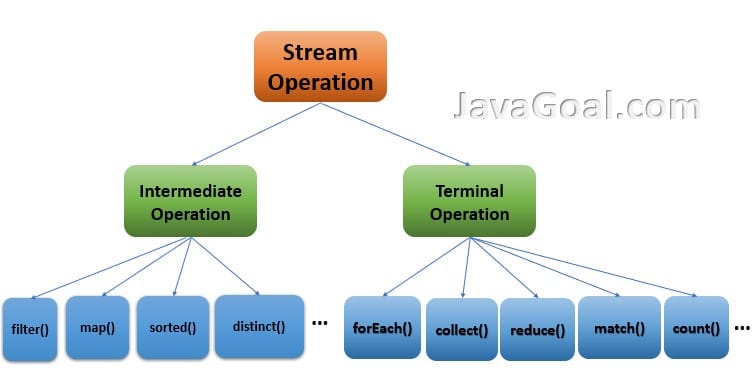
Here are a few others:
reduce(): Combines all elements of a stream into a single result. For example, you could usereduceto sum all integers in a stream or find the longest string. While powerful,collectis often a more specific and readable tool for many reduction tasks.count(): Returns the total number of elements in the stream as along.anyMatch(),allMatch(),noneMatch(): These take aPredicateand return aboolean. They check if any, all, or no elements in the stream match the given condition. They are often short-circuiting.findFirst(),findAny(): These return the first element of the stream (or any element, for parallel streams) wrapped in anOptional.
For now, focus on mastering forEach and collect. We will cover some of the other collectors and Optional in upcoming lessons.
Conclusion
You have now learned how to complete the stream pipeline, transforming a lazy set of instructions into concrete actions and results. By adding a terminal operation, you bring your data processing logic to life.
Key Takeaways:
- Terminal operations are eager, trigger the stream pipeline's execution, and consume the stream.
forEach()is a terminal operation used for performing a side-effect (like printing) for each element. It does not return a result from the pipeline.collect()is a versatile terminal operation used to gather stream elements into a result container, such as aList,Set, orMap.- The
Collectorsutility class provides factory methods for commonCollectorimplementations, withCollectors.toList()being the most fundamental.
We've only scratched the surface of what collect() can do. In the next lesson, we will dive deeper into the Collectors class and explore more powerful methods like toSet(), toMap(), and joining(), enabling you to handle a much wider range of data aggregation tasks with elegance and efficiency.