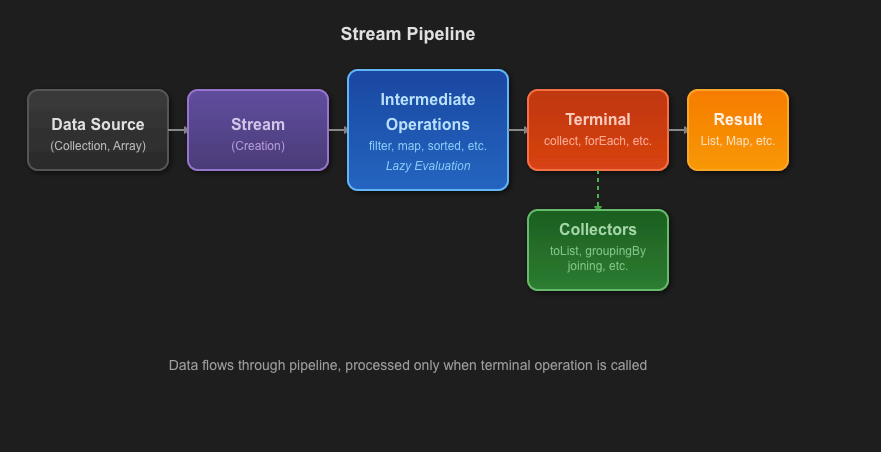
In our last session, we activated our stream pipelines using terminal operations, focusing on forEach() for actions and collect(Collectors.toList()) for gathering results into a List. You learned that the terminal operation is what brings the entire lazy pipeline to life.
Today, we will significantly expand your data aggregation capabilities. This lesson delves deeper into the collect() method, exploring several powerful, pre-built collectors from the Collectors utility class. We'll move beyond simple lists and learn how to transform streams into Sets, Maps, and concatenated Strings. Mastering these collectors is a key step toward writing clean, expressive, and efficient data manipulation code in modern Java.
1. The Power of the Collectors Utility Class
In the previous lesson, you used Collectors.toList() to gather stream elements. This toList() method is a static factory method from the java.util.stream.Collectors class. This class is a treasure trove of Collector implementations designed to handle the most common data aggregation tasks.
A common and recommended practice is to use a static import for the Collectors methods to improve code readability. For example:
import java.util.List;
import java.util.Set;
import static java.util.stream.Collectors.*; // Static import

// ...

List<String> names = List.of("Ana", "Bob", "Ana");
Set<String> uniqueNames = names.stream().collect(toSet()); // More concise
Let's now explore some of the most essential collectors.
2. Collecting Unique Elements with toSet()
You already know that a List can contain duplicate elements. A Set, on the other hand, guarantees uniqueness. The Collectors.toSet() method provides a straightforward way to collect stream elements into a Set, automatically discarding any duplicates.
This is incredibly useful when you need to find the unique items from a collection. For example, imagine you have a list of product tags and you want to compile a list of all unique tags available.
import java.util.List;
import java.util.Set;
import static java.util.stream.Collectors.toSet;

List<String> tags = List.of("java", "backend", "spring", "java", "api");

Set<String> uniqueTags = tags.stream()
                             .collect(toSet());

System.out.println(uniqueTags); // Output might be: [spring, backend, java, api]
Notice that the duplicate "java" tag appears only once in the resulting Set. Also, remember that a standard Set (like a HashSet) does not guarantee any order.
The following reading provides a concise, test-driven example of toSet() in action.
The Ultimate Guide to Java Stream API Collectors - 4Comprehension
This article section provides clear, example-driven explanations of the basic collectors.
Focus on the subsections "The Collectors Facade" and "Collectors#toList/toSet/toCollection". Read the introductory text and then examine the test case example for toSet(). The example here clearly shows how a list with duplicates is collected into a set of unique elements.
3. Creating Lookups with toMap()
Perhaps the most versatile and frequently used collector after toList() is toMap(). It allows you to create a Map from a stream, which is essential for building fast lookups. For instance, you could process a list of User objects and create a Map where the user ID is the key and the User object is the value.
To use toMap(), you need to provide at least two functions:
keyMapper: A function that takes a stream element and returns the key for the map.valueMapper: A function that takes a stream element and returns the value for that key.
Let's imagine we have a Student class and want to create a Map<String, Integer> of student names to their ages.
class Student {
    private String name;
    private int age;
    // constructor, getters...
}

List<Student> students = List.of(
    new Student("Alice", 22),
    new Student("Bob", 21),
    new Student("Charlie", 23)
);

Map<String, Integer> nameToAgeMap = students.stream()
    .collect(Collectors.toMap(
        Student::getName, // keyMapper: extracts the name
        Student::getAge   // valueMapper: extracts the age
    ));

System.out.println(nameToAgeMap); // {Alice=22, Bob=21, Charlie=23}
This is straightforward, but a critical problem arises if two elements produce the same key. By default, toMap() will throw an IllegalStateException. To handle this, you must provide a third argument: a mergeFunction that resolves the conflict.
The following video from The Coding Zoo is an excellent, detailed guide on using toMap(), covering the basic use case, handling key collisions, and even specifying which type of Map to create.
Java List Stream to Map using the Collectors toMap API : Java 8 Streams
This video focuses exclusively on Collectors.toMap, providing clear and practical examples for each of its features.
Watch the initial segment on basic usage, where a list of students is converted into a map. Note the use of Function.identity() to use the object itself as the value. Next, focus on the critical part about handling key collisions. This explains why collisions happen and how to provide a merge function to resolve them (e.g., keeping the old value or the new one). Finally, briefly review the section on specifying a map implementation, which shows how you can request a LinkedHashMap to preserve insertion order.
As the video explains, if you have duplicate keys, you can resolve them like this: (oldValue, newValue) -> newValue. This tells the collector to simply discard the old value and keep the new one. This is a common and practical strategy.
4. Joining Strings with joining()
Another very handy collector is joining(). It is used on a stream of CharSequence (like String) and concatenates them into a single String. This is far more elegant and efficient than using a traditional loop with string concatenation.
The joining() collector has three useful variants:
joining(): Joins the elements with no separator.joining(delimiter): Joins the elements using the specified delimiter. This is the most common version.joining(delimiter, prefix, suffix): Joins the elements with a delimiter, and adds a prefix and suffix to the final string.
Here is an example:
import java.util.List;
import static java.util.stream.Collectors.joining;

List<String> words = List.of("Java", "is", "powerful");

// No delimiter
String phrase = words.stream().collect(joining());
System.out.println(phrase); // "Javaispowerful"

// With a space delimiter
String sentence = words.stream().collect(joining(" "));
System.out.println(sentence); // "Java is powerful"

// With delimiter, prefix, and suffix
String formatted = words.stream().collect(joining(", ", "[", "]"));
System.out.println(formatted); // "[Java, is, powerful]"
This pattern is extremely useful for generating comma-separated values (CSV), logging, or any task that involves formatting a list of strings for display.
This reading from DigitalOcean provides very clear and concise examples of all three joining() overloads.
Java Stream collect() Method Examples
This article section provides jshell examples that are quick and easy to understand.
Read the section titled "Collectors joining() Example". Pay attention to the three different examples demonstrating joining() with no arguments, with a delimiter, and with a delimiter, prefix, and suffix.
Conclusion
You have now added three of the most important Collector patterns to your Java toolkit. By mastering these, you can handle a vast majority of common data aggregation tasks you'll encounter as a developer.
Key Takeaways:
- The
Collectorsutility class provides static methods for creating commonCollectorimplementations. Collectors.toSet()gathers stream elements into aSet, automatically removing duplicates.Collectors.toMap()creates aMapfrom a stream, requiring functions to define keys and values. You must also consider a merge strategy for handling duplicate keys.Collectors.joining()provides an elegant way to concatenate a stream of strings into a single string, with optional delimiters, prefixes, and suffixes.
In our next lesson, we will bring everything together. You'll learn how to chain multiple intermediate operations (filter, map, sorted, etc.) into sophisticated pipelines that transform and aggregate data in a single, readable statement, culminating in one of the collectors you learned about today.