Welcome back! In our previous lessons, we've assembled a powerful set of tools for working with Java Streams. You've learned how to create streams, transform them with intermediate operations like filter and map, and produce results using terminal operations like forEach and collect. You've also seen how to use the Collectors class to aggregate stream data into lists, sets, and maps.
Today, we'll bring all these pieces together. The true power of the Streams API lies not in using these operations individually, but in chaining them into a sophisticated, readable data processing pipeline. This lesson will teach you how to construct these pipelines to perform complex data transformations and aggregations in a single, expressive statement. This skill is central to writing modern, clean, and efficient Java code.
1. The Stream Pipeline: A Chain of Operations
A stream pipeline is a sequence of operations that are performed on a data source. It always consists of three parts:
- Source: Where the stream comes from (e.g., a
List, anArray). - Intermediate Operations (zero or more): These are operations like
filter(),map(), andsorted()that transform a stream into another stream. They are lazy, meaning they don't execute until a terminal operation is called. - Terminal Operation (one): This is the final operation, like
collect()orforEach(), that produces a result or a side-effect. It is eager and triggers the execution of the entire pipeline.
Data flows from the source, through the intermediate operations, and is finally processed by the terminal operation.
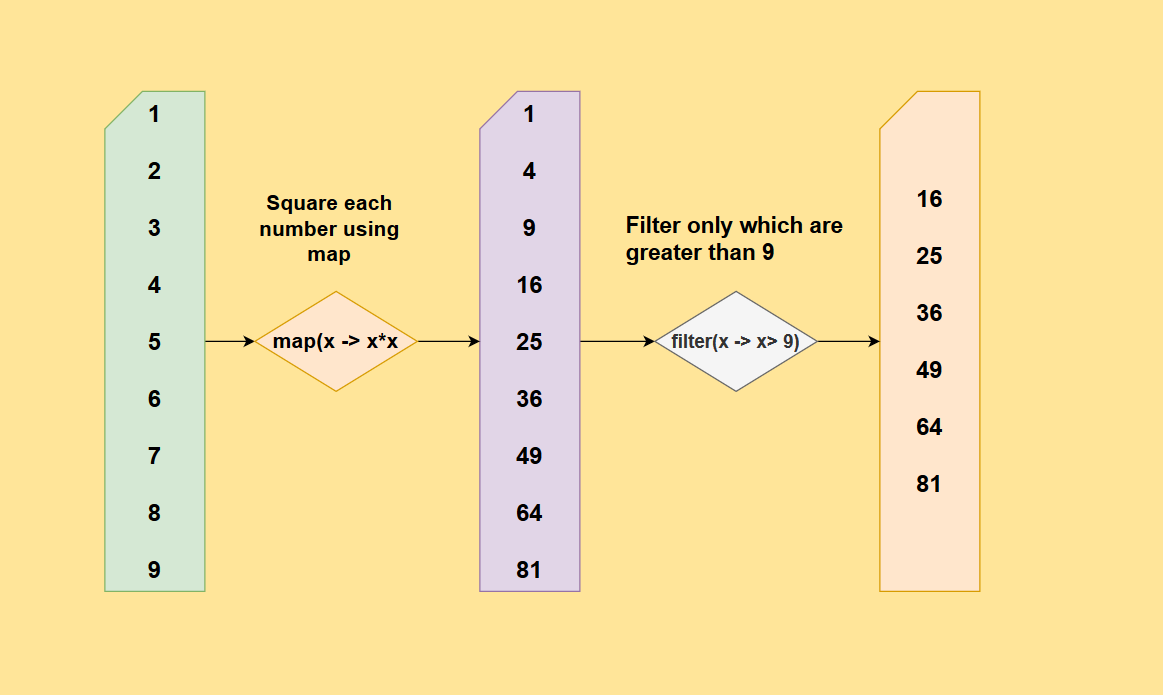
The following video provides an excellent conceptual overview of the stream pipeline and the lazy nature of intermediate operations.
Mastering Java Streams: Comprehensive Guide with Examples🚀
This video from CodeSnippet effectively explains the structure of a stream pipeline.
Watch the segment from the beginning to understand the flow of data through intermediate operations to a terminal operation. Pay close attention to the explanation of "lazy evaluation," which is a core concept of why chaining is efficient.
2. Building a Basic Pipeline
Let's combine the operations you already know into a simple pipeline. Imagine we have a list of integers and we want to get a new list containing the squares of only the even numbers.
Without streams, you might write something like this:
List<Integer> numbers = List.of(1, 2, 3, 4, 5, 6);
List<Integer> evenSquares = new ArrayList<>();
for (Integer n : numbers) {
    if (n % 2 == 0) { // filter
        evenSquares.add(n * n); // map and add
    }
}
System.out.println(evenSquares); // [4, 16, 36]
With a stream pipeline, you can express this much more declaratively:
import static java.util.stream.Collectors.toList;

List<Integer> numbers = List.of(1, 2, 3, 4, 5, 6);

List<Integer> evenSquares = numbers.stream() // 1. Get the stream
    .filter(n -> n % 2 == 0)                 // 2. Keep only even numbers
    .map(n -> n * n)                         // 3. Square each of them
    .collect(toList());                      // 4. Collect the results into a list

System.out.println(evenSquares); // [4, 16, 36]
Each dot . represents a link in the chain. The code reads like a description of the problem: "start with a stream of numbers, filter for the even ones, map them to their squares, and collect them into a list." This is the elegance and readability that stream pipelines provide.
3. Expanding the Chain with More Operations
The real power comes from adding more operations to the chain. The Streams API provides a rich set of intermediate operations to handle common data manipulation tasks.
Key intermediate operations include:
distinct(): Returns a stream with unique elements.sorted(): Sorts the stream elements. It can use natural order or a customComparator.limit(n): Truncates the stream to be no longer thannin length.skip(n): Discards the firstnelements of the stream.flatMap(): Transforms each element into a stream of other objects and then "flattens" all these small streams into a single, combined stream. This is crucial for working with nested collections.
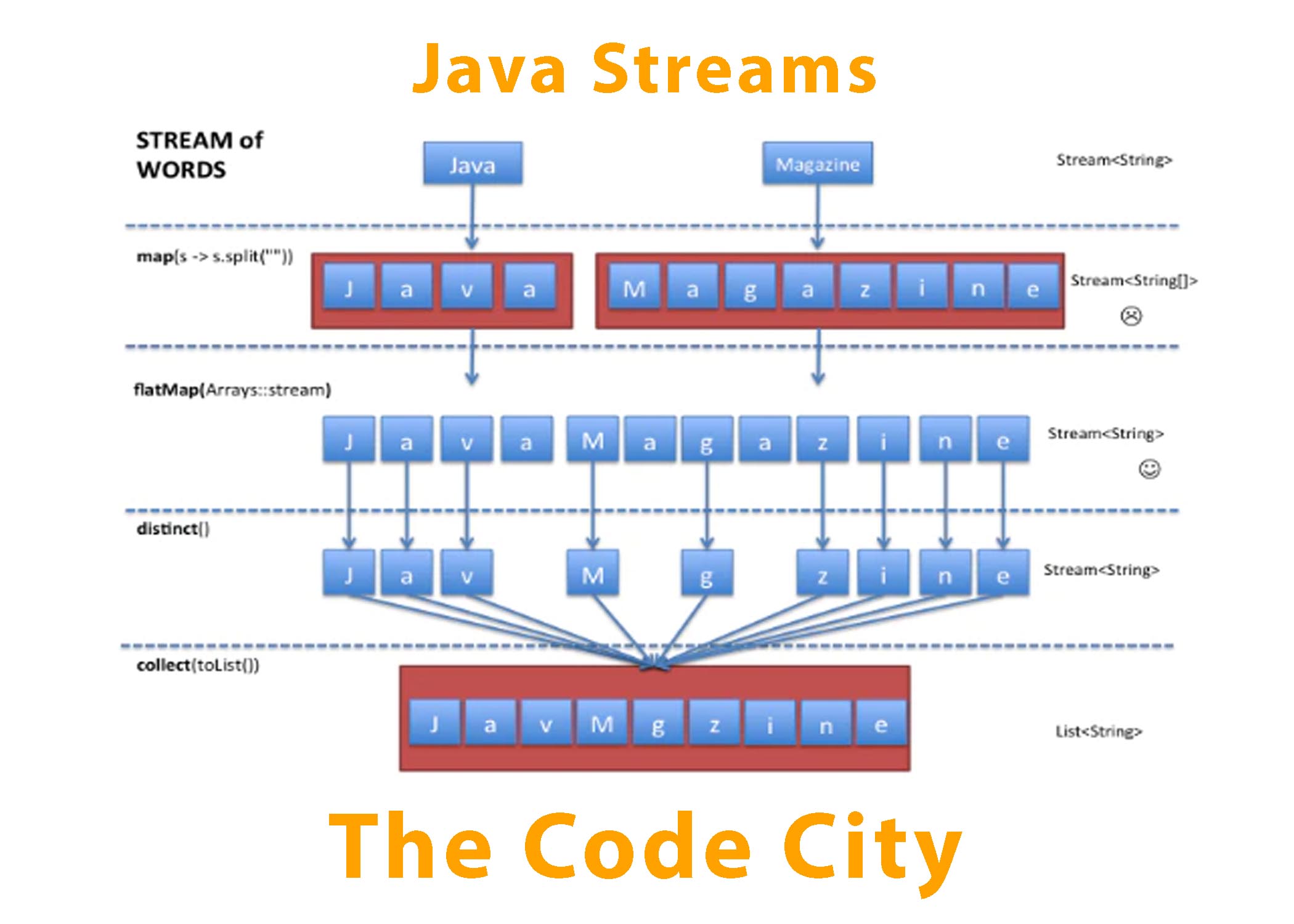
The image below gives a great visual for what flatMap does. map on a stream of words creates a stream of arrays of characters. flatMap takes it a step further and creates a single stream of all the individual characters.
The following guide provides excellent examples for all these key intermediate operations.
Mastering Java 8 Streams: A Complete Developer's Guide ...
This article from Aravind S provides a practical overview of the most common intermediate stream operations.
Read the section "Intermediate Operations with Examples". You're already familiar with filter() and map(), so you can review those quickly. Focus your attention on the examples for flatMap, and the combined section on distinct, sorted, limit, and skip. Also, note the peek() operation, which is very useful for debugging your stream pipelines by observing elements at different stages of the chain.
4. A Real-World Example: Chaining in Practice
Let's solve a more complex problem to see a sophisticated pipeline in action.
Problem: Given a list of students with grades in different subjects, find the names of all students who have an average grade above 85.
class Student {
    private String name;
    private String subject;
    private int grade;
    // constructor, getters...
}

List<Student> students = // ... a list of student records

// Example data:
// new Student("Alice", "Math", 90)
// new Student("Alice", "Physics", 88)
// new Student("Bob", "Math", 82)
// new Student("Bob", "Physics", 95)
// ...
Here's how we can solve this with a single stream pipeline:
Set<String> excellentStudents = students.stream() // 1. Start with a stream of all student records
    .collect(Collectors.groupingBy(Student::getName)) // 2. Group records by student name. Result: Map<String, List<Student>>
    .entrySet().stream() // 3. Stream the entries (name -> list of grades) of the resulting map
    .filter(entry -> entry.getValue().stream() // 4. Filter these entries...
        .mapToInt(Student::getGrade) // ...by taking the list of grades for each student
        .average() // ...calculating the average
        .orElse(0.0) > 85) // ...and checking if it's > 85
    .map(Map.Entry::getKey) // 5. For the students who passed the filter, get their names (the map key)
    .collect(Collectors.toSet()); // 6. Collect the names into a Set to ensure uniqueness
This example, adapted from the "Student Grade Analysis" in the guide you just read, is a fantastic demonstration of chaining. It even involves creating a new stream midway through the process (entrySet().stream()) to analyze the results of the groupingBy collector.
5. Advanced Chaining for Complex Aggregation
Sometimes, the aggregation at the end of the chain is itself a multi-step process. You might need to perform several calculations (e.g., count, sum, and average) at once. This is where chaining collectors becomes incredibly powerful.
Let's consider a TaxEntry class and a complex requirement: for each state-city pair, calculate the total number of entries, the sum of all prices, and the weighted average price (sum of (rate * price) / total entries).
This is a non-trivial calculation, but it can be accomplished by chaining collectors like groupingBy, mapping, reducing, and collectingAndThen. The following article walks through this exact problem. While the code is dense, it's a perfect illustration of how far you can push stream pipelines.
Grouping and Aggregations With Java Streams
This DZone article by Manu Barriola shows how to solve complex, multi-field aggregations. The final example is the pinnacle of collector chaining.
Focus on the final code block in the section "Complex Multiple Aggregations: A Resolution Path". Don't worry about memorizing the syntax. Instead, follow the author's detailed breakdown to understand the strategy: groupingBy: The outer-most operation, to group by state and city. mapping: The first inner step, to transform each TaxEntry into a temporary aggregation object. reducing: The second inner step, to sum up the values from all the temporary objects in a group. collectingAndThen: The final step, which takes the reduced result and performs a final transformation (calculating the average).
Understanding this pattern shows how you can compose operations to solve nearly any data aggregation task without ever leaving the declarative style of the Streams API.
Conclusion
In this lesson, you've learned to assemble the building blocks of the Streams API into powerful, readable, and efficient data processing pipelines. This is a fundamental skill for any modern Java developer.
Key Takeaways:
- A stream pipeline consists of a source, lazy intermediate operations, and an eager terminal operation.
- Operations can be chained together using dot notation to form a declarative pipeline that reads like a story.
- You can chain various intermediate operations like
filter,map,sorted,distinct, andflatMapto refine your data. - Complex aggregation logic can be built by chaining collectors like
groupingBy,mapping,reducing, andcollectingAndThen.
In our next lesson, we will address a common reality of working with streams: sometimes, an operation might not find a result. We will explore the Optional class, a robust way to handle potentially absent values returned by terminal operations like findFirst() or reduce(), preventing NullPointerExceptions and making your code safer.