In our previous lesson, we unlocked a core feature of modern Java: lambda expressions. You learned how to write concise, anonymous functions to implement functional interfaces like Predicate, Consumer, and Function. Now, we'll put that knowledge to immediate and powerful use by exploring the Java Streams API.
Today's goal is to learn how to process collections using stream pipelines with two of the most common intermediate operations: filter and map. This will enable you to write clean, declarative code to transform and select data, moving away from traditional, imperative loops. You'll see how your new lambda skills are the key that unlocks this elegant way of working with data.
1. The Stream Pipeline: A High-Level View
Before we dive into specific operations, let's understand what a stream is and how it works. In simple terms, a stream is a sequence of elements from a source (like a List or an Array) that you can process. It's not a data structure that stores elements; it's more like a conveyor belt for your data.
A key principle of streams is that they do not modify the original data source. When you filter or transform elements, the original List remains untouched.
Streams API in Java: A Detailed Guide - DEV Community
This short introduction from the DEV Community article "Streams API in Java" clearly defines what a stream is.
Read the section defining a stream to solidify this core concept. Pay attention to the distinction between a stream and a collection.
The processing of a stream happens in a structure called a pipeline. This pipeline has three distinct stages:
- Source: Where the stream originates (e.g., calling
.stream()on aList). - Intermediate Operations: A series of operations that transform the stream into another stream.
filter()andmap()are in this category. You can chain multiple intermediate operations together. - Terminal Operation: An operation that produces a final result (like a new list, a single value, or a side-effect like printing). This operation triggers the processing of the entire pipeline and closes the stream.
The following diagram illustrates this flow perfectly.
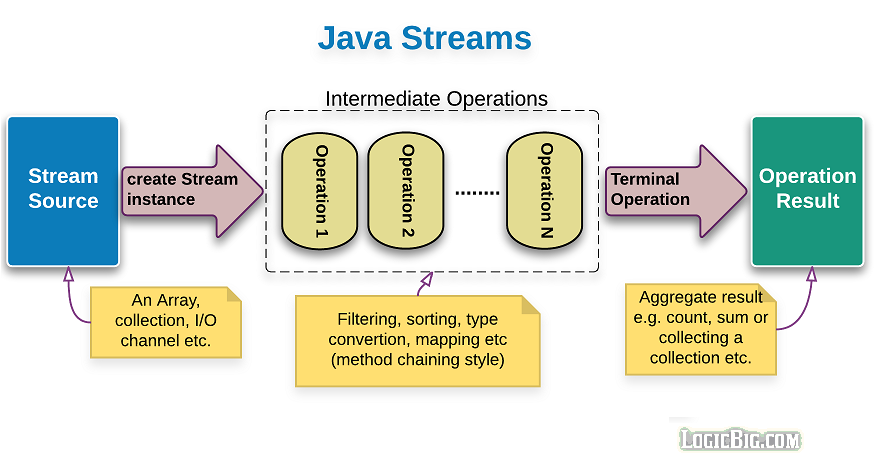
Today, we focus on the middle part: the intermediate operations. We'll leave the terminal operations for our next lesson.
2. Selecting Elements with filter()
The filter() operation is exactly what it sounds like: it allows elements to pass through the stream only if they satisfy a specific condition.
How do you provide this condition? This is where our previous lesson comes in. The filter() method accepts a Predicate<T>—a functional interface whose single abstract method, test(), returns a boolean. You'll provide the implementation for this Predicate using a lambda expression.
This video from Visual Computer Science provides a clear, practical example of using filter.
Java Streams API Explained (with examples)
This video demonstrates the filter operation on a list of Car objects.
Watch the segment from filtering to see how a Predicate lambda is used to select only cars of type "sedan". The narrator does a great job of explaining how the Predicate interface works in this context.
Let's look at a simple code example. Imagine we have a list of numbers and we only want the even ones.
import java.util.List;
import java.util.stream.Stream;

List<Integer> numbers = List.of(1, 2, 3, 4, 5, 6, 7, 8);

// 1. Get a stream from the list (Source)
Stream<Integer> numberStream = numbers.stream();

// 2. Apply an intermediate operation: filter
//    The lambda n -> n % 2 == 0 is our Predicate<Integer>
Stream<Integer> evenNumberStream = numberStream.filter(n -> n % 2 == 0);

// At this point, no actual work has been done! The stream is just set up.
// We need a terminal operation to see the results, which we'll cover next lesson.
// For now, imagine 'evenNumberStream' represents the potential sequence: 2, 4, 6, 8.
The lambda n -> n % 2 == 0 is the implementation of the Predicate's test method. For each number n in the stream, it returns true if the number is even, and false otherwise. The filter operation ensures that only the elements for which the predicate returns true continue down the pipeline.
3. Transforming Elements with map()
While filter() is for selecting elements, map() is for transforming them. It applies a function to every element in the stream and returns a new stream containing the results of that function.
The map() method accepts a Function<T, R>. As we learned, this functional interface's apply() method takes an object of type T and returns an object of type R. This means map() can even change the type of elements in the stream.
Let's watch a demonstration of map from the same video.
Java Streams API Explained (with examples)
This segment shows how to use map to transform a stream of Car objects into a stream of Strings (the car makes).
Watch the explanation of the map function. Notice how the lambda car -> car.make implements the Function interface, transforming each Car object into its make field.
Here's a code example. Let's take a list of words and transform it into a list of their lengths.
import java.util.List;
import java.util.stream.Stream;

List<String> words = List.of("Java", "is", "powerful");

// 1. Get a stream from the list (Source)
Stream<String> wordStream = words.stream();

// 2. Apply an intermediate operation: map
//    The lambda s -> s.length() is our Function<String, Integer>
Stream<Integer> lengthStream = wordStream.map(s -> s.length());

// 'lengthStream' now represents the potential sequence of integers: 4, 2, 8.
// The stream type has changed from Stream<String> to Stream<Integer>.
In this case, the lambda s -> s.length() is our Function. For each String s, it applies the .length() method and returns an Integer. The map operation collects these integers into a new stream.
4. Building a Pipeline by Chaining Operations
The true power of streams is realized when you chain these operations together to form a processing pipeline. An element flows from the source and passes through each intermediate operation in sequence.
The following image provides a perfect mental model for this process.
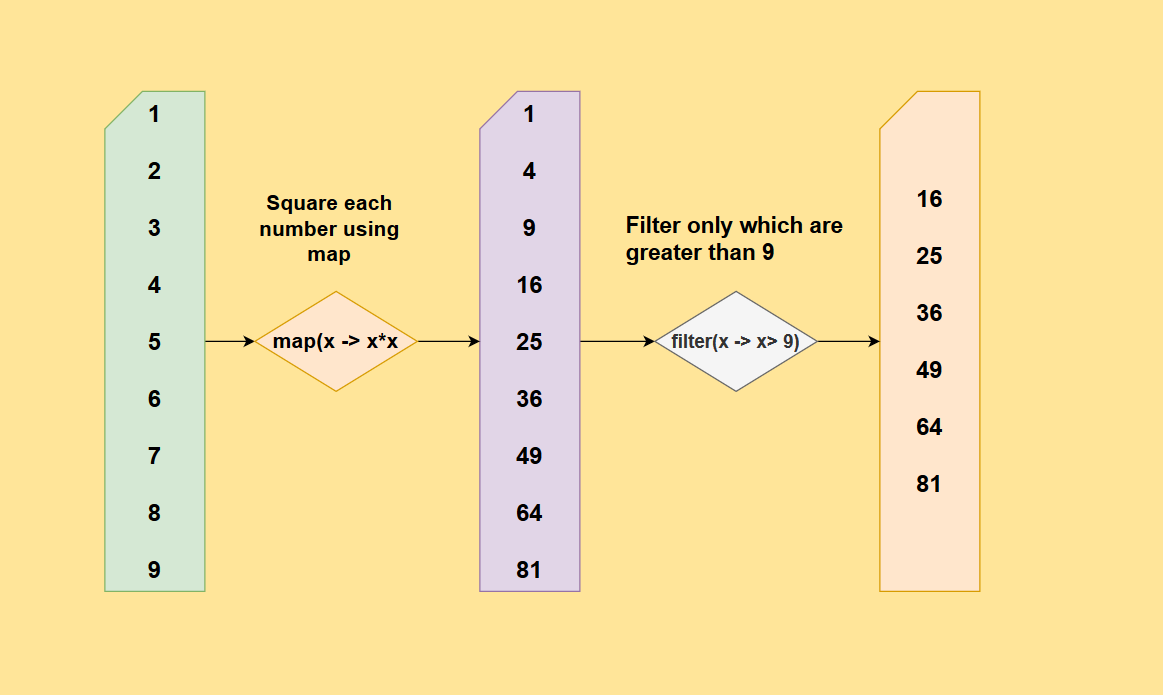
Let's translate this image directly into Java code:
import java.util.List;
import java.util.stream.Stream;

List<Integer> numbers = List.of(1, 2, 3, 4, 5, 6, 7, 8, 9);

// Chain of operations
Stream<Integer> resultStream = numbers.stream()           // Source: [1, 2, 3, 4, 5, 6, 7, 8, 9]
                                      .map(n -> n * n)    // Intermediate 1: [1, 4, 9, 16, 25, 36, 49, 64, 81]
                                      .filter(sq -> sq > 9); // Intermediate 2: [16, 25, 36, 49, 64, 81]
This is incredibly expressive. In one fluent chain of calls, you've described a complex data transformation: "take a stream of numbers, map each to its square, then filter out any result that isn't greater than 9." This declarative style, where you say what you want to do rather than how to do it (like with a for loop and if statements), is a hallmark of functional programming and a key benefit of streams.
Let's look at one more practical example.
Streams API in Java: A Detailed Guide - DEV Community
This section from the DEV Community article shows a realistic use case combining filter and map on a custom Employee object.
Read the short example that finds the names of high-earning employees. It's a classic pipeline: filter first, then map to extract the desired information.
5. Lazy Evaluation
There's one final, crucial concept you need to understand about intermediate operations: they are lazy. This means that calling filter() or map() doesn't actually cause the stream to be processed. The operations are only recorded. The real work only begins when a terminal operation is called.
Furthermore, the data isn't processed in bulk at each stage (e.g., mapping all elements, then filtering all elements). Instead, elements are pulled through the pipeline one at a time as needed by the terminal operation.
The GeeksforGeeks article on streams provides an excellent explanation and an example that makes this behavior obvious.
This article section demonstrates the concept of lazy evaluation with a clever code example.
Read the text starting from the definition of lazy evaluation. Then, carefully study the code example and its output. The print statements inside the filter and map lambdas reveal exactly when and how the elements are processed.
As you saw in the example, the pipeline stopped processing as soon as it found the first element that matched the criteria ("Sita"). It never even looked at "Rahul" or "Sam". This is called short-circuiting, and it's a powerful optimization that streams give you for free. If you had written this with a traditional for loop, you would have had to manage the early exit with a break statement manually.
Conclusion
In this lesson, we've built directly on your knowledge of lambdas to unlock a powerful and modern way of processing data in Java. You've learned how to construct declarative data pipelines that are both readable and efficient.
Key Takeaways:
- A stream pipeline consists of a source, intermediate operations, and a terminal operation.
- The
filter()intermediate operation selects elements from a stream based on aPredicatelambda. - The
map()intermediate operation transforms each element in a stream using aFunctionlambda. - Intermediate operations can be chained together to create complex data processing logic in a clean, readable way.
- Stream pipelines are lazy: no work is done until a terminal operation is invoked, which allows for efficient processing and short-circuiting.
So far, we've only been creating these pipelines. In our next lesson, we will explore the final piece of the puzzle: terminal operations. You'll learn how to use methods like forEach() to perform an action on each element and collect() to gather your stream's results back into a collection like a List or Set.