Welcome back! In our previous lesson, we explored abstract classes, which act as non-instantiable blueprints for a family of related classes. We saw how an abstract Animal class can enforce that all its subclasses, like Dog and Cat, must implement a makeNoise method. This established a strong "is-a" relationship (A Dog is an Animal).
This lesson introduces a complementary concept: interfaces. What happens when you want to define a common capability for classes that might be completely unrelated? For example, a Bird and an Airplane can both fly, but they don't share a common parent in the way a Dog and Cat do. Interfaces solve this by defining a contract of behaviors—a "can-do" relationship.
By the end of this lesson, you will be able to define and implement interfaces in Java and, crucially, understand when to use an interface versus when to use an abstract class, a common point of confusion and a frequent topic in technical interviews.
1. The Need for Interfaces: Decoupling Your Code
Before diving into the syntax, it's essential to understand why interfaces are so powerful. They are a primary tool for achieving loose coupling in software design, which means reducing the dependencies between different parts of your system. A loosely coupled system is more flexible, easier to maintain, and easier to test.
The Telusko YouTube channel has an excellent video that builds a scenario demonstrating this exact need. It starts with a Developer class that is tightly coupled to a Laptop class and shows how this design breaks when a Desktop is introduced.
This video tells a story that perfectly illustrates the problem that interfaces solve. It will guide you from a rigid, tightly-coupled design to a flexible one.
Watch these segments to see the problem and the evolution of the solution: The Problem of Tight Coupling: The instructor sets up a scenario where a Developer object can only work with a Laptop object. Notice the error when they try to give the developer a Desktop. This is the core problem we want to solve. Solution with an Abstract Class: Here, an abstract Computer class is introduced to generalize Laptop and Desktop. This decouples the Developer from a specific implementation, which is a big improvement and links directly to our last lesson. Introducing Interfaces: Finally, the video shows how an interface can achieve the same goal, setting the stage for our main topic.
As the video demonstrates, both abstract classes and interfaces can be used to write more flexible code. The Developer doesn't care if it's a Laptop or a Desktop; it only cares that it has a Computer that can code(). Now, let's formalize the concept of an interface.
2. Defining and Implementing an Interface
An interface is a purely abstract type that defines a contract. It specifies a set of methods that an implementing class must provide.
Here's the basic syntax:
// 1. Defining the interface
public interface Drivable {
    // Methods in an interface are public and abstract by default.
    // You don't need to write 'public abstract'.
    void startEngine();
    void turn(String direction);
    void stopEngine();
}

// 2. A class implementing the interface
public class Car implements Drivable {

    // The class MUST provide an implementation for all methods in the interface.
    @Override
    public void startEngine() {
        System.out.println("Car engine started.");
    }

    @Override
    public void turn(String direction) {
        System.out.println("Car is turning " + direction);
    }

    @Override
    public void stopEngine() {
        System.out.println("Car engine stopped.");
    }
}

// 3. Another unrelated class can also implement the same interface
public class LawnMower implements Drivable {

    @Override
    public void startEngine() {
        System.out.println("Lawnmower engine started with a pull cord.");
    }

    @Override
    public void turn(String direction) {
        System.out.println("Pushing the lawnmower to turn " + direction);
    }

    @Override
    public void stopEngine() {
        System.out.println("Lawnmower engine stopped.");
    }
}
Key characteristics of an interface:
- You use the
interfacekeyword to declare it. - A class uses the
implementskeyword to adopt the contract. - All methods are implicitly
publicandabstract. - Any fields declared in an interface are implicitly
public,static, andfinal(they are constants). This means interfaces cannot have state (instance variables).
The article "When to use abstract classes vs. interfaces in Java" from InfoWorld provides a clear example of implementing an interface.
When to use abstract classes vs. interfaces in Java - InfoWorld
This article gets straight to the point about how interfaces work as a contract.
Read the section on using interfaces, which uses the List interface from the JDK as a great example of polymorphism. Then, review the example under Overriding an interface method to see the implements and @Override keywords in action.
3. Abstract Class vs. Interface: The Decisive Comparison
This is the central question. While they seem similar, they have fundamental differences that dictate their use cases.
Core Distinction: "Is-A" vs. "Can-Do"
- Abstract Class (is-a): Use an abstract class when you have a group of tightly related classes that share a common identity. An
Audiis aCar. ACaris aVehicle. This defines a hierarchy. - Interface (can-do): Use an interface to define a capability that can be shared by unrelated classes. A
Carcandrive. ARobotcandrive. ABirdcanfly. AnAirplanecanfly. This defines a contract for a behavior.
The Baeldung article "Using an Interface vs. Abstract Class in Java" provides excellent heuristics for this.
Using an Interface vs. Abstract Class in Java
This article provides clear, actionable guidance on when to choose one over the other.
Focus on these two sections: "When to Use an Interface": Pay close attention to the bolded sentence: "A is capable of [doing this]". "When to Use an Abstract Class": Note the corresponding heuristic here: "A is a B".
Key Technical Differences
Let's break down the technical distinctions.
-
Multiple Inheritance: A class can
implementmultiple interfaces, but can onlyextendone class (abstract or not). This is a major reason to prefer interfaces when a class needs to take on several roles.class FlyingCar extends Car implements Flyable, Drivable { ... } -
State (Instance Fields): Abstract classes can have instance variables (state) with any access modifier (
private,protected, etc.). Interfaces can only havepublic static finalconstants. If you need to share state or complex implementation details among subclasses, an abstract class is the right tool. -
Constructors: Abstract classes have constructors, which are called by their subclasses using
super(). Interfaces do not have constructors. -
Methods:
- Abstract Classes can have a mix of
abstractmethods (no body) and concrete methods (with implementation). - Interfaces (traditionally) only had
abstractmethods. However, Java 8 introduceddefaultandstaticmethods.defaultmethods provide an implementation within the interface. This allows new methods to be added to an interface without breaking all the existing classes that implement it.staticmethods are utility methods that are part of the interface but are not inherited by implementing classes.
- Abstract Classes can have a mix of
The video from Coding with John offers a concise verbal and visual comparison of these points.
Abstract Classes and Methods in Java Explained in 7 Minutes
This segment directly addresses the common interview question: "What's the difference between an abstract class and an interface?"
Watch from the start of the comparison. The video clearly explains the difference in multiple inheritance and how fields are handled in each.
4. Visual Summary
Let's consolidate our understanding with some visuals. The first image provides a side-by-side code example of an abstract class versus an interface.

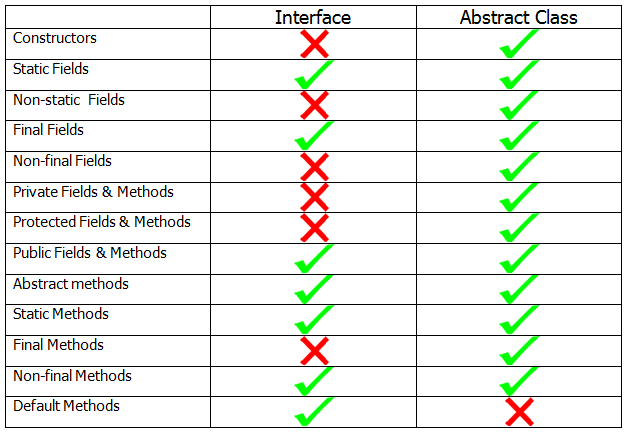
The second image is a comprehensive feature comparison table, which serves as an excellent cheat sheet.
Conclusion
You've now covered two of the most important concepts in object-oriented design: abstract classes and interfaces. Understanding the trade-offs between them is crucial for writing clean, maintainable, and flexible Java code.
Here are the key takeaways for making the right choice:
-
Choose an abstract class when:
- You want to share code among several closely related classes (an "is-a" relationship).
- You need to share state (non-static, non-final fields) or methods with non-public access.
- You are creating a base for a component that will have a common, partially implemented behavior.
-
Choose an interface when:
- You need to define a contract for a capability that can be adopted by unrelated classes (a "can-do" relationship).
- You want a class to inherit behaviors from multiple sources (multiple inheritance of type).
- You want to design for loose coupling, programming to a contract rather than an implementation (e.g.,
List list = new ArrayList();).
With this lesson, we conclude our deep dive into the core principles of Object-Oriented Programming. You now have the foundational tools to design robust class structures. In our next module, we will shift our focus from language structure to the powerful libraries that come with Java, starting with how to effectively work with text using the String class.