Welcome to our next lesson on the Java Collections Framework. In the previous session, we contrasted ArrayList and LinkedList, focusing on how their internal data structures dictate their performance for different tasks. That analysis set the stage for today's topic, where we'll explore two of the most powerful and frequently used collections in Java: HashMap and HashSet.
These collections are not about ordered sequences like lists; instead, they are optimized for one primary goal: speed. Your objective for this lesson is to learn how to use HashMap and HashSet for highly efficient data storage and retrieval. We'll look under the hood to understand the principle of hashing that makes them so fast, a concept that is not only fundamental to Java but also a cornerstone for solving a wide array of problems in coding interviews.
1. HashMap: The Ultimate Key-Value Store
A HashMap is the quintessential implementation of the Map interface. It allows you to store and retrieve data as key-value pairs. Think of it like a dictionary: you look up a word (the key) to find its definition (the value). The magic of HashMap is that, on average, it can add, retrieve, and remove these pairs in constant time, or O(1), regardless of how many pairs are already in the map.
Let's start with a practical introduction to the most common HashMap operations.
Map and HashMap in Java - Full Tutorial
The video "Map and HashMap in Java" by Coding with John provides a clear, code-driven tutorial on the basics of using HashMap.
Please watch the following segments to get a feel for how HashMap is used in practice: Declaring a HashMap: Pay attention to the syntax, especially the use of angle brackets for key and value types. Basic Operations: This part covers the essential put() and get() methods for adding and retrieving data. Checking for Existence: Learn how to use containsKey() and containsValue(). Removing an Entry: See how the remove() method works. A Note on Types: This is an important detail about using wrapper classes (like Integer) instead of primitive types (like int).
How Does HashMap Achieve O(1) Performance?
The "hash" in HashMap refers to its internal mechanism: hashing. At its core, a HashMap uses an array, often called a table of "buckets." When you want to store a key-value pair, it performs three main steps:
- Generate a Hash Code: It calls the
hashCode()method on your key object. This method returns an integer that is a numerical representation of the key. - Calculate an Index: It uses this hash code to compute an index in the internal array. A common and efficient way to do this is with the formula
index = hashCode(key) & (n - 1), wherenis the number of buckets (the array's capacity). The bitwise&operation is a fast equivalent of the modulo operator (%) whennis a power of two. - Store the Entry: It places the key-value pair (as a
Nodeobject) at the calculated index.
Retrieving a value with get(key) follows the exact same logic. It calculates the index and looks directly in that bucket, which is why it's so fast.
The following article from GeeksforGeeks provides an excellent, detailed explanation of this process.
Internal Working of HashMap in Java
This article breaks down the internal mechanics of how HashMap stores and retrieves data.
Read from the beginning, focusing on these two sections: Basic Structure: This introduces the Node class that holds the key, value, and other information. Hashing and Index Calculation: This section explains the core formula used to determine where an entry is stored.
Handling Collisions
What happens if two different keys produce the same index? This is called a collision, and it's a natural part of hashing. HashMap handles this elegantly.
When a collision occurs, instead of overwriting the existing entry, it forms a linked list at that bucket index. Each new entry with the same index is simply added to the end of the list. When you get() a key, HashMap calculates the index, finds the list, and then iterates through it, using the equals() method to find the exact key you're looking for.

Since Java 8, there's an important optimization: if the number of entries in a single bucket's linked list exceeds a certain threshold (specifically, 8), the list is converted into a balanced red-black tree. This changes the worst-case search time within that bucket from O(n) to O(log n), providing a safety net against performance degradation from poorly designed hash functions.
This step-by-step walkthrough will solidify your understanding of insertion and collisions.
Internal Working of HashMap in Java
Continuing with the same GeeksforGeeks article, this section provides a concrete example of the put() method in action.
Read the section Internal Working of put(), which shows how two different keys can end up at the same index, causing a collision.
2. HashSet: Storing Only Unique Elements
Now, let's turn to HashSet. As an implementation of the Set interface, its purpose is simple: to store a collection of elements where every element is unique. Like HashMap, it also offers average O(1) time complexity for adding, removing, and checking for the existence of an element.
How does it ensure uniqueness and maintain this performance? The answer is surprisingly simple: a HashSet is secretly a HashMap under the hood.
When you add an element to a HashSet, you're actually adding a key to an internal HashMap. The value associated with that key is a constant, dummy object that Java calls PRESENT.
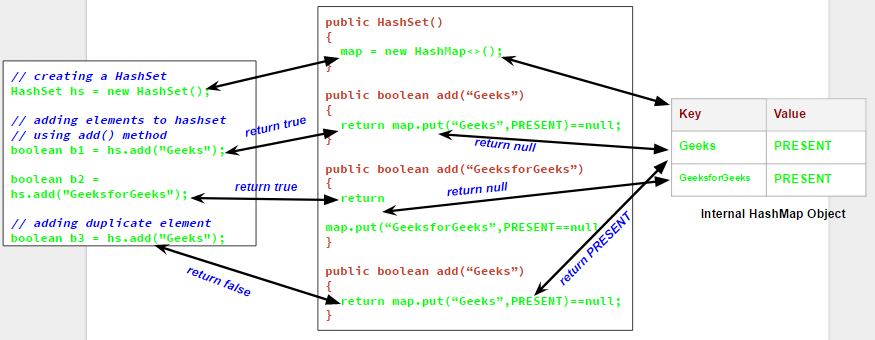
This clever design means HashSet inherits all the performance benefits and internal mechanics of HashMap. The add() method of HashSet returns true if the element was added successfully and false if the element was already present (because HashMap's put() method returns the old value if the key already exists, which would not be null).
This video provides a great practical overview of HashSet and its core features.
Set and HashSet in Java - Full Tutorial
The "Set and HashSet in Java" tutorial from Coding with John introduces the Set interface and demonstrates the most common use cases for HashSet.
Watch the following key parts of the video: What is a Set?: This explains the concept of a Set, how it differs from a List, and how to create a HashSet. Adding and Duplicates: This segment shows how add() works and, most importantly, demonstrates that duplicates are automatically ignored. A Common Use Case: This is a highly practical example of using a HashSet to efficiently remove duplicate elements from a List—a very common pattern.
3. Practical Use Cases and Summary
Given your goal of preparing for software engineering roles, it's crucial to know when to use which data structure. HashMap and HashSet are workhorses in many algorithms.
-
Use
HashMapwhen you need to associate data. This is perfect for problems involving frequency counting, mapping IDs to objects, or implementing a cache. For example, to count the occurrences of each character in a string:String text = "hello world"; Map<Character, Integer> freqMap = new HashMap<>(); for (char c : text.toCharArray()) { freqMap.put(c, freqMap.getOrDefault(c, 0) + 1); } // freqMap will contain { =1, r=1, d=1, e=1, w=1, h=1, l=3, o=2}This
getOrDefault()pattern is a concise way to handle the first time a key is seen. -
Use
HashSetwhen you only need to track the existence of unique items. This is ideal for de-duplication, finding unique elements, or checking if an item has been "seen" before in an algorithm. For example, to find if an array contains any duplicates:int[] numbers = {1, 2, 3, 4, 2}; Set<Integer> uniqueNumbers = new HashSet<>(); for (int number : numbers) { if (!uniqueNumbers.add(number)) { System.out.println("Duplicate found: " + number); // Prints "Duplicate found: 2" break; } }This works because
set.add()returnsfalseif the element is already in the set.
These data structures are the foundation for solving many classic interview problems, such as "Two Sum," "Valid Sudoku," and "Longest Substring Without Repeating Characters," which we will explore in our upcoming DSA modules.
Conclusion
In this lesson, we demystified HashMap and HashSet, two of the most efficient collections in Java. You now know not just how to use them but also why they are so fast.
Here are the key takeaways:
HashMapstores key-value pairs using a hashing mechanism that provides average O(1) time forput,get, andremoveoperations.- It resolves collisions (multiple keys mapping to the same index) by using a linked list, which is upgraded to a balanced tree in Java 8 for better performance in high-collision scenarios.
HashSetstores a collection of unique elements, also with average O(1) performance.- It achieves this by being a clever wrapper around a
HashMap, where the set elements are the map's keys. - The choice is clear: use
HashMapfor associations (key-value) andHashSetfor uniqueness (just values).
Now that you're comfortable storing data in these powerful collections, our next lesson will focus on the standard techniques for processing that data. We will cover how to iterate over any collection, including HashMap and HashSet, using iterators and the enhanced for-loop.