In our previous lesson, we explored the fundamental methods of Java's String class for manipulating text. We concluded by highlighting a key characteristic: immutability. You rightly questioned the efficiency of creating a new string for every single modification. This lesson will address that question head-on.
We will start by delving into what string immutability truly means in terms of memory and program behavior, and why this design choice is a powerful feature, not just a limitation. Then, we will introduce StringBuilder, the standard Java tool for situations where you need to build or modify strings efficiently. By the end of this lesson, you'll have a clear understanding of when to use String and when to use StringBuilder, a crucial distinction for writing clean and performant Java code.
1. The True Meaning and Benefits of Immutability
In the last lesson, we said strings are immutable, meaning they cannot be changed. This can be confusing because code like String s = "hello"; s = s + " world"; seems to change the string. What's really happening?
When you declare String s = "hello";, the variable s acts as a reference (or a pointer) to an object in memory that holds the characters "hello". When you then execute s = s + " world";, you are not changing that original "hello" object. Instead, Java creates a brand new String object containing "hello world" and updates the s variable to point to this new object. The original "hello" object is now unreferenced by s (and may be garbage collected later if nothing else refers to it).
This distinction between the reference variable and the object in memory is the core of immutability. The video from the "Coding with John" channel provides an excellent visual explanation of this process.
Java Strings are Immutable - Here's What That Actually Means
This video clearly illustrates what happens in memory when you "change" a string variable and explains the key benefits of immutability.
Please watch the following segments: The initial explanation clearly shows the difference between the string variable and the string object in memory. The section on the String Pool demonstrates how immutability allows Java to save a significant amount of memory by reusing identical string literals. Pay attention to the == vs. .equals() comparison, which reinforces what we learned previously. The security example shows a practical scenario where immutability prevents malicious or accidental data modification. Finally, watch the brief explanation on thread safety. While we won't dive deep into multithreading now, it's good to know that immutability is a key principle for writing safe concurrent programs.
To reinforce what the video showed, let's examine the following diagram. It illustrates how different string declarations and operations affect memory, distinguishing between the String Pool (for literals) and the Heap (for objects created with new).

So, why are strings immutable? It's a deliberate design choice that provides three main advantages:
- Memory Optimization: The String Pool can exist only because strings are immutable. If multiple variables pointed to the same string object and one of them could change it, it would corrupt the value for all other variables.
- Security: Immutable strings can be safely passed around your application (e.g., as method parameters, database usernames, or keys in a
Map) without fear that they will be modified unexpectedly. - Thread Safety: Because they cannot be changed, string objects can be shared freely among multiple threads without the need for complex synchronization logic.
2. The Cost of Immutability: Inefficient Concatenation
The benefits are clear, but there's a significant performance penalty in one common scenario: building a string piece by piece, especially within a loop.
Consider this code:
String report = "";
for (int i = 0; i < 100; i++) {
    report = report + " " + i; // Inefficient!
}
In each iteration of this loop, the line report = report + " " + i; does the following:
- Creates a new string to hold the current value of
report. - Creates another new string for the space and the number
i. - Concatenates them, creating a third new
Stringobject. - Assigns the reference of this new object back to the
reportvariable.
This creates hundreds of temporary, short-lived objects that the Java Garbage Collector has to clean up, wasting CPU cycles and memory. The AlgoMaster article provides a clear explanation of this problem.
This article reinforces the concepts we've discussed and provides a concrete example of the performance issue with string concatenation.
Read the section titled Performance Impact, which directly addresses the inefficiency of using String for multiple modifications. Then, look at the code example under Performance Overhead in Concatenation, which contrasts the inefficient loop with the efficient StringBuilder approach.
3. The Solution: StringBuilder
To solve this problem, Java provides the StringBuilder class. StringBuilder is designed specifically for situations where you need to perform many modifications to a string. Unlike String, StringBuilder is mutable.
When you append, insert, or delete characters from a StringBuilder, it modifies its internal character array directly rather than creating a new object. This is far more efficient.
The typical workflow is:
- Create an empty
StringBuilder. - Use methods like
append()in a loop to build your string. - Once you are finished, call the
toString()method to get a final, immutableStringobject.
The GeeksForGeeks article offers a comprehensive guide to using StringBuilder.
This article introduces the StringBuilder class, its constructors, and its most common methods with clear examples.
First, read the introductory paragraphs to understand its purpose as a mutable character sequence. Then, review the basic example to see the append() method in action. Skim the section on Constructors to see how you can initialize a StringBuilder. Finally, study the table of Important StringBuilder Methods. Pay special attention to append(), insert(), delete(), reverse(), and toString(). The code example just above the table demonstrates many of these methods.
4. String vs. StringBuilder vs. StringBuffer
You now know about String (immutable) and StringBuilder (mutable). There is a third related class, StringBuffer.
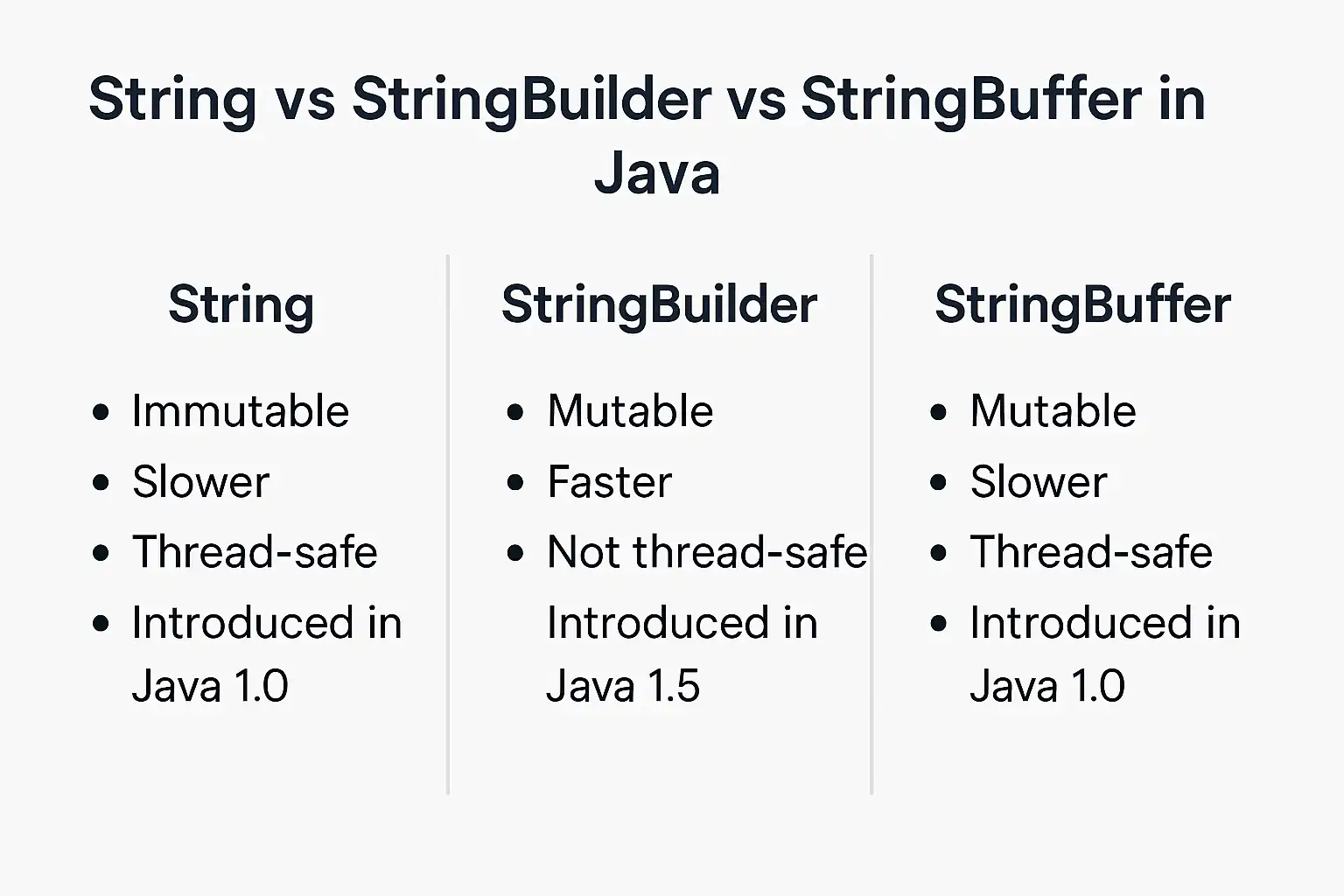
String: Immutable. Best for fixed text or infrequent changes. Thread-safe.StringBuilder: Mutable. Best for building strings in a loop or with many modifications in a single-threaded environment. It is not thread-safe, which makes it faster because it doesn't have the overhead of synchronization.StringBuffer: Mutable and thread-safe. It's essentially a synchronized version ofStringBuilder. All its modification methods aresynchronized, meaning only one thread can call them at a time. This safety comes at a performance cost.
Since you are focused on core backend development and will primarily be working in single-threaded contexts for now, you should almost always choose StringBuilder over StringBuffer when you need a mutable string.
This comparison is a classic Java interview question. The following image provides a concise summary.
Conclusion
You've now moved from simply using strings to understanding their fundamental design in Java. This deeper knowledge is what separates a novice from a professional developer.
Here are the key takeaways from this lesson:
- String Immutability is a Feature: It provides memory savings via the String Pool, enhances security, and ensures thread safety. It means the object in memory cannot be changed, not the reference variable.
- Concatenation in Loops is Inefficient: Using the
+operator orconcat()onStringobjects inside a loop creates excessive temporary objects and should be avoided. StringBuilderis the Go-To for Modification: When you need to build a string from multiple pieces,StringBuilderis the efficient, mutable solution for single-threaded applications.- Know When to Use What: Use
Stringby default. Switch toStringBuilderwhen you have multiple modifications to make.StringBufferis reserved for specific multi-threaded scenarios.
In our next lesson, we will tackle another cornerstone of robust software development: exception handling. You'll learn how to anticipate and manage errors gracefully using try-catch blocks, ensuring your applications don't crash when faced with unexpected input or system issues.