In our last lesson, we built a theoretical foundation for analyzing algorithms with Big O notation. We learned how to describe an algorithm's efficiency by focusing on its worst-case performance as the input size grows. Today, we'll bring that theory to life by implementing and analyzing two of the most fundamental search algorithms: linear search and binary search.
This lesson is a crucial step in your journey toward becoming a job-ready developer. Search algorithms are not only common interview questions but also form the building blocks of more complex data structures and systems. Our goal is to implement both algorithms in Java, understand their starkly different performance characteristics, and know when to use each one. This will be our first concrete application of the O(n) vs. O(log n) concepts we just covered.
1. Linear Search: The Simple, Sequential Approach
The most intuitive way to find an element in an array is to start at the beginning and check each item one by one until you either find what you're looking for or reach the end. This is called linear search or sequential search.

The main advantage of linear search is its simplicity. It's easy to implement and, importantly, it works on any array, whether it's sorted or not. However, its simplicity comes at a cost, which we'll analyze shortly.
Let's watch a clear, practical implementation of this algorithm in Java.
Linear & Binary Search Code | Big O Notation
This video from the "Telusko" channel provides a straightforward, step-by-step guide to coding a linear search function. The approach is very practical and easy to follow.
Focus on the first part of the video, from the implementation of linear search. Pay attention to how the for loop iterates through the array and how the function returns the index if the element is found, or -1 if it's not. This "return -1" convention is a standard practice for search functions in programming.
Here is the complete code for a linearSearch method, which you can add to your own projects.
public class SearchAlgorithms {

    public static int linearSearch(int[] arr, int target) {
        // Iterate through each element in the array
        for (int i = 0; i < arr.length; i++) {
            // If the current element matches the target, return its index
            if (arr[i] == target) {
                return i;
            }
        }
        // If the loop completes without finding the target, return -1
        return -1;
    }

    public static void main(String[] args) {
        int[] numbers = {3, 8, 12, 6, 10, 2};
        int target = 6;
        int index = linearSearch(numbers, target);

        if (index != -1) {
            System.out.println("Element found at index: " + index);
        } else {
            System.out.println("Element not found.");
        }
    }
}
Complexity Analysis of Linear Search
- Time Complexity:
O(n)
As we discussed in the last lesson, the time complexity is linear. In the worst-case scenario (the element is the last one in the array or not present at all), the algorithm must examine allnelements. - Space Complexity:
O(1)
The algorithm uses a constant amount of extra memory (for the loop counteriand thetargetvariable). This memory usage does not increase with the size of the input array.
2. Binary Search: The "Divide and Conquer" Strategy
Linear search is fine for small or unsorted arrays, but it becomes very slow for large datasets. If we know the array is sorted, we can use a much more powerful technique: binary search.
The core idea of binary search is to repeatedly divide the search interval in half. Instead of checking from the beginning, we start by checking the middle element.
- If the middle element is our target, we're done.
- If the target is smaller than the middle element, we know it must be in the left half of the array. We can completely ignore the right half.
- If the target is larger than the middle element, we know it must be in the right half. We can completely ignore the left half.
We repeat this process on the remaining half, again checking the middle and eliminating half of what's left, until we find the element or the search interval becomes empty.
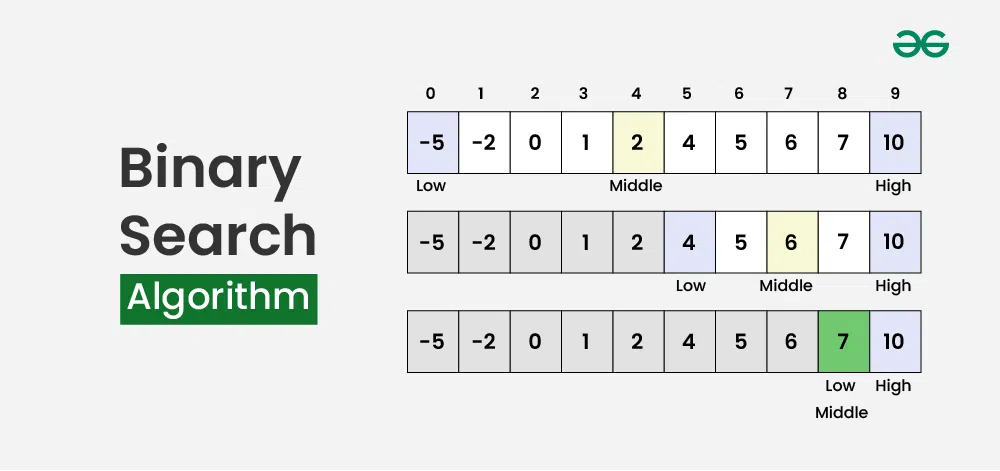
The prerequisite that the array must be sorted is a crucial trade-off. Sorting an array takes time (as we'll see later, typically O(n log n)), but if you need to perform many searches on the same dataset, the initial cost of sorting is quickly paid back by the lightning-fast searches.
Let's explore a high-quality implementation guide.
Binary Search Algorithm in Java
This article from Baeldung provides an excellent, detailed walkthrough of implementing binary search iteratively. It also includes an important detail that is often missed in introductory tutorials.
First, read the introduction under the heading "3. Binary Search" to solidify the core concept. Next, study the code and explanation in the section on Iterative Implementation. Pay close attention to this line of code: int mid = low + ((high - low) / 2); The article explains that this method of calculating the middle index prevents a potential integer overflow bug that can occur with very large arrays if you simply use (low + high) / 2. This is a professional-grade detail that interviewers appreciate.
Here is a clean, iterative implementation based on that article:
public class SearchAlgorithms {

    public static int binarySearch(int[] sortedArray, int target) {
        int low = 0;
        int high = sortedArray.length - 1;

        while (low <= high) {
            // Prevent potential integer overflow
            int mid = low + (high - low) / 2;

            if (sortedArray[mid] == target) {
                return mid; // Found it!
            } else if (sortedArray[mid] < target) {
                // Target is in the right half
                low = mid + 1;
            } else {
                // Target is in the left half
                high = mid - 1;
            }
        }
        return -1; // Element not found
    }

    // ... (include linearSearch and main method for testing)
}
Complexity Analysis of Binary Search
- Time Complexity:
O(log n)
This is the magic of binary search. Because we discard half of the remaining elements at each step, the number of comparisons grows logarithmically, not linearly. For an array of a million items, linear search might take a million steps in the worst case, while binary search will take at most 20. - Space Complexity:
O(1)
The iterative version uses only a few variables (low,high,mid), so its space usage is constant.
3. Seeing the Difference: A Practical Demonstration
Reading about O(n) vs. O(log n) is one thing; seeing it in action is another. The following video provides a powerful demonstration by adding a "steps" counter to both algorithms and running them on increasingly large arrays.
Linear & Binary Search Code | Big O Notation
Let's return to the Telusko video to see a direct comparison of the number of operations each algorithm performs.
Watch the segment from where the instructor adds a step counter to both the linear and binary search methods. Observe how, as the array size doubles, the number of steps for linear search also roughly doubles, while the number of steps for binary search increases by only one. This is the practical meaning of linear vs. logarithmic growth.
4. Other Implementations and Practical Usage
While the iterative implementation is robust and efficient, it's useful to be aware of other approaches.
Recursive Binary Search
Binary search can also be implemented using recursion, where the function calls itself with updated low and high boundaries.
Binary Search Algorithm in Java
The Baeldung article also provides a concise recursive implementation.
Read the section 3.2. Recursive Implementation. Notice how the logic is similar, but instead of a while loop, the function calls itself with a smaller search range. We'll be diving deep into recursion in our next lesson, so think of this as a preview.
While recursive solutions can be elegant, they risk causing a StackOverflowError for very large inputs due to too many nested function calls. For this reason, the iterative approach is often preferred in production code and interviews.
Using Java's Built-in Methods
In your day-to-day work, you'll rarely need to write a search algorithm from scratch. Java provides highly optimized, built-in methods that you should use.
Binary Search Algorithm in Java
Finally, let's look at the standard library methods.
Read section 3.3. Using Arrays.binarySearch(). This shows how to perform a binary search on an array with a single line of code. Remember, the array must be sorted first!
Here's how you'd use it:
import java.util.Arrays;

//...

int[] sortedNumbers = {2, 5, 8, 12, 16, 23, 38, 56, 72, 91};
int target = 23;

// The array MUST be sorted for this to work correctly.
int index = Arrays.binarySearch(sortedNumbers, target);

System.out.println("Element found at index: " + index); // Output: 5
Conclusion
In this lesson, we moved from the theory of Big O to the practical implementation of two key algorithms. You now have a tangible understanding of the massive performance difference between linear and logarithmic time complexity.
Here are the key takeaways:
- Linear Search: Simple to implement, works on unsorted data, but has a time complexity of
O(n), making it inefficient for large datasets. - Binary Search: Extremely fast with a time complexity of
O(log n), but requires the data to be sorted beforehand. - The
O(log n)Advantage: For large inputs, the performance gain of binary search over linear search is enormous. This is a critical concept for writing scalable software. - Iterative vs. Recursive: Iterative binary search is generally safer and more memory-efficient than its recursive counterpart.
- Standard Library: In practice, always prefer using built-in, optimized methods like
Arrays.binarySearch()over writing your own.
In our next lesson, we will formally explore recursion. We've had a small preview of it today, and next time we will dedicate the entire session to understanding how recursive thinking can solve complex problems in an elegant way.