Following our last session on conditional logic, where we learned to direct program flow through different branches, we now turn to another fundamental control structure: iteration. This lesson focuses on loops, which empower your programs to perform repetitive tasks efficiently. Since you're familiar with Python, the concept of looping will be familiar, but Java has its own distinct syntax and a couple of loop types that might be new to you.
Our goal is to master the implementation of for, while, and do-while loops. These are the workhorses of iterative logic in Java, and understanding when and how to use each one is crucial for writing effective code. We will explore how to set up loops that run a specific number of times, loops that run until a condition is met, and loops that are guaranteed to run at least once.
Let's start with a high-level look at the three main types of loops we'll be covering today.
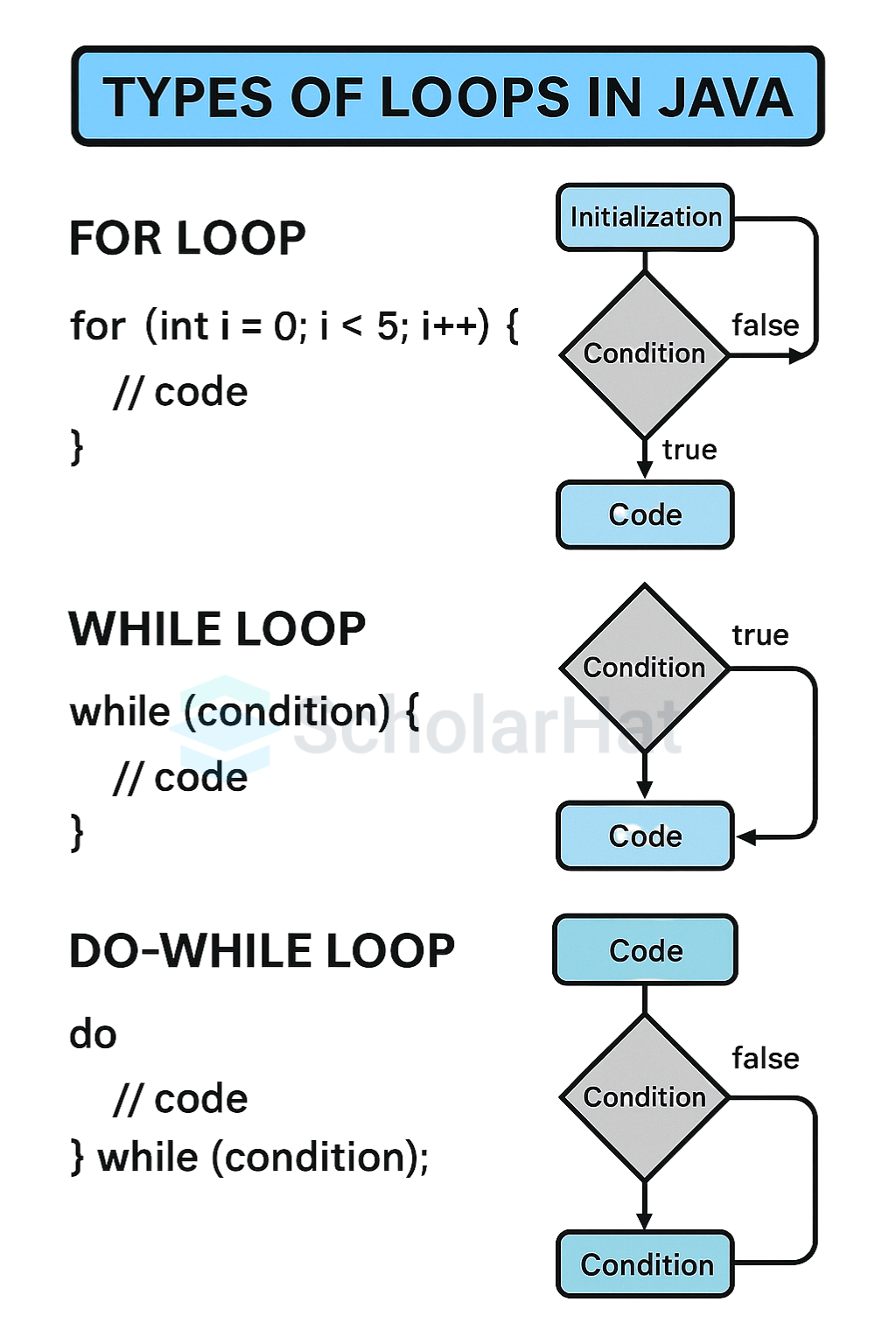
1. The while Loop: Condition-Controlled Repetition
The while loop is perhaps the most straightforward type of loop. It repeatedly executes a block of code as long as a specified boolean condition remains true. The condition is checked before each iteration, which means if the condition is initially false, the loop's body will not execute at all. This is known as an "entry-controlled" or "pre-test" loop.
A very common use case for a while loop is input validation—continuously asking a user for input until they provide a valid response. The "Bro Code" channel on YouTube has an excellent video that uses this exact scenario to introduce while loops.
Learn Java while loops in 12 minutes! ♾️
This video offers a practical demonstration of why while loops are useful, moving beyond simple counting examples to a real-world input validation scenario.
Please watch the following segments: Begin with the demonstration of using a while loop to ensure a user enters their name. Notice how it forces the program to wait until a valid input is given. Next, watch the segment on infinite loops. This is a critical concept and a common bug to watch out for. Understanding how to ensure your loop's condition can eventually become false is essential.
To formalize this, let's look at the syntax and flowchart.
This section from the GeeksForGeeks article on Java loops provides the formal syntax, a code example, and a flowchart for the while loop.
In the article, find and read section 2. while Loop. Focus on the syntax and explanation. Compare the flowchart to the one shown in the "TYPES OF LOOPS IN JAVA" image at the start of the lesson.
The key components of a while loop are:
- Initialization: A variable used in the condition is set up before the loop begins.
- Condition: The boolean expression that is checked before each iteration.
- Update: An expression inside the loop that modifies the variable from the condition, allowing the loop to eventually terminate. Forgetting this is what leads to an infinite loop.
2. The for Loop: Structured Iteration
While a while loop is great for when you don't know how many iterations are needed, a for loop is ideal when you need to loop a specific number of times. It bundles the initialization, condition, and update steps into a single, compact line of code. This makes it highly readable and less prone to errors like forgetting the update step.
In Python, you're used to for i in range(10):. Java's for loop is more explicit about its three components, which is a common pattern in C-style languages.
The Codecourse channel provides a clear introduction to the for loop, contrasting it with the while loop we just saw.
Java For Beginners: While, Do While & For Loops (7/10)
This video segment explains the for loop as a more concise way to write loops where the number of iterations is known.
Watch the section that introduces the for loop. Pay close attention to how the three parts (initialization, condition, increment) are defined within the parentheses.
Let's break down those three parts more formally.
This section of the GeeksForGeeks article provides a detailed breakdown of the for loop's structure.
Please read section 1. for loop. Focus on the detailed explanation of the three parts within the syntax: the components. This structure is fundamental to writing controlled loops in Java.
The Enhanced for Loop (for-each)
Java also has a simplified version of the for loop, often called the "for-each" loop. It's designed for iterating over all elements of an array or a collection. The syntax is much closer to what you've seen in Python (for item in collection:).
int[] numbers = {1, 2, 3, 4, 5};

for (int number : numbers) {
    System.out.println(number);
}
We will revisit this loop in detail when we cover arrays and collections, but it's good to know it exists as it is extremely common in modern Java code.
3. The do-while Loop: Guaranteed Execution
The do-while loop is a variation of the while loop with one critical difference: the condition is checked after the body of the loop has executed. This means a do-while loop is guaranteed to run at least once, even if its condition is initially false. This is known as an "exit-controlled" or "post-test" loop. Python does not have a direct equivalent to this construct.
This type of loop is perfect for situations where an action must be performed at least once before a condition is evaluated, such as displaying a menu of options to a user.
Java For Beginners: While, Do While & For Loops (7/10)
This final segment of the Codecourse video clearly explains the do-while loop and highlights its unique "run at least once" behavior.
Watch the explanation of the do-while loop. The example provided, where the condition is initially false, perfectly illustrates why you would choose this loop over a standard while loop.
Here is a visual example that emphasizes this unique characteristic.

To see the formal structure, you can refer back to the GeeksForGeeks article.
This part of the article covers the syntax and flowchart for the do-while loop.
Read section 3. do-while Loop. Pay special attention to the flowchart and the description that highlights its exit-controlled nature.
4. Loop Control: break and continue
Sometimes you need to alter the normal flow of a loop. Java provides two keywords for this:
break: Immediately terminates the innermost loop it's in. Execution continues at the first statement after the loop. You've already seenbreakused withswitchstatements.continue: Immediately skips the rest of the current iteration and proceeds to the next one. The loop's condition is re-evaluated (forwhileanddo-while) or the update expression is run (forfor) before the next iteration begins.
The tutorial from McGill University provides a great code example showing both keywords in action.
[PDF] Iterative Programming Constructs in Java & Basic Debugging ...
This section of the tutorial provides a code example that uses break to exit an infinite loop and continue to skip processing certain characters.
On slide 9, examine the code example. Trace the logic to understand what it does. The while(true) creates an infinite loop, which is a common pattern when the exit condition is complex and handled internally. The break provides the escape hatch. The continue ensures that only digits are processed.
5. Choosing the Right Loop and Avoiding Errors
With three types of loops, how do you decide which one to use? The GeeksForGeeks article you've been using has a handy table that summarizes this.
This table provides a concise comparison of the different loop types.
Review the Summary Table at the end of the article. This is a great reference to help you decide which loop is most appropriate for a given task.
Here's a quick summary of my own:
- Use a
forloop when you know the number of iterations in advance (e.g., "process these 10 items," "count from 1 to 100"). - Use a
whileloop when the number of iterations is unknown and depends on a condition that might be false from the start (e.g., "keep processing data from this file until it's empty"). - Use a
do-whileloop when the loop body must execute at least once, regardless of the condition (e.g., "show the menu, then ask for user input").
Finally, be mindful of common errors, such as infinite loops and off-by-one errors (e.g., using < when you meant <=). The "Common Loop Mistakes" section in the same GeeksForGeeks article is a valuable read to help you avoid these classic bugs.
Key Takeaways
- Loops are used to execute a block of code repeatedly.
- The
whileloop is a pre-test (entry-controlled) loop that runs as long as a condition is true. It might not run at all. - The
forloop is ideal for loops that run a known number of times, combining initialization, condition, and update into one statement. - The
do-whileloop is a post-test (exit-controlled) loop that always executes at least once. breakexits a loop entirely, whilecontinueskips to the next iteration.- Choosing the correct loop depends on whether you know the iteration count and whether the loop must run at least once.
In our next lesson, we will learn how to define and use methods. This will allow us to organize our code, including the loops we've learned today, into reusable, logical blocks, which is a foundational practice in software engineering.