Welcome to your second lesson in the Java Language Foundations module. In our previous session, we explored the operators that form the building blocks of Java expressions. Today, we'll put that knowledge into practice by learning how to control the flow of our programs.
This lesson focuses on conditional logic, which allows a program to make decisions and execute different blocks of code based on whether certain conditions are true or false. You'll learn to write if-else statements, which are versatile for all sorts of conditions, and switch statements, which are excellent for handling a variable with multiple possible values. As you know Python, the concepts behind if-else will be familiar, but we'll focus on Java's specific syntax and introduce its powerful switch construct, including modern enhancements.
Let's begin by looking at a map of the decision-making tools available in Java.
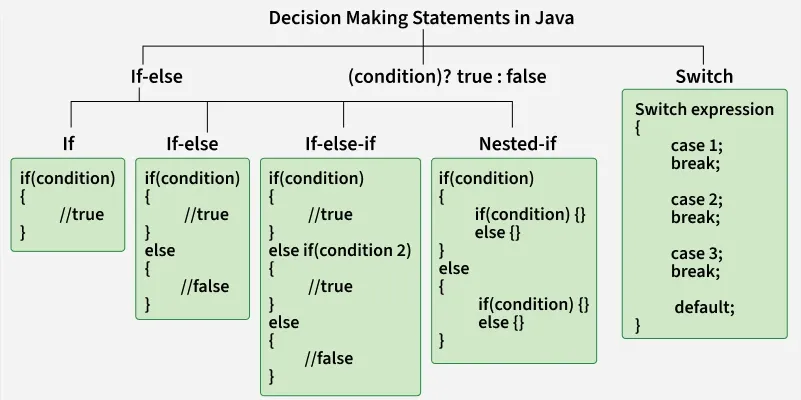
1. The if-else Family: Building Blocks of Decision-Making
At its core, decision-making in programming is about asking a question and choosing a path. The if-else family of statements provides a flexible way to implement this logic.
Programs usually execute code sequentially, line by line. Control flow statements like if allow us to break this sequence, creating branches in our code's execution path. This is fundamental for building any non-trivial software. A great introduction to this concept is provided in a video by Jenny's Lectures CS IT.
Java Control Statements - if & if else | JAVA Placement Course
This video introduces the 'why' behind control flow statements using relatable, real-life analogies before diving into the code.
Watch the first part of the video, which explains what control flow statements are and why they are essential for moving beyond simple sequential programs. You can watch from the beginning up to the start of the types section.
The Simple if and if-else
The simplest conditional is the if statement. It executes a block of code only if a given boolean expression evaluates to true. This is where the relational and logical operators from our last lesson come into play.
The if-else statement extends this by providing an alternative path: the else block, which executes if the condition is false. This allows you to create a binary choice in your code.
The same video provides a very clear, practical demonstration of both if and if-else, including common mistakes beginners make.
Java Control Statements - if & if else | JAVA Placement Course
This part of the video is a hands-on guide to writing if and if-else statements, with a focus on syntax and common pitfalls.
Please watch these two segments: Start with the explanation of the simple if statement. Pay close attention to the discussion about omitting curly braces and adding a semicolon by mistake. Next, watch the segment on the if-else statement, which shows how to provide an alternative execution path.
Handling Multiple Conditions: if-else-if and nested if
What if you have more than two possible paths? For this, you can use the if-else-if ladder. This structure allows you to check a series of conditions in order. The first condition that evaluates to true will have its code block executed, and the rest of the ladder will be skipped. This is Java's equivalent of Python's elif.
You can also place an if statement inside another if statement. This is called a nested if statement and is useful when a second decision depends on the outcome of a first one.
For a concise review of the entire if-else family, the article from GeeksForGeeks is an excellent resource.
Decision Making in Java - Conditional Statements - GeeksforGeeks
This article provides clear definitions, syntax, and flowcharts for each variation of the if statement.
Please read the following sections to solidify your understanding: Java if Statement Java if-else Statement Java nested-if Statement Java if-else-if ladder As you read, notice how the flowcharts visually represent the logic you saw in the video.
2. The switch Statement: A Cleaner Alternative
When you have a long if-else-if ladder that compares a single variable against multiple exact values, the code can become clumsy. The switch statement is designed to handle this scenario more elegantly.
A switch statement evaluates an expression and then tries to match the result to one of its case labels.
The Classic switch
Let's explore the traditional switch statement. A key concept here is the break keyword. When a matching case is found, the code inside that block is executed. If you omit break, execution "falls through" to the next case block, which is a common source of bugs but can be used intentionally for grouping cases.
The Baeldung article on the switch statement provides an excellent, in-depth explanation.
This article demonstrates how switch improves readability and explains its core mechanics, including data type support.
Please read the following sections: Start with the Example of Use, which shows how a messy if-else chain can be refactored into a clean switch. Read section 3, The break Statement. This is crucial for understanding the "fall-through" behavior. Finally, review section 4.1, Data Types, to learn which types (like int, char, and String) can be used in a switch.
3. Modern Java: switch Expressions
Java is constantly evolving. Starting with Java 12, a more powerful and concise version of switch, called a switch expression, was introduced. It has several advantages over the traditional statement:
- It can return a value, allowing you to use it directly in an assignment.
- It uses a cleaner
->(arrow) syntax. - There is no "fall-through," so you don't need
breakstatements. This eliminates a common source of errors. - It enforces exhaustiveness, meaning you must handle all possible values of the variable, which makes your code safer.
The Geekific channel on YouTube has a great tutorial on these modern features.
If, If-Else, Switch Statements and Switch Expressions in Java | Control Statements | Geekific
This video provides a dynamic visual guide to the modern switch expression, contrasting it with the traditional switch statement.
Watch the segment from switch expressions. Pay close attention to the new arrow syntax, handling multiple cases, the yield keyword for more complex logic, and the concept of exhaustiveness.
Modern Integrated Development Environments (IDEs) are smart enough to recognize when you can upgrade your code. They will often suggest refactoring a traditional if-else or switch statement into a modern switch expression, as shown in the image below.

4. if-else vs. switch: Which One to Choose?
So, when should you use if-else versus switch? Here's a quick guide:
| Feature | if-else |
switch |
|---|---|---|
| Use Case | Ideal for complex conditions, checking ranges (e.g., age > 18), or evaluating multiple unrelated variables. |
Best when checking a single variable against a set of discrete, constant values (e.g., days of the week, user menu choices). |
| Flexibility | Highly flexible. Can handle any boolean expression. | More restricted. Classic switch works with primitives, enums, and Strings. Cannot easily handle ranges. |
| Readability | Can become hard to read with many else if branches. |
Very readable for multi-way branching on a single variable. Modern switch expressions are even cleaner. |
| Performance | For many conditions, it can be slightly slower as it evaluates each condition sequentially. | Often more efficient as the compiler can optimize it into a jump table, allowing for direct branching. |
In short, use if-else for complex, range-based, or varied logical checks. Use switch for clean, multi-path branching based on a single variable's value.
Key Takeaways
if,if-else, andif-else-ifprovide a flexible way to control program flow based on complex boolean conditions.- The classic
switchstatement is a cleaner alternative to longif-else-ifchains when checking a single variable against multiple constant values. Thebreakkeyword is critical to prevent "fall-through" behavior. - Modern
switchexpressions (Java 12+) offer a more powerful, safer, and more concise syntax, eliminating the need forbreakand ensuring all cases are handled. - Choosing between
if-elseandswitchdepends on whether you are checking complex logical expressions or branching based on a single value.
In our next lesson, we will explore loops (for, while, do-while), which allow us to repeat blocks of code. You will see how conditional statements are often used inside loops to control their execution, making the concepts from today's lesson even more powerful.