Welcome to our next lesson. In our previous session, we mastered loops, giving us the power to repeat actions in our code. Now, we'll take a crucial step towards writing professional, organized programs by learning about methods. The goal of this lesson is to learn how to define and call methods, pass data into them using parameters, and get results back using return types.
Since you're familiar with Python, you'll recognize methods as Java's equivalent of functions. They serve the same fundamental purpose: to break down complex problems into smaller, manageable, and reusable pieces of code. This principle of modularity is a cornerstone of software engineering and will be essential as we move towards building complex applications with Spring Boot.
1. The Anatomy of a Method
A method is a named block of code that performs a specific task. Think of it as a recipe: you define the steps once, and you can "call" or execute that recipe whenever you need it, perhaps with different ingredients (data) each time.
At its core, a method declaration in Java has several parts. Let's look at a visual breakdown.

Let's break these down:
- Modifier: Controls the visibility of the method (e.g.,
publicmeans it can be called from anywhere). We'll cover these in more detail in the Object-Oriented Programming module. For now, we'll mostly usepublic. - Return Type: The data type of the value the method sends back after it's done. If the method doesn't return anything, we use the keyword
void. - Method Name: A unique identifier for the method. The convention in Java is to use camelCase, starting with a lowercase letter (e.g.,
calculateSum). - Parameter List: The data passed into the method. Each parameter has a type and a name. If a method takes no data, the parentheses are empty.
- Method Body: The block of code, enclosed in curly braces
{}, that gets executed when the method is called.
The "Bro Code" channel has a great video that walks through creating and calling a simple method. It also explains a key detail you've already seen: the static keyword. For now, just know that since our main method is static, any other methods we call directly from it must also be static. We will explore what static truly means in the next module.
Java methods explained in 10+ minutes! 📞
This segment introduces the concept of a method, showing you how to define a basic void method (one that doesn't return a value) and how to call it from main.
Watch the first part of the video, covering what a method is and how to call it. Pay attention to the syntax and the flow of execution from main to the hello method and back.
2. Passing Data with Parameters and Arguments
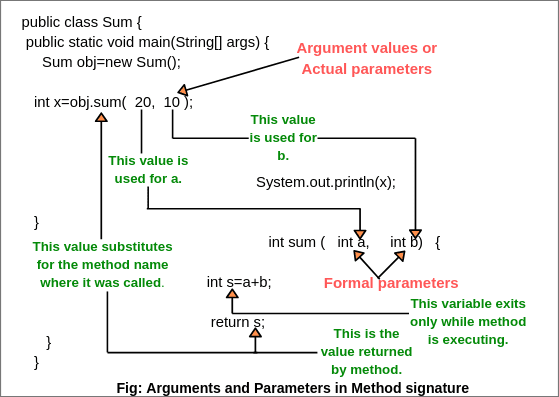
Static methods that do the same thing every time are useful, but their power increases dramatically when they can operate on different data. We achieve this by passing data into them. This is where the terms "parameters" and "arguments" become important.
- Parameters: The variables declared in the method's signature. They act as placeholders for the data the method expects to receive.
- Arguments: The actual values or variables that you pass to the method when you call it.
The following image clearly illustrates this relationship.
Let's continue with the "Bro Code" video, which provides a clear, practical example of adding parameters to a method.
Java methods explained in 10+ minutes! 📞
This part of the video explains how to make your methods more dynamic by passing arguments to them. It demonstrates how to define parameters to accept these arguments.
Watch the segment on passing data to methods. Note how the number and type of arguments in the method call must match the number and type of parameters in the method definition.
To reinforce this, let's look at a textual explanation from Programiz. The distinction between "actual argument" and "formal argument" is another way to think about the same concept.
This article section provides a formal definition of method parameters and arguments, with clear code examples.
Read the section on Method Parameters in Java. Focus on the definitions and examples. Pay special attention to the note at the end that explicitly defines "actual argument" and "formal argument."
3. Getting Results with Return Types
Just as we can pass data into a method, we can also get a computed value back. This is done using a return type and the return keyword.
When you declare a method, you specify the data type of the value it will return (e.g., int, double, String). Inside the method, the return statement does two things:
- It immediately stops the execution of the method.
- It sends a value of the specified return type back to where the method was called.
If a method is not meant to return any value, its return type must be void.
The final part of the "Bro Code" video demonstrates this perfectly by creating a method that adds two numbers and returns the result.
Java methods explained in 10+ minutes! 📞
This segment explains how to create methods that return a value. It shows how to change the return type from void and use the return keyword to send a result back to the caller.
Watch the final part of the video on return types. Notice the different ways you can use the returned value: storing it in a variable or using it directly in another statement, like System.out.println().
The Neso Academy video provides a slightly more formal perspective and shows how you can use the return values from multiple method calls within a single expression.
These sections differentiate void methods from value-returning methods and show how to call them and use their results.
First, quickly review the concept of a value-returning method to solidify your understanding of the syntax for parameters and the return statement. Then, watch the next segment on calling the method and using its return value. The example of adding the results of two separate sum calls (sum(1, 2) + sum(3, 5)) is particularly insightful.
4. The return Keyword in Depth
The return keyword is more powerful than it first appears. As we saw, it passes a value back. But it also provides an explicit way to exit a method at any point.
- In a value-returning method,
returnmust be followed by a value of the correct type. The compiler will enforce this. - In a
voidmethod, you can usereturn;by itself to exit the method early, often based on a certain condition. - Any code placed after a
returnstatement within the same block is considered "unreachable code" and will cause a compilation error.
This deeper understanding is useful for writing more robust and efficient methods.
This final video segment explores the nuances of the return keyword, including common errors and its use for early exit.
Watch this explanation of the return keyword's behavior. It highlights important rules, such as what happens if you try to return the wrong data type or place code after a return statement.
Key Takeaways
- Modularity: Methods are the primary way we achieve code reuse and organization in Java, breaking large problems into smaller, logical units.
- Definition Syntax: A method is defined with its access modifier, return type, name, and a list of parameters:
public static int add(int a, int b) { ... }. - Parameters vs. Arguments: Parameters are the variables in the method signature that act as placeholders. Arguments are the actual values passed to the method when it is called.
- Return Values: A method can return one value (or none). The
returnkeyword sends the value back to the caller and exits the method. A method that returns nothing has a return type ofvoid. - Method Call: A method is invoked by its name, followed by parentheses containing the arguments:
int sum = add(5, 10);.
In our next lesson, we will build on this foundation by exploring method overloading. This is a powerful feature in Java that allows you to define multiple methods with the same name, as long as they have different parameter lists. This lets you create more flexible and intuitive APIs for your code.