Hello! In our last lesson, we took a significant step by learning how to design and create the very structure of a database using CREATE TABLE, primary keys, and foreign keys. You now know how to build the containers for your data. Today, we'll focus on what you can do with that data once it's in the tables.
This lesson is all about summarizing and analyzing data. We will explore how to use the GROUP BY clause in combination with aggregate functions like COUNT, SUM, and AVG. This is an essential skill for any backend developer, as it allows you to move beyond simply retrieving rows and start generating meaningful insights, reports, and statistics from your data—a common requirement in real-world applications.
1. Summarizing Data with Aggregate Functions
Before we can group data, let's first understand the tools we use to summarize it. Aggregate functions in SQL take a set of values (for instance, all values in a column) and return a single summary value. You've likely encountered similar concepts in programming or even spreadsheet software.
The most common aggregate functions are:
COUNT(): Counts the number of rows.SUM(): Calculates the sum of a set of numeric values.AVG(): Calculates the average of a set of numeric values.MAX(): Finds the maximum value in a set.MIN(): Finds the minimum value in a set.
Let's watch a video that introduces these functions and shows how they work on an entire table.
SQL Aggregate Functions | COUNT, SUM, AVG, MAX, MIN | #SQL Course 21
The channel "Data with Baraa" provides a clear, conceptual introduction to the five most common aggregate functions.
Watch the following segments to understand each function: What are aggregate functions? A brief overview. The COUNT function to count the total number of records. The SUM function to get the total of a numeric column. The AVG function to calculate the average value. The MAX and MIN functions to find the highest and lowest values.
For example, if we had a Transactions table, we could find the total revenue from all transactions with a simple query:
SELECT SUM(amount) FROM Transactions;
This is powerful, but its scope is limited to the entire table. What if we wanted to know the total revenue for each day, or for each customer? For that, we need to group our data first.
2. The GROUP BY Clause: The "Split-Apply-Combine" Strategy
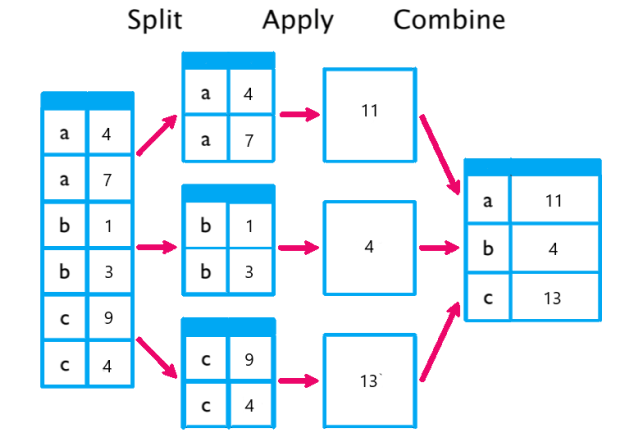
The GROUP BY clause is the key to unlocking more granular analysis. Its job is to take all the rows in a table and organize them into groups, or "buckets," based on the values in one or more columns. Once the data is grouped, you can apply aggregate functions to each group individually.
This process is often described as a "Split-Apply-Combine" strategy:
- Split: The data is partitioned into groups based on the
GROUP BYcolumn(s). - Apply: An aggregate function (like
SUM()orCOUNT()) is applied to each group. - Combine: The results from each group are combined into a final result set.
This diagram perfectly illustrates the concept:
Now, let's put this concept into the context of a SQL query.
SQL Group By Tutorial: Count, Sum, Average, and Having ...
This freeCodeCamp article provides a fantastic analogy and a clear explanation of how GROUP BY works and the rules you must follow.
Please read these two sections: First, read How does a GROUP BY work?. The analogy of grouping people by country to find average height is an excellent way to build intuition. Next, read the section on writing the clause. This part is critical as it explains a fundamental rule of GROUP BY: any column you SELECT that is not inside an aggregate function must appear in the GROUP BY clause. It clearly explains why this rule exists.
3. Calculating Per-Group Summaries
Now that we understand the concept, let's combine GROUP BY with the aggregate functions we saw earlier. This is where you can start answering real business questions.
Imagine a bookstore's inventory table. You don't just want to know the total number of books; you want to know how many books you have in each genre. GROUP BY makes this trivial.
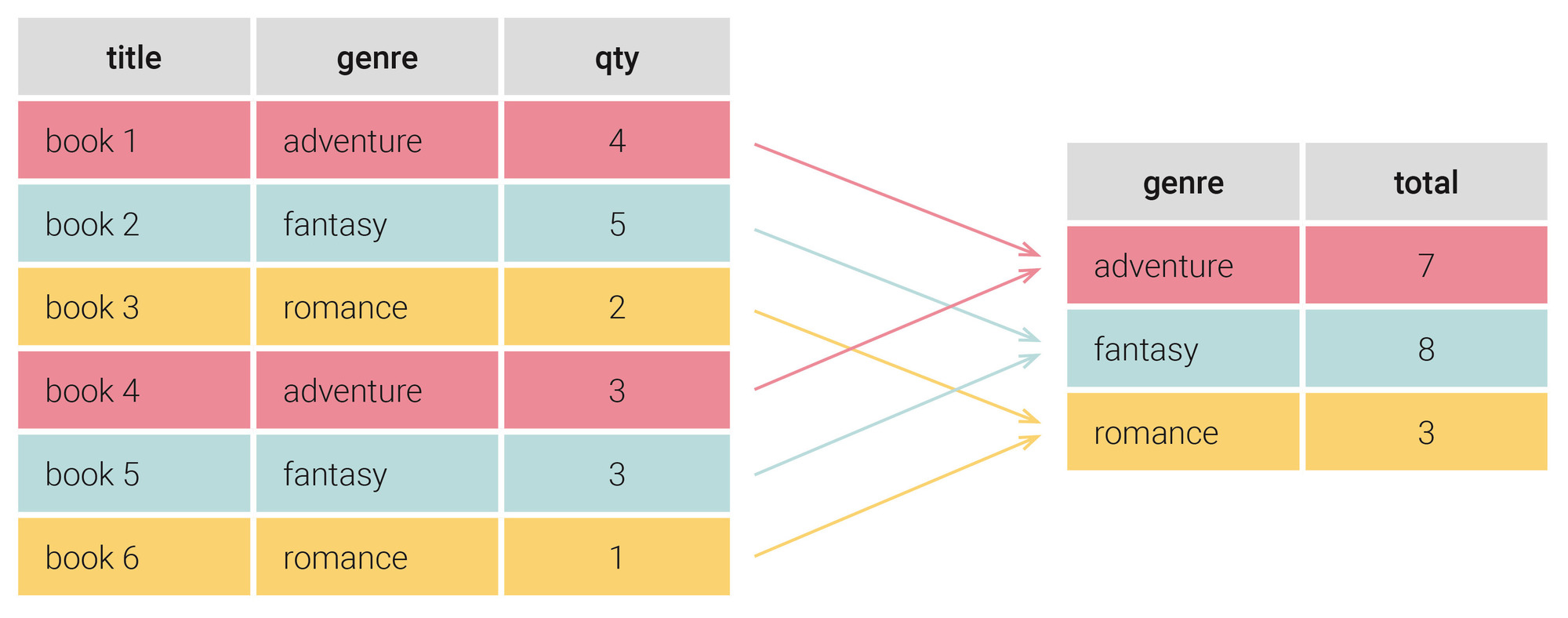
The SQL query to produce the result in the image above would be:
SELECT
  genre,
  SUM(qty) AS total
FROM
  Books
GROUP BY
  genre;
Notice how genre is in both the SELECT list and the GROUP BY clause, while qty is used inside the SUM() aggregate function.
Let's see more examples of COUNT(), SUM(), and AVG() in action with GROUP BY.
SQL Group By Tutorial: Count, Sum, Average, and Having ...
Continuing with the freeCodeCamp article, this section provides concrete examples for the most common aggregate functions.
Read the section titled Aggregations (COUNT, SUM, AVG) and review the examples for SUM and AVG that follow. This will solidify your understanding of how to apply these functions to grouped data.
You can also use multiple aggregate functions in a single query to create a comprehensive summary. For example, for each department in an employees table, you could find the number of employees, the average salary, and the highest salary all at once.
SELECT
  department,
  COUNT(*) AS total_employees,
  AVG(salary) AS avg_salary,
  MAX(salary) AS max_salary
FROM
  employees
GROUP BY
  department;
4. Grouping by Multiple Columns and Filtering Groups
Sometimes, grouping by a single column isn't specific enough. You might need to know the sales figures not just per store, but per product, per store. You can achieve this by simply listing multiple columns in your GROUP BY clause. This creates groups for each unique combination of values in those columns.
SELECT
  location,
  product,
  SUM(amount) AS total_sales
FROM
  sales
GROUP BY
  location, product;
Finally, a common point of confusion is how to filter results when using GROUP BY. You already know the WHERE clause, but it has a limitation: WHERE filters rows before they are grouped. What if you want to filter the groups after the aggregation has been calculated? For example, what if you want to find only the departments with an average salary above $50,000?
This is where the HAVING clause comes in. HAVING filters groups after aggregation.
Here’s a quick comparison:
WHERE order_date > '2024-01-01'— Filters individual rows before grouping.HAVING COUNT(*) > 5— Filters entire groups after counting.
The Bro Code channel on YouTube has a very direct explanation of this.
This video provides a quick, practical demonstration of why WHERE doesn't work with aggregates and how HAVING solves the problem.
Watch the segment from this timestamp, which explains and demonstrates the use of the HAVING clause to filter grouped results.
Conclusion
In this lesson, you've learned how to transform raw data into summarized insights. This is a fundamental skill in data analysis and a frequent task for backend developers who need to build reporting features or API endpoints that provide statistical information.
Key Takeaways:
- Aggregate functions like
COUNT(),SUM(), andAVG()collapse many rows into a single summary value. - The
GROUP BYclause organizes rows into groups based on the values in one or more columns. - By combining
GROUP BYwith aggregate functions, you can calculate statistics for each group, enabling powerful, granular analysis. - Any column in the
SELECTlist that is not an aggregate must also be in theGROUP BYclause. - Use the
HAVINGclause to filter results based on the output of an aggregate function, whereasWHEREis used to filter rows before grouping.
In our next lesson, we will tackle one of the most powerful features of relational databases: combining data from multiple tables using INNER JOIN and LEFT JOIN. This will allow us to query across the related tables you learned to build in the previous lesson.