Welcome back! In our previous lesson, we focused on retrieving and organizing data from existing tables using SELECT, WHERE, and ORDER BY. Now that you're comfortable querying data, it's time to learn how to define the very structure that holds it. This is a fundamental skill for any backend developer, as you will often be responsible for designing the database schema for your applications.
This lesson will guide you through the process of creating your own database tables. We will cover the CREATE TABLE statement, the critical task of choosing appropriate data types for your columns, and how to establish structure and relationships using primary and foreign keys. By the end of this lesson, you'll be able to design and build a simple, robust relational database schema from scratch.
1. Defining a Table's Blueprint: CREATE TABLE and Data Types
Before you can store data, you need to define a container for it. In SQL, this container is a table, and you create it using the CREATE TABLE command. The syntax is straightforward: you provide a table name and then a list of column definitions, where each definition includes a column name and a data type.
Choosing the correct data type for each column is one of the most important decisions in database design. It's not just about what kind of data you can store; it dictates storage efficiency, performance, and data integrity. As a CSE student, you can think of this as being analogous to choosing between an int, float, or char in a lower-level language—the choice has direct implications for memory usage and the operations you can perform.
A good way to get an overview of the most common data types is to watch a short primer.
MySQL 24 - Important Data Types
This video from Caleb Curry's channel provides a quick and clear introduction to the most essential data types you'll use.
Watch these key segments: First, understand the difference between fixed-length and variable-length strings with CHAR vs. VARCHAR. Next, review the main numeric types, including INT, DECIMAL, and DOUBLE. Pay close attention to the distinction between DECIMAL for exact math (like money) and DOUBLE for floating-point values. Finally, get a quick look at the types used for dates and times.
To dive deeper and have a reference guide, the following article from DigitalOcean is an excellent resource. It provides detailed tables and best practices.
Understanding SQL Data Types: A Complete Guide
This guide offers a comprehensive look at SQL data types, their usage, and best practices.
Please read the following sections to solidify your understanding: Start with the Introduction for a high-level overview. Next, review the tables in the sections on Numeric Data Types, Date and Time Data Types, and Character and String Data Types. You don't need to memorize them, but get a feel for the options available. Finally, and most importantly, read the Best practices section. The "Goldilocks Rule" and the advice on understanding your data domain are crucial for professional development.
2. The Unique Identifier: The Primary Key
Every well-designed table needs a way to uniquely identify each row. Imagine a table of Users where two people are named "John Smith." How would you reliably retrieve the correct one? The solution is a primary key.
A primary key is a column (or a set of columns) whose value must be unique for every row in the table. It has two strict rules:
- It must be unique: No two rows can have the same primary key value.
- It cannot be NULL: Every row must have a primary key value.
This constraint ensures data integrity and provides a reliable way to reference specific records.
The video below offers a clear explanation of what a primary key is and how it differs from other constraints.
Primary Key and Foreign Key Constraints in SQL
This video from Neso Academy breaks down the concept of primary keys and shows the syntax for creating them.
Watch these three parts: The introduction explains the role of a primary key in ensuring data integrity. This segment demonstrates the SQL syntax for defining a primary key within a CREATE TABLE statement. Finally, watch the part that provides a comparison table distinguishing PRIMARY KEY, UNIQUE, and NOT NULL constraints. This is a common point of confusion, and the explanation here is very clear.
To create a primary key, you simply add the PRIMARY KEY constraint to a column definition. A very common practice is to use an integer that automatically increments for each new row.
Here is a typical example:
CREATE TABLE Artists (
    ArtistId int IDENTITY(1,1) NOT NULL PRIMARY KEY,
    ArtistName nvarchar(255) NOT NULL,
    ActiveFrom date
);
In this example, ArtistId is the primary key. The IDENTITY(1,1) keyword (in SQL Server; AUTO_INCREMENT in MySQL) tells the database to automatically generate a new number for this column, starting at 1 and incrementing by 1 for each new artist added.
3. Connecting the Dots: The Foreign Key
Rarely does data exist in isolation. You have customers and orders; artists and albums; students and courses. Relational databases are powerful because they allow you to model these relationships. The mechanism for this is the foreign key.
A foreign key is a column in one table that refers to the primary key of another table. This creates a link between the two tables and enforces what is known as referential integrity. In simple terms, the database guarantees that you cannot create an "orphaned" record. For example, you can't add an order for a customer who doesn't exist.
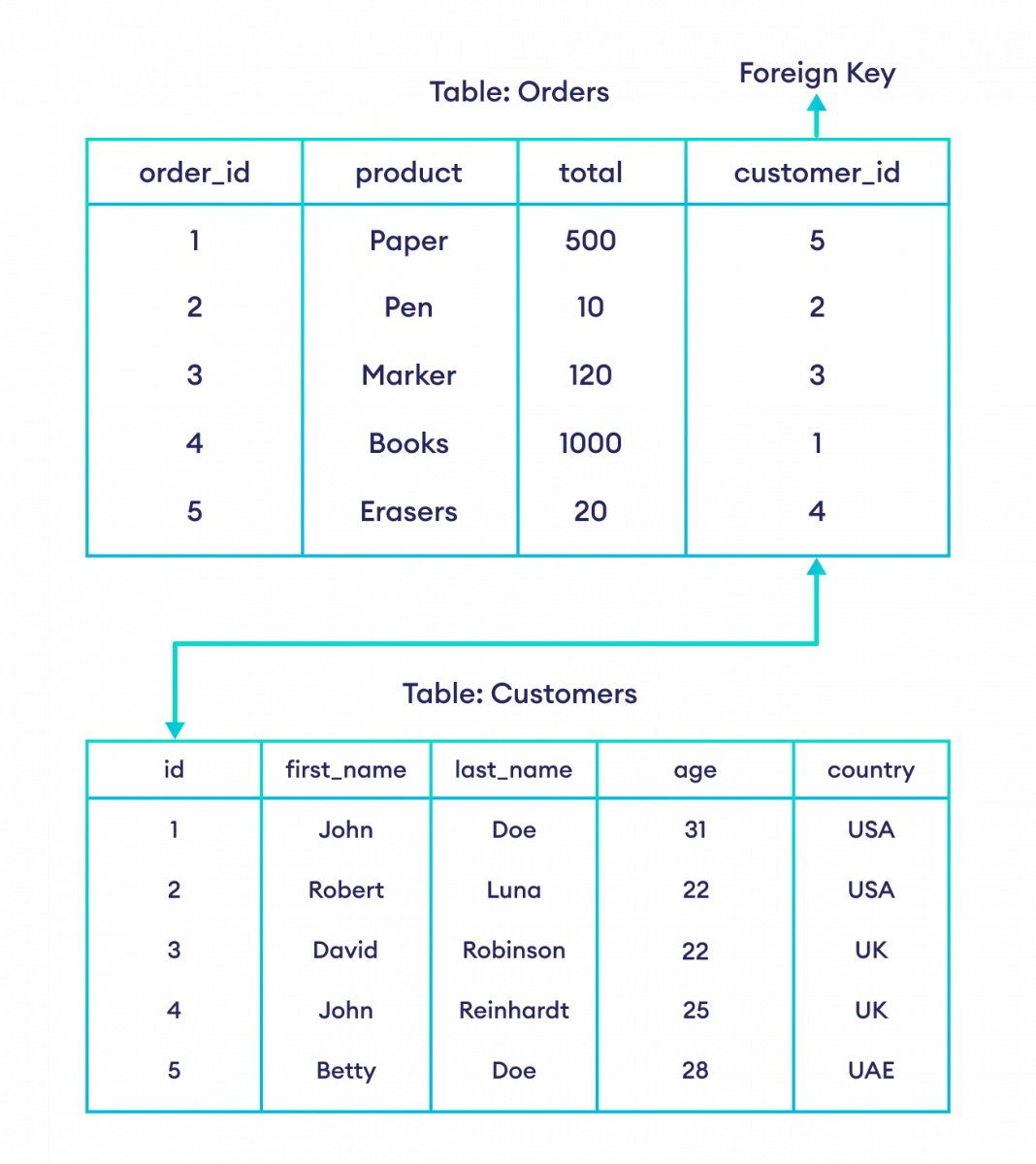
Let's watch a detailed walkthrough of how this works in practice.
Primary Key and Foreign Key Constraints in SQL
Continuing with the Neso Academy video, this part provides an excellent, step-by-step example of creating a foreign key relationship.
First, watch the introduction to foreign keys. Then, pay close attention to the full example. The narrator creates an employee table and a department table, then uses a foreign key to link them. This segment is crucial because it explains how the database validates insertions, preventing you from adding an employee to a department that doesn't exist.
4. Putting It All Together
Now let's look at a complete example that uses all the concepts we've discussed: creating tables with appropriate data types, primary keys, and foreign keys. Given your interest in music, we can model an Artists and Albums database.

Let's break down the code from the image:
-
CREATE TABLE Artists:ArtistId int IDENTITY(1,1) NOT NULL PRIMARY KEY: This defines an auto-incrementing integer as the primary key.ArtistName nvarchar(255) NOT NULL: A variable-length Unicode string to store the artist's name. It cannot be empty.ActiveFrom date: A column to store the date when the artist became active.
-
CREATE TABLE Albums:AlbumId int IDENTITY(1,1) NOT NULL PRIMARY KEY: The album's own unique primary key.AlbumName nvarchar(255) NOT NULL: The album's title.ArtistId int NOT NULL: This column will store the ID of the artist who created the album. Notice it has the same data type (int) as theArtistIdin theArtiststable.CONSTRAINT FK_Albums_Artists FOREIGN KEY (ArtistId) REFERENCES dbo.Artists (ArtistId): This is the foreign key constraint.FOREIGN KEY (ArtistId)specifies that theArtistIdcolumn in this table (Albums) is the foreign key.REFERENCES dbo.Artists (ArtistId)specifies that it points to theArtistIdcolumn in theArtiststable.
This structure elegantly ensures that every album in the Albums table is associated with a valid artist from the Artists table.
To see another complete, practical example, review the e-commerce scenario in the OWOX article.
Mastering Primary and Foreign Keys in SQL for Data Integrity
This article provides another end-to-end example of creating related tables.
Review the section titled A Real-Life Use Case. It demonstrates how to create Categories, Sellers, and Products tables, linking them together with primary and foreign keys. This reinforces the patterns we've discussed today.
Conclusion
In this lesson, you've moved from being a data consumer to a data architect. You now have the foundational skills to design and build the tables that will form the backbone of your applications.
Key Takeaways:
- The
CREATE TABLEstatement is used to define a new table's structure, including its columns and their data types. - Choosing the appropriate data type (
INT,VARCHAR,DECIMAL,DATE, etc.) is critical for data integrity, performance, and storage efficiency. - A primary key is a constraint that uniquely and non-nullably identifies each row in a table, often using an auto-incrementing integer.
- A foreign key is a column in one table that references the primary key of another, creating a relationship and enforcing referential integrity.
In our next lesson, we will explore how to perform calculations and summarize data across multiple rows. You will learn to use GROUP BY and aggregate functions like COUNT(), SUM(), and AVG(), which are essential tools for generating reports and insights from your data.