Welcome to the "SQL and Database Fundamentals" module! As a backend developer, your Java code will almost always interact with a database to store, retrieve, and manage application data. SQL (Structured Query Language) is the universal language for this interaction. This module is designed to give you the practical database skills you'll need for your Spring Boot projects.
In our previous lesson, we explored Java's Optional class to handle the absence of a value safely. This concept has a direct and common application in database programming. When you query a database for a single item, like a user by their ID, what happens if no such user exists? Instead of returning a null and risking a NullPointerException, modern Java applications often return an Optional. You'll see this pattern frequently when we connect Java to a database later in the course.
Today, we will build on your existing basic knowledge of SELECT and WHERE to master the foundational SQL commands for retrieving and sorting data. By the end of this lesson, you will be able to write robust queries using SELECT, WHERE, and ORDER BY to precisely fetch and organize the data you need from any relational database.
1. The Language of Databases: SQL
SQL, or "sequel," stands for Structured Query Language. It's a declarative language, which means you tell the database what data you want, and the database engine figures out how to retrieve it. This is different from a procedural language like Java, where you define step-by-step instructions.
Databases that use SQL are typically relational databases, where data is organized into tables. Think of a table as a spreadsheet with rows and columns. Each table stores a specific type of entity (like Customers or Products), and they can be linked together through relationships. For instance, an Orders table might be related to a Customers table.
The following video provides an excellent high-level introduction to what SQL is, why databases organize data into separate, related tables (a concept called normalization), and how it all works.
This video from Kevin Stratvert's channel will give you the essential context for our work with SQL.
Please watch these two key segments: First, watch the introduction from What is SQL? to get a clear definition. Then, jump to the explanation from on normalization to understand why we split data into different tables. This is a fundamental concept in database design.
2. Retrieving Data: SELECT and FROM
The most fundamental SQL query involves two main clauses:
SELECT: Specifies the columns (fields) you want to retrieve.FROM: Specifies the table you want to retrieve the data from.
You can either select all columns using an asterisk (*) or list specific columns separated by commas. It's also common practice to give columns a more readable name in the output using an alias with the AS keyword.

Let's watch a practical demonstration of how to construct these basic queries.
This part of the Kevin Stratvert video provides a great walkthrough of writing your first queries.
Watch the segment from writing your first query. Pay attention to these key actions: Selecting all columns with *. Selecting specific columns by name. Creating a column alias with AS. Using DISTINCT to get a list of unique values.
3. Filtering Rows: The WHERE Clause
Retrieving all the data from a table is rarely what you want. The WHERE clause allows you to filter the rows and retrieve only those that match specific criteria. You're already familiar with simple equality checks, but the WHERE clause supports a much richer set of operators.
- Comparison:
=,!=(or<>),>,<,>=,<= - Logical:
AND,OR,NOT - List/Set:
IN (...),NOT IN (...) - Pattern Matching:
LIKE(using wildcards%for any number of characters and_for a single character) - Range:
BETWEEN ... AND ... - Null Checks:
IS NULL,IS NOT NULL
The following video segment provides a comprehensive tour of these operators.
Learn Basic SQL in 15 Minutes Business Intelligence For Beginners SQL Tutorial For Beginners 13
This video from Adam Finer's "Learn BI" channel offers a very concise and clear explanation of filtering with the WHERE clause.
Watch the segment from how to return specific rows. It effectively demonstrates how to filter both numeric and text data using various operators, including LIKE, IN, BETWEEN, and IS NULL.
4. Sorting the Results: The ORDER BY Clause
After retrieving and filtering your data, you'll often want the results presented in a specific order—for example, alphabetically by name or chronologically by date. The ORDER BY clause handles this.
You can sort by one or more columns. The default order is ascending (ASC), but you can specify descending order using the DESC keyword.
A crucial concept to understand is the logical order of execution. While you write the SQL statement in a certain sequence (SELECT, FROM, WHERE, ORDER BY), the database engine processes it in a different logical order.
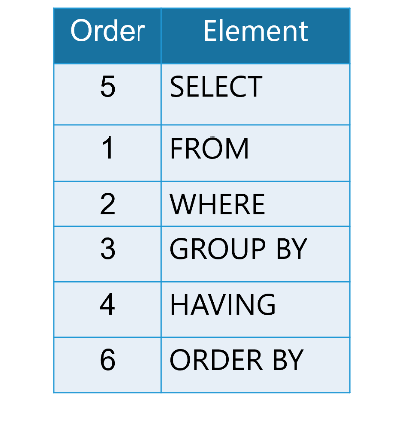
The correct logical order is:
FROM: Identifies the table(s).WHERE: Filters the rows.GROUP BY/HAVING: (We'll cover these later).SELECT: Selects the final columns.ORDER BY: Sorts the final result set.
This explains why ORDER BY must always come after the FROM and WHERE clauses in your written query.
Let's see a quick demonstration and then read a bit more for clarity.
Let's return to the Kevin Stratvert video for a quick look at ORDER BY.
Watch this short clip from ordering results to see ORDER BY with ASC and DESC in action.
Now, let's solidify this concept with a short reading that explains the ORDER BY clause and its place in a query.
How To Use GROUP BY and ORDER BY in SQL
This DigitalOcean article provides excellent explanations. We'll focus on the sections about ORDER BY and clause sequence.
Please read the following two sections: Start with the section Using ORDER BY. This will walk you through examples of sorting by numeric and text columns, in both ascending and descending order. Then, skip down to the "Common Errors and Debugging" section and read the part on Placing ORDER BY Before GROUP BY. This part is critical as it reinforces the correct sequence of SQL clauses.
5. Practice Your Skills
The best way to learn SQL is by writing it. The following resource from GeeksForGeeks provides a series of exercises based on Sales and Products tables. Try to answer the questions yourself before looking at the provided query solution.
SQL Exercises : SQL Practice with Solution for Beginners ...
This article contains a great set of exercises to test your understanding of the clauses we've covered today.
Work through exercises 1 through 20. Pay special attention to the queries that combine SELECT, WHERE, and ORDER BY, such as: Exercise 7: Combines SELECT specific columns with a WHERE clause. Exercise 14: Combines SELECT with ORDER BY DESC. Exercise 20: Combines SELECT with ORDER BY ASC.
Conclusion
Excellent work! In this lesson, we laid the critical groundwork for interacting with databases. You have solidified your understanding of the core SQL statements for data retrieval and presentation.
Key Takeaways:
- SQL is a declarative language used to communicate with relational databases.
- The
SELECTclause specifies the columns you want, andFROMspecifies the table. Use*for all columns or list them by name. - The
WHEREclause filters rows based on conditions using a wide range of operators (=,>,LIKE,IN,BETWEEN, etc.). - The
ORDER BYclause sorts the final result set in either ascending (ASC) or descending (DESC) order. - The logical execution order (
FROM->WHERE->SELECT->ORDER BY) determines the structure of your query and how it's processed.
In our next lesson, we will move from querying existing tables to defining our own. You will learn how to CREATE tables, define columns with appropriate data types, and establish relationships using primary and foreign keys. This is the next essential step toward building the backend of a complete application.