Hello! In our last lesson, we mastered the art of summarizing data within a single table using GROUP BY and aggregate functions. This allowed us to derive meaningful statistics from our data. However, in the real world, data isn't stored in one giant table. It's strategically split across multiple related tables—a concept you might recognize from your CSE studies as normalization.
Today, we'll learn how to put that scattered data back together. This lesson focuses on one of the most fundamental and powerful features of SQL: JOINs. We will explore how to combine data from multiple tables using INNER JOIN and LEFT JOIN. This is a non-negotiable skill for a backend developer, as you'll constantly need to retrieve related information—like a user and all their posts, or a product and all its reviews—to build the API responses that power applications.
1. Why Do We Need to Join Tables?
Before we dive into the syntax, let's understand the "why." In relational databases, we separate data into different logical units to avoid redundancy and maintain data integrity. For example, we might have one table for employees and another for departments. The employees table would contain a department_id to link to the correct department, but it wouldn't repeat the department's name for every single employee.
To get a complete view—like a list of employees and their department names—we need to join these tables. A JOIN clause combines rows from two or more tables based on a related column between them, typically a primary key in one table and a foreign key in another.
The following video from "Data with Baraa" provides an excellent conceptual overview of what joins are and the main reasons we use them.
SQL Joins Basics (Visually Explained) | INNER, LEFT, RIGHT, FULL | #SQL Course 8
This video explains the core purpose of SQL joins and how they differ from other ways of combining tables.
Watch the segment from the beginning up to the main reasons for using joins. Focus on the three key use cases presented: recombining data, data enrichment, and checking for existence.
2. INNER JOIN: Finding the Intersection
The most common type of join is the INNER JOIN. It returns only the records that have matching values in both tables. Think of it as the intersection in a Venn diagram. If you join employees and departments on department_id, an INNER JOIN will only return employees who are assigned to a department that actually exists in the departments table.
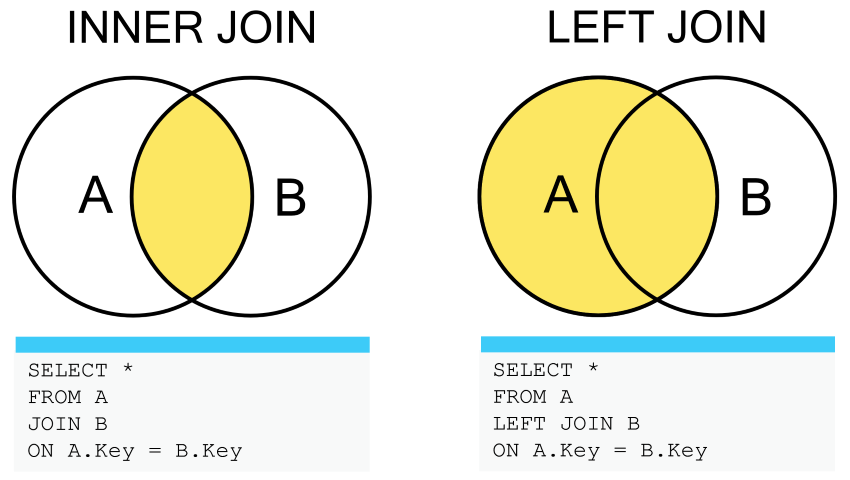
Let's read about the syntax and see a practical example. We'll use a simple employees and departments dataset to make the concept concrete.
SQL JOIN for Beginners with Diagrams & Interactive Examples
This article from Beekeeper Studio provides a clear, beginner-friendly introduction to joins with sample data you can follow along with.
First, review the sample data and INNER JOIN example. Pay close attention to the two tables, employees and departments, and the ON clause that defines the relationship. Notice in the result that "Diana" (who has no department) and the "Sales" department (which has no employees) are both missing.
The syntax for an INNER JOIN is:
SELECT
  e.name,
  d.dept_name
FROM
  employees AS e
INNER JOIN
  departments AS d ON e.dept_id = d.dept_id;
Here, e and d are aliases for the table names. Using aliases is a best practice that makes your queries shorter and more readable, especially when you start joining many tables.
To see how the database engine actually processes this, the "Data with Baraa" video provides a fantastic step-by-step walkthrough.
SQL Joins Basics (Visually Explained) | INNER, LEFT, RIGHT, FULL | #SQL Course 8
This segment visualizes the execution of an INNER JOIN query, showing how rows are matched and filtered.
Watch the detailed explanation of INNER JOIN from the beginning of the section. This part covers the syntax, the importance of aliases, and a visual trace of how the matching happens. Don't worry about the final execution breakdown at the end; focus on the query writing part.
3. LEFT JOIN: Keeping All Records from the Left
What if your requirement changes? Imagine your manager wants a list of all employees, along with their department names, but insists that no employee should be left out, even if they haven't been assigned to a department yet. An INNER JOIN would exclude these employees. This is where LEFT JOIN comes in.
A LEFT JOIN (also called LEFT OUTER JOIN) returns all records from the left table (the one specified in the FROM clause) and the matched records from the right table. If a record in the left table has no match in the right table, the columns from the right table will contain NULL.
The order of tables is crucial here! FROM employees LEFT JOIN departments is different from FROM departments LEFT JOIN employees.
Let's see this in action with the same article.
SQL JOIN for Beginners with Diagrams & Interactive Examples
Now let's see how the LEFT JOIN changes the result.
Read the section on LEFT JOIN. Notice how "Diana", who was excluded before, now appears in the result set, but her dept_name is NULL. This is the key behavior of a LEFT JOIN.
The syntax is very similar:
SELECT
  e.name,
  d.dept_name
FROM
  employees AS e
LEFT JOIN
  departments AS d ON e.dept_id = d.dept_id;
The techTFQ channel has an excellent video that demonstrates this exact scenario—where a business requirement change forces a developer to switch from an INNER JOIN to a LEFT JOIN.
SQL JOINS Tutorial for beginners | Practice SQL Queries using JOINS - Part 1
This video walks through a practical, real-world problem that perfectly illustrates when and why to choose a LEFT JOIN over an INNER JOIN.
Watch these two parts: First, see the initial problem solved with an INNER JOIN from this segment. Then, watch how the query is modified to a LEFT JOIN when the requirement changes to include all employees, from this segment. This transition is a core concept for any backend developer.
Summary: When to Use Which Join
The choice between INNER and LEFT join depends entirely on your goal.
-
Use
INNER JOINwhen you need to see only the data that has a complete relationship.- "Show me students and the courses they are enrolled in." (You don't want students who aren't enrolled in anything).
- "List products that have been purchased." (You don't care about products that have never sold).
-
Use
LEFT JOINwhen you need all the data from a primary table, regardless of whether a relationship exists in the secondary table.- "Show me all students and any courses they are enrolled in." (You want to see all students, even those not currently enrolled).
- "List all users and their profile information." (You want every user, even if they haven't filled out their profile).
This image provides a helpful visual summary of the most common join types. For now, focus on INNER JOIN and LEFT INCLUSIVE (which is the standard LEFT JOIN).

Conclusion
You've now unlocked a critical SQL skill. By learning to use INNER JOIN and LEFT JOIN, you can query across multiple tables to construct complex and meaningful datasets. This moves you from analyzing isolated tables to understanding the relationships that form the backbone of a relational database.
Key Takeaways:
- JOINs are used to combine rows from two or more tables based on a related column specified in the
ONclause. INNER JOINreturns only the records that have matching values in both tables. It's for when you only want the intersection.LEFT JOINreturns all records from the left table and the matched records from the right table. If there's no match,NULLis returned for the right table's columns.- The order of tables matters for a
LEFT JOINbut not for anINNER JOIN. - Using table aliases (e.g.,
FROM employees AS e) is essential for writing clean and readable join queries.
In our next lesson, we'll step back and look at the "why" behind splitting data into multiple tables in the first place. We'll explore database normalization, the design principle that makes joins so necessary and powerful.