Hello! Welcome back to the course.
In our last lesson, we learned how to use Ansible's dynamic inventory to discover and manage ephemeral cloud resources in AWS. This is a critical skill for modern DevOps, but it raises an important question: how do we ensure the automation we run against this dynamic infrastructure is correct, reliable, and predictable? Running untested roles in an automated pipeline is a recipe for disaster.
This lesson directly answers that question. We will focus on the learning outcome: Test Ansible roles locally using Molecule to ensure correctness and idempotency.
We'll move beyond the "run and see" approach and adopt a professional, test-driven workflow. You'll learn how to use Molecule, the official Ansible testing framework, to build high-quality, reusable roles that you can deploy with confidence. This is a foundational practice for building robust CI/CD pipelines.
1. The "Why": Moving Up the Ansible Testing Spectrum
Before diving into Molecule, it's helpful to understand where it fits in the broader landscape of automation testing. Not all testing is equal. Manually spinning up an EC2 instance to test a role is slow and error-prone. We need a more structured approach.
Ansible 101 - Episode 7 - Molecule Testing and Linting and Ansible Galaxy
Jeff Geerling, a prominent figure in the Ansible community, provides a great conceptual overview of what he calls the "Ansible Testing Spectrum." This will help you understand the different layers of testing and why a tool like Molecule is so important.
Watch the section from 17:57 to 23:34. Focus on the hierarchy of testing methods he presents, from simple syntax validation (yamllint, ansible-lint) to full integration testing with tools like Molecule. This establishes the motivation for what we're about to learn.
Molecule automates the middle-to-upper tiers of this spectrum: it provisions a clean test environment, runs your role, verifies the outcome, checks for idempotency, and tears everything down.
2. Understanding the Molecule Workflow
At its core, Molecule formalizes the manual testing process into a repeatable, automated sequence. It uses a set of configurable components to manage the entire lifecycle of a test.
- Driver: The engine for creating test instances. Common choices are Docker (fast, lightweight), Vagrant (full VMs), and cloud providers like EC2. We will focus on the Docker driver.
- Provisioner: The tool that applies the configuration. This is almost always Ansible.
- Verifier: The framework for asserting the final state of the test instance. Popular options are Testinfra (Python-based tests) and Ansible itself.
When you run molecule test, it executes a default sequence of actions. This diagram shows a typical flow:
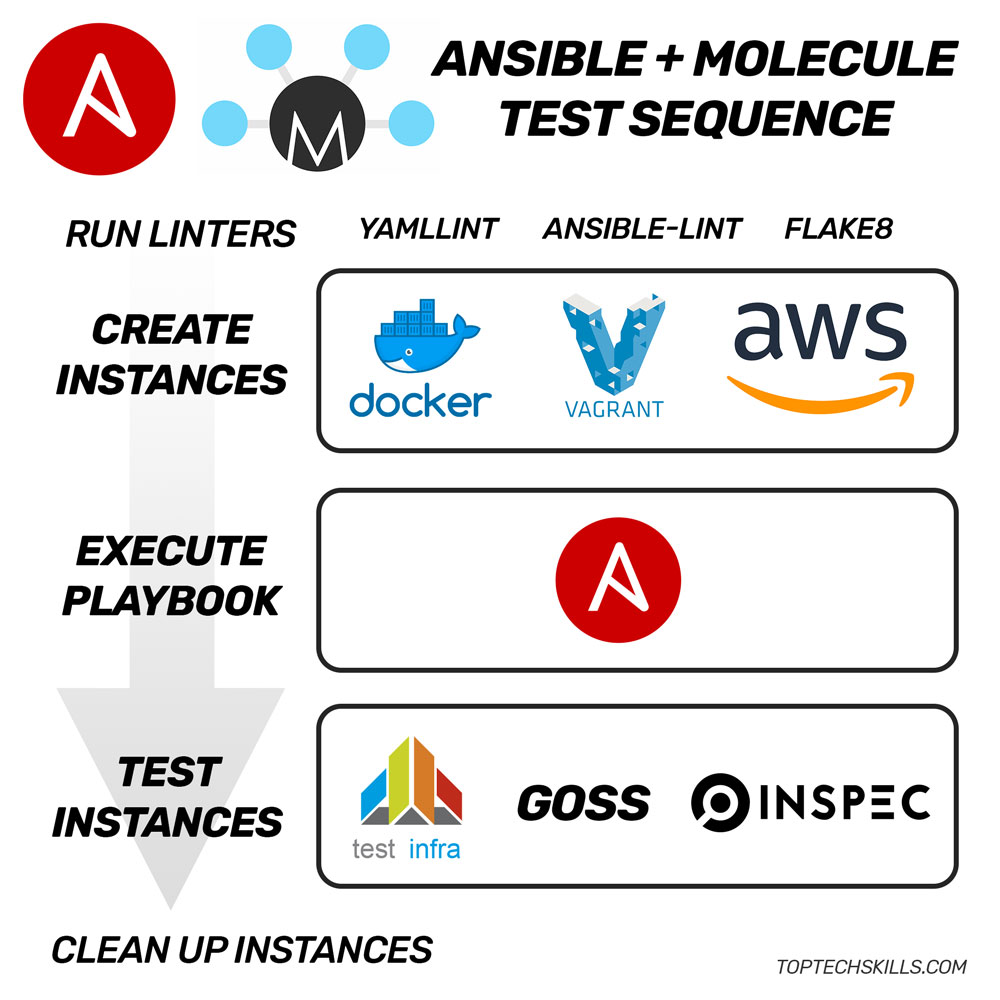
Let's see a video that walks through this sequence in detail.
Rapidly Build & Test Ansible Roles with Molecule + Docker
This video from TopTechSkills provides a fantastic, rapid-fire introduction to Molecule's core concepts and test sequence.
Please watch these two short segments: What is Molecule? (00:00 - 00:46): This gives a high-level overview of Molecule's purpose. Explaining the molecule test sequence (04:01 - 06:54): This is the most important part. The presenter explains each step of the test matrix (lint, destroy, create, converge, idempotency, verify, etc.) as it executes. This will solidify your understanding of the diagram above.
3. Hands-On: Your First Molecule-Managed Role
Theory is great, but let's get our hands dirty. We'll adopt a Test-Driven Development (TDD) workflow: write a test that fails, then write the Ansible code to make it pass.
3.1. Setup and Initialization
First, you'll need to install Molecule and its Docker driver. Make sure you have Docker running on your system.
# It's best practice to use a Python virtual environment
python -m venv venv
source venv/bin/activate


# Install Molecule and the Docker plugin
pip install "molecule[docker]" ansible
Now, let's initialize a new role. This command creates a standard Ansible role structure and adds a molecule/default directory containing the testing boilerplate.
molecule init role my-nginx-role --driver-name docker
cd my-nginx-role
Take a moment to inspect the files inside molecule/default/. The key files are:
molecule.yml: Configures the driver, platforms (test instances), provisioner, and verifier.converge.yml: The playbook Molecule runs to apply your role to the test instance.tests/test_default.py: The verification tests written using Testinfra and Pytest.
3.2. Writing a Failing Test
Let's define our goal: this role should install and enable the NGINX web server. Following TDD, we'll write the tests first.
Open molecule/default/tests/test_default.py and replace its contents with this:
import os
import testinfra.utils.ansible_runner

testinfra_hosts = testinfra.utils.ansible_runner.AnsibleRunner(
    os.environ['MOLECULE_INVENTORY_FILE']).get_hosts('all')


# Test 1: Check if the nginx package is installed
def test_nginx_package_installed(host):
    assert host.package("nginx").is_installed


# Test 2: Check if the nginx service is running and enabled
def test_nginx_service_running_and_enabled(host):
    service = host.service("nginx")
    assert service.is_running
    assert service.is_enabled
Our tests are ready. Now, let's run just the verification step. It will fail because we haven't written any Ansible tasks yet.
molecule verify
You should see output from pytest indicating that the tests failed spectacularly. This is expected!
3.3. The Development Loop: Converge, Login, Verify
Running molecule test for every small change is too slow. The professional workflow revolves around the converge command, which leaves the test instance running for inspection and quick iteration.
First, let's add the Ansible tasks to make our tests pass. Edit tasks/main.yml with the following content:
---


# tasks file for my-nginx-role
- name: Install NGINX
  ansible.builtin.package:
    name: nginx
    state: present

- name: Ensure NGINX service is started and enabled
  ansible.builtin.service:
    name: nginx
    state: started
    enabled: true
Now, let's use the iterative development workflow.
Ansible 101 - Episode 7 - Molecule Testing and Linting and Ansible Galaxy
Jeff Geerling demonstrates the powerful converge and login commands, which form the core of the local development loop.
Watch from 54:53 to 1:00:01. This section perfectly illustrates the iterative development cycle. Pay attention to how he uses molecule converge to apply changes without destroying the instance, and molecule login to get a shell inside the test container for debugging.
Now, try this workflow yourself:
-
Converge: Run the playbook. Molecule will create the Docker container and apply your role.
molecule converge -
Login (Optional): If something went wrong, you can get a shell inside the container to debug.
molecule login # Inside the container, you can check things manually # > systemctl status nginx # > exit -
Verify: Run your Testinfra tests against the running container.
molecule verify
This time, the tests should all pass. You've successfully built and verified your role!
- Destroy: Once you're done, clean up the environment.
molecule destroy
4. Guaranteeing Idempotency
Correctness is one half of the equation; idempotency is the other. As we've discussed, a well-behaved Ansible role should produce the same state no matter how many times it's run. On the second run and beyond, no tasks should report as "changed".
Molecule has a dedicated idempotence step that automatically checks this for you by running the converge playbook a second time and failing the test if any task reports a change.
How to Write Idempotence Tests in Molecule
This article from OneUptime is an excellent resource for understanding common idempotence failures and how to fix them. Getting this right is a mark of a senior-level Ansible practitioner.
Please read these two key sections: "What the Idempotence Test Does": This explains the simple but effective mechanism Molecule uses to check for idempotency. "Common Idempotence Failures and Fixes": This is the most valuable part. Study the five 'BAD' vs 'GOOD' examples. They cover the most frequent mistakes, such as using command/shell modules improperly and restarting services instead of notifying handlers.
To see this in action, run the full test suite on the role you just created.
molecule test
Observe the output. You will see the converge step, followed by the idempotence step. Because we used the package and service modules correctly, the idempotence check will pass.
5. Advanced Testing: Multiple Platforms and Scenarios
Real-world roles often need to support multiple operating systems. Molecule makes this easy. By adding more entries to the platforms section of molecule.yml, you can test your role against different distributions like Ubuntu, CentOS, and Debian simultaneously.
However, testing service management requires Docker images that have an init system (like systemd) running. The default Docker Hub images often don't.
Rapidly Build & Test Ansible Roles with Molecule + Docker
Let's return to the TopTechSkills video to see how to handle more realistic testing scenarios, including multiple OS platforms and roles that manage services.
Watch these advanced sections: Multi-Platform Testing (08:44 - 10:00): See how simple it is to add Ubuntu and Debian to the test matrix in molecule.yml. Testing Service Management (14:30 - 16:58): This part explains why standard Docker images fail for service tasks and how to switch to specialized images (like those from Jeff Geerling) that are pre-configured for Ansible testing with a running init system.
Here's an example of a molecule.yml platforms section configured for multi-OS service testing:
platforms:
  - name: ubuntu2204
    image: "geerlingguy/docker-ubuntu2204-ansible:latest"
    pre_build_image: true
    privileged: true
  - name: rocky9
    image: "geerlingguy/docker-rocky9-ansible:latest"
    pre_build_image: true
    privileged: true
Conclusion
You now have a powerful framework for developing and testing your Ansible automation. This local, rapid feedback loop is essential for building confidence in your code before it gets integrated into a CI/CD pipeline and deployed to production.
Key Takeaways:
- Automated Testing is Essential: You understand that manual testing doesn't scale and that frameworks like Molecule are necessary for professional infrastructure-as-code development.
- Molecule's Workflow: You are familiar with the
create,converge,verify, anddestroysequence and know how to use it for both full validation (molecule test) and iterative development (molecule converge). - Test-Driven Development (TDD): You can write verification tests using Testinfra before writing your Ansible tasks, ensuring your role is built correctly from the start.
- Idempotency is King: You know what idempotency means, how Molecule tests for it, and how to avoid common patterns that cause idempotence failures.
- Multi-Platform Testing: You can configure Molecule to validate your role across multiple Linux distributions.
What's Next?
We've built a high-quality, locally tested Ansible role. The next logical step is to automate its execution in a deployment pipeline. In our next lesson, "Integrate Ansible playbook execution into a CI/CD pipeline with secure credential handling," we will take this tested role and build a workflow in GitHub Actions that runs it automatically, bridging the gap between local development and continuous delivery.