Hello! Welcome back to our module on Advanced AWS for DevOps.
In our previous lesson, we established a robust, centralized secret management strategy using AWS Secrets Manager. We saw how to manage secrets as code with Terraform and securely integrate them with both applications and CI/CD pipelines, removing credentials from your code and CI environment.
This lesson builds on that foundation of automation and control. We'll shift from managing static configurations to building dynamic, reactive systems. Our learning outcome is to design an event-driven automation workflow using Amazon EventBridge to react to changes in AWS resources. You'll learn how to decouple your services and build powerful, automated workflows that respond in real-time to events happening across your AWS environment. For a DevOps Engineer, this skill is fundamental for creating self-healing infrastructure, automating security responses, and streamlining operational tasks.
1. The Shift to Event-Driven Architecture (EDA)
In many traditional systems, components communicate directly and synchronously. A web server calls a payment service and waits for a response. If the payment service is slow or down, the web server is stuck, and the user experience suffers. This tight coupling creates brittle systems.
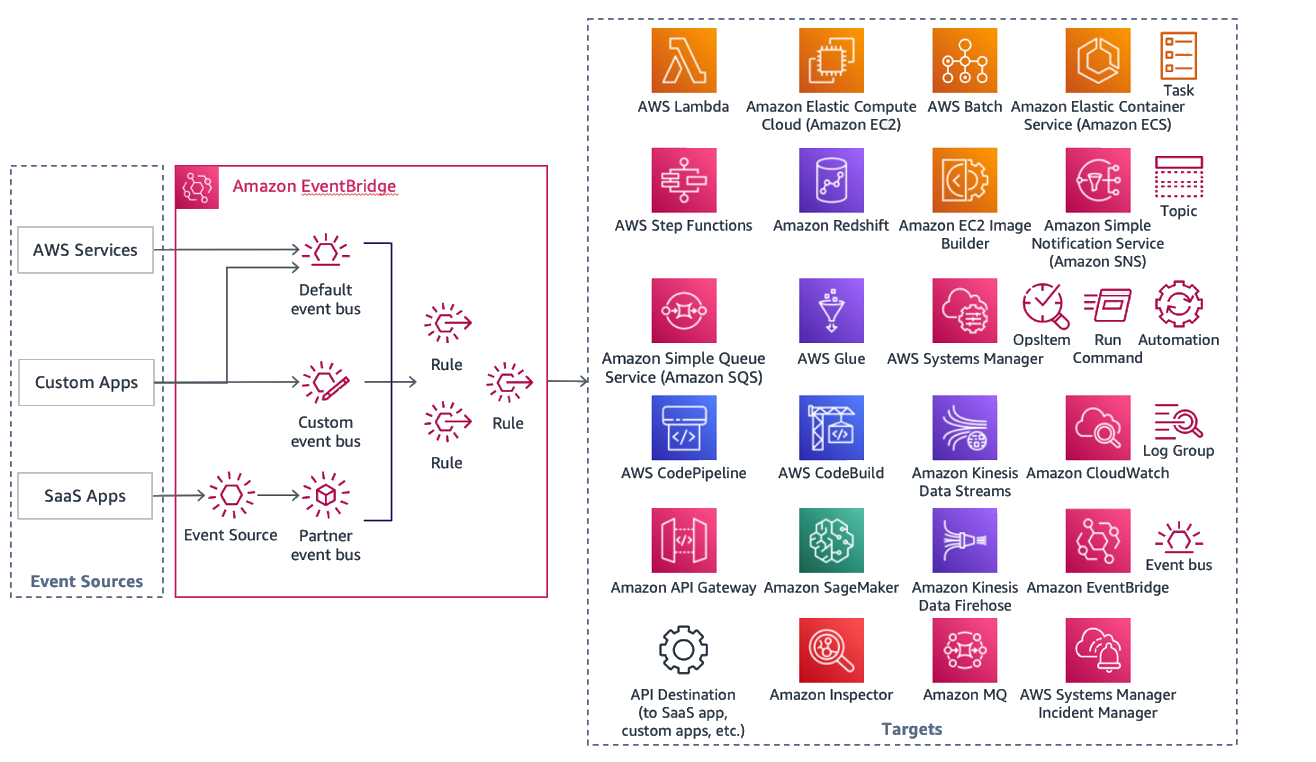
Event-Driven Architecture (EDA) offers a different model. Instead of direct calls, services produce events—immutable facts about something that happened (e.g., OrderPlaced, InstanceStopped). These events are sent to an event bus, which acts as a central router. Other services, known as consumers, subscribe to the events they care about and react accordingly, without the producer knowing or caring who is listening.
This asynchronous, loosely-coupled model is the core of modern, resilient cloud applications. To dive deeper into the core concepts and patterns of EDA, let's watch a segment from an AWS re:Invent talk.
AWS re:Invent 2023 - Advanced event-driven patterns with Amazon EventBridge (COM301-R)
The talk "Advanced event-driven patterns with Amazon EventBridge" provides a superb introduction to the 'why' and 'how' of EDA and EventBridge.
Please watch the following segments: The Basics of EDA (01:13 - 09:33): This part contrasts synchronous and asynchronous patterns and introduces the four core elements of EDA: producers, consumers, the event broker (bus), and the events themselves. It clearly explains how EventBridge solves the problem of tightly-coupled microservices. Designing Your Events (11:16 - 15:19): Focus on the structure of an EventBridge event and the best practice of using metadata and data sections within the detail payload. This is key for creating clean, understandable events. The Choreography Pattern (16:48 - 20:10): This explains the most common pattern used with EventBridge, where services react to events independently without a central controller. This is the pattern we will be building today.
2. The Core Components of an EventBridge Workflow
As you saw in the video, a workflow in EventBridge consists of a few key components. Let's formalize them.
AWS EventBridge Development Guide for Event Driven Apps ...
The article "AWS EventBridge Development Guide" from AgileSoftLabs provides a concise, technical breakdown of these components. It's a great quick reference.
Please read the section "Core Components: How EventBridge Works". Pay close attention to the descriptions of the Event Bus, the JSON structure of an Event, the purpose of Rules, and the table of different Target types. This will solidify the concepts from the video.
Let's recap the components with a focus on our goal—reacting to AWS service events:
- Event Source: The AWS service that generates the event. This could be Amazon S3 (
s3.amazonaws.com), Amazon EC2 (ec2.amazonaws.com), or even AWS Health (health.amazonaws.com). - Event Bus: The channel where events are sent. AWS services send their events to the default event bus in your account, so we'll primarily use that. You can also create custom buses for your own applications and partner buses for SaaS integrations.
- Rule & Event Pattern: A rule matches incoming events and sends them to targets. The logic of the match is defined by an event pattern, a JSON object that specifies the conditions an event must meet. This is where you filter for the specific events you're interested in.
- Target: The AWS resource that processes the event. This is your "automation." Common targets include:
- AWS Lambda: For running custom code in response to an event.
- Amazon SNS Topic: For fanning out notifications to email, SMS, or other subscribers.
- Amazon SQS Queue: To reliably queue events for later processing, which is useful for buffering and handling failures.
- AWS Step Functions: To orchestrate complex, multi-step workflows.
3. Practical Walkthrough: S3 Object Creation to SNS Notification
Now, let's build a classic event-driven workflow: when a new file is uploaded to an S3 bucket, send a notification email via SNS. This demonstrates the end-to-end flow of an event from a source to a target.
The following video is a step-by-step tutorial that guides you through the entire process in the AWS console. This hands-on practice is crucial for understanding how the pieces fit together.
Amazon S3 Event Notifications with Amazon EventBridge - Step By Step Tutorial
The video "Amazon S3 Event Notifications with Amazon EventBridge" by DataEng Uncomplicated is a clear, concise walkthrough of a very common EventBridge use case.
Please follow along with this tutorial in your own AWS account. The video covers: Enabling EventBridge on an S3 Bucket (00:45 - 01:34): A prerequisite for S3 to send events to EventBridge. Creating the SNS Topic and Subscription (01:34 - 03:57): This sets up our target—the destination for the notification. Creating the EventBridge Rule (03:57 - 06:14): This is the core logic. You'll define an event pattern to match ObjectCreated events from your specific S3 bucket. Testing the Workflow (06:14 - 06:57): You'll upload a file and verify that you receive the email notification. Bonus - Handling Encryption (06:57 - 09:38): This is a great advanced topic. It shows how to adjust KMS key policies to allow EventBridge to publish to an encrypted SNS topic, a common security requirement in enterprise environments.
4. Designing a Security Automation Workflow
With the fundamentals in place, let's design a more complex workflow relevant to your DevOps and cybersecurity interests: automated security group remediation.
Scenario: A developer accidentally modifies a security group to allow SSH access (port 22) from the entire internet (0.0.0.0/0). This is a major security risk. We want to design a workflow that automatically detects and logs this event.
To do this, we need to react to AWS API calls. All authorized API calls in your account generate CloudTrail events, which are automatically published to the default EventBridge bus.
The AWS documentation provides a tutorial for a similar use case. We will use its principles to design our solution.
Create an EventBridge rule that reacts to AWS API calls via CloudTrail
The tutorial "Create an EventBridge rule that reacts to AWS API calls via CloudTrail" explains the core mechanism we need. We'll adapt its concepts for our security scenario.
Focus on Step 3: Create a rule. Notice how the event pattern is configured to look for a specific AWS service (EC2) and a specific API call (StopInstances). We will adapt this pattern.
Here is the design for our security remediation workflow:
- Event Source: AWS CloudTrail, which captures the
AuthorizeSecurityGroupIngressAPI call. - Event Bus: The
defaultevent bus. - Target: An AWS Lambda function that logs the event details for security analysis. (A more advanced version could use
boto3to automatically revoke the dangerous rule). - Event Pattern: This is the most critical part. We need a pattern that is highly specific to avoid false positives.
Here is what the event pattern would look like. This is the kind of logic you'd place in the "Event pattern" section of your EventBridge rule:
{
  "source": ["aws.ec2"],
  "detail-type": ["AWS API Call via CloudTrail"],
  "detail": {
    "eventName": ["AuthorizeSecurityGroupIngress"],
    "requestParameters": {
      "ipPermissions": {
        "items": {
          "ipRanges": {
            "items": {
              "cidrIp": ["0.0.0.0/0"]
            }
          },
          "fromPort": [22],
          "toPort": [22],
          "ipProtocol": ["tcp"]
        }
      }
    }
  }
}
This pattern precisely targets the event where someone attempts to open port 22 to the world. When this event occurs, EventBridge will trigger our Lambda function, which can then log the details from the event payload (like the user identity and the affected security group) to CloudWatch Logs or send a high-priority alert to an SNS topic.
5. Advanced Pattern: Cross-Account Event Architectures
In many organizations, development, staging, and production environments live in separate AWS accounts. EventBridge is designed to work seamlessly in this multi-account world. A common pattern is to have a central "DevOps" or "Audit" account that aggregates events from all other accounts.

This is achieved by setting a resource-based policy on the central event bus, granting other AWS accounts permission to send events to it. A rule in the source account can then set the central bus as its target. This pattern is incredibly powerful for centralized monitoring and governance.
Conclusion
Excellent work! You've now designed event-driven workflows, a core competency for building scalable and automated cloud infrastructure. You've moved beyond simple scripting to creating systems that intelligently react to their environment.
Key Takeaways:
- Event-Driven Architecture (EDA) decouples services, leading to more resilient and scalable systems.
- EventBridge is the central nervous system for EDA on AWS, consisting of event buses, rules, and targets.
- The event pattern is the heart of an EventBridge rule, allowing you to filter events with high precision based on their JSON content.
- You can react to events from AWS services (like S3 object creation) or API calls via CloudTrail (like a security group change) to automate operational and security tasks.
- EventBridge supports cross-account patterns, enabling centralized event processing and governance in enterprise environments.
What's Next?
We've covered core AWS infrastructure services for DevOps: centralized secrets management with Secrets Manager and event-driven automation with EventBridge. In our next lesson, we will focus on deploying applications. We'll explore AWS Fargate, a serverless container engine, and see how it helps you run containers without managing servers, comparing its operational model to the Kubernetes environment you're already familiar with. This will be our next lesson: "Deploy and manage a containerized application on AWS Fargate, highlighting its operational differences from Kubernetes."