Hello! Welcome back to our module on Configuration Management with Ansible.
In our last lesson, you learned how to organize automation into reusable Ansible Roles, which brings structure and scalability to your projects. We identified the templates directory as the designated place for dynamic configuration files.
Today, we will dive deep into that directory. This lesson focuses on the learning outcome: Generate dynamic configuration files using Jinja2 templates and filters. You will learn how to leverage variables, logic, and data manipulation inside your templates to create configuration files that can adapt to different hosts and environments. This skill is the key to unlocking truly powerful and maintainable automation.
1. Recap: Roles and the templates Directory
As a quick refresher from our previous lesson, Ansible Roles use a standardized directory structure. The templates directory is where we store files that will be processed by the Jinja2 templating engine. These files typically have a .j2 extension.
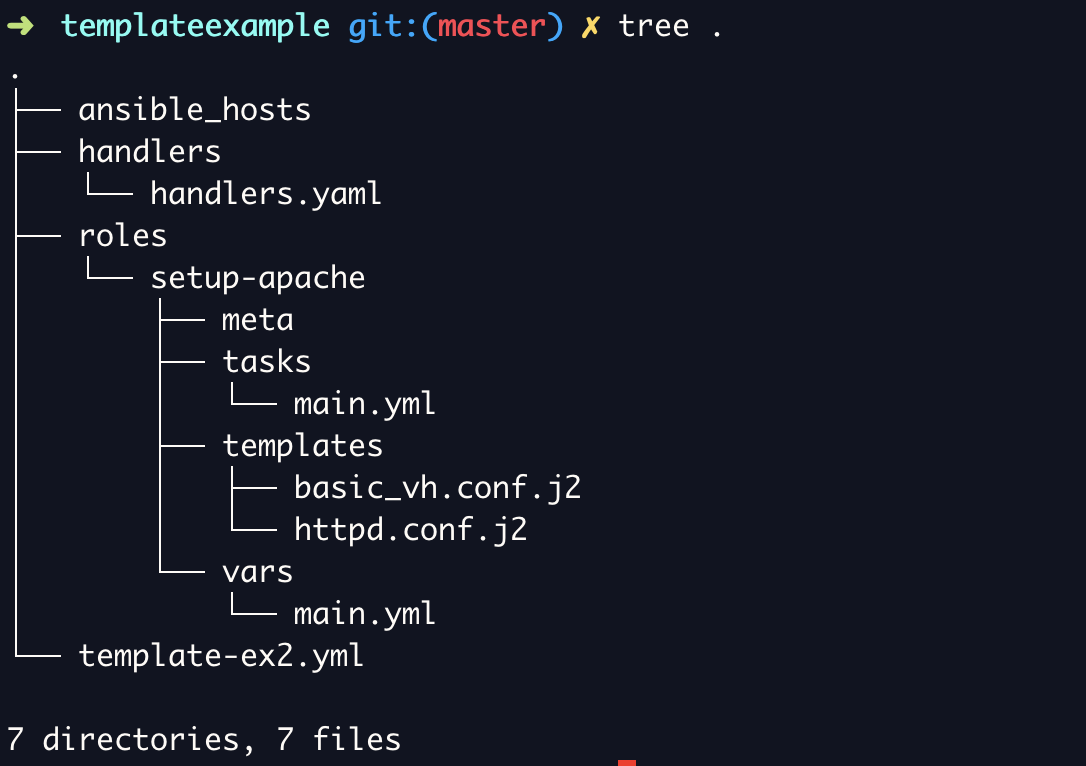
2. The Fundamentals of Jinja2 in Ansible
Jinja2 is a modern and designer-friendly templating language for Python. Ansible uses it to enable dynamic content in your files. The syntax is straightforward and uses distinct delimiters for different actions:
{{ ... }}: For expressions, used to print the value of a variable or fact.{% ... %}: For statements, such asifconditions orforloops.{# ... #}: For comments that will not be included in the final rendered file.
Let's see these in action. The following video provides a great hands-on demonstration of the core Jinja2 features within an Ansible context.
Ansible JINJA2 (template) Tutorial - Complete Beginners Guide - 2022
Watch this tutorial from LondonIAC to see how to use Ansible facts, playbook variables, conditionals, and loops inside a Jinja2 template.
Watch the following segments to grasp the core concepts: Using Ansible Facts (02:55 - 04:22): See how facts like ansible_hostname and ansible_default_ipv4.address are used to populate a file with host-specific information. Using Playbook Variables (04:22 - 05:39): Understand how to define a variable in your playbook and reference it within the template. Conditionals (05:39 - 07:51): Observe how if/else statements can be used to generate different content based on a variable's value (e.g., memory size). Loops (07:51 - 10:16): This is a powerful feature. Pay attention to how a for loop iterates over a list of hosts to dynamically generate an /etc/hosts file.
This video demonstrates that by combining variables, conditionals, and loops, you can create a single template file that generates unique configurations for dozens or hundreds of different servers.
3. Deploying Templates with the template Module
Now that you've seen what a .j2 file contains, how do we tell Ansible to process it and deploy it to a managed node? We use the built-in template module.
The template module's primary job is to render a local Jinja2 template file and copy it to a remote location.

The template module has several key parameters:
src: The path to the.j2template file on your Ansible control node. If you're using a role, Ansible automatically looks in thetemplatesdirectory.dest: The absolute path where the rendered file should be placed on the target machine.owner,group,mode: Standard file permission parameters to set on the destination file.backup=yes: A useful safety feature. If set, Ansible will create a timestamped backup of the original file on the remote host before replacing it.
For another practical view of this, let's revisit the sshd_config example from the Learn Linux TV series.
Getting started with Ansible 16 (Series Finale) - Templates
This short clip shows exactly how the template module is added to a role's task file.
Watch from 09:55 to 11:08. Notice how the src parameter uses a variable (ssh_template_file) to dynamically select the correct template based on the OS. This is a common and powerful pattern.
4. Transforming Data with Filters
Filters are where Jinja2 truly shines. They allow you to transform and manipulate data before it's rendered into the template. The syntax is simple: {{ variable | filter }}. You can even chain filters: {{ variable | filter1 | filter2 }}.
Given your experience, think of filters as functions that you pipe data through. Let's explore some of the most essential filters for a DevOps engineer.
Using filters to manipulate data — Ansible Community Documentation
The official Ansible documentation is the best resource for learning about filters. We'll focus on the most critical categories for configuration management. Please review the linked sections.
Read through the following sections to get a solid grasp of key filters: Handling undefined variables: This is one of the most important concepts. Understand how to use the default filter (e.g., {{ http_port | default(80) }}) to prevent errors and make your roles more flexible. Also, note the mandatory filter for enforcing required variables. Managing data types: Skim this section to see how you can cast values to different types, such as | int or | bool. This is crucial when dealing with inputs that might be strings but need to be numbers or booleans in the final config file. Also, note the split filter. Manipulating text: Focus on the join filter, which is used to concatenate a list of items into a single string. This is extremely useful for building lists of allowed IPs, server names, etc.
Here are some quick examples of these filters in action:
default: To set a web server port, defaulting to 80 if the variable isn't defined.Listen {{ apache_port | default(80) }}join: To create a comma-separated list of server names from a list variable.# The variable `server_aliases` is a list: ['www.example.com', 'app.example.com'] ServerAlias {{ server_aliases | join(',') }}bool: To correctly format a boolean setting for a config file.# The variable `enable_feature` could be 'true', 'yes', 'on', etc. feature_enabled = {{ enable_feature | bool }}
5. Tying It All Together: A Real-World Example
Let's consolidate everything we've learned by analyzing a complete example of managing an Apache web server using Jinja2 templates.
How to manage Apache web servers using Jinja2 templates and filters
This Red Hat blog post provides an excellent, end-to-end practical example. It creates two templates, populates them with a mix of Ansible facts and custom variables, and uses a playbook to deploy them.
Read through the article, paying close attention to: httpd.conf.j2: Note the use of {{ ansible_managed }}, custom variables like {{ http_port }}, and facts like {{ ansible_hostname }}. index.html.j2: See how it accesses nested facts (ansible_memory_mb['real']['used']) and uses the join filter to format a list of partitions. apache-template.yml: Observe how the playbook defines the variables (http_port, admin, etc.) under the vars: section and uses the template module to deploy the .j2 files. Verification: The ad-hoc commands at the end clearly show the dynamically generated output in the final configuration files.
This example perfectly illustrates how a few template files and a single playbook can generate tailored configurations, which is the essence of scalable infrastructure management with Ansible.
Conclusion
In this lesson, you have moved beyond static file copying and learned to generate dynamic, intelligent configuration files. This is a critical skill for any DevOps professional, allowing you to manage diverse environments with a minimal, maintainable codebase.
Key Takeaways:
- Jinja2 Syntax: You can now use expressions
{{ ... }}, statements{% ... %}, and comments{# ... #}to build logic into your templates. - The
templateModule: This is the bridge between your.j2files and the managed nodes, handling rendering and deployment. - Filters are Power-ups: Filters like
default,join,split, and type-casting filters (int,bool) are essential tools for transforming data and creating robust configurations. - Combining Facts and Variables: The most powerful templates combine predefined Ansible facts with your own custom variables to create context-aware configurations.
What's Next?
We've seen how to create dynamic files, but a question naturally arises: "How should I handle sensitive data like passwords, tokens, or API keys in these templates?" You should never store secrets in plain text, not even in your Git repository. In our next lesson, "Securely manage sensitive data such as passwords and API keys using Ansible Vault," we will tackle this exact problem.