Hello! In our last lesson, we secured our server at the network layer by configuring host-based firewalls with iptables and firewalld. This gave us control over what traffic can reach the server's ports.
Today, we shift our focus from the network to the filesystem itself. The learning outcome for this lesson is to apply special permissions (setuid, setgid, sticky bit) and explain their security implications.
These permissions are a fundamental part of Linux security, providing a mechanism to grant specific, temporary privileges that the standard read, write, and execute model doesn't cover. Understanding them is crucial, as misconfigurations—especially with setuid—are a classic vector for privilege escalation attacks and a common finding in security audits. We will cover:
- The function and purpose of
setuid,setgid, and thesticky bit. - How to apply and identify these permissions.
- The significant security risks and when (and when not) to use them.
- How these concepts apply in modern, containerized environments.
1. Beyond rwx: An Introduction to Special Permissions
Standard Linux permissions control access for the user, group, and others. Special permissions add another layer to this model to handle specific scenarios. There are three special permissions:
- Set User ID (
setuid): Affects executable files. - Set Group ID (
setgid): Affects executable files and directories. - Sticky Bit: Affects directories.
These are represented in the output of ls -l by replacing the x in the permission string.
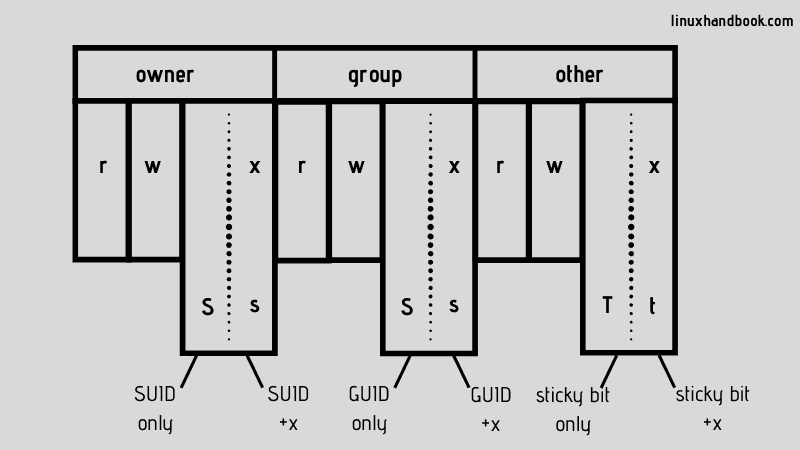
Let's explore what each of these does and why they are so important from a security perspective.
2. The setuid Bit: Running as the Owner
The setuid permission is the most powerful and dangerous of the three.
-
Function: When applied to an executable file, it allows the user who runs the program to execute it with the privileges of the file's owner, not their own.
-
Classic Example: The
passwdcommand. For a user to change their own password, the system needs to write to the/etc/shadowfile, which is owned byrootand not accessible to normal users. Thepasswdbinary is owned byrootand has thesetuidbit set. This temporarily elevates the user's privileges only for the duration of that command, allowing them to update their password securely.

Security Implications: A Major Risk
Because setuid grants the permissions of the file's owner (often root), any vulnerability in that program (like a buffer overflow or command injection flaw) can be exploited to gain a full root shell. This makes setuid-root binaries a primary target for attackers seeking to escalate privileges.
Best Practice: Never apply setuid to custom scripts. It should only be found on carefully written and audited system binaries. If you need to grant specific privileges, using a granular sudo rule is almost always a safer alternative.
3. The setgid Bit: Group-Level Execution and Collaboration
The setgid permission has two distinct behaviors depending on whether it's applied to a file or a directory.
-
Function (on a file): Similar to
setuid, when an executable withsetgidis run, it executes with the privileges of the file's group. This is less risky thansetuidbut can still be used to gain access to resources belonging to that group. -
Function (on a directory): This is the most common and useful application of
setgid. When set on a directory, any new files or subdirectories created within it will automatically inherit the group ownership of the parent directory, rather than the primary group of the user who created them. -
Practical Use Case: Imagine a shared directory
/opt/project_filesfor a development team, with its group set todevelopers. Withoutsetgid, if you create a file, it might be owned byyour_user:your_user, and other team members might not be able to edit it. Withsetgidon the directory, your new file will be owned byyour_user:developers, ensuring the whole team has access based on the group permissions.
4. The Sticky Bit: Protecting Files in Shared Directories
The sticky bit is a simple but effective tool for managing shared spaces.
-
Function: When the sticky bit is set on a directory, it restricts file deletion. Even if a user has write permissions to the directory, they can only delete or rename files that they personally own. The directory owner and
rootcan, of course, delete any file. -
Classic Example: The
/tmpdirectory. It is typically world-writable (drwxrwxrwt), meaning anyone can create files there. The sticky bit (t) at the end prevents one user from deleting another user's temporary files, which would be a security and stability issue.
5. Applying and Verifying Special Permissions in Practice
Theory is one thing; seeing it in action is another. The following video provides excellent, concise demonstrations of setting up setuid, setgid, and the sticky bit for common scenarios.
Special Linux Permissions Part 4
To see these permissions in action, the video 'Special Linux Permissions Part 4' by Ed Walsh provides clear, step-by-step demonstrations for each special permission.
Watch the following segments to see how to apply and verify each special permission: Setuid Demo (01:25 - 06:17): Pay attention to the passwd example and how the instructor then applies setuid to the parted command to grant temporary root privileges to a regular user. This clearly shows the power and risk. Setgid Demo (06:17 - 09:13): Follow the scenario of creating a shared 'sales' folder. Observe how the setgid bit forces new files to inherit the group ownership of the folder, solving a common collaboration problem. Sticky Bit Demo (09:13 - 10:51): See how adding the sticky bit to the shared folder prevents users from deleting files they don't own, completing the secure collaborative setup.
You can set these permissions using both symbolic and octal notation with the chmod command. The special permissions use a fourth, leading octal digit:
setuid: 4setgid: 2sticky bit: 1
Examples:
chmod u+s my_programorchmod 4755 my_program(setssetuidandrwxr-xr-x)chmod g+s shared_dirorchmod 2775 shared_dir(setssetgidandrwxrwxr-x)chmod +t public_dirorchmod 1777 public_dir(sets sticky bit andrwxrwxrwx)
6. Auditing Your System for Special Permissions
As a DevOps engineer, you must be able to audit your systems for potentially dangerous permissions. The find command is the right tool for this job.
Brief Discussion of SUID & SGID
The video 'Brief Discussion of SUID & SGID' demonstrates how to use the find command to discover files with these permissions.
Watch the segment from 08:42 to 09:48. This will show you how to construct find commands to locate files with setuid or setgid bits set, a critical skill for security audits.
Here are the commands you can use to scan your entire filesystem. It's good practice to run these on a new system to establish a baseline and periodically check for unauthorized changes.
# Find all setuid files
sudo find / -perm /u=s -type f 2>/dev/null


# Find all setgid files
sudo find / -perm /g=s -type f 2>/dev/null


# Find world-writable directories
sudo find / -perm -o+w -type d 2>/dev/null


# Find world-writable directories WITHOUT the sticky bit (a potential problem)
sudo find / -perm -o+w -type d ! -perm +t 2>/dev/null
7. Modern Context: Containers, Compliance, and Best Practices
While these concepts are decades old, they remain highly relevant. Your experience with Kubernetes and containerized environments adds an important layer here.
Linux Setuid, Setgid, and Sticky Bits - LiquidWeb.com
These permissions concepts aren't just for classic servers. Understanding how they behave in modern infrastructure is key. The article 'Linux Setuid, Setgid, and Sticky Bits' provides excellent context for this.
Please read the sections: 'Permissions in Containers and Modern Platforms': This explains how privilege is handled differently in containerized environments like Docker and Kubernetes, often favoring Linux Capabilities over setuid. 'Permissions and compliance: why auditors care': This section reinforces the security implications from a compliance perspective. 'Best practices that still hold up': This provides a concise summary of how to use these permissions responsibly.
Conclusion
You have now explored one of the most fundamental aspects of Linux filesystem security. While seemingly simple, special permissions have deep security implications that are critical for any DevOps professional to understand.
Key Takeaways:
setuidgrants a program the owner's privileges and is a significant security risk if the owner isroot. It should be avoided on custom scripts.setgidon a directory is a powerful tool for enabling group collaboration by ensuring consistent group ownership of new files.- The
sticky bitprotects shared, world-writable directories like/tmpby restricting file deletion to the file owner. - Regularly auditing for special permissions with
findis a critical security practice to detect potential privilege escalation vectors.
Preview of the Next Lesson:
We've just covered Discretionary Access Control (DAC), where the owner of an object determines its permissions. In the next lesson, we will explore Mandatory Access Control (MAC) by looking at SELinux. SELinux is a more rigid and powerful security framework that enforces system-wide policies, adding another, more complex layer of defense on top of the permissions we've learned today.