Hello! Welcome to the final lesson in our "CI/CD Pipeline Mastery" module.
In our last lesson, we built a crucial safety net by implementing staging environments and manual approval gates. This ensures that deployments to production are intentional and have passed a final round of checks. But what happens if, despite all our precautions, a deployment fails in production?
This lesson addresses exactly that scenario, covering the learning outcome: Compare common rollback strategies and design a process to revert a failed deployment. A fast and reliable rollback process is your last, and arguably most important, line of defense for maintaining service stability. It's a core competency that separates a good CI/CD process from a great one.
We will explore how different deployment strategies facilitate rollbacks and then design an automated process to detect failure and revert changes, minimizing impact on your users.
1. The Need for a Rollback Strategy: Minimizing MTTR
No matter how thorough your testing is, production is a complex environment, and some issues only manifest under real-world load and conditions. When a deployment introduces a critical bug, a performance degradation, or impacts business metrics, your primary goal is to restore service as quickly as possible. This is measured by Mean Time To Recovery (MTTR).
While it might be tempting to "roll forward" with a quick fix, this is often risky. The fastest and safest path to recovery is almost always a rollback: reverting to the last known stable version of your application. Your deployment strategy directly impacts how quickly and safely you can do this.
2. Comparing Deployment Strategies for Effective Rollbacks
Different deployment strategies are not just about releasing new code; they are fundamentally different approaches to risk management. Let's explore the most common ones and their inherent rollback capabilities.
To start, watch this short, high-level overview of several deployment strategies.
Top 5 Most-Used Deployment Strategies
The video 'Top 5 Most-Used Deployment Strategies' from ByteByteGo provides a clear and concise animation of how Rolling, Blue/Green, and Canary deployments work. Focus on how each one manages the transition from an old version to a new one.
Please watch the segments covering Rolling (01:11 - 03:17), Blue/Green (03:17 - 05:38), and Canary (05:38 - 07:49) deployments. Pay attention to how each strategy handles the existence of old and new versions simultaneously and the implications for a rollback.
Now, let's break down these strategies with a focus on their rollback mechanisms.
Rolling Deployment
- How it works: Instances running the old version are gradually replaced with instances running the new version, one by one or in batches. During the update, a mix of old and new versions are running.
- Rollback Process: A rollback is effectively another "rolling update," but this time you deploy the previous stable version to replace the faulty new one.
- Analysis:
- Pro: It's simple to configure and resource-efficient. It's the default strategy in orchestrators like Kubernetes.
- Con: The rollback process is slow, taking as long as the initial deployment. During this time, users are still being impacted by the faulty version.
Blue/Green Deployment
- How it works: You maintain two identical, independent production environments: "Blue" (current stable version) and "Green" (new version). All traffic goes to Blue. You deploy the new version to the Green environment, test it, and then switch the load balancer to route all traffic from Blue to Green.
- Rollback Process: If the new Green environment shows problems, the rollback is an instantaneous traffic switch back to the still-running Blue environment.
- Analysis:
- Pro: The rollback is nearly instant and extremely low-risk.
- Con: It's resource-intensive and costly, as you need to run double the infrastructure capacity.
Canary Deployment
- How it works: The new version is rolled out to a small subset of users (the "canaries") or servers. You monitor this group closely for errors or performance issues. If it performs well, you gradually increase the traffic percentage to the new version until it handles 100%.
- Rollback Process: If the canary version shows problems, you simply redirect all traffic back to the stable version and terminate the canary instances.
- Analysis:
- Pro: It's very low-risk, as any failure only impacts a small percentage of users. The rollback is fast.
- Con: It's more complex to implement, requiring sophisticated traffic shaping and robust monitoring.
The following image provides a great visual comparison of how Canary and Blue/Green strategies manage application versions and user traffic.
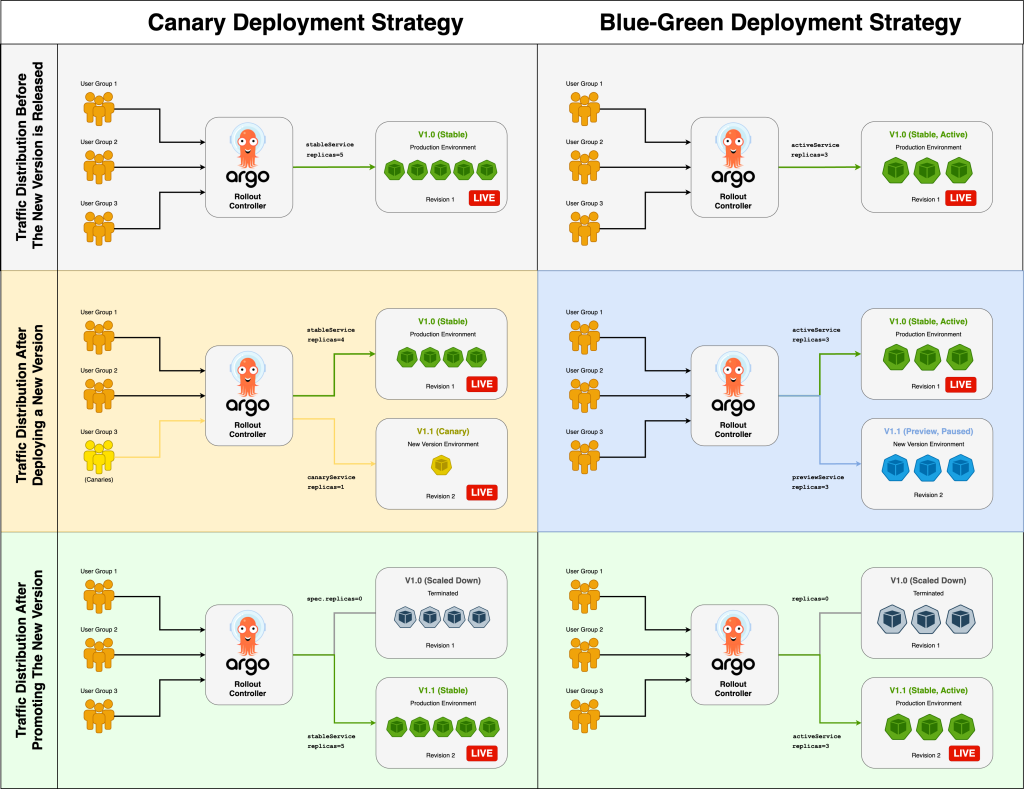
For a more detailed breakdown and a useful comparison table, please read the following article.
Zero-Downtime Deployments: Blue-Green vs Canary vs Rolling ...
The article 'Zero-Downtime Deployments' provides an excellent textual summary of these strategies, including code examples and a helpful comparison matrix.
Please read the sections on Blue-Green, Canary, and Rolling deployments. Pay close attention to the 'Advantages' and 'Disadvantages' listed for each, as they directly relate to rollback capabilities. Finally, study the 'Comparison Matrix' which summarizes the key trade-offs.
3. Designing a Robust and Automated Rollback Process
Knowing the strategies is the first step. The next is to design a system that can automatically detect a failed deployment and trigger a rollback. A manual rollback is good; an automated one is better.
The process can be broken down into three key areas: Detection, Decision, and Action.
A. Failure Detection: Your Automated Watchtower
How do you know a deployment is failing? You can't rely on users to report issues. A robust system uses automated monitoring to make data-driven decisions.
This involves defining rollback triggers or rollback alarms based on key metrics. The following video explains this concept perfectly in the context of a CI/CD pipeline.
The IDEAL & Practical CI / CD Pipeline - Concepts Overview
In 'The IDEAL & Practical CI / CD Pipeline', the author discusses the critical safety mechanisms needed in a production deployment. The concept of 'rollback alarms' is central to this lesson.
Please watch these sections: (08:07 - 10:20): Introduction to the 'one-box' (or canary) concept for safe deployments. (10:20 - 11:55): This is the most important part. It details what 'rollback alarms' are and which metrics to monitor (errors, latency, business metrics). (11:55 - 13:42): The 'bake period' concept, where you monitor a new deployment for a set time before promoting it further. (13:42 - 15:49): Using synthetic tests ('canaries') to constantly validate production workflows.
The key is to monitor a combination of metric types:
- Technical Metrics: HTTP 5xx error rates, application latency (p99, p95), CPU/memory utilization.
- Business Metrics: Number of sign-ups, items added to cart, checkout completion rate. A technical success can still be a business failure if it negatively impacts user behavior.
B. The Automated Rollback Workflow
With monitoring in place, you can design an automated workflow that looks like this:
- Deploy: The CI/CD pipeline deploys the new version using a Canary strategy (e.g., sending 5% of traffic to it).
- Monitor (Bake-in): The pipeline enters a "bake" period. During this time, automated monitoring tools scrutinize the metrics from the canary instances.
- Analyze: The monitoring system compares the canary's performance against predefined thresholds (e.g.,
error_rate > 1%orp99_latency > 500ms). - Decide & Act:
- If thresholds are breached: An alarm fires. The CI/CD tool is notified (via webhook or API call) and automatically triggers the rollback action—shifting 100% of traffic back to the stable version. The team is alerted that a rollback occurred.
- If metrics are healthy: The pipeline proceeds with the gradual rollout, increasing the traffic percentage to the new version.
C. Critical Design Considerations
An automated rollback process has complexities, especially concerning state.
Rollback Automation: Best Practices for CI/CD | Hokstad Consulting
The article 'Rollback Automation: Best Practices for CI/CD' is a fantastic resource that dives deep into the practical challenges and solutions for building a resilient rollback process.
Please read the sections 'Core Principles for Effective Rollback Automation' and 'Implementing Rollback Strategies in CI/CD Pipelines'. Focus on the subsections about: Setting Rollback Criteria and Triggers Using Immutable Infrastructure Managing State and Atomic Rollbacks Version Control Best Practices
Based on that reading, here are two of the most important considerations:
-
Database Migrations and State: This is the hardest part of rollbacks. If your new code version requires a database schema change, rolling back the code doesn't automatically roll back the database.
- The Golden Rule: Make database changes backward-compatible. The old version of the code must be able to work with the new database schema.
- The Pattern: Use an "expand and contract" pattern. For example, to rename a column, you would:
- Expand: Add the new column, but keep the old one.
- Migrate: Deploy code that writes to both columns. Run a backfill script to populate the new column for existing rows.
- Switch: Deploy new code that reads/writes only from the new column.
- Contract: After a safe period, deploy a change to remove the old column.
This multi-phase approach ensures that at any point, a code rollback is possible without breaking data integrity.
-
Test Your Rollback Procedure: An untested rollback plan is not a plan; it's a hope.
- Problem: Teams often design a rollback process but never test it. When a real incident occurs, they discover the process is broken, credentials have expired, or the automation script has a bug.
- Solution: Regularly test your rollback procedure in a staging or even production environment (during a maintenance window or on a small scale). This can be part of a "game day" or chaos engineering exercise. Make it part of your CI/CD pipeline to deploy and then immediately roll back to verify the process works.
4. Behavioral Interview Preparation
This topic is a goldmine for behavioral questions. Being able to articulate a story about a failed deployment shows experience and maturity as an engineer.
Interview Question: "Tell me about a time a deployment failed in production. How did you handle it, and what did you learn?"
Use the STAR method to structure your answer:
- Situation: "We were deploying a new version of our core API that included a refactored query service. All automated tests in staging passed, and it was approved for a canary release."
- Task: "My responsibility was to monitor the health of the canary as it rolled out to 10% of our production traffic."
- Action: "Shortly after the deployment began, I noticed our Grafana dashboards showed a sharp increase in p99 latency and a corresponding rise in HTTP 504 errors for the canary instances. Our automated rollback alarm, which was configured in Datadog to trigger if the error rate exceeded 2%, fired. The system automatically shifted 100% of traffic back to the stable version via our AWS Application Load Balancer's weighted target groups. The customer impact was limited to a small user base for less than 5 minutes."
- Result: "The immediate result was service restoration with minimal MTTR. The post-mortem investigation revealed that the new query performed poorly against a specific data pattern that was only present in our production database, which our staging environment hadn't replicated. As a result, we learned two things: First, we improved our staging data sanitization process to better reflect production data distribution. Second, we validated that our automated rollback process worked exactly as designed, reinforcing its value and giving us confidence to continue deploying frequently."
This answer demonstrates your understanding of deployment strategies (Canary), monitoring (Grafana/Datadog), cloud-native tools (AWS ALB), and the importance of post-mortems and continuous improvement.
Conclusion
You have now reached the end of the CI/CD module and possess a comprehensive understanding of the entire deployment lifecycle, from building an artifact to safely deploying it and, crucially, recovering when things go wrong.
Key Takeaways:
- Deployment strategies like Blue/Green and Canary are designed not just for deployment but for safe and fast rollbacks.
- A robust rollback process is automated, triggered by real-time monitoring of both technical and business metrics.
- Handling stateful systems, especially databases, requires careful planning with backward-compatible changes to ensure rollbacks are possible.
- An untested rollback plan is a failed plan. You must regularly validate your recovery procedures.
In our next module, "Advanced Infrastructure as Code with Terraform," we will shift our focus to provisioning and managing the very infrastructure that our CI/CD pipelines deploy to, closing the loop on the DevOps lifecycle.