Hello! Welcome back to our module on CI/CD Pipeline Mastery.
In our last lesson, we focused on orchestrating workflows by creating dependencies between jobs with needs and sharing data with artifacts. You learned how to build sequential pipelines where the output of one job becomes the input for the next.
Today, we'll tackle a common challenge in DevOps: how do you test your application across multiple environments without duplicating your entire CI pipeline? This lesson addresses that question directly, focusing on the learning outcome: Implement matrix builds in GitHub Actions to test across multiple environments or versions.
You already write GitHub Actions workflows, but mastering matrix strategies will significantly enhance your ability to create efficient, scalable, and maintainable pipelines—moving you closer to writing them "by heart." We'll explore how to run a single job definition across various combinations of operating systems, language versions, or other parameters, a technique that is fundamental to robust continuous integration.
1. What is a Matrix Build and Why Use It?
Imagine you need to ensure your application works correctly on Ubuntu and Windows, and is compatible with both Node.js v16 and v18. Without a matrix, you might create four separate, nearly identical jobs:
test-ubuntu-node16test-ubuntu-node18test-windows-node16test-windows-node18
This approach is repetitive and hard to maintain. A matrix build solves this by letting you define your variables (like OS and Node.js version) and automatically generating a job for each combination. It's a powerful application of the Don't Repeat Yourself (DRY) principle in your CI/CD pipelines.
The following article gives a great definition of matrix builds and compares it to a for loop in programming, which is a useful mental model.
Matrix Builds with GitHub Actions
Let's start with a clear definition from the article 'Matrix Builds with GitHub Actions' on the Blacksmith blog.
Please read the section 'What are matrix builds?'. It clearly explains the core concept and its benefits.
Matrix builds are versatile and can be used for many scenarios beyond just OS and language versions.

2. The Basic Syntax: strategy and matrix
To implement a matrix, you add a strategy block to your job definition. Inside that, you define your matrix with one or more variables, each with a list of values.
Here is a basic structure:
jobs:
  test:
    runs-on: ubuntu-latest
    strategy:
      matrix:
        node-version: [16, 18, 20] # This is our first matrix variable
    steps:
    - uses: actions/checkout@v4
    - name: Use Node.js ${{ matrix.node-version }}
      uses: actions/setup-node@v4
      with:
        node-version: ${{ matrix.node-version }} # Access the variable here
    - run: npm ci
    - run: npm test
This workflow will automatically create and run three parallel jobs, one for each value in the node-version array. Notice how we access the current value for each job using the context expression ${{ matrix.node-version }}.
The following video provides a concise demonstration of creating a matrix and accessing its variables.
GitHub Actions - Reusable workflows - Matrix Strategies
This video from Mickey Gousset, titled 'GitHub Actions - Reusable workflows - Matrix Strategies', clearly demonstrates the setup and execution of a matrix build.
Watch from 00:43 to 01:35 and then from 04:40 to 07:16. The first part explains the concept, and the second part shows a live demo of adding a strategy: matrix block, using the matrix variable, and viewing the parallel jobs in the Actions tab.
3. Testing Across Multiple Operating Systems
One of the most common use cases for a matrix is testing across different operating systems. This is achieved by defining an os variable in your matrix and using it in the runs-on field of the job.
jobs:
  build:
    strategy:
      matrix:
        os: [ubuntu-latest, windows-latest, macos-latest]
    runs-on: ${{ matrix.os }} # Dynamically set the runner OS
    steps:


      # ... your build and test steps ...
This will run your job three times, once on each specified operating system. Let's watch a demonstration of this.
GitHub Actions Tutorial - Basic Concepts and CI/CD Pipeline with Docker
In the 'GitHub Actions Tutorial' video by TechWorld with Nana, which we've referenced before, there is an excellent segment that focuses specifically on creating a matrix for multiple operating systems.
Please watch from 22:40 to 24:39. This section demonstrates how to add a matrix for different OS versions and shows the resulting parallel execution in the GitHub UI.
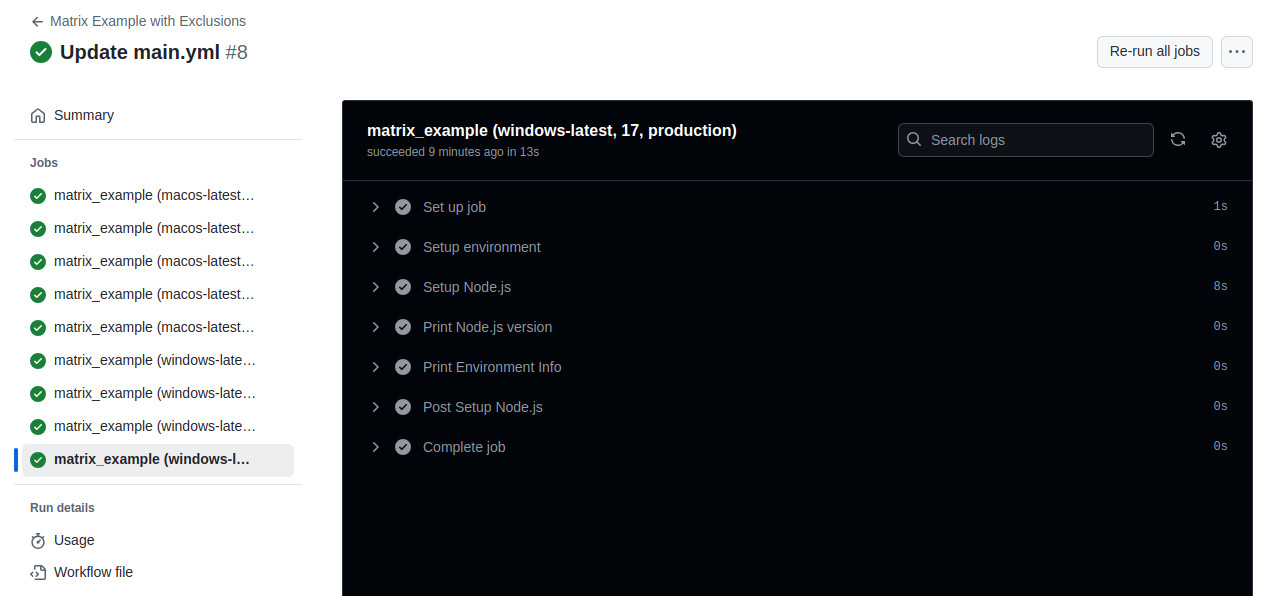
When the workflow runs, you will see a job for each combination in your matrix, clearly labeled in the GitHub Actions UI.
4. Fine-Tuning Your Matrix: include, exclude, and fail-fast
Sometimes, you need more control than a simple combination of all variables provides. GitHub Actions offers keywords to refine your matrix:
include: Adds a specific combination to the matrix, potentially with extra variables. This is useful for testing a beta version on only one OS or adding a special configuration.exclude: Removes a specific combination from the matrix. This is perfect for skipping known-incompatible setups (e.g., an old library version on a new OS).fail-fast: By default, if any job in a matrix fails, GitHub Actions immediately cancels all other in-progress and queued jobs in that matrix. You can setfail-fast: falseto allow all jobs to complete regardless of failures, which can be useful for gathering comprehensive test results.
The following article provides clear examples for all these scenarios.
GitHub Actions Matrix Strategy: Basics, Tutorial & Best Practices
The article 'GitHub Actions Matrix Strategy' from Codefresh offers an excellent tutorial on these advanced controls.
Read the sections 'Expanding or Adding Matrix Configurations' (for include), 'Excluding Matrix Configurations' (for exclude), and 'Handling Failures' (for fail-fast and continue-on-error).
5. Your Turn: Create a Multi-Environment Test Workflow
Now, let's apply what you've learned.
Task:
Create a GitHub Actions workflow that tests a simple Node.js application across multiple environments. You can create a new repository or add this to an existing one with a package.json file.
Requirements:
- Name the workflow file
multi-env-test.yml. - The workflow should have a single job named
test. - The
testjob must use a matrix to run on two operating systems:ubuntu-latestandwindows-latest. - The matrix should also test against two Node.js versions:
18and20. - This would normally create four jobs. Exclude the combination of
windows-latestand Node.js version18. - The job steps should:
- Check out the code.
- Set up the correct Node.js version using the matrix variable.
- Run
npm installto install dependencies. - Run
npm test(orecho "Running tests..."if you don't have a test script).
Click here to see the solution
name: Multi-Environment Test

on: [push]

jobs:
  test:
    strategy:
      matrix:
        os: [ubuntu-latest, windows-latest]
        node-version: [18, 20]
        exclude:
          - os: windows-latest
            node-version: 18

    runs-on: ${{ matrix.os }}

    steps:
    - name: Check out code
      uses: actions/checkout@v4

    - name: Set up Node.js ${{ matrix.node-version }}
      uses: actions/setup-node@v4
      with:
        node-version: ${{ matrix.node-version }}

    - name: Install dependencies
      run: npm install

    - name: Run tests
      run: npm test
This configuration will generate three jobs:
- ubuntu-latest / node 18
- ubuntu-latest / node 20
- windows-latest / node 20
Conclusion
Great job! You've now mastered one of the most powerful features in GitHub Actions for creating efficient and comprehensive CI pipelines.
Key Takeaways:
- Matrix builds automate running a job across multiple configurations using the
strategy: matrixsyntax. - This approach follows the DRY principle, making workflows more maintainable and scalable.
- You can create matrices for any variable, such as operating system (
runs-on: ${{ matrix.os }}), language version, or cloud environment. - Use
includeandexcludeto fine-tune your test matrix andfail-fast: falseto ensure all jobs run even if one fails.
In our next lesson, we will continue on the theme of writing reusable and maintainable CI/CD code. We'll explore Jenkins Shared Libraries and GitHub Actions reusable workflows, two different but related approaches to reducing code duplication across many pipelines and repositories.