Hello! Welcome back to your Embedded Interview Preparation Bootcamp.
In our last lesson, we focused on micro-level software architecture by designing a portable Hardware Abstraction Layer (HAL). We saw how to decouple application logic from specific hardware using function pointer interfaces. Now, we're going to zoom out to the macro level and tackle a classic senior embedded systems design interview question.
Your learning outcome for this lesson is to: Architect a bootloader system supporting A/B partitioning, secure boot verification, and robust OTA firmware updates.
This topic is a favorite for interviewers at companies like Qualcomm, NVIDIA, and AMD because it tests your ability to integrate concepts across security, system reliability, and software architecture to design a complex, robust system. It's a direct measure of your experience and architectural thinking.
We will break down this system design into three core components:
- Secure Boot: Establishing a chain of trust from an immutable hardware root.
- A/B Partitioning: Ensuring the system can survive and recover from failed updates.
- OTA Update Flow: The end-to-end process of safely downloading and applying new firmware.
1. The Foundation: Secure Boot and the Chain of Trust
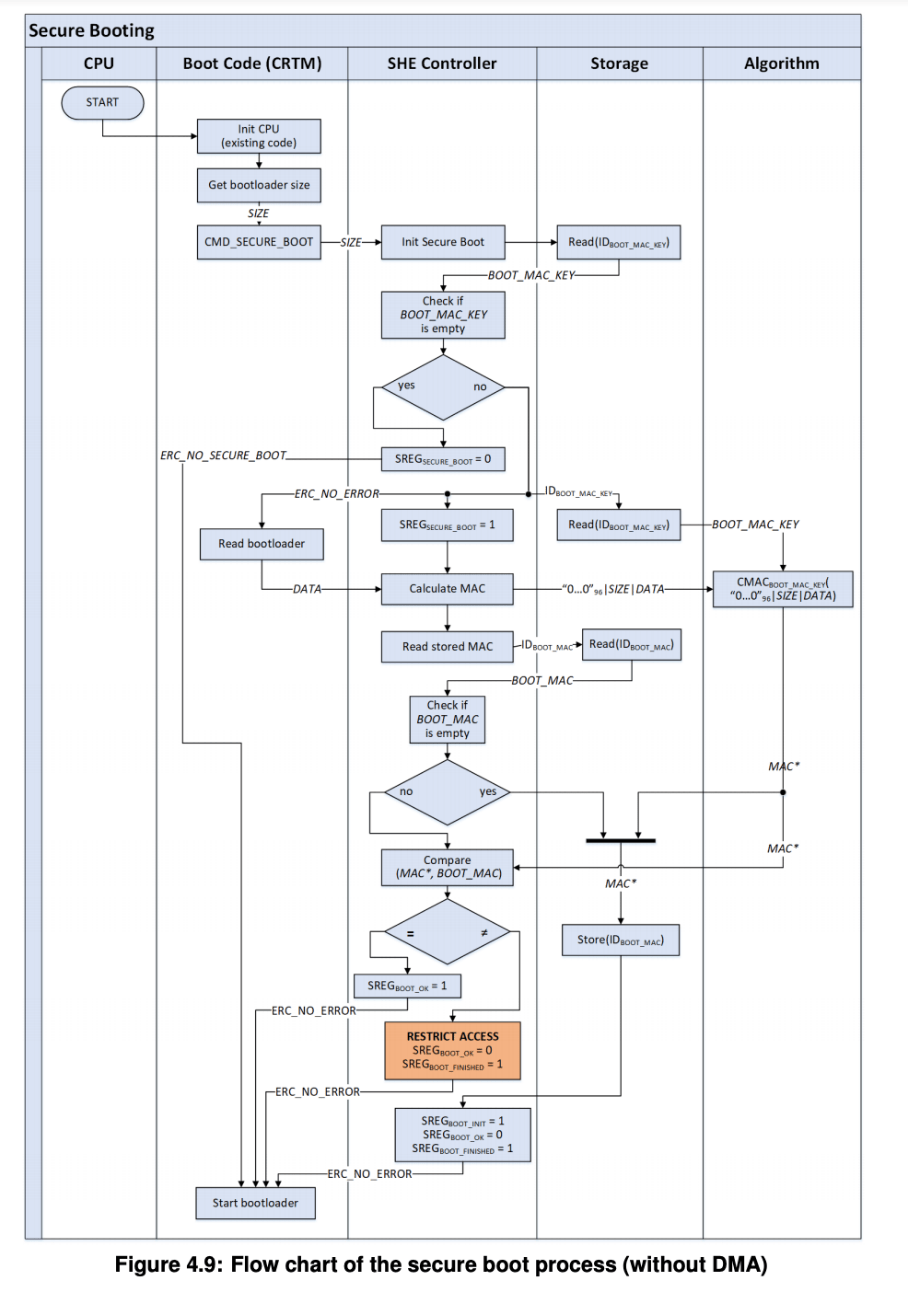
Before we can safely update a device, we must first guarantee that the code running on it is authentic and unmodified. This is the role of Secure Boot. The entire process relies on establishing a Chain of Trust, which begins with something that cannot be changed: a hardware root of trust.
To start, let's watch a video from Texas Instruments that explains the "why" and "how" of secure boot and introduces the core cryptographic concepts involved.
This video, 'Introduction to Secure Boot', provides an excellent overview of the fundamental principles. It covers the need for a hardware root of trust and the cryptographic primitives that make it possible.
Please watch the following segments: Why Secure Boot? (00:39 - 02:58): Focus on the motivation: protecting assets and ensuring only authorized software runs. Hardware Root of Trust (02:58 - 04:27): Pay attention to the components mentioned, like the secure ROM and One-Time Programmable (OTP) memory for storing keys. Cryptographic Concepts (07:18 - 11:34): This is a critical section. Understand the roles of hash functions (e.g., SHA256), asymmetric encryption, digital signatures, and X.509 certificates. These are the building blocks of secure boot.
The core idea is this:
- An immutable piece of code, the Boot ROM, is etched into the silicon at the factory. It's the ultimate root of trust.
- A public key (or a hash of it) corresponding to your organization's private key is permanently written into OTP memory or eFuses on the device. This is also irreversible.
- Every subsequent piece of software (like the bootloader) is digitally signed offline using the corresponding private key, which is kept in a highly secure Hardware Security Module (HSM).
- At boot time, the Boot ROM uses the public key stored on the device to verify the signature of the next stage bootloader before executing it.
This process continues, with each stage verifying the next, forming the chain of trust.
To see how this fits into a real SoC, the following video segment explains how the secure subsystem on a TI ARM-based processor handles the initial authentication.
Bootloaders 101: How Do Embedded Processors Start? - Bryan Brattlof, Texas Instruments
This clip from 'Bootloaders 101' shows a practical example of a secure subsystem's role in an ARM SoC boot process.
Watch these clips to see the theory in action: Secure Subsystem Role (19:34 - 22:00): Note how the first code to run is in a dedicated secure core, which sets up firewalls and crypto accelerators to protect the rest of the boot process. Binary Authentication (23:24 - 25:55): Focus on how the tiboot3.bin image, which contains the bootloader, is packaged with an X.509 certificate and how the secure subsystem uses keys etched into the chip to verify it. Handling Failures (27:21 - 28:18): Observe what happens on an authentication failure—the system resets and tries to find a backup boot source, a simple form of rollback.
2. The Robustness Mechanism: A/B Partitioning
Secure boot ensures we run authentic code, but it doesn't protect against a power failure or network interruption midway through a firmware update. A naive update process that overwrites the only copy of the application can easily "brick" a device, requiring a costly recall.
The industry-standard solution is A/B partitioning (also called dual-bank updates). The core principle is to always maintain a known-good, working version of the firmware while the update is in progress.
This diagram clearly illustrates the A/B update flow.

The following article provides a superb, detailed explanation of this architecture and other critical OTA concepts.
Firmware over-the-air (OTA) updates: design patterns, pitfalls, and a playbook you can ship
The article 'Firmware over-the-air (OTA) updates: design patterns, pitfalls...' is a comprehensive guide to building robust update systems. We'll start with the section on the A/B architecture.
Please read the section 'Bootloaders and dual-bank architecture'. Pay close attention to the roles of the three key partitions: the bootloader partition, the two application banks (A/B), and the settings partition.
As the article explains, the key elements of an A/B system are:
- Immutable Bootloader: A tiny, read-only bootloader that is never (or very rarely) updated in the field. Its only jobs are to verify an image and decide which partition to boot.
- Active/Staging Partitions: One partition (e.g., Bank A) holds the currently running, known-good application. The other (Bank B) is used as a staging area to download and write the new image.
- Health Check & Rollback: After an update, the bootloader boots the new image for a trial run. The new application must send a "heartbeat" signal within a defined time window to prove it's healthy. If this signal isn't received (e.g., the new code crashed), the bootloader automatically rolls back by booting the old image from the other partition on the next reset.
- Settings Partition: A small, separate partition is needed to store state information, such as which partition is active, the update status, and boot counters.
3. The Complete Architecture: A Whiteboard Design
In an interview, you'll be expected to synthesize these concepts into a coherent system design. Let's walk through how to architect the complete boot and update flow.
The Memory Map
A robust system will have a memory map similar to this:
- Bootloader Partition: Contains the primary bootloader. This region should be write-protected after manufacturing.
- Partition A: Stores the first copy of the application and/or OS.
- Partition B: Stores the second copy of the application and/or OS.
- Settings Partition: A small, wear-leveled partition to store update state (e.g., which partition is active, boot success/failure counts, current version).
- User Data Partition: For application data that must persist across updates.
The End-to-End OTA Update Flow
Here is the step-by-step process, combining secure boot and A/B partitioning:
- Running State: The device is running firmware from the active partition, let's say Partition A.
- Download: The application receives a notification of a new update. It downloads the new, signed firmware image over the air. The image is written directly into the inactive partition (Partition B). The download process must be resumable to handle network interruptions.
- Pre-verification: Once the download is complete, the application can perform an initial verification of the image's signature and integrity (CRC/hash) in Partition B.
- Commit to Update: If the pre-verification passes, the application writes to the Settings Partition, setting a flag like
update_pending = trueand changing theboot_targetto Partition B. It then triggers a system reboot. - Bootloader Verification: The bootloader starts. It reads the Settings Partition and sees that an update is pending for Partition B.
- It performs its own, definitive cryptographic verification of the image in Partition B using the public key from its trusted store (OTP/fuses).
- If verification fails: The bootloader clears the
update_pendingflag, sets theboot_targetback to Partition A, and reboots the device into the old, known-good firmware. The failed update attempt is logged.
- Trial Boot:
- If verification passes: The bootloader starts a hardware watchdog timer with a specific timeout (e.g., 60 seconds) and then jumps to the new application in Partition B.
- Health Heartbeat: The new application must initialize successfully and, before the watchdog timer expires, "pet" the watchdog and send a "commit" signal to the bootloader logic. This signal typically involves writing to the Settings Partition to clear the
update_pendingflag, confirming a successful boot. - Automatic Rollback: If the new application fails to send the heartbeat (because it crashed, deadlocked, etc.), the watchdog timer will trigger a hardware reset.
- Rollback Execution: On reboot, the bootloader again reads the Settings Partition. It sees
update_pendingis still true but may also notice a boot counter has incremented without a success flag. It concludes the update failed, sets theboot_targetback to Partition A, and reboots the system into the original, working firmware. The system is now safely recovered.
This closed-loop system is extremely resilient to both update corruption and application-level bugs in new firmware.
Bootloader Design for Field Updates - Salitronic
The article from Salitronic, 'Bootloader Design for Field Updates', reinforces these concepts of state management and failsafe mechanisms. The FAQ section is particularly useful for interview-style thinking.
Read the sections 'Update state management' and the FAQ 'How do you protect a bootloader from power failures during updates?'. These sections emphasize the importance of atomic state transitions and having a clear recovery path for every step of the process.
4. Interview-Critical Trade-offs and Considerations
A top-tier answer doesn't just describe the ideal path; it discusses trade-offs and edge cases.
-
Delta vs. Full Updates:
- Full Image: Simple and robust. You replace the entire partition. The downside is high bandwidth usage and more flash wear.
- Delta Update: Only the binary differences between the old and new versions are sent, saving significant bandwidth. The trade-offs are increased complexity on the device (patching logic is required), higher CPU/RAM usage during the update, and the need for a fallback to a full update if patching fails.
- Recommendation: Start with full updates. Introduce delta updates only when bandwidth costs or update times become a serious issue.
-
Anti-Rollback Protection:
- Problem: An attacker could force a device to "update" to an older, vulnerable firmware version to exploit a known bug.
- Solution: The device must store a monotonic version counter in OTP/fused memory. The bootloader will reject any firmware image with a version number lower than this counter, even if it's perfectly signed.
-
Key Management is Paramount:
- As the TI video emphasized, the entire security model collapses if your private signing keys are compromised. These keys must be protected in an HSM, with strict access controls and procedures. A candidate who mentions the operational security of the signing process shows a mature understanding of the whole system.
-
Common Failure Modes:
- Being able to discuss what can go wrong shows experience.
- For excellent real-world examples, review the following sections.
Firmware over-the-air (OTA) updates: design patterns, pitfalls, and a playbook you can ship
Let's return to the Arshon.com article to review common pitfalls and testing strategies. This demonstrates a practical, operational mindset.
Please read the sections 'Testing and validation of OTA processes' and 'Case studies of OTA failures'. Think about how you would answer the question, 'How would you test this bootloader design?'
Conclusion
You have now architected a complete, robust, and secure bootloader and OTA update system. This is a significant design task that touches on many facets of embedded engineering.
Key Takeaways:
- Start with Trust: Secure boot is the foundation. It establishes a chain of trust from an immutable hardware root using cryptographic signatures.
- Design for Failure: A/B partitioning is the key to robustness. It ensures you always have a known-good fallback and can survive power loss or corrupted updates.
- The Closed-Loop System: The combination of a trial boot, a health-check heartbeat, and an automatic rollback mechanism makes the system self-recovering.
- State is Everything: A dedicated settings partition to atomically manage the state of the system (active partition, update status) is critical for the bootloader to make correct decisions.
- Discuss Trade-offs: Show your seniority by discussing choices like Delta vs. Full updates, anti-rollback mechanisms, and the supreme importance of key management.
Preview of the Next Lesson:
Having tackled this major system-level design, our next lesson will zoom back in on a common software architecture challenge within complex drivers. The topic will be: Design a layered device driver architecture that separates protocol logic from physical bus access.